Page 77 of 381

yellowblue
2-20
Ignition Positions
With the ignition key in the ignition switch, you can turn
the switch to five different positions.
ACCESSORY (A): This position lets you use your
electrical power accessories such as power windows,
power sunroof (if equipped), radio and the windshield
wipers. To use, push in the ignition key and turn it
toward you. Your steering wheel will remain locked, just
as it was before you inserted the key.
OFF/LOCK (B): This is the only position in which you
can remove the key. This position locks your ignition,
steering wheel and transaxle. It's a theft
-deterrent feature.
OFF/UNLOCK (C): This position lets you turn off the
engine but still turn the steering wheel. It doesn't lock
the steering wheel like OFF/LOCK and it doesn't send
any electrical power to the accessories. The instrument
panel cluster will remain powered in OFF/LOCK to
illuminate the gear shift indicator. The cluster will also
activate the parking brake light when the parking brake
is set. Use OFF/UNLOCK if you must have your vehicle
in motion while the engine is not running.
Page 78 of 381

yellowblue
2-21
RUN (D): This is the position the switch returns to after
you start your engine and release the switch. This is the
position for normal driving. Even when the engine is not
running, you can use RUN to operate your electrical
power accessories and to display some instrument panel
warning lights.
START (E): This position starts your engine. When the
engine starts, release the key. The ignition switch will
return to RUN for normal driving.
NOTICE:
If your key seems stuck in LOCK and you can't
turn it, be sure you are using the correct key; if
so, is it all the way in? If it is, then turn the
steering wheel left and right while you turn the
key hard. But turn the key only with your hand.
Using a tool to force it could break the key or the
ignition switch. If none of this works, then your
vehicle needs service.
Key Reminder Warning
If you leave your key in the OFF ignition position, you will
hear a warning chime when you open the driver's door.
Always leave your key in LOCK. If you leave it in any
other position, you will drain your battery power.
Retained Accessory Power
After you turn the ignition off and remove the key, you
will still have electrical power to such accessories as the
power windows, audio steering wheel controls, clock,
sunroof (if equipped) and the radio for up to 10 minutes.
The instrument cluster lights will stay on for a few
seconds, then will go out. Once you open a door, the
power will shut off.
Page 93 of 381

yellowblue
2-36
Turn Signal/Multifunction Lever
The lever on the left side of the steering column
includes your:
�Turn Signal and Lane Change Indicator
�Headlamp High/Low
-Beam Changer and
Passing Signal
�Windshield Wipers and Washer
Turn and Lane Change Indicator
To signal a turn, move the lever on the left side of the
steering wheel all the way up or down. The lever returns
automatically when the turn is complete.
An arrow on the instrument
panel will flash in the
direction of the turn or
lane change.
If your vehicle is equipped with the Head
-Up Display
(HUD), an arrow will also appear in the display area
to indicate the direction of the turn or lane change
(See ªHead
-Up Display (HUD)º in Index for
more information).
Raise or lower the lever until the arrow starts to flash to signal
a lane change. Hold it there until the lane change is complete.
The lever will return by itself when you release it.
If the arrows flash very fast as you signal a turn or a lane
change, a signal bulb may be burned out and other
drivers won't see your turn signal.
Page 94 of 381

yellowblue
2-37
If a bulb is burned out, replace it to help avoid an
accident. If the arrows don't go on at all when you
signal a turn, check the fuse (see ªFuses and Circuit
Breakersº in the Index) and for burned
-out bulbs.
Turn Signal On Chime
If your turn signal is left on for more than 0.8 miles
(1.3 km), a chime will sound at each flash of the turn
signal. To turn off the chime, move the turn signal lever
to the off position.
Headlamp High/Low-Beam Changer
To change the headlamps from low beam to high beam
or high beam to low beam, pull the turn signal lever
toward you and release it.
When the high beams are
on, this light located on the
instrument panel will
also be on.If your vehicle is equipped with the Head
-Up Display
(HUD), an arrow will also appear in the display area to
indicate the high beams are on (See ªHead
-Up Display
(HUD)º in Index for more information).
Flash-To-Pass
This feature lets you use the high-beam headlamps to
signal the driver in front of you that you want to pass.
It works even if your headlamps are off.
Pull the turn signal lever toward you briefly to
flash
-to-pass.
If the headlamps are off or on low beam, the high
-beam
headlamps will turn on. They'll stay on as long as you
hold the lever toward you and the high
-beam indicator
on the instrument panel cluster will come on. Release
the lever to turn the high
-beam headlamps off.
Page 98 of 381

yellowblue
2-41
CAUTION:
�Cruise control can be dangerous where you
can't drive safely at a steady speed. So,
don't use your cruise control on winding
roads or in heavy traffic.
�Cruise control can be dangerous on
slippery roads. On such roads, fast changes
in tire traction can cause needless wheel
spinning, and you could lose control.
Don't use cruise control on slippery roads.
If your vehicle is in cruise control when the optional
traction control system begins to limit wheel spin,
the cruise control will automatically disengage.
(See ªTraction Control Systemº in the Index.)
When road conditions allow you to safely use it again,
you may turn the cruise control back on.Setting Cruise Control
CAUTION:
If you leave your cruise control switch on when
you're not using cruise, you might hit a button
and go into cruise when you don't want to. You
could be startled and even lose control. Keep the
cruise control switch off until you want to use
cruise control.
1. Press the ON/OFF button to turn cruise control on.
(The button is located on the bottom left of the
steering wheel.) An indicator light will come on to
show that the cruise control is on.
2. Get up to the speed you want.
3. Press the SET/COAST button, the CRUISE light on the
instrument panel cluster will illuminate. (The button is
located on the bottom right of the steering wheel.)
4. Take your foot off the accelerator pedal.
Page 100 of 381

yellowblue
2-43
Using Cruise Control on Hills
How well your cruise control will work on hills depends
upon your speed, load and the steepness of the hills.
When going up steep hills, you may have to step on the
accelerator pedal to maintain your speed. When going
downhill, you may have to brake or shift to a lower gear
to keep your speed down. Applying the brake or shifting
into a lower gear will take your vehicle out of cruise
control. If you need to apply the brake or shift to a lower
gear due to the grade of the downhill slope, you may not
want to attempt to use your cruise control feature.
Ending Cruise Control
There are two ways to turn off the cruise control:
�Step lightly on the brake pedal; or
�press the ON/OFF button.
Erasing Speed Memory
When you turn off the cruise control or the ignition,
your cruise control set speed memory is erased.Exterior Lamps
These switches control these systems:
�Headlamps
�Taillamps
�Parking Lamps
�License Lamps
�Sidemarker Lamps
�Instrument Panel Lights
Headlamps
Press the button with the lamp symbol on it to turn on
the headlamps. Press it again to turn them off. When the
headlamps are turned on, the instrument panel lights as
well as the parking lamps will also turn on.
Wiper
-Activated Headlamps
This feature turns on the headlamps and parking lamps
when the Twilight Sentinel
� is in day mode and after
the windshield wipers have been in use for
approximately six seconds.
Page 101 of 381

yellowblue
2-44
To operate the wiper-activated headlamps, the Twilight
Sentinel must be on. If the wiper
-activated headlamps
are on and the ignition switch is turned to RUN, the
wiper
-activated headlamps will continue. When you
turn the key to OFF/UNLOCK, the wiper
-activated
headlamps will immediately turn off. The
wiper
-activated headlamps will also turn off if you
turn off the Twilight Sentinel or the windshield wipers.
Parking Lamps
Press the PARK button to turn on the parking lamps.
Press it again to turn them off. (If the parking lamps
were turned on with the PARK button, they must be
turned off with that button).
When the parking lamps are turned on during the day,
the instrument panel cluster lights and backlighting to
buttons will turn on. At night, the brightness of this
lighting can be adjusted by the instrument panel
intensity/brightness control if the ignition key is turned
to RUN. The radio and climate control displays will also
be on. When it becomes dark outside, the instrument
panel intensity/brightness control will operate all
instrument panel lighting.
Lamps On Reminder
If you leave the manual headlamp or parking lamp
switch on, remove the key from the ignition and open
the driver's door, you will hear a continuous warning
chime. The chime will turn off when the lamps are
turned off.
Daytime Running Lamps
Daytime Running Lamps (DRL) can make it easier for
others to see the front of your vehicle during the day.
DRL can be helpful in many different driving
conditions, but they can be especially helpful in the
short periods after dawn and before sunset.
A light sensor on top of the instrument panel monitors
the exterior light level for the operation of DRL and
Twilight Sentinel, so be sure it isn't covered.
The DRL system will make your high
-beam headlamps
turn on at reduced brightness in daylight when:
�The ignition is on,
�the headlamp switch is off and
�the transaxle is not in PARK (P).
When the DRL are on, only your high
-beam headlamps
will be on. The parking lamps, taillamps, sidemarker
and other lamps won't be on.
Page 103 of 381
yellowblue
2-46
Park Lamp Override Feature
If the Twilight Sentinel lighting is active, it can be
disabled by turning on the manual parking lamps. The
lighting will be disabled until the ignition is moved from
RUN or until the outside light level becomes daylight.
The outside light level changing to daylight will cause
the Twilight Sentinel feature to deactivate. If it becomes
dark again, the parking lamps will have to be turned on
again. (If the parking lamps are already on, they will
have to be turned off, then back on to disable twilight).
The wiper
-activated headlamps will override the
twilight disable feature.
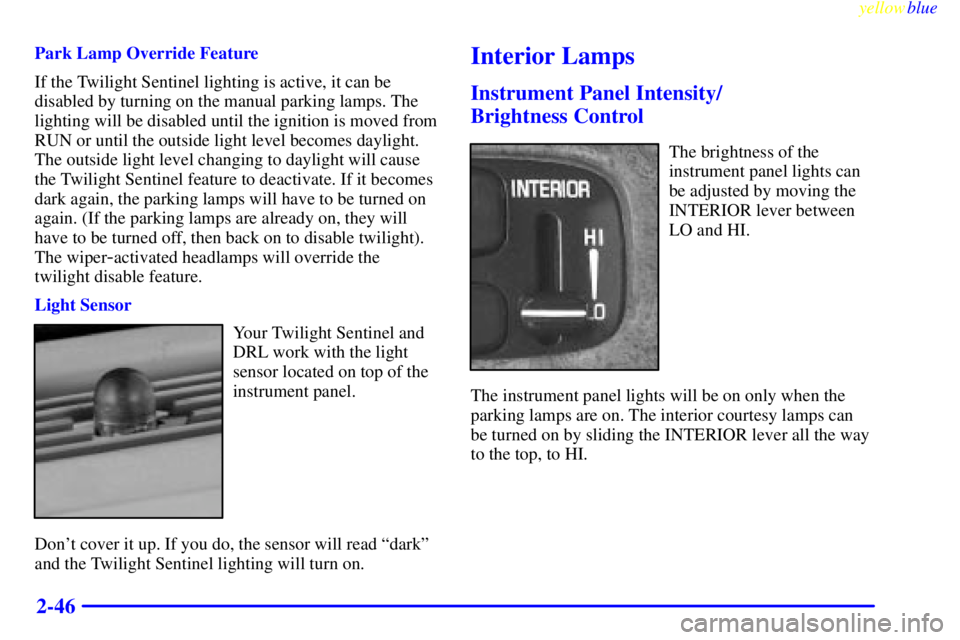
Light Sensor
Your Twilight Sentinel and
DRL work with the light
sensor located on top of the
instrument panel.
Don't cover it up. If you do, the sensor will read ªdarkº
and the Twilight Sentinel lighting will turn on.
Interior Lamps
Instrument Panel Intensity/
Brightness Control
The brightness of the
instrument panel lights can
be adjusted by moving the
INTERIOR lever between
LO and HI.
The instrument panel lights will be on only when the
parking lamps are on. The interior courtesy lamps can
be turned on by sliding the INTERIOR lever all the way
to the top, to HI.