Page 2 of 17
2
Mk-3 Navigation
Mk-3 NAVIGATION SYSTEM
Models: E38, E39, E46, E52, E53
Production Date: E46 from 6/00, all others from 9/00
Objectives
After completing this module you should be able to:
• Recognize the changes to Mk-3 from the previous Mk-2 navigation system.
Identify the components used in the system.
Review the operating fundamentals of GPS navigation.
Describe how to properly code and program the Mk-3 computer.
Page 4 of 17
4
Mk-3 Navigation
System Components
Mk-3 Navigation Computer
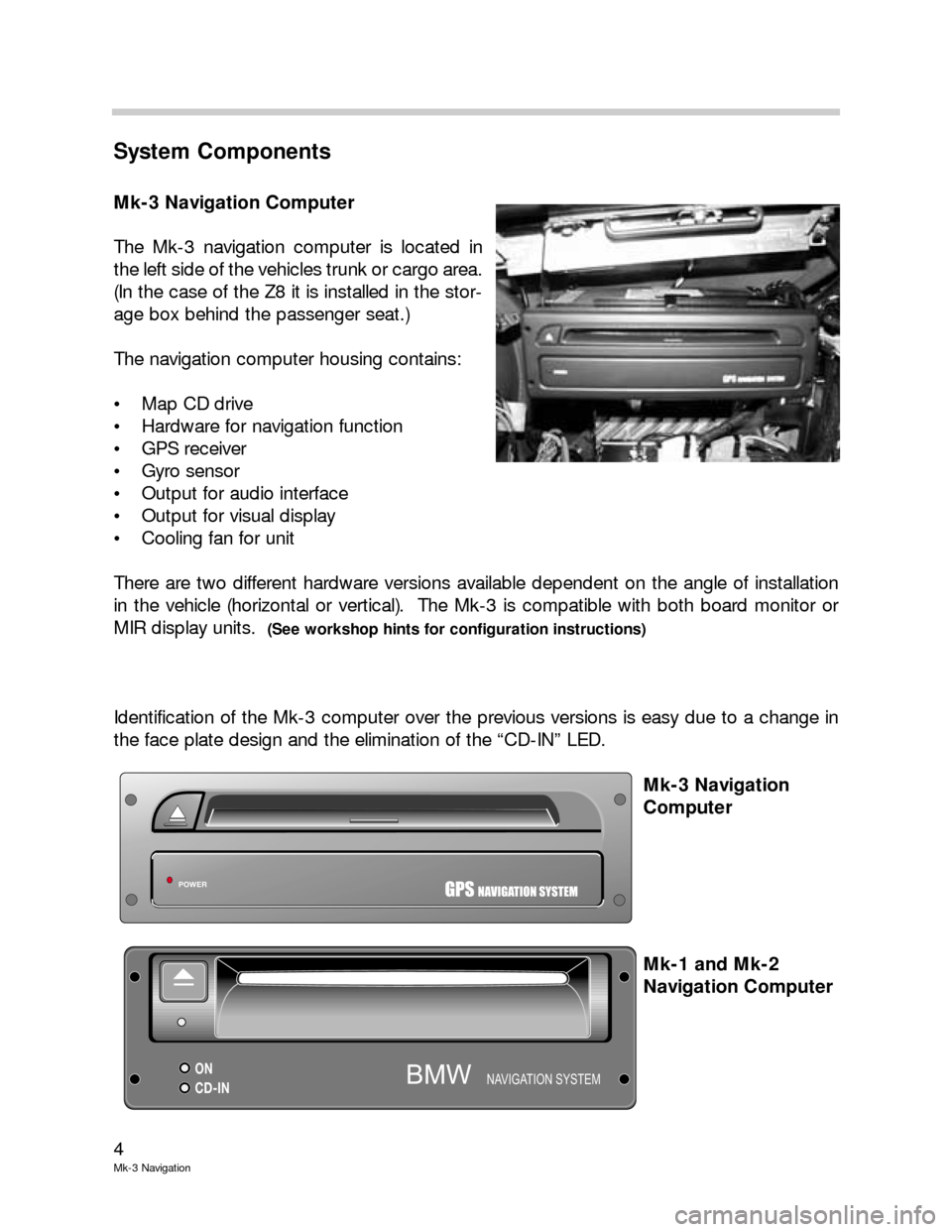
The Mk-3 navigation computer is located in
the left side of the vehicles trunk or cargo area.
(In the case of the Z8 it is installed in the stor-
age box behind the passenger seat.)
The navigation computer housing contains:
Map CD drive
Hardware for navigation function
GPS receiver
Gyro sensor
Output for audio interface
Output for visual display
Cooling fan for unit
There are two different hardware versions available dependent on the angle of installation
in the vehicle (horizontal or vertical). The Mk-3 is compatible with both board monitor or
MIR display units.
(See workshop hints for configuration instructions)
Identification of the Mk-3 computer over the previous versions is easy due to a change in
the face plate design and the elimination of the “CD-IN” LED.
Mk-3 Navigation
Computer
Mk-1 and Mk-2
Navigation Computer
POWERGPSNAVIGATION SYSTEM
ON
CD-INNAVIGATION SYSTEMBMW
Page 5 of 17

5
Mk-3 navigation
GPS (Global Positioning System) Receiver
The GPS receiver module of the previous Mk-2 system is integrated into the housing of the
Mk-3 computer, further reducing the complexity and the number of components used in
the system. The receiver is not serviceable.
The GPS receiver is responsible for receiving the satellite signals and providing the vehicle’s
position information to the navigation computer.
Information provided by the GPS receiver to the navigation computer can be displayed in
the service mode
(see workshop hints) but is not typically used in diagnosis.
Gyro (Rotation) Sensor
The navigation computer contains the electronic (piezo) Gyro sensor that detects rotation
(yaw) of the vehicle as a confirmation that the vehicle is turning. The signal provided by the
gyro is a mili-voltage that changes as the vehicle rotates. The navigation computer uses
the input to track the vehicle along the digitized map and display the exact vehicle position.
The signal is available in the sensor test page of the service mode for diagnosis. The
sensor is not a separately serviceable item and does not require calibration.
Mk-3 computer
GPS antenna
connection18 pin ELO
connectors:
X1313: Violet
X1312: Blue
Integrated GPS receiver and Gyro (rotation) sensor
Page 12 of 17
12
Mk-3 Navigation
Workshop Hints
Replacing the Mk-3 navigation computer
When replacing the Mk-3 navigation computer be aware that there are two hardware
variants depending on the installation position (vertical or horizontal).
The ignition should be in position 0 during removal and replacement of the computer. After
installing, close all doors, hood and trunk. A bus line reset will be carried out within two
minutes. Resetting allows the gyro to perform a calibration run. Do not move the car
during this reset period.
The coding sequence for the Mk-3 navigation computer has been changed from the
previous Mk-2. There is now an additional step (configuration) that must be done before
the software can be loaded.
After resetting, a configuration signal is needed to allow the computer to load the correct
software for use with a board monitor or MIR. This is performed using the DIS coding pro-
gram (CD 22.0 onward) and the Navigation System operating software (CD V15.0 onward).
Note: Vehicles using the wide screen BM require CD V16.1 onward.
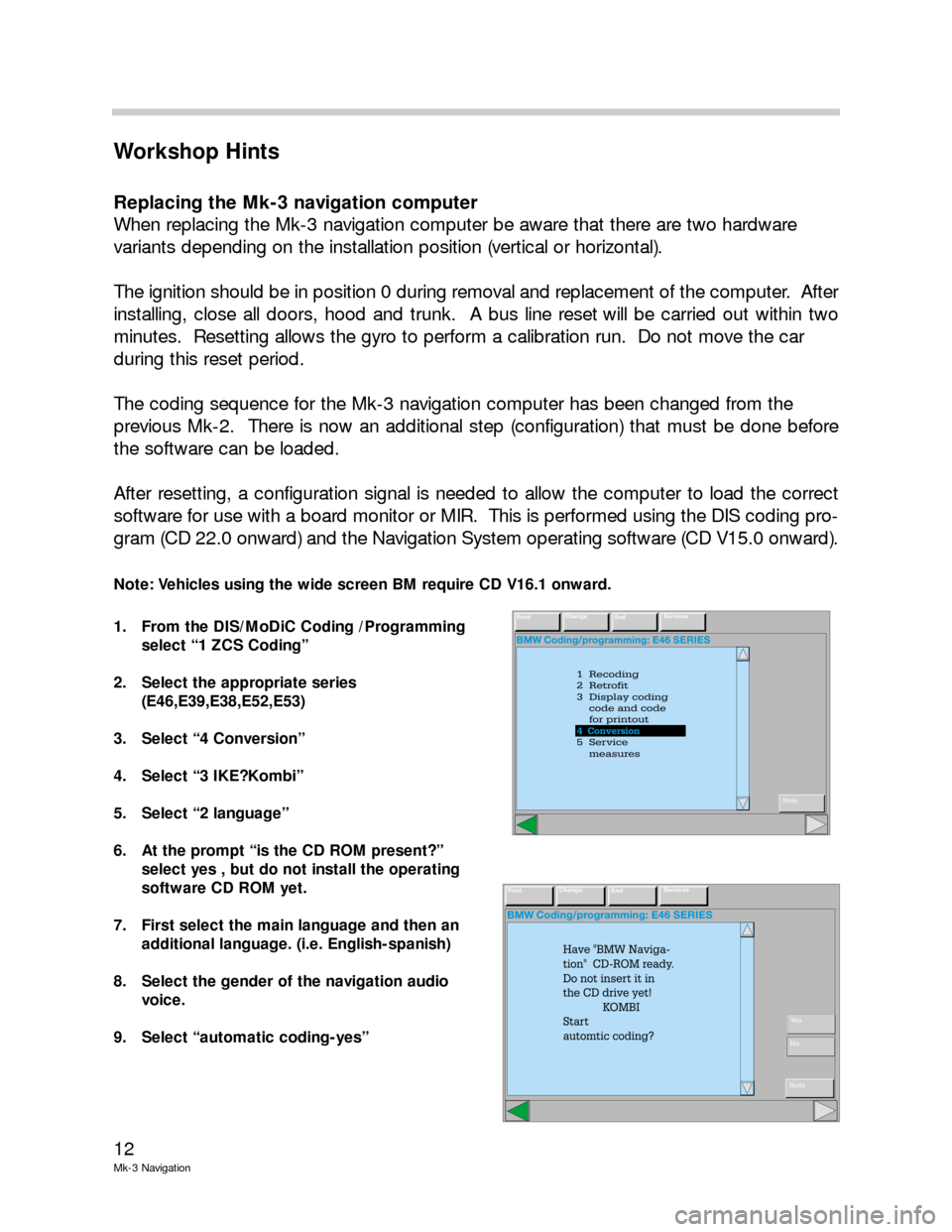
1. From the DIS/MoDiC Coding /Programming
select “1 ZCS Coding”
2. Select the appropriate series
(E46,E39,E38,E52,E53)
3. Select “4 Conversion”
4. Select “3 IKE?Kombi”
5. Select “2 language”
6. At the prompt “is the CD ROM present?”
select yes , but do not install the operating
software CD ROM yet.
7. First select the main language and then an
additional language. (i.e. English-spanish)
8. Select the gender of the navigation audio
voice.
9. Select “automatic coding-yes”
BMW Coding/programming: E46 SERIES
1 Recoding
2 Retrofit
3 Display coding
code and code
for printout
5 Service
measures 4 Conversion
4
PrintChange
EndServices
Note
4 Conversion
BMW Coding/programming: E46 SERIES
PrintChange
EndServices
Note
Have "BMW Naviga-
tion" CD-ROM ready.
Do not insert it in
the CD drive yet!
KOMBI
Start
automtic coding?
Ye s
No
Page 17 of 17
17
Mk-3 navigation
Review Questions
1. List the most signoficant changes made to the Mk-3 navigation computer over the
previous Mk-2.
2. How can the signal provided by the gyro sensor to the navigation computer be
checked?
3. Describe how the display signals are transmitted from the navigation computer to the
MIR and board monitor.
4. What step is necessary before loading the navigation computer operating software CD
on a newly replaced navigation computer? Where can the software status be confirmed
after it has been loaded?
5. How is the VIN entered into the navigation computer?