2000 BMW 328I remote control
[x] Cancel search: remote controlPage 51 of 189
51n
IndexDataTechnologyRepairsCar careControlsOverview
Seat and mirror memory
*
Adjusting steering wheel
Your BMW center can adjust your
vehicle's systems in such a man-
ner that your personalized settings are
automatically set for the seat and out-
side mirror positions when you unlock
the vehicle with your personal remote
control.<
If you make use of this method of
adjustment, be sure that the foot-
well behind the driver's seat is unob-
structed before unlocking the vehicle.
If you fail to do so, persons or objects
could be injured or damaged if the seat
should move backward.<
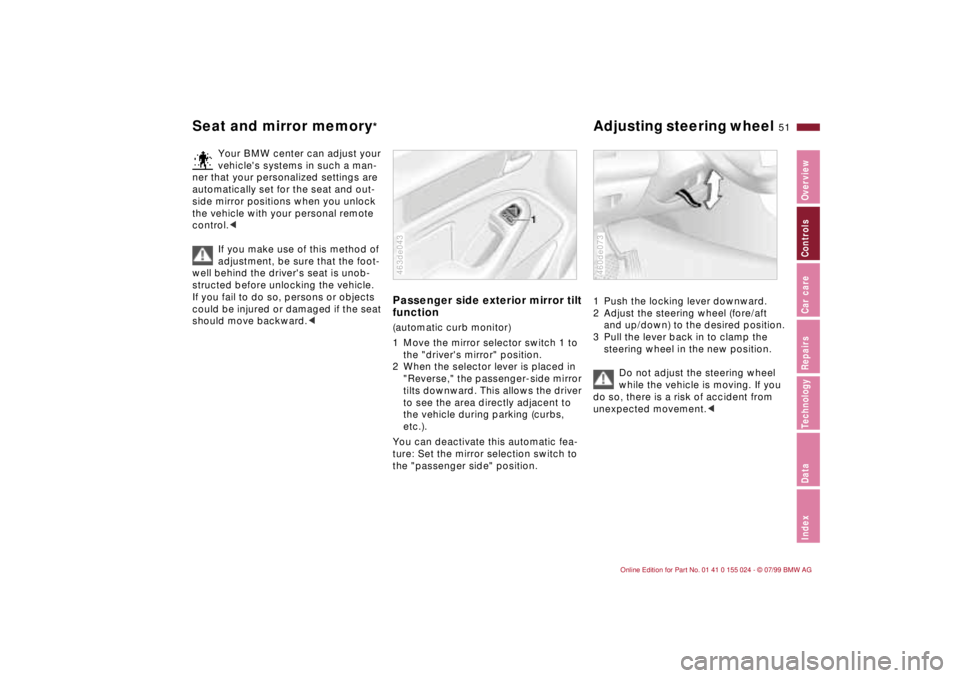
Passenger side exterior mirror tilt
function(automatic curb monitor)
1 Move the mirror selector switch 1 to
the "driver's mirror" position.
2 When the selector lever is placed in
"Reverse," the passenger-side mirror
tilts downward. This allows the driver
to see the area directly adjacent to
the vehicle during parking (curbs,
etc.).
You can deactivate this automatic fea-
ture: Set the mirror selection switch to
the "passenger side" position.463de043
1 Push the locking lever downward.
2 Adjust the steering wheel (fore/aft
and up/down) to the desired position.
3 Pull the lever back in to clamp the
steering wheel in the new position.
Do not adjust the steering wheel
while the vehicle is moving. If you
do so, there is a risk of accident from
unexpected movement.<460de073
Page 53 of 189
53n
IndexDataTechnologyRepairsCar careControlsOverview
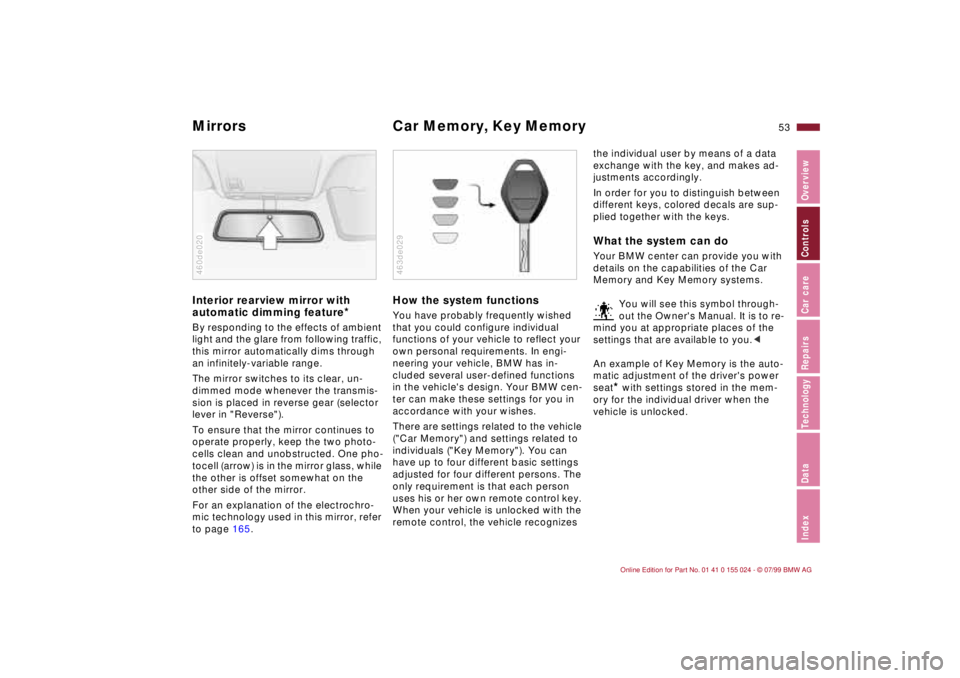
Mirrors Car Memory, Key Memory Interior rearview mirror with
automatic dimming feature
*
By responding to the effects of ambient
light and the glare from following traffic,
this mirror automatically dims through
an infinitely-variable range.
The mirror switches to its clear, un-
dimmed mode whenever the transmis-
sion is placed in reverse gear (selector
lever in "Reverse").
To ensure that the mirror continues to
operate properly, keep the two photo-
cells clean and unobstructed. One pho-
tocell (arrow) is in the mirror glass, while
the other is offset somewhat on the
other side of the mirror.
For an explanation of the electrochro-
mic technology used in this mirror, refer
to page 165.460de020
How the system functionsYou have probably frequently wished
that you could configure individual
functions of your vehicle to reflect your
own personal requirements. In engi-
neering your vehicle, BMW has in-
cluded several user-defined functions
in the vehicle's design. Your BMW cen-
ter can make these settings for you in
accordance with your wishes.
There are settings related to the vehicle
("Car Memory") and settings related to
individuals ("Key Memory"). You can
have up to four different basic settings
adjusted for four different persons. The
only requirement is that each person
uses his or her own remote control key.
When your vehicle is unlocked with the
remote control, the vehicle recognizes 463de029
the individual user by means of a data
exchange with the key, and makes ad-
justments accordingly.
In order for you to distinguish between
different keys, colored decals are sup-
plied together with the keys.What the system can doYour BMW center can provide you with
details on the capabilities of the Car
Memory and Key Memory systems.
You will see this symbol through-
out the Owner's Manual. It is to re-
mind you at appropriate places of the
settings that are available to you.<
An example of Key Memory is the auto-
matic adjustment of the driver's power
seat
* with settings stored in the mem-
ory for the individual driver when the
vehicle is unlocked.
Page 88 of 189
88n
Automatic climate controlTips for pleasant drivingUse the automatic system (switch on
AUTO Ð button 7). Select an interior
temperature that is comfortable for you
Ð we recommend 70 7 (22 6). When
the outside temperature is above 42 7
(5 6), you can also use the air condi-
tioner (12). This will dry the air as well
as preventing condensation on the win-
dow surfaces Ð if there are passengers
with damp clothing, for example. Set
the air outlets (2) so that the air flows
past you and is not directed straight at
you. Set the rotary dial between the air
outlets (2) for the upper body to a me-
dium position, since air that is some-
what cooler promotes driving without
fatigue.
Detailed setting options are described
for you in the following section.
Your vehicle is set in such a man-
ner that, when you unlock the car
with your personalized remote control,
your own personalized setting of the
automatic climate control is initiated.<
Automatic air distribution
The AUTO program assumes
the adjustment of the air distri-
bution and the air supply for you and in
addition adapts the temperature to ex-
ternal influences (summer, winter) to
meet preferences you can specify. This
program maintains a comfortable in-car
climate regardless of the season. Select
an interior temperature that is comfort-
able for you Ð we recommend 70 7
(22 6). The temperature selected and
AUTO for the air supply appear in
display (10), refer to the overview on
page 86. Open the air outlets for the
upper body area. Switch on the air con-
ditioner in warm weather. The maxi-
mum cooling capacity is achieved when
you set rotary dial (3) to cold. Refer to
page 90.
Individual air distribution
You can cancel the AUTO pro-
gram by selecting specific dis-
tribution patterns to suit your
own individual requirements.
You can direct air to flow onto the win-
dows , toward the upper body ,
and into the footwell .
Temperature
The figures in the display pro-
vide a general indication of inte-
rior temperature. We recommend 70 7
(22 6) as a comfortable setting,
whether the air conditioner is operating
or not. When you start the vehicle, the
system ensures that the selected tem-
perature is reached as quickly as possi-
ble. It then maintains this temperature,
regardless of the season.
Set rotary dial (3; refer to "Draft-free
ventilation" on page 90) to a medium
setting, since air that is somewhat
cooler promotes driving without fatigue.
You can use this setting for mixing air to
make minor comfort modifications.
The full, uncontrolled heater out-
put is available starting at an inte-
rior temperature setting of 90 7
(32 6). At a setting of 60 7 (16 6),
the full cooling output is available when
the air conditioner is activated.<
Page 182 of 189

Everything from A to ZGlove compartment lamp
bulb replacement148
Gross vehicle weight174HHandbrake63
Handsfree system95
Hazard warning flashers25
Hazard warning triangle25
Head restraint48
Headlamp covers,
care132, 143
Headlamp flasher83
Headlamp washer
system124, 175
Headlamp washers70
Heated seats91
Heavy loads99
Height173
HiFi system Ð harman
kardon92
High beams23, 68, 83
bulb replacement143
Hood release120
Horn17
Hubcap150IIce warning76
Icy roads76
Identification, tires116Ignition key32
Ignition lock61
Indicator lamps20
Inflated pressure27, 113
Inflation pressure
monitoring80, 167
INSPECTION74
Installing a child restraint
system60
Instrument cluster18
Instrument lighting82
Instrument panel18
Interaxle tire rotation115
Interface socket96
for Onboard
Diagnostics139
Interference
cellular phones112
Interior lamps36, 83
bulb replacement147
remote control36
Interior motion sensor42
Interior rearview mirror52
automatic dimming
feature53, 165
Interlock61
Intermittent wipe68
JJack149
Jump-starting157
KKey Memory53
Keys32
with remote control32LLAMPS ON warning82
Lashing eyes99
Leather care136
Length173
License plate lamp
bulb replacement147
Light switch82
Light-alloy wheels118
Lighter96
Load-securing devices99
Louvers86
Low beam headlamps82
Low beams
bulb replacement143
Lug bolts150
Lug wrench149
Luggage compartment41
capacity174
floor mat41
floor panel41
remote control37
Luggage compartment
lamps
bulb replacement148Luggage compartment
lid39
emergency release39
securing separately39
Luggage compartment
lighting39
Luggage rack100
Lumbar support49
MM+S tires117
Maintenance74, 131
Malfunction displays75
Manual transmission64
Manually controlled
recirculated-air89
Memory50
MFL (Multifunction steering
wheel)24
Microfilter90, 155
Mirror memory50
Mirrors52
Mobile phones112
Modifications,
technical6, 138
Multifunction steering wheel
(MFL)24NNeckrest48
Page 183 of 189
Everything from A to Z
183n
IndexDataTechnologyRepairsCar careControlsOverview
OOBD interface socket139
Obstruction protection44
Odometer73
Oil
capacity175
consumption125
dipstick125
quality126
specifications126
viscosity126
Oil additives125
Oil change intervals, see the
Service and Warranty
Information Booklet
Oil filter change175
Oil level
check125
indicator lamp20
Oil pressure, indicator
lamp20
OILSERVICE74
Onboard computer76
Onboard tool kit142
Outside temperature
display76PPaint blemishes133
Paint, care133
Paintwork, minor
repairs134Paintwork, waxing134
Park Distance Control
(PDC)78
Parking brake63
Parking help78
Parking lamps83
Parking, winter111
PDC (Park Distance
Control)78
Performance172
Pocket flashlight92
Pollen90
Power seat49
Power steering111
Power windows44
safety switch45
Pressure monitoring,
tires80, 167
Pressure, tires27, 113
RRadiator175
Radio
refer to the separate
Owner's Manual
Radio Data System
(RDS)164
Radio reception112, 164
Rain sensor69, 166
RDC (Tire Pressure
Control)80, 167
RDS (Radio Data
System)164Reading lamps84
Rear backrest, folding97
Rear lamps145
Rear window
defroster70, 90
Rearview mirror52
Reclining seat47
Refueling26
Remote control35
Removing condensation,
windows89
Replacement key32
Reporting safety defects7
Restraint system59
Reverse17, 64
Roller blind, sun
protection91
Roller sun blind91
Roof load capacity174
Roof-mounted luggage
rack100
Rubber parts110
SSafety belt tensioner164
Safety belts54
height adjustment54
Safety feature44
Safety lock buttons38
Seat
mechanical47
power49
Seat adjustment47Seat heating91
Seat memory50
Securing cargo99
Securing loads99
Selector lever, automatic
transmission65
Self-defrosting mirrors52
Self-diagnostics168
Service and Warranty
Information Booklet131
Service Interval
Display74, 131
Shiftlock65
Side airbags56
Side impact Head Protection
System56
Side lamps82
bulb replacement144
Ski bag98
Skid control111
Sliding/Tilt sunroof45
closing following an
electrical malfunction156
convenience operation34
Slippery roads110
Snow chains110, 118
Space-saver spare tire149
Spare key32
Spare tire149
Spare wheel149
Spark plugs176
Speaker95
Speed control71
Page 184 of 189

Everything from A to ZSpeed display18
Speedometer18
Sports Seat49
Starting61
Starting assistance157
Starting problems105, 157
Starting the engine61
Steel wheels118
Steering111
Steering wheel lock61
Steptronic65
Stopping the vehicle62
Storage compartments93
Storing the vehicle137
Stroke172
Summer tires116
Sun visors52
Switching off the engine62
Symbols4, 153
Synthetic oils126TTachometer73
Tail lamp assembly
bulb replacement145
Tail lamps145
Tank capacity175
Technical data172
Technical
modifications6, 138Telephone
refer to the separate
Owner's Manual
Telephone hookup95
Temperature adjustment88
Temperature display
outside temperature76
Temperature gauge
engine coolant74
Temperature layering90
Third brake lamp147
Through-loading system97
Tilt alarm36, 43
remote control36
Tire codes116
Tire damage113
Tire inflation
pressure27, 113
Tire pressure
checking27
Tire Pressure Control
(RDC)80, 167
Tire pressure
monitoring80, 167
Tire replacement114, 115
Tire specifications118
Tire tread113
Tools142
Torque172
Tow fittings158
Tow starting158Towing158
Track173
Traction Control System
refer to DSC79
Transmission64
Tread depth, tires113
Trip odometer73
Trunk39
Trunk lid, refer to luggage
compartment lid39
Turn signal
indicator23, 68, 144
bulb replacement144
Turning radius173
Two-way radios112
UUsed batteries154VVacuum cleaner,
connecting96
Vanity mirror52
bulb replacement148
Vehicle battery152, 176
Vehicle care
exterior133
interior134
Vehicle identification130
Vehicle Identification
Number (VIN)130Vehicle immobilizer33
Vehicle painting133
Vehicle storage137
Vehicle weight174
Ventilation86
draft-free90
Vinyl care135
WWarning lamp "Please fasten
safety belts"21
Warning lamps20
Warning messages75
Warranty and Service Guide
Booklet131
Washer reservoir, filling124
Washing your car132
Water on roadways
deep water104
Waxing, paintwork134
Weights174
Wheel rims116
Wheelbase173
Wheels and tires116, 118
Width173
Windows, convenience
operation34
Windshield washer nozzle
adjustment124
Windshield washer reservoir,
filling124, 175