Page 9 of 17
9
Mk-3 navigation
Speed Signals
A speed signal is provided to the navigation computer for detection of distance traveled and
vehicle speed to calculate the vehicles position on the digital map. The input is a processed
signal provided by the vehicles DSC control unit.
E46: The speed signal used is from the l le
ef
ft
t
r
re
ea
ar
r
wheel.
E38/E39/E52/E53: The speed signal used is from the l le
ef
ft
t
f
fr
ro
on
nt
t
wheel.
Reverse Gear Input
The reverse gear input is used by the navigation computer to distinguish between the
vehicle backing up or turning around.
E38/E39/E52/E53: The reverse input is a high signal produced by the LCM III.
•E46: The reverse input is a high signal supplied by a splice from the back-up lights.
Mk-3 NAV
GS 20 Reverse
lightsReversing
Light Relay
K6325 KL15KL30
LCMMk-3 NAV
Reverse
lights
Automatic Transmission
version shown
Page 11 of 17

11
Mk-3 navigation
The GPS antenna passes the signal to the GPS receiver incorporated in the navigation
computer. A CD with map data is loaded in the CD drive of the navigation computer. The
navigation computer combines the vehicle position calculated by the GPS with this map
data.
The current position of the vehicle can be shown on the on-board monitor by selecting
“Emergency” from the main menu.
The driver can enter a destination. The navigation computer calculates a route from the
current location to this destination based on selectable criteria (main use of highways,
shortest distance, etc.). The calculated route is shown in the route display.
The navigation computer generates the RGB color video signal for all on-board monitor
displays. These three signals are sent over separate shielded wires to the on-board mon-
itor.
In the case of the E52 MIR (also referred as radio navigation) which does not have a color
display, the visual display data is sent via one wire called the navigation bus. On both sys-
tems, color and monochrome display, the audio output from the navigation computer for
voice directions is sent over two separate wires.
The driver has the choice of displays that utilize a color map with an icon of the vehicle
being traced on the map or the use of arrow indicators and distance data shown on the
on-board monitor display. Vehicles equipped with the wide screen board monitor have a
split screen option that includes both display methods. The MIR only makes use of the
arrows and distance display. With the assistance of voice prompts, the navigation
computer indicates how and where to get into the correct lane or turn off.
The navigation computer calculates the distance traveled from the wheel speed signal
delivered by the DSC control unit.
The gyro incorporated into the navigation computer housing informs the navigation com-
puter when the vehicle is turning. An alternative route is re-calculated automatically if the
driver does not follow the original route instructions.
Once the driver has reached their destination, the navigation computer is ready for
another destination input.
Refer to the on-board monitor owners manual for instructions on using the navigation system
software.
Page 12 of 17
12
Mk-3 Navigation
Workshop Hints
Replacing the Mk-3 navigation computer
When replacing the Mk-3 navigation computer be aware that there are two hardware
variants depending on the installation position (vertical or horizontal).
The ignition should be in position 0 during removal and replacement of the computer. After
installing, close all doors, hood and trunk. A bus line reset will be carried out within two
minutes. Resetting allows the gyro to perform a calibration run. Do not move the car
during this reset period.
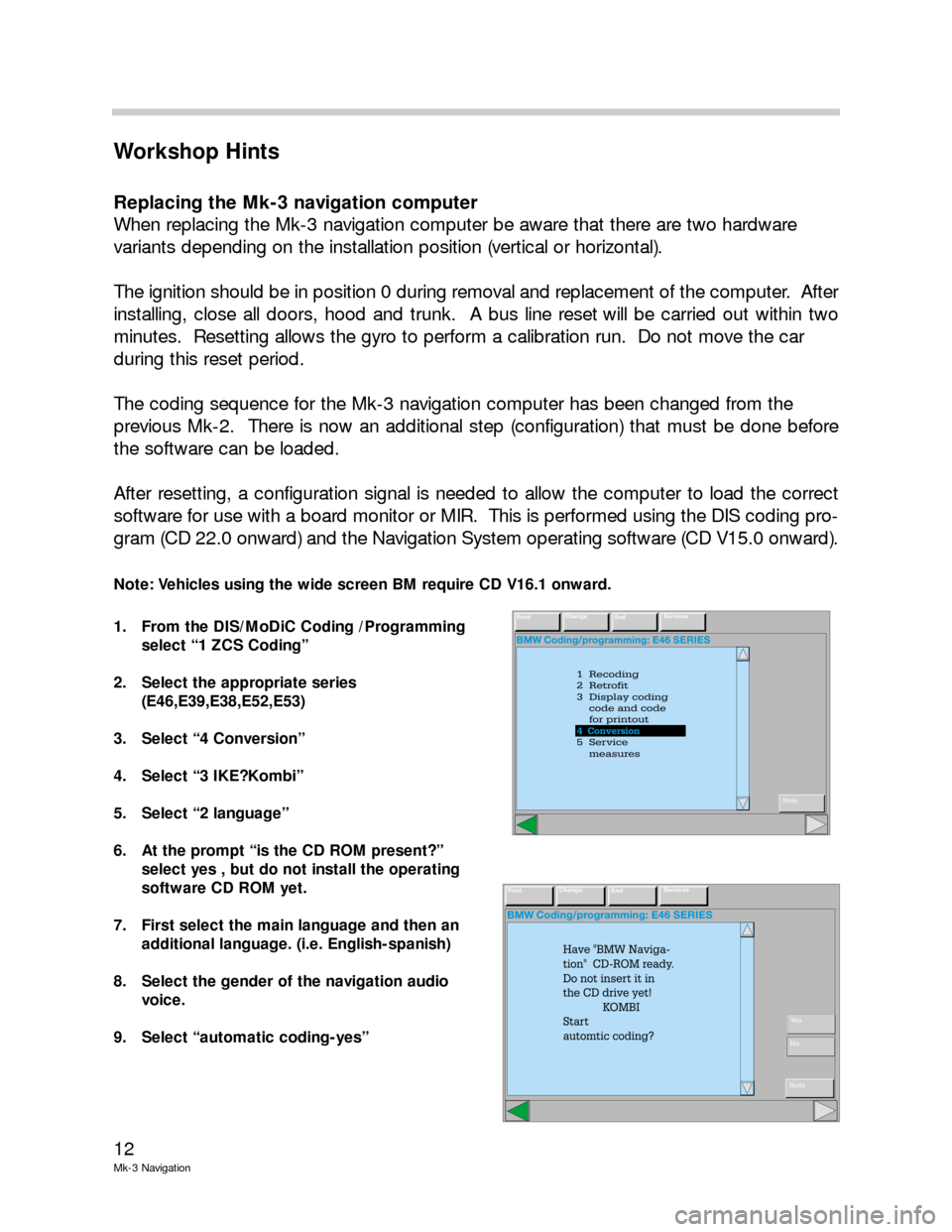
The coding sequence for the Mk-3 navigation computer has been changed from the
previous Mk-2. There is now an additional step (configuration) that must be done before
the software can be loaded.
After resetting, a configuration signal is needed to allow the computer to load the correct
software for use with a board monitor or MIR. This is performed using the DIS coding pro-
gram (CD 22.0 onward) and the Navigation System operating software (CD V15.0 onward).
Note: Vehicles using the wide screen BM require CD V16.1 onward.
1. From the DIS/MoDiC Coding /Programming
select “1 ZCS Coding”
2. Select the appropriate series
(E46,E39,E38,E52,E53)
3. Select “4 Conversion”
4. Select “3 IKE?Kombi”
5. Select “2 language”
6. At the prompt “is the CD ROM present?”
select yes , but do not install the operating
software CD ROM yet.
7. First select the main language and then an
additional language. (i.e. English-spanish)
8. Select the gender of the navigation audio
voice.
9. Select “automatic coding-yes”
BMW Coding/programming: E46 SERIES
1 Recoding
2 Retrofit
3 Display coding
code and code
for printout
5 Service
measures 4 Conversion
4
PrintChange
EndServices
Note
4 Conversion
BMW Coding/programming: E46 SERIES
PrintChange
EndServices
Note
Have "BMW Naviga-
tion" CD-ROM ready.
Do not insert it in
the CD drive yet!
KOMBI
Start
automtic coding?
Ye s
No
Page 16 of 17

16
Mk-3 Navigation
PDOP Position Dilution of Precision
HDOP Horizontal Dilution of Precision
VDOP Vertical Dilution of Precision
S/N Signal/noise relationship
Gyro Piezo gyro sensor (in navigation computer)
Dir Direction of travel
Menu Display Explanation
GPS/Status
GPS/Tracking
info G-speed
Heading
Rec status
Pos-src
PDOP
HDOP
VDOP
CH
PRN
S/N
Visible Sat
Almanac Relative speed over the ground
Direction of travel
Search/track/position receiver status
Number of satellites available for analysis
Accuracy of the calculated location
<8=sufficient determinations of location
<4=very good determinations of location
Channel
Satellite detection
Better reception as the value increases
Number of visible satellites, receivable
Signals, depending on time of
day/configuration
Satellite database, loaded automatically after
15 minutes
Telematics VIN
Color
GSM
BMW info
Emergency call out
Initialization
Logging off VIN (Automatically assigned during coding)
Color code or text
Telephone network/contract number
Customer specific info
On/off status
Telematics services on/off status
Logging off telematics services
