Page 144 of 311

Audio System
Remote Audio Controls
AUDIO/CHBUTTON
Two controls for the audio system
are mounted in the steering wheel
hub. These let you control basic
functions without removing your hand from the wheel. The top and bottom buttons adjust
the volume up or down
Press the proper button and hold it
until the desired volume is reached,
then release it.
The AUDIO/CH button has three functions, depending on whether youare listening to the radio, or playing a
cassette or CD.
If you are listening to the radio, use
the AUDIO/CH button to changestations. Each time you press this
button, the system advances to the next preset station on the band youare listening to. You will see the
number of the selected Preset button
in the display. To change bands,
press the AM or FM button on the audio system's front panel. If you are playing a cassette, use the
AUDIO/CH button to advance to the next selection. You will see "FF"blinking in the display when you
press the AUDIO/CH button. The system fast forwards until it senses a
silent period, then goes back to
PLAY.
If you are playing a CD, the system
skips to the beginning of the next
track each time you push the
AUDIO/CH button. You will see the disc and track number in the display.
Comfort and Convenience Features
Page 157 of 311

Accessories and Modifications
Modifications
Do not remove any originalequipment or modify your car in any
way that would alter its design or operation. This could make your car
unsafe and illegal to drive.
For example, do not make any
modifications that would change the
ride height of your car, or install
wheels and tires with a different overall diameter.
Such modifications can adversely
affect handling, and interfere with
the operation of the car's anti-lock
brakes and other systems. In addition, any modifications that
decrease ground clearance increase
the chance of undercarriage parts striking a curb, speed bump, or other
raised object, which could cause
your airbags to deploy.
Do not modify your steering wheelor any other part of your
Supplemental Restraint System.
Modifications could make the system ineffective.
Additional Safety Precautions
• Do not attach or place objects on the airbag covers. Any object
attached to or placed on the covers
marked "SRS AIRBAG," in the center of the steering wheel and
on top of the dashboard, could
interfere with the proper operation
of the airbags. Or, if the airbags
inflate, the objects could be
propelled inside the car and hurt someone.
• Do not attach hard objects on or near a front door. If a side airbag
inflates, a cup holder or other hard object attached on or near the
door could be propelled inside the
car and hurt someone.
• Do not place any objects over the outside edge of a front seat-back.
Covering the outside edge of a
front seat-back, with a non-Acura seat cover for example, could
prevent the airbag from inflating
properly.
Before Driving
Page 163 of 311

Preparing to Drive
You should do the following checksand adjustments every day before
you drive your car.
1. Make sure all windows, mirrors, and outside lights are clean and
unobstructed. Remove frost, snow, or ice.
2. Check that the hood and trunk are fully closed.
3. Visually check the tires. If a tire looks low, use a gauge to check its
pressure.
4. Check that any items you may be carrying with you inside are stored
properly or fastened down securely. 5. Check the adjustment of the seat
(see page 12).
6. Check the adjustment of the inside and outside mirrors (seepage 97).
7. Check the adjustment of the steering wheel (see page 17).
8. Make sure the doors are securely closed and locked.
9. Fasten your seat belt. Check that your passengers have fastenedtheir seat belts (see page 15). 10. Turn the ignition switch ON (II).
Check the indicator lights in the
instrument panel.
11. Start the engine (see page 161). 12. Check the gauges and indicator lights in the instrument panel (see
page 53).
Driving
Page 171 of 311

Automatic Transmission
Drive (D4, D3) — These positions
are similar to D
5, except when you
select the D
4 position, only the first
four gears are selected. When you select D
5, only the first three gears
are selected. D
4 can also keep the
transmission from cycling between
fourth and fifth gears in stop-and-go driving, and D
3 can keep the
transmission from cycling between
third and fourth gears.
Use D
3 when towing a trailer in hilly
terrain, or to provide engine braking
when going down a steep hill. D
3
gives you more power and increased engine braking. For faster acceleration when in D
3
D4 or D5, you can get the
transmission to automatically downshift by pushing the accelerator
pedal to the floor. The transmission
will shift down one or two gears, depending on your speed. Second (2) — This position locks
the transmission in second gear. It does not downshift to first gear
when you come to a stop. Second gives you more power when climbing,and increased engine braking when
going down steep hills. Use second
gear when starting out on a slippery surface or in deep snow. It will help
reduce wheelspin.
Driving
Page 174 of 311

Parking
Always use the parking brake whenyou park your car. The indicator onthe instrument panel shows that the
parking brake is not fully released; it does not indicate that the parking
brake is firmly set. Make sure the
parking brake is set firmly or your car may roll if it is parked on an
incline.
Set the parking brake before you put
the transmission in Park. This keeps
the car from moving and putting
pressure on the parking mechanism in the transmission — making it
easier to move the shift lever out of
Park when you want to drive away. If the car is facing uphill, turn the
front wheels away from the curb.
If the car is facing downhill, turn the
front wheels toward the curb.
Make sure the parking brake is fully
released before driving away.
Driving with the parking brake
partially set can overheat or damage
the rear brakes. Parking Tips
• Make sure the moonroof and the
windows are closed.
• Turn off the lights.
• Place any packages, valuables, etc., in the trunk or take them with you.
• Check the indicator on the driver'sdoor to verify that the security
system is set.
• Never park over dry leaves, tallgrass, or other flammable
materials. The three way catalytic
converter gets very hot, and could
cause these materials to catch on
fire.
Driving
Page 175 of 311

The Braking System
Your Acura is equipped with discbrakes at all four wheels. A powerassist helps reduce the effort needed
on the brake pedal. The ABS helps
you retain steering control when braking very hard.
Put your foot on the brake pedal only
when you intend to brake. Resting
your foot on the pedal keeps the brakes applied lightly, causing themto build up heat. Heat build-up can
reduce how well your brakes work. Italso keeps your brake lights on all
the time, confusing drivers behind
you. Constant application of the brakes
when going down a long hill builds up heat and reduces their effective-
ness. Use the engine to assist the
brakes by downshifting to a lower
gear and taking your foot off the accelerator pedal.
Check your brakes after driving
through deep water. Apply the
brakes moderately to see if they feel normal. If not, apply them gently and
frequently until they do. Since a longer distance is needed to stop
with wet brakes, be extra cautious and alert in your driving. Brake Wear Indicators
All four brakes have audible brake wear indicators.
When the brake pads need replacing,
you will hear a distinctive metallic "screeching" sound when you apply
the brakes. If you do not have the
brake pads replaced, they will begin screeching all the time.
Your brakes may sometimes squeal or squeak when you apply them
lightly. Do not confuse this with the
brake wear indicators. They make a
very audible "screeching."
Driving
Page 176 of 311

The Braking System
Brake System Design
The hydraulic system that operates the brakes has two separate circuits.Each circuit works diagonally across
the vehicle (the left-front brake is connected with the right-rear brake,
etc.). If one circuit should develop a
problem, you will still have brakingat two wheels.
Front
Anti-lock Brakes Your car has an Anti-lock Brake System (ABS) as standard
equipment. ABS helps to prevent the
wheels from locking up and skidding during hard braking, allowing you to
retain steering control.
When the front tires skid, you lose steering control; the car continues
straight ahead even though you turn
the steering wheel. The ABS helps to
prevent lock-up and helps you retain steering control by pumping the
brakes rapidly; much faster than a person can do it. You should never pump the
brake pedal, this defeats thepurpose of the ABS. Let the ABS
work for you by always keeping firm, steady pressure on the brake pedal
as you steer away from the hazard.
This is sometimes referred to as "stomp and steer."
You will feel a pulsation in the brake pedal when the ABS activates, and
you may hear some noise. This is normal, it is the ABS rapidly
pumping the brakes.
Activation varies with the amount of traction your tires have. On dry
pavement, you will need to press on
the brake pedal very hard before you
activate the ABS. However, you may
feel the ABS activate immediately if
you are trying to stop on snow or ice.
CONTINUED
Driving
Page 177 of 311
The Braking System
Important Safety Reminders
ABS does not reduce the time or distance it takes to stop the
vehicle, it only helps with steering control during braking. You should
always maintain a safe following
distance from other vehicles.
ABS will not prevent a skid that results from changing direction
abruptly, such as trying to take a
corner too fast or making a sudden
lane change. Always drive at a safe,prudent speed for the road and
weather conditions. ABS cannot prevent a loss of
stability. Always steer moderately
when you are braking hard. Severe or sharp steering wheel movement
can still cause your car to veer into oncoming traffic or off the road.
A vehicle with ABS may require a longer distance to stop on loose or
uneven surfaces, such as gravel or
snow, than a vehicle without anti-
lock. Slow down and allow a greater
distance between vehicles under
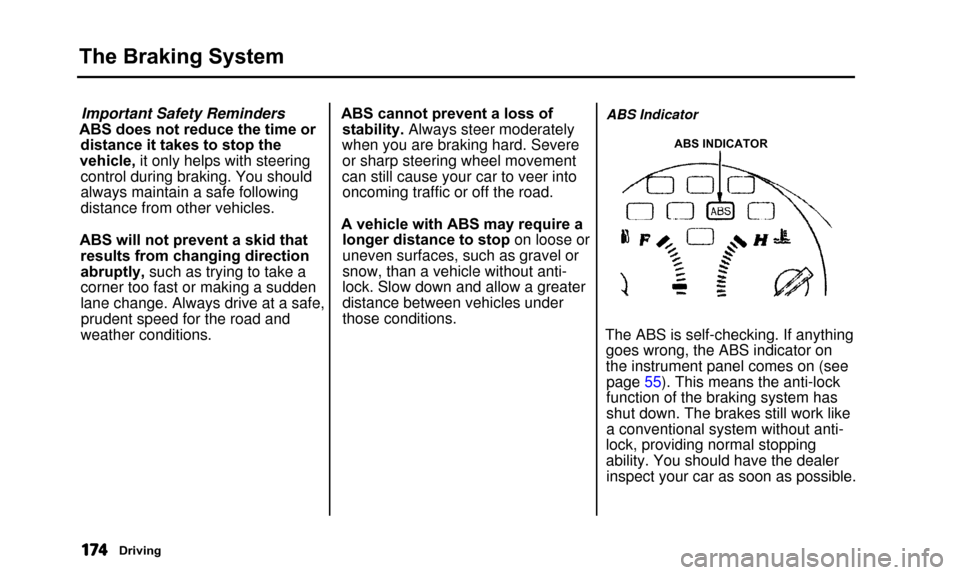
those conditions.ABS Indicator
ABS INDICATOR
The ABS is self-checking. If anythinggoes wrong, the ABS indicator on
the instrument panel comes on (seepage 55). This means the anti-lock
function of the braking system has
shut down. The brakes still work like
a conventional system without anti-
lock, providing normal stopping
ability. You should have the dealer inspect your car as soon as possible.
Driving