1999 TOYOTA SOLARA instrument panel
[x] Cancel search: instrument panelPage 96 of 244
SOLARA_U
96
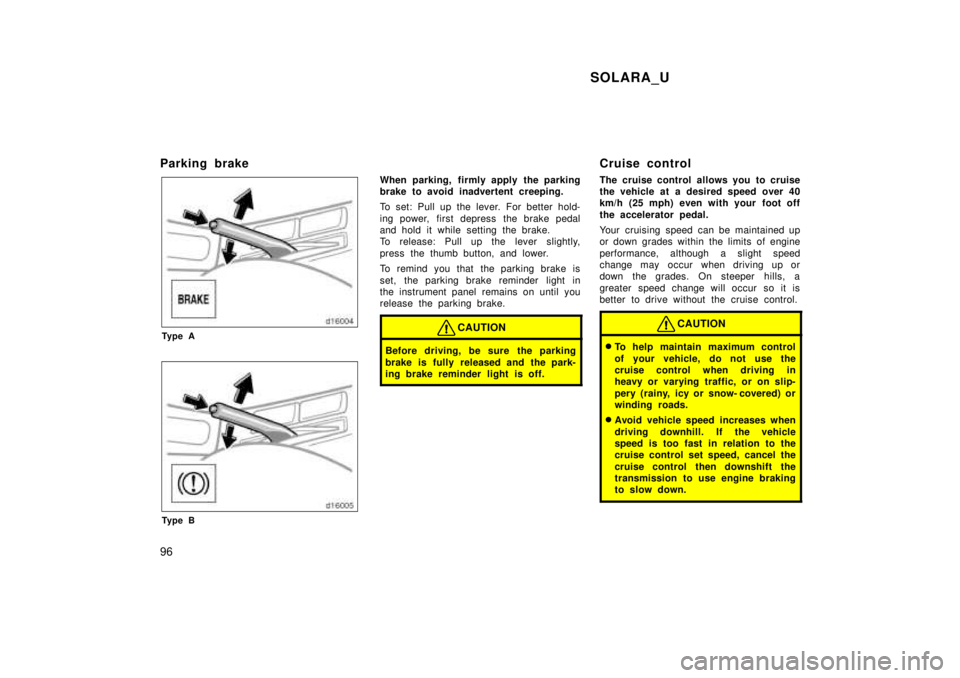
Parking brake
Ty p e A
Ty p e B
When parking, firmly apply the parking
brake to avoid inadvertent creeping.
To set: Pull up the lever. For better hold-
ing power, first depress the brake pedal
and hold it while setting the brake.
To release: Pull up the lever slightly,
press the thumb button, and lower.
To remind you that the parking brake is
set, the parking brake reminder light in
the instrument panel remains on until you
release the parking brake.
CAUTION
Before driving, be sure the parking
brake is fully released and the park-
ing brake reminder light is off.
Cruise control
The cruise control allows you to cruise
the vehicle at a desired speed over 40
km/h (25 mph) even with your foot off
the accelerator pedal.
Your cruising speed can be maintained up
or down grades within the limits of engine
performance, although a slight speed
change may occur when driving up or
down the grades. On steeper h
ills, a
greater speed change will occur so it is
better to drive without the cruise control.
CAUTION
To help maintain maximum control
of your vehicle, do not use the
cruise control when driving in
heavy or varying traffic, or on slip-
pery (rainy, icy or snow- covered) or
winding roads.
Avoid vehicle speed increases when
driving downhill. If the vehicle
speed is too fast in relation to the
cruise control set speed, cancel the
cruise control then downshift the
transmission to use engine braking
to slow down.
Page 97 of 244
SOLARA_U97
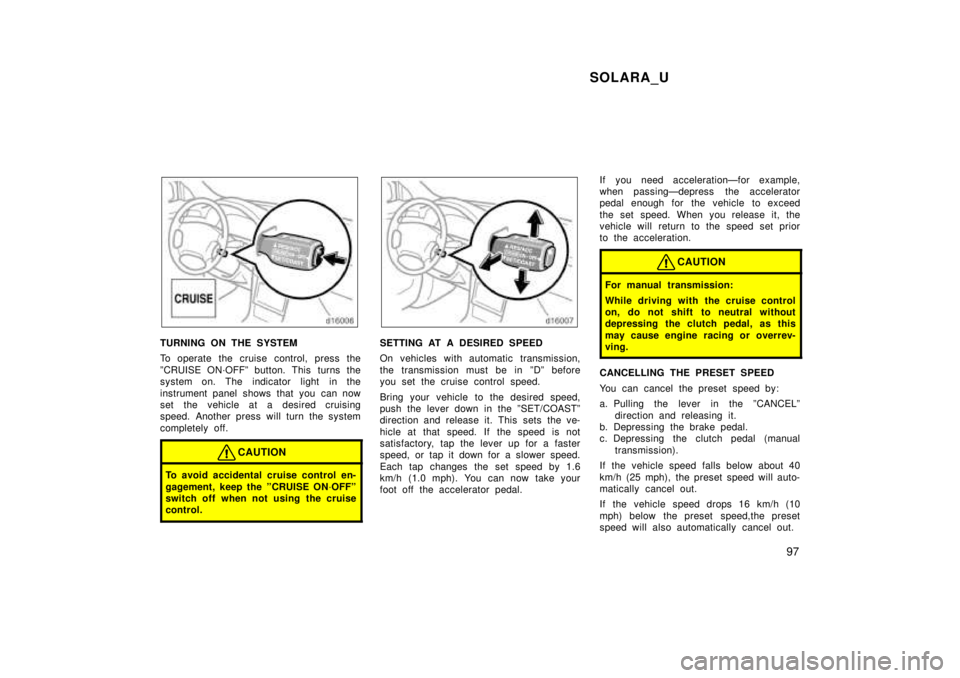
TURNING ON THE SYSTEM
To operate the cruise control, press the
ºCRUISE ON´OFFº button. This turns the
system on. The indicator light in the
instrument panel shows that you can now
set the vehicle at a desired cruising
speed. Another press will turn the system
completely off.
CAUTION
To avoid accidental cruise control en-
gagement, keep the ºCRUISE ON´OFFº
switch off when not using the cruise
control.
SETTING AT A DESIRED SPEED
On vehicles with automatic transmission,
the transmission must be in ºDº before
you set the cruise control speed.
Bring your vehicle to the desired speed,
push the lever down in the ºSET/COASTº
direction and release it. This sets the ve-
hicle at that speed. If the speed is not
satisfactory, tap the lever up for a faster
speed, or tap it down for a slower speed.
Each tap changes the set speed by 1.6
km/h (1.0 mph). You can now take your
foot off the accelerator pedal. If you need accelerationÐfor example,
when passingÐdepress the accelerator
pedal enough for the vehicle to exceed
the set speed. When you release it, the
vehicle will return to the speed set prior
to the acceleration.
CAUTION
For manual transmission:
While driving with the cruise control
on, do not shift to neutral without
depressing the clutch pedal, as this
may cause engine racing or overrev-
ving.
CANCELLING THE PRESET SPEED
You can cancel the preset speed by:
a. Pulling the lever in the ºCANCELº
direction and releasing it.
b. Depressing the brake pedal.
c. Depressing the clutch pedal (manual
transmission).
If the vehicle speed falls below about 40
km/h (25 mph), the preset speed will auto-
matically cancel out.
If the vehicle speed drops 16 km/h (10
mph) below the preset speed,the preset
speed will also automatically cancel out.
Page 133 of 244
SOLARA_U133
1. PanelÐ
Air flows mainly from the
instrument panel vents.
2. Bi- levelÐ Air flows from both the floor
vents and the instrument panel vents.
3. FloorÐ Air flows mainly from the floor
vents.
4. Floor/WindshieldÐ Air flows mainly
from the floor vents and windshield
vents.
5. Windshield (type 1 only)Ð Air flows
mainly from the windshield vents.
For details about air flow selector settings,
see the illustration after ºA/Cº button.
Type 1 onlyÐ
Turning the air flow control knob to wind-
shield position turns on the defroster-
linked air conditioning. This is to clean up
the front view more quickly.
When the ºA/Cº button is not pressed in,
turning the air flow control knob to anoth-
er position turns off the air conditioning.
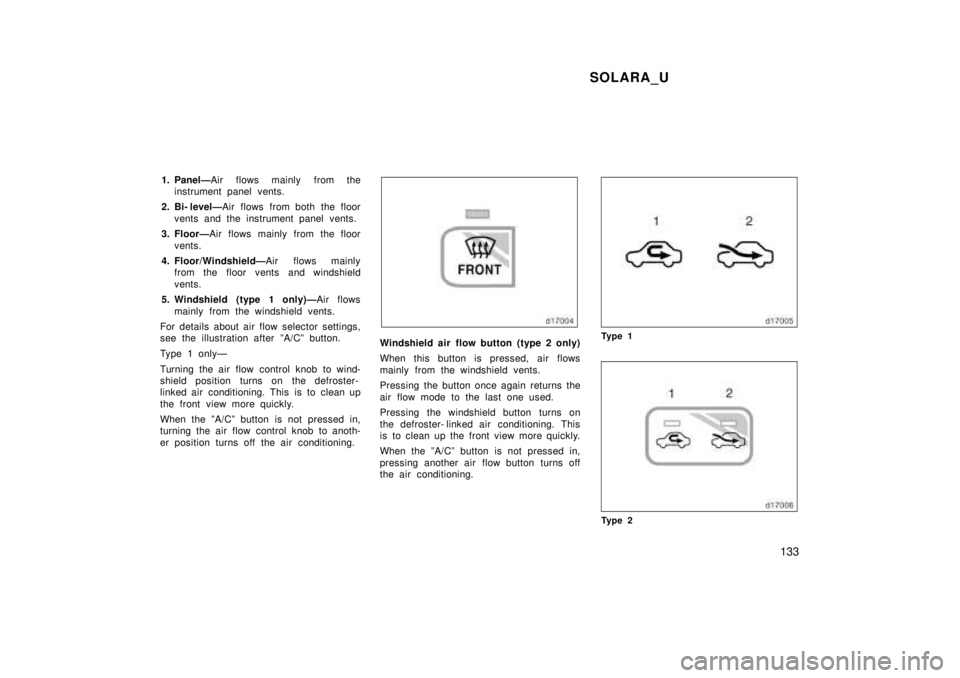
Windshield air flow button (type 2 only)
When this button is pressed, air flows
mainly from the windshield vents.
Pressing the button once again returns the
air flow mode to the last one used.
Pressing the windshield button turns on
the defroster- linked air conditioning. This
is to clean up the front view more quickly.
When the ºA/Cº button is not pressed in,
pressing another air flow button turns off
the air conditioning.Ty p e 1
Ty p e 2
Page 138 of 244

SOLARA_U
138
Ty p e 2 Ð
ÐFor automatic operation
TemperatureÐ To w a r d s WARM
(to the right)
Air intakeÐFRESH (outside air)
Air flowÐWINDSHIELD
ÐFor manual operation
Fan speedÐ To the desired fan speed
TemperatureÐ To w a r d s WARM
(to the right)
Air intakeÐFRESH (outside air)
Air flowÐWINDSHIELD
Pressing the windshield button turns on
the defroster- linked air conditioning. This
is to clean up the front view more quickly.
When the ºA/Cº button is not pressed in,
pressing another air flow button turns off
the air conditioning.
To heat the vehicle interior while de-
frosting the windshield, choose
floor/windshield air flow. ÐSide ventsIf air flow control is not satisfactory, check
the instrument panel vents. The instrument
panel vents may be opened or closed as
shown.
Page 140 of 244
SOLARA_U
140
Part 1
OPERATION OF
INSTRUMENTS AND
CONTROLSÐ
Chapter 1- 8
Other equipment
Clock
Thermometer
Cigarette lighter and ashtrays
Power outlet
Glovebox
Garage door opener
Garage door opener box
Miscellaneous box
Auxiliary box
Cup holder
Traction control system
Floor mat
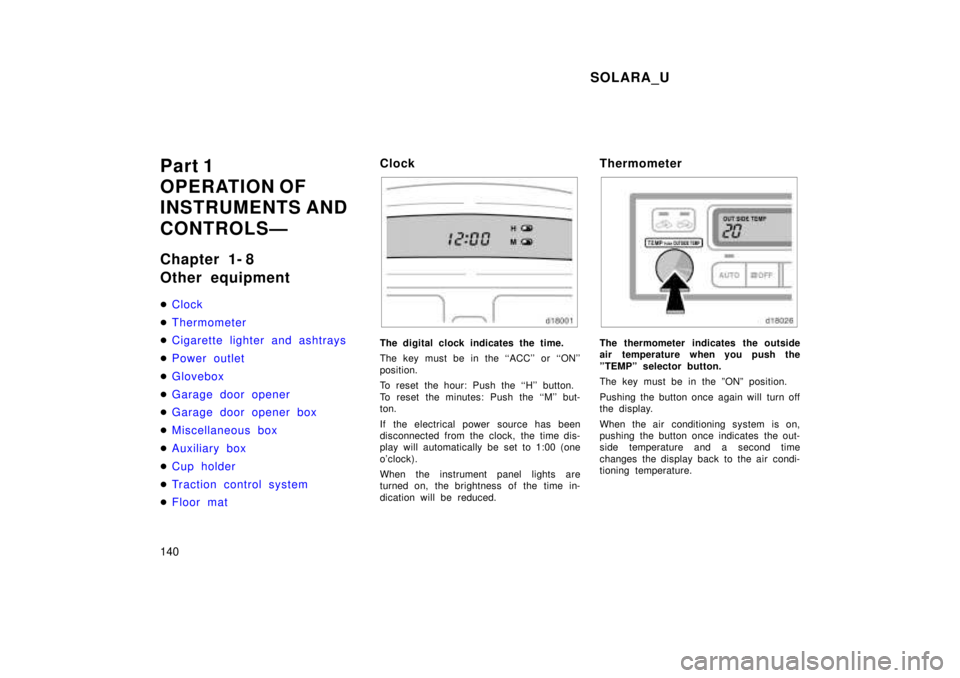
Clock
The digital clock indicates the time.
The key must be in the ``ACC'' or ``ON''
position.
To reset the hour: Push the ``H'' button.
To reset the minutes: Push the ``M'' but-
ton.
If the electrical power source has been
disconnected from the clock, the time dis-
play will automatically be set to 1:00 (one
o'clock).
When the instrument panel lights are
turned on, the brightness of the time in-
dication will be reduced.
ThermometerThe thermometer indicates the outside
air temperature when you push the
ºTEMPº selector button.
The key must be in the ºONº position.
Pushing the button once again will turn off
the display.
When the air conditioning system is on,
pushing the button once indicates the out-
side temperature and a second time
changes the display back to the air condi-
tioning temperature.
Page 142 of 244
SOLARA_U
142
Close the power outlet lid when the
power outlet is not in use. Insertinga foreign object other than the ap- propriate plug that fits the outlet,
or allowing any liquid into the out-let may cause electrical failure orshort circuits.
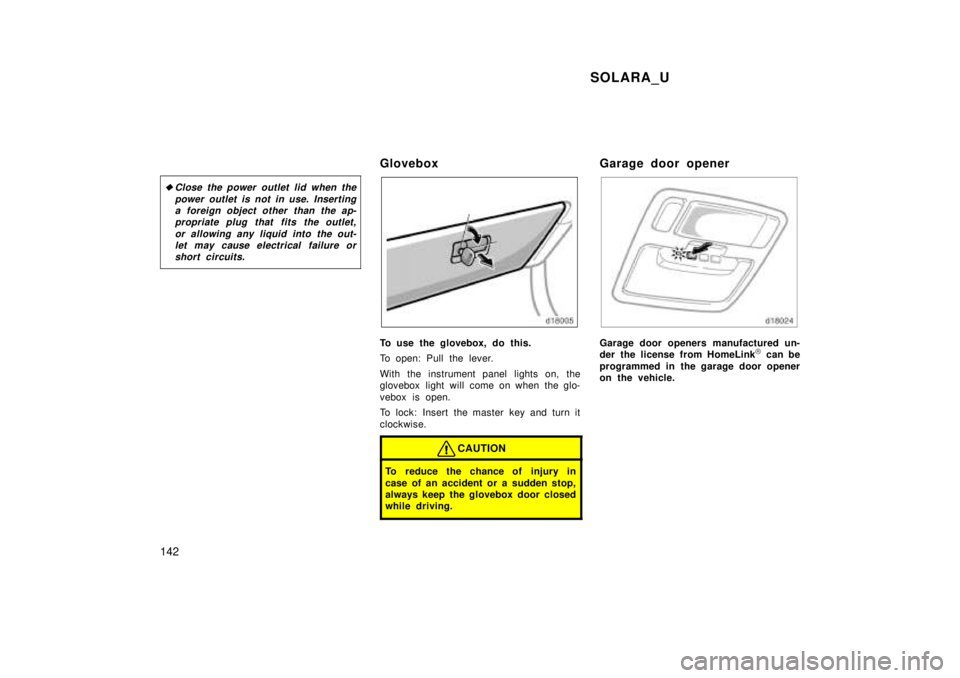
Glovebox
To use the glovebox, do this.
To open: Pull the lever.
With the instrument panel lights on, the
glovebox light will come on when the glo-
vebox is open.
To lock: Insert the master key and turn it
clockwise.
CAUTION
To reduce the chance of injury in
case of an accident or a sudden stop,
always keep the glovebox door closed
while driving.
Garage door opener
Garage door openers manufactured un-
der the license from HomeLink )
can be
programmed in the garage door opener
on the vehicle.
Page 161 of 244

SOLARA_U161
Luggage stowage pr
ecautions
When stowing luggage or cargo in the
vehicle, observe the following: Put luggage or cargo in the trunk when
at all possible. Be sure all items are
secured in place.
Be careful to keep the vehicle bal-
anced. Locating the weight as far for-
ward as possible helps maintain bal-
ance.
For better fuel economy, do not carry
unneeded weight.
CAUTION
To prevent luggage or packages
from sliding forward during braking,
do not stack anything in the en-
larged trunk. Keep luggage or pack-
ages low, as close to the floor as
possible.
Never allow anyone to ride in the
enlarged trunk. It is not designed
for passengers. They should ride in
their seats with their seat belts
properly fastened. Otherwise, they
are much more likely to suffer seri-
ous bodily injury, in the event of
sudden braking or a co llision.
Do not place anything on the filler
panel behind the rear seatback.
Such items may be thrown about
and possibly injure people in the
vehicle during sudden braking or an
accident.
Do not drive with objects left on
top of the instrument panel. They
may interfere with the driver's field
of view. Or they may move during
sharp vehicle acceleration or turn-
ing, and impair the driver's control
of the vehicle. In an accident they
may injure the vehicle occupants.
NOTICE
Do not load the vehicle beyond the
vehicle capacity weight specified inPart 8.
The vehicle identification number (VIN)
is the legal identifier for your vehicle.
This number is on the left top of the
instrument panel, and can be seen
through the windshield from outside.
This is the primary identification number
for your Toyota. It is used in registering
the ownership of your vehicle. Your Toyota's identificationÐ
ÐVehicle identification number
Page 196 of 244
SOLARA_U
196
Air conditioning control panel, car au-
dio, instrument panel,
c onsole panel,
and switches
Use a soft damp cloth for cleaning.
Soak a clean soft cloth in water or luke-
warm water then lightly
w ipe off dirt.
NOTICE
Do not use organic substances (sol-
vents, kerosene, alcohol,
g asoline,
etc.) or alkaline or acidic solutions. These chemicals can cause discol-
oring, staining or peeling of thesurface.
If you use cleaners or polishing
agents, make sure their ingredientsdo not include the substances men- tioned above.
If you use a liquid car freshener, donot spill the liquid onto the ve-
hicle's interior surfaces. It may con-tain the ingredients mentioned
a-
bove. Immediately clean any spill
using the method mentioned above.
Leather Interior
The leather upholstery may be cleaned
with neutral detergent for wool.
Remove dirt using a soft cloth dampened
with 5% solution of neutral detergent for
wool. Then thoroughly wipe off all traces
of detergent with a clean damp cloth.
After cleaning or whenever any part of the
leather gets wet, dry with a soft clean
cloth. Allow the leather to dry in a venti-
lated shaded area.
NOTICE
If a stain should fail to come outwith a neutral detergent, apply acleaner that does not contain an
organic solvent.
Never use organic substances such as benzine, alcohol or gasoline,
or
alkaline or acid solutions for clean-
ing the leather as thesecould
c ause discoloring.
Use of a nylon brush or synthetic
fiber cloth, etc. may scratch thefine grained surface of the leather.
Mildew may develop on soiled leath-
er upholstery. Be especially carefulto avoid oil spots. Try to keep yourupholstery always clean.
Long exposure to direct sunlight may cause the leather surface toharden and shrink. Keep your ve-
hicle in a shaded area, especially inthe summer.
The interior of your vehicle is aptto heat up on hot summer days,
so
avoid placing on the upholstery
items made of vinyl or plastic orcontaining wax as these tend tostick to leather when warm.
Improper cleaning of the leather up-
holstery could result in discolor-
ation or staining.
If you have any questions about the
cleaning of your Toyota, your local
Toyota dealer will be pleased to answer
them.