1999 TOYOTA SOLARA ESP
[x] Cancel search: ESPPage 95 of 244
SOLARA_U95
Recommended shifting speeds
The transmission is fully synchronized and
upshifting or downshifting is easy.
For the best compromise between fuel
economy and vehicle performance, you
should upshift or downshift at the following
speeds:
gear km/h (mph)
1 to 2 or 2 to 1 24 (15)
2 to 3 or 3 to 2 40 (25)
3 to 4 or 4 to 3 64 (40)
4 to 5 or 5 to 4 72 (45)
Downshift to the appropriate gear if accel-
eration is needed when you are cruising
below the above downshifting speeds.
Upshifting too soon or downshifting too
late will cause lugging, and possibly ping-
ing. Regularly revving the engine to maxi-
mum speed in each gear will cause ex-
cessive engine wear and high fuel
consumption. Maximum allowable speeds
To get on a highway or to pass slower
traffic, maximum acceleration may be nec-
essary. Make sure you observe the follow-
ing maximum allowable speeds in each
gear:
gear km/h (mph)1 52 (32)
2 93 (57)
3 147 (91)
NOTICE
Do not downshift if you are going
faster than the maximum allowablespeed for the next lower gear.
Good driving practice
If it is difficult to shift into reverse, put
the transmission in neutral, release the
clutch pedal momentarily, and then try
again.
When towing a trailer, in order to main-
tain engine braking efficiency, do not
use the fifth gear.
CAUTION
Be careful when downshifting on a
slippery surface. Abrupt shifting
could cause the vehicle to spin or
skid.
NOTICE
Make sure the vehicle is completely
stopped before shifting into reverse.
Page 101 of 244
SOLARA_U101
YOUR RADIO ANTENNA
NOTICE
Attaching the film (especially conduc-
tive or metallic type) on the rearglass will noticeably reduce the sensi-tivity of the radio.
YOUR CASSETTE PLAYER
When you insert a cassette, the exposed
tape should be to the right.
NOTICE
Do not oil any part of the player and
do not insert anything other than cas-sette tapes into the slot, or the tapeplayer may be damaged.
YOUR COMPACT DISC PLAYER
When you insert a disc, gently push it in
with the label side up. (The player will
automatically eject a disc if the label side
is down.) The compact disc player will
play from track 1 through the end of the
disc. Then it will play from track 1 again.
NOTICE
Never try to disassemble or oil any
part of the compact disc player. Donot insert anything except a compact disc into the slot.
8 cm (3 in.) compact disc singles
Your compact disc player does not need
an adaptor to play compact disc singles.
Compact disc singles are about 8 cm (3
in.) in diameter- smaller than standard
discs.
After you eject a compact disc single, do
not insert a standard 12 cm (5 in.) disc
until ºDISCº disappears from the display.
NOTICE
Do not use an adaptor for compact
disc singlesÐit could cause trackingerrors or interfere with the ejection of compact discs.
Page 119 of 244

SOLARA_U11 9
SEEK (Seeking)
Radio
In the seek mode, the radio finds and
plays the next station up or down the
station band.
To seek a station, push and hold the º
º
or º º side of ºTUNEº until you hear a
beep. Do this again to find another sta-
tion.
Cassette Player
By using this button, you can skip up or
down to a different track.
You can skip up tp nine tracks at a time.
Push the up or down side of the button.
ºFF 1º or ºREW 1º will appear on the
display.
Next, push either side of the track button
until the number on the display reaches
the number of tracks you want to skip. If
you push the button ten times, the skip
feature will be turned off. When counting the number of tracks you
want to rewind, remember to count the
current track as well. For example, if you
want to rewind to a song that is two be-
fore the song you are listening to, push
on the down side of the button until ºREW
3º appears on the display.
If you have pushed the track button more
than you wanted to, push the other side
of the button. The track number will be
reduced.
The track number you select is not valid
if it is higher than the number of tracks
remaining on the current cassette side.
After the beginning of the tape is
reached, the player will automatically
start playing the same side.
After the end of the tape is reached,
the player will automatically reverse
sides and start playing the other side.
There must be at least 3 seconds of blank
space between tracks for the track button
to work correctly. In addition, the feature
may not work well with some spoken
word, live, or classical recordings. SKIP
The skip feature allows you to fast for-
ward past long stretches of blank tape.
This is especially useful at the end of
cassettes.
Push ºSKIPº. ºSKIPº will appear on the
display. The cassette player will keep
track of how much blank space it plays.
Any time it has played about 10 seconds
of blank tape, it will automatically fast
forward to the next track and begin to
play.
Push the button a second time to turn off
the skip feature.
ST (Stereo reception) display
Your radio automatically changes to stereo
reception when a stereo broadcast is re-
ceived. ºSTº appears on the display. If the
signal becomes weak, the radio reduces
the amount of channel separation to prev-
ent the weak signal from creating noise.
If the signal becomes extremely weak, the
radio switches from stereo to mono recep-
tion.
Page 126 of 244

SOLARA_U
126
SEEK (Seeking)
Radio
In the seek mode, the radio finds and
plays the next station up or down the
station band.
To seek a station, push and hold the º
~º
or º !º side of ºTUNEº until you hear a
beep. Do this again to find another sta-
tion.
Cassette Player
By using this button, you can skip up or
down to a different track.
You can skip up tp nine tracks at a time.
Push the up or down side of the button.
ºFF 1º or ºREW 1º will appear on the
display.
Next, push either side of the track button
until the number on the display reaches
the nunber of tracks you want to skip. If
you push the button ten times, the skip
feature will be turned off. When counting the number of tracks you
want to rewind, remember to count the
current track as well. For example, if you
want to rewind to a song that is two be-
fore the song you are listening to, push
on the down side of the button until ºREW
3º appears on the display.
If you have pushed the track button more
than you wanted to, push the other side
of the button. The track number will be
reduced.
The track number you select is not valid
if it is higher than the number of tracks
remaining on the current cassette side.
After the beginning of the tape is
reached, the player will automatically
start playing the same side.
After the end of the tape is reached,
the player will automatically reverse
sides and start playing the other side.
There must be at least 3 seconds of blank
space between tracks for the track button
to work correctly. In addition, the feature
may not work well with some spoken
word, live, or classical recordings. SKIP
The skip feature allows you to fast for-
ward past long stretches of blank tape.
This is especially useful at the end of
cassettes.
Push ºSKIPº. ºSKIPº will appear on the
display. The cassette player will keep
track of how much blank space it plays.
Any time it has played about 10 seconds
of blank tape, it will automatically fast
forward to the next track and begin to
play.
Push the button a second time to turn off
the skip feature.
ST (Stereo reception) display
Your radio automatically changes to stereo
reception when a stereo broadcast is re-
ceived. ºSTº appears on the display. If the
signal becomes weak, the radio reduces
the amount of channel separation to prev-
ent the weak signal from creating noise.
If the signal becomes extremely weak, the
radio switches from stereo to mono recep-
tion.
Page 128 of 244
SOLARA_U
128
AM
FadingÐAM broadcasts are reflected by
the upper atmosphereÐespecially at night.
These reflected signals can interfere with
those received directly from the radio sta-
tion, causing the radio station to sound
alternately strong and weak.
Station interferenceÐWhen a reflected sig-
nal and a signal received directly from a
radio station are very nearly the same
frequency, they can interfere with each
other, making it difficult to hear the broad-
cast.
StaticÐAM is easily affected by external
sources of electrical noise, such as high
tension power lines, lightening, or electri-
cal motors. This results in static.
CARING FOR YOUR CASSETTE PLAYER
AND TAPES
For high performance from your cassette
player and tapes:
Clean the tape head and other parts regu-
larly.
A dirty tape head or tape path can
decrease sound quality and tangle your
cassette tapes. The easiest way to
clean them is by using a cleaning tape.
(A wet type is recommended.) Use high- quality cassettes.
Low- quality cassette tapes can cause
many problems, including poor sound,
inconsistent playing speed, and
constant auto- reversing. They can also
get stuck or tangled in the cassette
player.
Do not use a cassette if it has been
damaged or tangled or if its label is
peeling off.
Do not leave a cassette in the player
if you are not listening to it, especially
if it is hot outside.
Store cassettes in their cases and out
of direct sunlight.
Avoid using cassettes with a total play-
ing time longer than 100 minutes (50
minutes per side). The tape used in
these cassettes is thin and could get
stuck or tangled in the cassette player.
CARING FOR YOUR COMPACT DISC
PLAYER AND DISCS
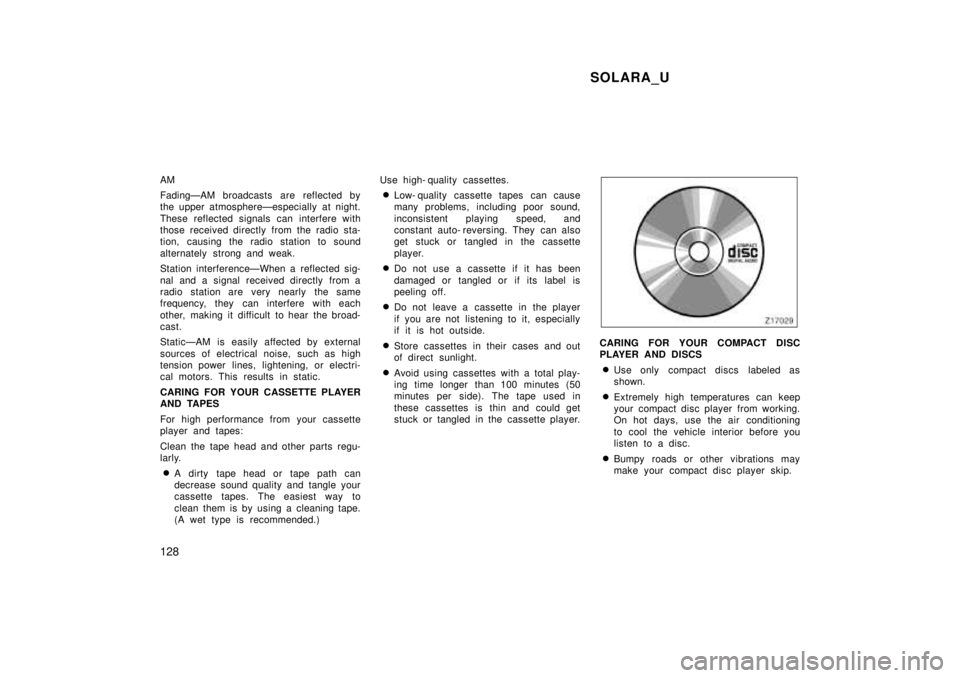
Use only compact discs labeled as
shown.
Extremely high temperatures can keep
your compact disc player from working.
On hot days, use the air conditioning
to cool the vehicle interior before you
listen to a disc.
Bumpy roads or other vibrations may
make your compact disc player skip.
Page 129 of 244
SOLARA_U129
If moisture gets into your compact disc
player, you may not hear any sound
even though your compact disc player
appears to be working. Remove the
disc from the player and wait until it
dries.
Handle compact discs carefully, espe-
cially when you are inserting them.
Hold them on the edge and do not
bend them. Avoid getting fingerprints
on them, particularly on the shiny side.
Dirt, scrapes, warping, pin holes, or
other disc damage could cause the
player to skip or to repeat a section of
a track. (To see a pin hole, hold the
disc up to the light.)
Remove discs from the compact disc
player when you are not listening
to them. Store them in their plastic
cases away from moisture, heat, and
direct sunlight.
To clean a compact disc: Wipe it with a
soft, lint- free cloth that has been damp-
ened with water. Wipe in a straight line
from the center to the edge of the disc
(not in circles). Dry it with another soft,
lint- free cloth. Do not use a conventional
record cleaner or anti- static device.
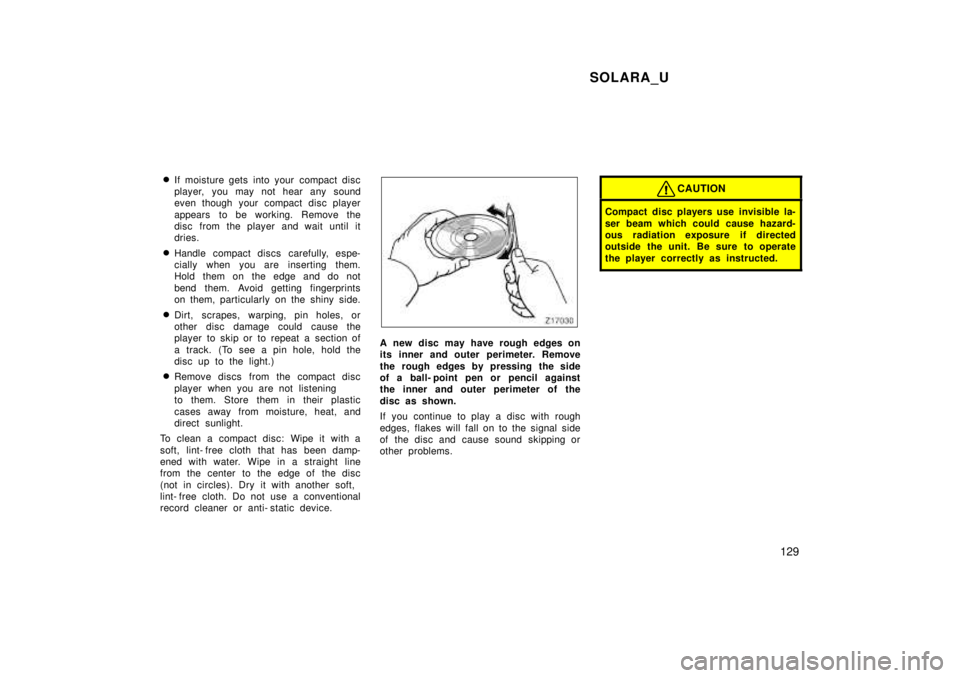
A new disc may have rough edges on
its inner and outer perimeter. Remove
the rough edges by pressing the side
of a ball- point pen or pencil against
the inner and outer perimeter of the
disc as shown.
If you continue to play a disc with rough
edges, flakes will fall on to the signal side
of the disc and cause sound skipping or
other problems.
CAUTION
Compact disc players use invisible la-
ser beam which could cause hazard-
ous radiation exposure if directed
outside the unit. Be sure to operate
the player correctly as instructed.
Page 143 of 244
SOLARA_U143
PROGRAMMING THE GARAGE DOOR OPENER
This garage door opener has 3 buttons
and you can store one program for each
button.
1. Decide which one of the 3 buttons you want to program. Push and hold down
one of the buttons until its indicator
light begins to flash.
2. While holding this button, bring the original garage door opener closer to
the garage door opener equipped on
the vehicle within about 25 mm (1 in.)
and push the button on the original
garage door opener. This signal from
the original garage door opener is sent
to the one to be programmed.
3. When the frequency and code is regis- tered, the indicator light flashes rapidly.
Then you can release both buttons.
4. If you wish, repeat the procedure for each remaining button for another ga-
rage door opener.
If you want to write a new program over
the program set already, select a button
you want to program and repeat the pro-
cedure from step 1. The previous program
is erased and a new program will be set. If the transmitter has a ºrolling c
odeº fea-
ture, it is necessary to program the ga-
rage door opener receiver on the garage
after programming the garage door opener
on the vehicle. For the setting of the re-
ceiver, refer to the instruction manual for
the receiver.
After setting the receiver, push the pro-
grammed button on the vehicle for about
1 to 2 seconds within the operational
range.
The old- type garage door openers
manufactured before 1982 cannot be pro-
grammed with this system.
CAUTION
When programming or operating the
garage door opener, make sure there
is no one around the moving door. It
is dangerous if someone is caught.
OPERATING THE GARAGE DOOR OPENER
Push the appropriate button to activate the
garage door opener. The indicator light
comes on. The garage door opener contin-
ues to send the signal for up to 20 sec-
onds as long as the button is pushed. ERASING THE GARAGE DOOR OPENER
MEMORY
Push and hold down the 2 outside buttons
until the indicator light flashes. All memo-
rized data will be erased.
FCC ID: CB2V94800
CANADA: 1763 102 264
This device complies with FCC Rules
part 15. Operation is subject to the fol-
lowing two conditions: (1) This device
may not cause harmful interference, and
(2) this device must accept any interfer-
ence that may be received, including
interference that may cause undesired
operation.
WARNING: This transmitter has been
tested and complies with FCC and
DOC/MDC rules. Changes or modifica-
tions not expressly approved by the
partly responsible for compliance
could void the user's authority to op-
erate the device.
Page 172 of 244
SOLARA_U
172
A safety chain must always be used
between the towing vehicle and the
trailer. Leave sufficient slack in the
chain for turns. The chain should
cross under the trailer tongue to
prevent the tongue from dropping to
the ground in case it becomes dam-
aged or separated. For correct safety
chain procedures, follow the hitch or
trailer manufacturer 's recommenda-
tions.
CAUTION
If the total trailer weight exceeds
453 kg (1000 lb.), trailer brakes are
required.
Never tap into your vehicle's hy-
draulic system as it would lower its
braking effectiveness.
Never tow a trailer without using a
safety chain securely attached to
both the trailer and the vehicle. If
damage occurs to the coupling unit
or hitch ball, there is danger of the
trailer wandering over into another
lane.
TIRES
Ensure that your vehicle's tires are
properly inflated. See Chapter 7- 2 for
instructions.
The trailer tires should be inflated to
the pressure recommended by the trail-
er manufacturer in respect to the total
trailer weight.
TRAILER LIGHTS Trailer lights must comply with federal,
state/provincial and local regulations.
See your local recreational vehicle
dealer or rental agency for the correct
type of wiring and relays for your trail-
er. Check for correct operation of the
turn signals and stop lights each time
you hitch up. Direct splicing may dam-
age your vehicle's electrical system
and cause a malfunction of your lights.
BREAK- IN SCHEDULE Toyota recommends that you do not
tow a trailer with a new vehicle or a
vehicle with any new power train com-
ponent (engine, transmission, differen-
tial, wheel bearing, etc.) for the first
800 km (500 miles) of driving. MAINTENANCE
If you tow a trailer, your vehicle will
require more frequent maintenance due
to the additional load. For this informa-
tion, please refer to the scheduled
maintenance information in the ºOwn-
er 's Manual Supplement/Maintenance
Scheduleº.
Retighten all fixing bolts of the towing
ball and bracket after approximately
1000 km (600 miles) of trailer driving.
PRE- TOWING SAFETY CHECK Check that your vehicle remains level
when a loaded or unloaded trailer is
hitched. Do not drive if the vehicle has
an abnormal nose- up or nose- down
condition, and check for improper
tongue load, overload,worn suspension
or other possible causes.
Make sure the trailer cargo is securely
loaded so that it can not shift.
Check that your rear view mirrors con-
form to any applicable federal, state/
provincial or local regulation. If not,
install the rear view mirrors required
for towing purpose.