1999 NISSAN PATHFINDER window
[x] Cancel search: windowPage 132 of 274

Start the engine and operate the controls to
activate the air conditioner.IThe air conditioner cooling function
operates only when the engine is run-
ning.
IDo not leave children, unreliable
adults, or pets alone in your vehicle.
On hot, sunny days, temperatures in
a closed vehicle could quickly be-
come high enough to cause severe or
possibly fatal injuries to people or
animals.
IDo not use the recirculation mode for
long periods as it may cause the
interior air to become stale and the
windows to fog up.
IPositioning of the heating or air con-
ditioning controls should not be done
while driving, in order that full atten-
tion may be given to the driving
operation.
SAA0347
HEATER AND AIR CONDITIONER
(Automatic)
Heater, air conditioner and audio systems
4-9
Z
01.1.22/R50-D/V5
X
Page 133 of 274

AUTOMATIC OPERATION
Cooling and/or dehumidified heating
(AUTO)This mode may be used all year round. The
system works automatically to maintain a
constant temperature. Air flow distribution and
fan speed are also controlled automatically.
1. Push the AUTO button on. (AUTO will
appear on the display.)
2. Push the temperature control button
to set the desired temperature.
IFor normal operation, adjust the tempera-
ture control button to about 75ÉF (24ÉC).
IThe temperature of the passenger compart-
ment will be maintained automatically. Air
flow distribution and fan speed are also
controlled automatically.
Heating (ECON)Use this mode when you need to heat only.
1. Push the ECON (Economy) button on.
(ECON appears on the display.)
2. Push the temperature control button
to set the desired temperature.
IThe temperature of the passenger compart-ment will be maintained automatically. Air
flow distribution and fan speed are also
controlled automatically.
IDo not set the temperature lower than the
outside air temperature. Otherwise the sys-
tem may not work properly.
IIf the windows fog up, do not use the ECON
mode.
Dehumidified defogging1. Push the DEF
switch on. (The indica-
tor light will come on.)
2. Push the temperature control button
to set the desired temperature.
ITo remove ice or fog from the outside of the
windows, push the manual fan control but-
tonand set to the maximum position.
IAs soon as possible after the windshield is
clean, push the AUTO button to return to
the auto mode.
IWhen the DEF
button is pushed, the
air conditioner will automatically be turned
on at outside temperatures above 32ÉF
(0ÉC) to defog the windshield. The air
recirculation mode will automatically be
turned off.
Outside air is drawn into the passenger com-partment to improve defogging performance.
MANUAL OPERATION
Fan speed controlPush the fan control button
to change
the fan speed manually.
IPush the AUTO button to return to auto-
matic control of the fan speed.
Air recirculationPush the air recirculation button
to recir-
culate interior air inside the vehicle. The indi-
cator light will come on.
Push it again to draw outside air into the
passenger compartment. The indicator will go
out.
IThe air recirculation button cannot be
activated when the air conditioner is in the
DEF mode.
Air flow controlPushing the MODE button selects the air outlet
to provide:
: Air flow from center and side ventilators.: Air flow from center and side ventilators
and foot outlets.
4-10
Heater, air conditioner and audio systems
Z
01.1.22/R50-D/V5
X
Page 139 of 274
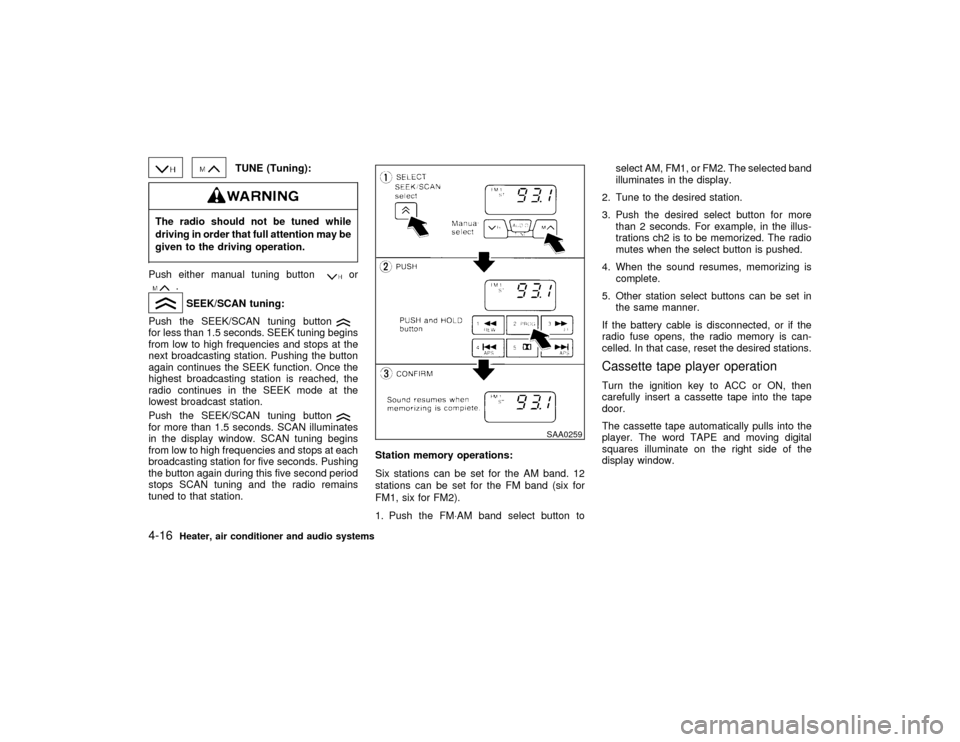
TUNE (Tuning):
The radio should not be tuned while
driving in order that full attention may be
given to the driving operation.Push either manual tuning button
or
.SEEK/SCAN tuning:
Push the SEEK/SCAN tuning button
for less than 1.5 seconds. SEEK tuning begins
from low to high frequencies and stops at the
next broadcasting station. Pushing the button
again continues the SEEK function. Once the
highest broadcasting station is reached, the
radio continues in the SEEK mode at the
lowest broadcast station.
Push the SEEK/SCAN tuning buttonfor more than 1.5 seconds. SCAN illuminates
in the display window. SCAN tuning begins
from low to high frequencies and stops at each
broadcasting station for five seconds. Pushing
the button again during this five second period
stops SCAN tuning and the radio remains
tuned to that station.Station memory operations:
Six stations can be set for the AM band. 12
stations can be set for the FM band (six for
FM1, six for FM2).
1. Push the FM×AM band select button toselect AM, FM1, or FM2. The selected band
illuminates in the display.
2. Tune to the desired station.
3. Push the desired select button for more
than 2 seconds. For example, in the illus-
trations ch2 is to be memorized. The radio
mutes when the select button is pushed.
4. When the sound resumes, memorizing is
complete.
5. Other station select buttons can be set in
the same manner.
If the battery cable is disconnected, or if the
radio fuse opens, the radio memory is can-
celled. In that case, reset the desired stations.
Cassette tape player operationTurn the ignition key to ACC or ON, then
carefully insert a cassette tape into the tape
door.
The cassette tape automatically pulls into the
player. The word TAPE and moving digital
squares illuminate on the right side of the
display window.
SAA0259
4-16
Heater, air conditioner and audio systems
Z
01.1.22/R50-D/V5
X
Page 140 of 274

Do not force the cassette tape into the
tape door. This could cause player
damage.The cassette tape automatically changes di-
rections to play the other side when the first
side is complete. At this time, the moving
digital squares illuminate on the left side of the
display window.
Precaution on cassette player operation:
ITo maintain good quality sound, NISSAN
recommends using cassette tapes of 60
minutes or shorter in length.
ICassette tapes should be removed from the
player when not in use. Store cassettes in
their protective cases and away from direct
sunlight, heat, moisture and magnetic
sources.
IDirect sunlight can cause the cassette to
become deformed. The use of deformed
cassettes may cause the cassette to jam in
the player.
IDo not use cassettes with labels which are
peeling and loose. If used, the label could
jam in the player.IIf a cassette has loose tape, insert a pencil
through one of the cassette hubs and re-
wind the tape firmly around the hubs. Loose
tape may cause tape jamming and waver-
ing sound quality.
IOver a period of time, the playback head,
capstan and pinch roller may collect a tape
coating residue as the tape is played. This
residue accumulation can cause weak or
wavering sound, and should be removed
periodically with a head cleaning tape. If the
residue is not removed periodically, the
player may need to be disassembled for
cleaning.
PLAY/STOP:
Push the PLAY/STOP button while the cas-
sette tape is playing to stop the tape. Push the
button again to play the tape.
FF (Fast Forward), REW
(Rewind):
Push either the FF or REW button for the
desired direction.
The FF or REW symbol illuminates in the
display.
To stop the FF or REW function, press the
or
again, or the
button.
APS (Automatic
Program Search) FF,
APS REW:
Push either the APS FF or APS REW button
while the cassette tape is playing. The tape
runs quickly, stops, then plays the next selec-
tion. Either the FF or REW symbol flashes in
the display while searching for the selection.
This system searches at the blank intervals
between selections. If there is a blank interval
within one selection or there is no interval
between selections, the system may not stop
in the desired or expected location.
PROG (Program):
Push the PROG (program) select button. The
moving digital squares illuminate on either the
right or left side of the display window to
indicate the side of program play.Dolby NR (Noise Reduction):
Push the Dolby NR button for Dolby NR en-
coded tapes to reduce high frequency tape
noise. The
indicator light comes on.
If in the clock display is in priority mode when
the Dolby NR button is pressed,
and
TAPE illuminate in the display window for
about 10 seconds. The clock mode then re-
turns to the display window.
Heater, air conditioner and audio systems
4-17
Z
01.1.22/R50-D/V5
X
Page 142 of 274

FM-AM RADIO WITH CASSETTE
PLAYER AND COMPACT DISC
(CD) PLAYER
Audio main operationHead unit
The radio has an FM diversity reception sys-
tem, which employs two antennas. One is a
rod type antenna; the other is an antenna
printed on the window. This system automati-
cally switches to the antenna which is receiv-
ing less noise.
The tape deck employs a permalloy head
which allows for improved reproduction of high
frequency ranges. Noise is also greatly re-
duced by the combined use of the Dolby NR
(Noise Reduction) system. The auto loudness
circuit enhances the low frequency range au-
tomatically in both radio reception and tape
and CD playback.
Bose system (if so equipped)
A large output amplifier featuring a low distor-
tion ratio is connected directly to each speaker
unit to provide increased output and excellent
tonal quality. The equalizing circuit permits
regeneration of forcible base sound. This
equalizing circuit permits the sound efficiency
to be matched with the interior conditions ofyour vehicle for a selection between ªnatural
soundº and ªhigh-fidelity soundº.
Power/Volume control:
Turn the ignition key to ACC or ON, and then
push the Power/Volume control knob while the
system is off to call up the mode (radio, tape or
CD) which was playing immediately before the
system was turned off. When no CD or tape is
loaded, the radio will come on. While the
system is on, pushing the Power/Volume con-
trol knob turns the system off.
To turn the radio off, press the Power/Volume
control knob.
Turn the Power/Volume control knob to adjust
the volume.
Heater, air conditioner and audio systems
4-19
Z
01.1.22/R50-D/V5
X
Page 146 of 274

FF (Fast Forward), REW
(Rewind):
Push the(fast forward) button to fast
forward the tape. To rewind the tape, push the
(rewind) button. Either the FF or REW
symbol illuminates on the right side of the
display window. To stop the FF or REW func-
tion, press the
(fast forward) or
(re-
wind) again, or the TAPE button.
APS (Automatic Program
Search) FF, APS REW:
When the(APS FF) button is pushed
while the tape is being played, the next pro-
gram will start to play from the beginning. Push
the
(APS FF) button several times to skip
through programs. The tape will advance the
number of times the button is pushed (up to
nine programs).
When the
(APS REW) button is pushed
once, the program being played starts over
from the beginning. Push the
(APS
REW) button several times to skip back sev-
eral selections. The tape will go back the
number of times the button is pushed. Either
the FF or REW symbol flashes on the right
side of the display window while searching for
the selection.
This system searches for the blank intervalsbetween selections. If there is a blank interval
within one program or there is no interval
between programs, the system may not stop in
the desired or expected location.
PROG (Program):
Push the PROG button to change the tape
side while the tape is being played.
The cassette tape will automatically change
directions to play the other side when the first
side is completed.Dolby NR (Noise Reduction):
Push the Dolby NR
button for Dolby NR
encoded tapes to reduce high frequency tape
noise. The indicator will come on.
Dolby noise reduction manufactured under li-
cense from Dolby Laboratories Licensing Cor-
poration. Dolby NR and the double-D symbol
are trademarks of Dolby Laboratories
Licensing Corporation.
Metal or chrome tape usage:
The cassette player will be automatically set to
high performance play when playing a metal or
chrome cassette tape.TAPE EJECT:
When this button is pushed with the tape
loaded, the tape will be ejected.When the tape is ejected while it is being
played, the system will be turned off.
Compact Disc (CD) player operationIDuring cold weather or rainy days,
the player may malfunction due to the
humidity. If this occurs, remove the
CD and dehumidify or ventilate the
player completely.
IThe player may skip while driving on
rough roads.
IThe CD player sometimes cannot
function when the compartment tem-
perature is extremely high. Decrease
the temperature before use.
IDo not expose the CD to direct sun-
light.
ICDs that are of poor quality, dirty,
scratched, or covered with finger-
prints may not work properly.
IDo not use an 8 cm CD adapter as this
will cause malfunction.
Heater, air conditioner and audio systems
4-23
Z
01.1.22/R50-D/V5
X
Page 149 of 274

IDirt and other foreign matter on the
power antenna rod may interrupt its
operation. Clean the rod periodically
with a damp cloth. This type of clean-
ing is especially important during the
winter seasons in areas where road
salt and other chemicals may be
spread on road surfaces and
splashed onto the antenna rod.
If equipped with a genuine NISSAN cellular
phone, your NISSAN features a non-
directional microphone in the steering column
cover, so it is not necessary to look at or speak
directly into the microphone when calling. To
do so could detract from the driving operation
and cause an accident. See the car phone
manual for operation.
Some models are pre-wired to accept the
genuine NISSAN cellular phone. In addition,
the same model has the phone antenna built
into the rear glass window.
When installing a CB, ham radio or car phone
in your NISSAN, be sure to observe the follow-
ing cautions, otherwise the new equipment
may adversely affect the MFI (Multiport Fuel
Injection) system and other electronic parts.IKeep the antenna as far as possible
away from the Electronic Control Unit
(including radio).
IKeep the antenna wire more than 8 in
(20 cm) away from the Multiport Fuel
Injection harness. Do not route the
antenna wire next to any harness.
IAdjust the antenna standing-wave ra-tio as recommended by the manufac-
turer.
IConnect the ground wire from the
radio chassis to the body.
IFor details, consult your NISSAN
dealer.CB RADIO OR CAR PHONE
4-26
Heater, air conditioner and audio systems
Z
01.1.22/R50-D/V5
X
Page 151 of 274

IDo not leave children, unreliable
adults, or pets alone in your vehicle.
They could accidentally injure them-
selves or others through inadvertent
operation of the vehicle. Also, on hot,
sunny days, temperatures in a closed
vehicle could quickly become high
enough to cause severe or possibly
fatal injuries to people or animals.
IProperly secure all cargo to help pre-
vent it from sliding or shifting. Do not
place cargo higher than the seat-
backs. In a sudden stop or collision,
unsecured cargo could cause per-
sonal injury.
EXHAUST GAS (Carbon monoxide)Do not breathe exhaust gases; they con-
tain colorless and odorless carbon mon-
oxide. Carbon monoxide is a dangerous.
It can cause unconsciousness or death.
IIf you suspect that exhaust fumes are
entering the vehicle, drive with all
windows fully open, and have the
vehicle inspected immediately.
IDo not run the engine in closed
spaces such as a garage.
IDo not park the vehicle with the en-
gine running for any extended length
of time.
IKeep the back door and rear window
closed while driving, otherwise ex-
haust gases could be drawn into the
passenger compartment. If you must
drive with the back door on rear win-
dow open, follow these precautions:
1. Open all the windows.
2. Set the air recirculation switchOFF and the fan control at 4 (high)
to circulate the air.
IIf electrical wiring or other cable con-
nections must pass to a trailer
through the seal on the back door or
the body, follow the manufacturer's
recommendation to prevent carbon
monoxide entry into the vehicle.
IIf a special body or other equipment
is added for recreational or other us-
age, follow the manufacturer's rec-
ommendation to prevent carbon
monoxide entry into the vehicle.
(Some recreational vehicle appli-
ances such as stoves, refrigerator,
heaters, etc. may also generate car-
bon monoxide.)
IThe exhaust system and body should
be inspected by a qualified mechanic
whenever:
a. The vehicle is raised for service.
b. You suspect that exhaust fumes
are entering into the passenger
compartment.
c. You notice a change in the sound
PRECAUTIONS WHEN STARTING
AND DRIVING5-2
Starting and driving
Z
01.1.22/R50-D/V5
X