Page 80 of 233

IAlways have the doors locked while
driving. Along with the use of seat
belts, this provides greater safety in
the event of an accident by helping to
prevent persons from being thrown
from the vehicle. This also helps keep
children and others from unintention-
ally opening the doors, and will help
keep out intruders.
IBefore opening any door, always look
for and avoid oncoming traffic.
IDo not leave children unattended in-
side the vehicle. They could unknow-
ingly activate switches or controls.
Unattended children could become
involved in serious accidents.
LOCKING WITH KEY
PowerThe power door lock system allows you to lock
or unlock all doors simultaneously.
ITurning the front door key to the front of the
vehicle will lock all doors.
ITurning the front door key one time to the
rear of the vehicle will unlock the corre-
sponding door. From that position, return-
ing the key to neutral (where the key can
only be removed and inserted) and turning
it to the rear again within 5 seconds will
unlock all doors.
LOCKING WITH INSIDE LOCK
KNOB
PowerPushing the front door inside lock knob to the
lock position will lock all doors.
To lock from the outside without a key, move
the inside lock knob to the LOCK position.
Then close the door.
When locking the door this way, be certain not
to leave the key inside the vehicle.
The inside lock knob cannot be set to the
LOCK position with the front doors open and
SPA0084
SPA0085
DOORS
Pre-driving checks and adjustments
3-3
Z
01.1.22/A32-D/V5.0
X
Page 81 of 233
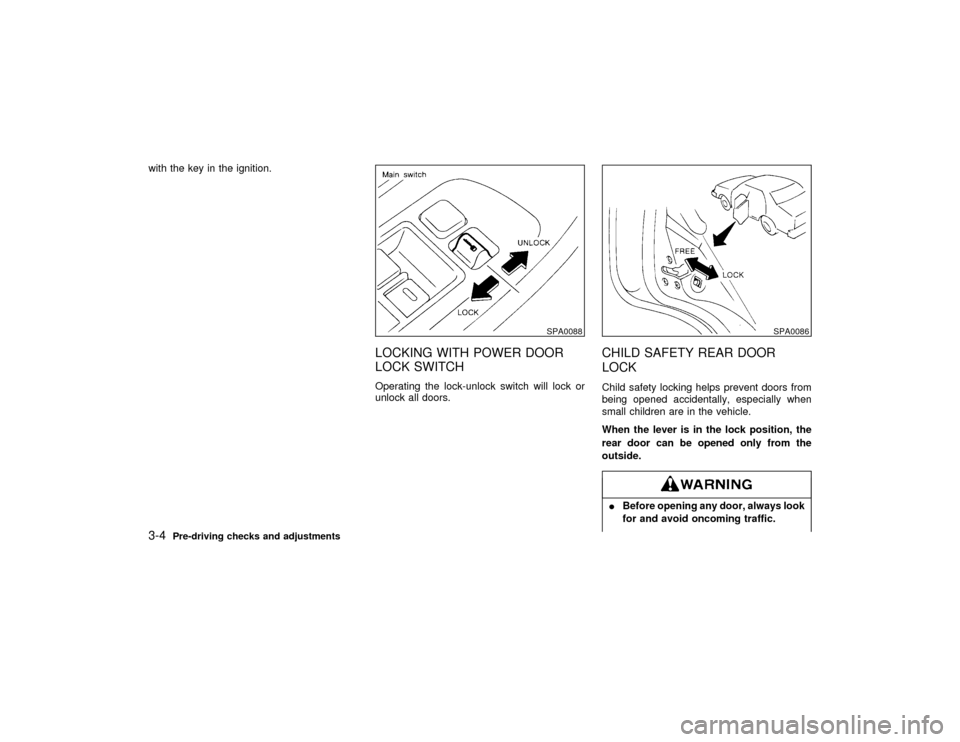
with the key in the ignition.
LOCKING WITH POWER DOOR
LOCK SWITCHOperating the lock-unlock switch will lock or
unlock all doors.
CHILD SAFETY REAR DOOR
LOCKChild safety locking helps prevent doors from
being opened accidentally, especially when
small children are in the vehicle.
When the lever is in the lock position, the
rear door can be opened only from the
outside.IBefore opening any door, always look
for and avoid oncoming traffic.
SPA0088
SPA0086
3-4
Pre-driving checks and adjustments
Z
01.1.22/A32-D/V5.0
X
Page 83 of 233

It is possible to lock/unlock all doors, to open
the driver's and front passenger's windows, to
release the trunk lid and to turn on or off the
interior light by using the remote controller
from outside the car.
Be sure to remove the key from the vehicle
before locking the doors and leaving it.
The remote controller can operate at a dis-
tance of approximately 49 ft (15 m) from the
vehicle. (The effective distance depends upon
the conditions around the vehicle.)
As many as four remote controllers can be
used with one vehicle. For information con-
cerning the purchase and use of additional
remote controllers, contact your NISSAN
dealer.Listed below are conditions or occur-
rences which will damage the remote
controller.
IDo not allow the remote controller to
become wet.
IDo not drop the remote controller.
IDo not strike the remote controller
sharply against another object.
IDo not place the remote controller foran extended period in an area where
temperatures exceed 140ÉF (60ÉC).
HOW TO USE MULTI-REMOTE
CONTROL SYSTEM
Locking doors1. Remove the ignition key.
2. Close all of the doors.
3. Push the
button on the multi-remote
controller.
4. All of the doors lock.
5. The hazard indicators flash twice.
When the
button is pushed with all doors
locked, the hazard indicator flashes twice as a
reminder that the doors are already locked.
Unlocking doors1. Push the
button on the multi-remote
controller. Only the driver side door un-
locks.
2. Push thebutton on the multi-remote
controller again within 5 seconds. The pas-
senger doors unlock.
3. The interior light will stay on for 30 secondswhen the interior light switch is in the center
qposition.
The interior light can be turned off without
waiting for 30 seconds by inserting the key into
the ignition or locking the doors with the multi-
remote controller or by pushing the interior
light button to OFF.
Opening the driver's and front
passenger's windows1. Push the
button on the multi-remote
controller for longer than 1.5 seconds after
the driver's door is unlocked.
2. The driver's and front passenger's windows
open.
The driver's and front passenger's windows
also open after all doors are unlocked with
the multi-remote controller.
The driver's and front passenger's win-
dows cannot be closed by using the
multi-remote controller.
Releasing the trunk lid1. Push the
button on the multi-remote
controller for longer than 0.5 second with
the key removed from the key cylinder.
2. The trunk lid opens.
3-6
Pre-driving checks and adjustments
Z
01.1.22/A32-D/V5.0
X
Page 85 of 233
ference received, including interference
that may cause undesired operation of the
device.
1. Pull the hood lock release handle
q1
lo-
cated below the instrument panel; the hood
will then spring up slightly.
2. Pull the lever
q2at the front of the hood with
your fingertips and raise the hood.
3. When closing the hood, slowly close the
hood and make sure it locks into place.
IMake sure the hood is completely
closed and latched before driving.
Failure to do so could cause the hood
to fly open and result in an accident.
IIf you see steam or smoke coming
from the engine compartment, to
avoid injury do not open the hood.
SPA0466
HOOD
3-8
Pre-driving checks and adjustments
Z
01.1.22/A32-D/V5.0
X
Page 87 of 233
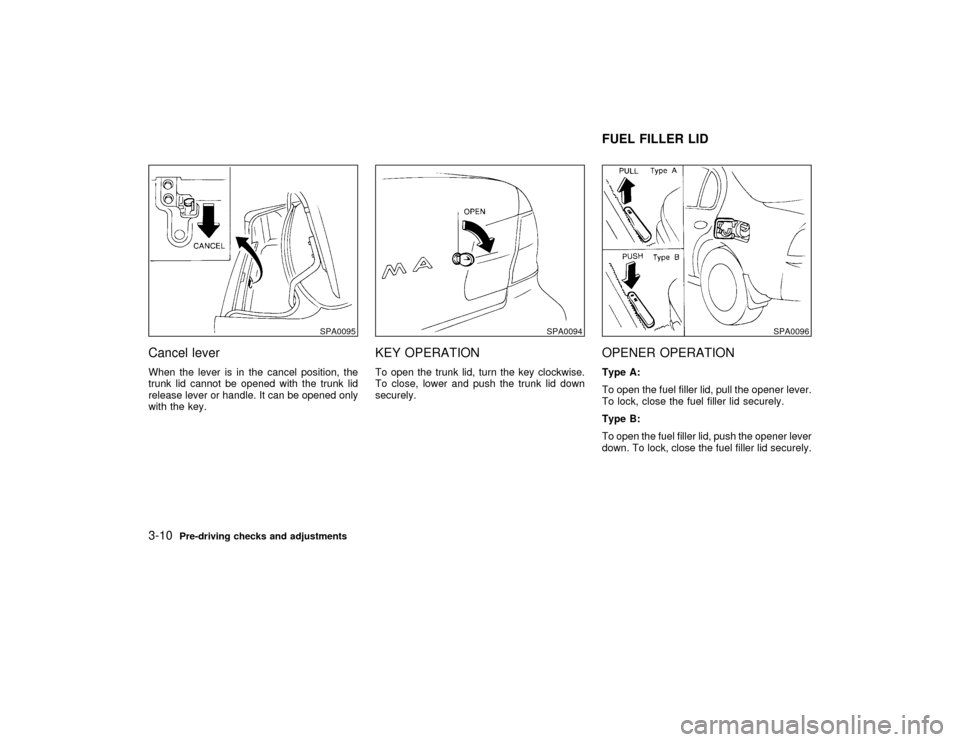
Cancel leverWhen the lever is in the cancel position, the
trunk lid cannot be opened with the trunk lid
release lever or handle. It can be opened only
with the key.
KEY OPERATIONTo open the trunk lid, turn the key clockwise.
To close, lower and push the trunk lid down
securely.
OPENER OPERATIONType A:
To open the fuel filler lid, pull the opener lever.
To lock, close the fuel filler lid securely.
Type B:
To open the fuel filler lid, push the opener lever
down. To lock, close the fuel filler lid securely.
SPA0095
SPA0094
SPA0096
FUEL FILLER LID
3-10
Pre-driving checks and adjustments
Z
01.1.22/A32-D/V5.0
X
Page 88 of 233

FUEL FILLER CAPThe fuel filler cap is a screw-on ratcheting
type. Tighten the cap clockwise until ratcheting
clicks are heard.
Put the fuel filler cap on the cap holder while
refueling.IGasoline is extremely flammable and
highly explosive under certain condi-
tions. You could be burned or seri-
ously injured if it is misused or mis-handled. Always stop the engine and
do not smoke or allow open flames or
sparks near the vehicle when refuel-
ing.
IFuel may be under pressure. Turn the
cap one-half turn, and wait for any
hissing sound to stop to prevent fuel
from spraying out and possible per-
sonal injury. Then remove the cap.
IDo not attempt to top off the fuel tank
after the fuel pump nozzle shuts off
automatically.
Continued refueling may cause fueloverflow, resulting in fuel spray and
possibly a fire.
IUse only a genuine NISSAN fuel filler
cap as a replacement. It has a built-in
safety valve needed for proper opera-
tion of the fuel system and emission
control system. An incorrect cap can
result in a serious malfunction and
possible injury.
INever pour fuel into the throttle body
to attempt to start your vehicle.
IIf fuel is spilled on the car body, flush
it away with water to avoid paint dam-
age.
ITighten until the cap clicks. Failure to
tighten the fuel cap properly may
cause the
Malfunction Indicator
Light (MIL) to illuminate. If this oc-
curs, securely close the fuel filler cap.
After driven for a while, the light
should remain off. If the light remains
on, have the vehicle inspected by an
authorized NISSAN dealer. For addi-
SPA0653
Pre-driving checks and adjustments
3-11
Z
01.1.22/A32-D/V5.0
X
Page 89 of 233
tional information, see the ªMalfunc-
tion indicator light (MIL)º in the ª2.
Instruments and controlsº section.
TILT OPERATIONPush the lock lever and while holding down,
adjust the steering wheel up or down to the
desired position.
Push the lock lever back into place to lock the
steering wheel in place.Do not adjust the steering wheel while
driving. You could lose control of your
vehicle and cause an accident.
INSIDE MIRRORThe night position will reduce glare from the
headlights of vehicles behind you at night.Use the night position only when neces-
sary, because it reduces rear view
clarity.
SPA0111
SPA0470
STEERING WHEEL MIRRORS
3-12
Pre-driving checks and adjustments
Z
01.1.22/A32-D/V5.0
X
Page 115 of 233

When the CD/CHG button is pushed with the
compact disc loaded but the tape or the radio
playing, the tape or radio will automatically be
turned off and the compact disc will start to
play.
FF (Fast Forward), REW
(Rewind):
When the(fast forward) or
(rewind)
button is pushed while the compact disc is
being played, the compact disc will play while
fast forwarding or rewinding. When the button
is released, the compact disc will return to
normal play speed.
APS (Automatic Program
Search) FF, APS REW:
When the(APS FF) button is pushed
while the compact disc is being played, the
program next to the present one will start to
play from its beginning. Push several times to
skip through programs. The compact disc will
advance the number of times the button is
pushed. (When the last program on the com-
pact disc is skipped through, the first program
will be played.) When the
(APS REW)
button is pushed, the program being played
returns to its beginning. Push several times to
skip back through programs. The compact disc
will go back the number of times the button is
pushed.
PROG (Program):
When the PROG button is pushed while the
compact disc is being played, the play pattern
will change as follows:
no mark: All the programs will be played
repeatedly in sequence.
1: Only one program (the one being played
when the PROG button is pushed) will be
repeated.
RANDOM: Programs will be played at random,
not following the sequence on the compact
disc. The same program may be repeated
twice.
When the compact disc is ejected, the
play pattern will automatically change to
no mark.
CD EJECT:
When the CD EJECT button is pushed with the
compact disc loaded, the compact disc will be
ejected.
When this button is pushed while the compact
disc is being played, the compact disc will
come out and the system will turn off.
If the compact disc comes out and is not
removed, it will be pulled back into the slotto protect it. (without 8 cm diameter com-
pact discs)
CD IN indicator:
CD IN indicator appears on the display when
the CD is loaded with the system on.
ANTENNA
Manual antennaThe manual antenna cannot be shortened, but
can be removed. When you need to remove
the antenna, turn the antenna rod counter-
clockwise.
To install the antenna rod, turn the antenna nut
clockwise. Tighten the antenna rod to specifi-
cation using a suitable tool, such as an open-
end wrench. The antenna rod tightening speci-
fication is 3.4 to 3.6 N×m (30 to 32 in-lb). Do not
use pliers to tighten the antenna as they can
leave marks on the antenna surface. The
antenna rod cannot be hand tightened to the
proper specification.Always properly tighten the antenna rod
during installation or the antenna rod
may bend or break during vehicle
4-24
Heater, air conditioner and audio systems
Z
01.1.22/A32-D/V5.0
X