1999 LINCOLN CONTINENTAL lock
[x] Cancel search: lockPage 42 of 208

²Use the SEL control to select the
program type. With the feature
on, use the SEEK or SCAN
control to find the desired
program type from the following
selections:
²Classic
²Country
²Info
²Jazz
²Oldies
²R&B
²Religious
²Rock
²Soft
²To p 4 0
Show
²RDS sends information with the
FM broadcast: station name,
station type, and/or radio text.
²With RDS activated, press the
RDS control until SHOW is
displayed.
²Use the SEL control to select
TYPE, NAME or NONE.
RDS clock feature
Refer toSetting the clockfor information.
SEL
RDS
SEL
Controls and features
42
Page 47 of 208

Radio reception factors
Three factors can affect radio reception:
²Distance/strength.The further an FM signal travels, the weaker it is.
The listenable range of the average FM station is approximately 40 km
(24 miles). This range can be affected by ªsignal modulation.º Signal
modulation is a process radio stations use to increase their
strength/volume relative to other stations.
²Terrain.Hills, mountains and tall buildings between your vehicle's
antenna and the radio station signal can cause FM reception problems.
Static can be caused on AM stations by power lines, electric fences,
traffic lights and thunderstorms. Moving away from an interfering
structure (out of its ªshadowº) returns your reception to normal.
²Station overload.Weak signals are sometimes captured by stronger
signals when you pass a broadcast tower. A stronger signal may
temporarily overtake a weaker signal and play while the weak station
frequency is displayed.
The audio system automatically switches to single channel reception if it
will improve the reception of a station normally received in stereo.
Audio system warranties and service
Refer to the ªWarranty Guideº for audio system warranty information.
If service is necessary, see your dealer or a qualified technician.
POSITIONS OF THE IGNITION
1. ACCESSORY, allows the electrical
accessories such as the radio to
operate while the engine is not
running.
2. LOCK, locks the steering wheel,
automatic transmission gearshift
lever and allows key removal.
3. OFF, shuts off the engine and all
accessories without locking the
steering wheel.
4. ON, all electrical circuits operational. Warning lights illuminated. Key
position when driving.
5. START, cranks the engine. Release the key as soon as the engine
starts.
3
1
2
5
4
Controls and features
47
Page 56 of 208

Quick summary
²To utilize your vehicle's RESCU system, your cellular phone must be
activated and plugged into the vehicle interface.
²Information or emergency assistance can be requested whenever your
key is in the RUN/START position and for six minutes after the vehicle
is turned off.
²An assistance request is initiated by pressing either the Information or
Emergency control located in the overhead console.
²When a control is pressed, a warning lamp located in the overhead
console will begin to flash and status messages will display on the
vehicle's message center (messages can only be displayed when the
key is in the RUN/START position).
²The vehicle's cellular phone automatically places a call to a 24 hour
emergency response center.
²When contact is made, the vehicle sends an electronic data message
to the response center's computer. This data message includes latitude
and longitude coordinates obtained from the vehicle's positioning
system and customer identification information.
²Once the data transmission is complete, the call is forwarded to a
response center operator who confirms your location using a
computerized map.
²The vehicle's cellular handset is locked-out, the phone is automatically
placed in the ªhands-freeº mode and voice communication is
established with the operator through the ªhands-freeº microphone.
²Typically, voice communication with an operator is established within
one minute after an assistance control is pressed.
²The operator verbally obtains details of your situation and, if
necessary, ties your vehicle into a three-way phone call with the
United States Auto Club or local 911 or other emergency services to
dispatch the appropriate assistance to your location.
²Once the situation has been appropriately handled, the operator will
terminate the call, the system warning light will stop flashing and the
system will be reset. In most situations, only the response center can
terminate an assistance request.
Controls and features
56
Page 59 of 208

Activation and deactivation
When either of the two Lincoln RESCU controls are pressed, or the air
bags are deployed (this will activate the system as an emergency
automatically), a warning light, located in the overhead console, will
begin to flash and status messages will be displayed on the vehicle's
message center, confirming an assistance request has been made. The
warning light will continue to flash throughout the activation.
The system can be activated whenever your ignition key is in the
RUN/START position and for six minutes after your vehicle is turned off.
Once a RESCU control has been pressed, do not attempt to crank the
engine as this may cancel the activation. In most situations, the
assistance request can only be terminated and the system reset when a
special tone is sent to the vehicle by the Lincoln Security Response
Center. (SeeAutomatic rediallater in this chapter for exceptions.)
Operation will continue even if the vehicle is turned off during an
activation (although visual feedback via the message center will not be
available in this situation).
INFO activations can be cancelled by pressing the END button on the
cellular phone.
Cellular phone interface
The cellular phone must be connected to the vehicle and activated for
the system to work. During an activation, Lincoln RESCU takes control
of the vehicle's cellular phone. If the phone is in use, the call will be
terminated and the Lincoln Security Response Center will automatically
be dialed. The cellular handset becomes inoperative and all voice
communication with the operator is accomplished via the cellular phone's
ªhands-freeº microphone.
When an activation is terminated, your phone is left unlocked, in the ON
state and may not return to its previous call restriction or system
selection setting. It can be reprogrammed to your previous setting as
desired.
Refer to your cellular phone user's manual for further information.
Controls and features
59
Page 62 of 208

Lincoln RESCU system limitations
²
Inoperative if cellular phone inactive or inoperative
Lincoln RESCU utilizes your vehicle's cellular phone and will not operate
if cellular service has not been activated or if the phone is inoperative.
²
Inoperative if battery discharged or disconnected
Lincoln RESCU is powered by the vehicle's battery and will not operate if
the battery is discharged or disconnected.
²
Inoperative if cellular phone is not installed in the vehicle
interface
Lincoln RESCU utilizes your vehicle's cellular phone and will not operate
if cellular phone is not installed in the vehicle interface.
²
Potentially inoperative if vehicle involved in accident
If the vehicle is involved in an accident, some components can be
damaged, rendering your RESCU System inoperative.
²
Positioning capability degraded if satellite signals obstructed
Vehicle positioning is accomplished by receiving and interpreting signals
transmitted by satellites. If the signals are obstructed positioning
capability could be degraded or lost. This situation will be most prevalent
in urban areas populated with tall buildings. tunnels, underpasses,
parking garages, trees and similar structures could also adversely affect
positioning performance. Under these conditions, the system will operate
but the response center could have difficulty identifying your current
location. (The last valid position obtained before the obstruction is
retained, however, and will be sent.) The operator may depend on you to
provide verbal information regarding vehicle location.
²
Positioning capability temporarily degraded after battery
reconnect
When your vehicle is started, the Lincoln RESCU GPS receiver begins
the process of determining vehicle location. The receiver will search the
sky and attempt to acquire signals from all visible satellites. A real-time
clock and an almanac containing detailed information about satellite
constellation are stored in the on-board computer's memory and are used
to expedite the search. If the vehicle's battery is disconnected, the clock
memory is erased and time and date are lost. Once the battery is
reconnected, it could take approximately 15 minutes to reacquire the
clock and for positioning capability to be restored. During this time, the
Controls and features
62
Page 64 of 208

²Incompatible or performance limited with certain cellular
providers features
Some cellular carriers offer customers various optional features with
their cellular services. Several of these features are not compatible or
could potentially limit the performance of your Lincoln RESCU System.
No outgoing calls, hotline and NPA restrictions are incompatible cellular
features and must be avoided. Operation is possible with no incoming
calls, call forwarding, busy/no answer transfer and call waiting, but these
features could impact overall system performance. Because carriers are
regularly making new features available to customers, this list may not be
complete. Contact you dealer for assistance if you are unsure if a
particular cellular feature is compatible with your Lincoln RESCU
System.
²
Potential limitations if activated outside home cellular region
At the time you receive your vehicle (or shortly after), you will need to
select a cellular carrier and activate your phone. If desired, carrier
selection can be arranged through your dealer. This carrier is usually
local to your region and will handle call processing and billing services
for your cellular telephone. In order to use your phone when traveling
outside your home cellular region, the services of the carriers local to the
new area will be required. If your home carrier does not have an
agreement with the new local carrier, your phone calls could be
forwarded to an operator and you may be required to provide a credit
card number before your call is processed. If an activation occurs in this
situation, the initial call will be terminated and a second call which
bypasses the response center's computer will be placed.
Unlike during the first call attempt, your cellular handset will not be
locked during the second call, so you will have the option of terminating
the assistance request at any time by pushing either PWR or END on the
cellular phone. If the second call is not terminated, it will be forwarded
to a local cellular carrier operator. In this situation, you can provide the
operator with the number you are dialing (Lincoln Security Response
Center at 1±800±334±1327) and your credit card number or ask to be
connected to the local 911 or other emergency services.
Registration requirement
In order to recieve effective service, it is highly recommended that you
to register with the Lincoln Security Response Center shortly after
receiving your vehicle. The registration process is simple and can be
accomplished by calling the Lincoln Security Response Center at
Controls and features
64
Page 67 of 208
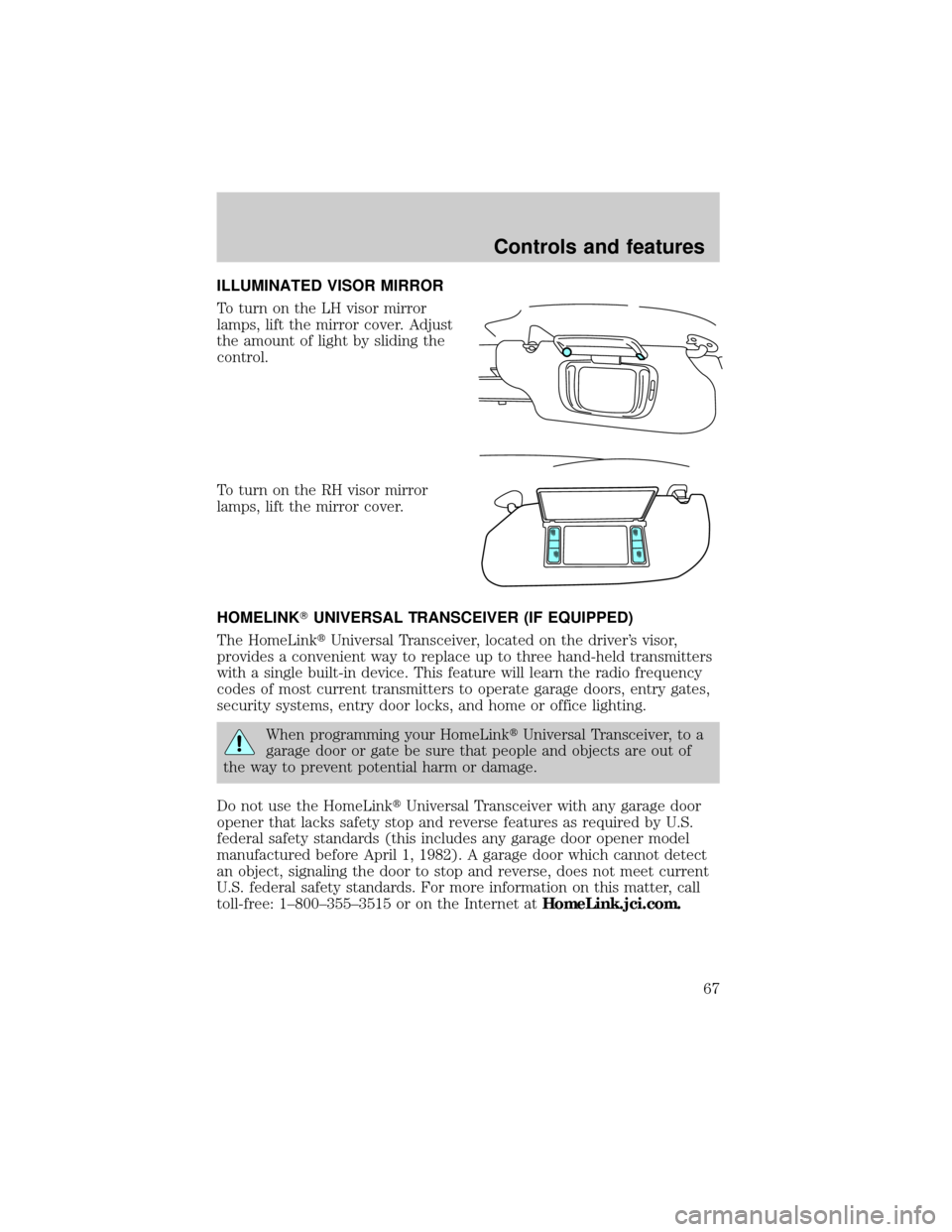
ILLUMINATED VISOR MIRROR
To turn on the LH visor mirror
lamps, lift the mirror cover. Adjust
the amount of light by sliding the
control.
To turn on the RH visor mirror
lamps, lift the mirror cover.
HOMELINKTUNIVERSAL TRANSCEIVER (IF EQUIPPED)
The HomeLinktUniversal Transceiver, located on the driver's visor,
provides a convenient way to replace up to three hand-held transmitters
with a single built-in device. This feature will learn the radio frequency
codes of most current transmitters to operate garage doors, entry gates,
security systems, entry door locks, and home or office lighting.
When programming your HomeLinktUniversal Transceiver, to a
garage door or gate be sure that people and objects are out of
the way to prevent potential harm or damage.
Do not use the HomeLinktUniversal Transceiver with any garage door
opener that lacks safety stop and reverse features as required by U.S.
federal safety standards (this includes any garage door opener model
manufactured before April 1, 1982). A garage door which cannot detect
an object, signaling the door to stop and reverse, does not meet current
U.S. federal safety standards. For more information on this matter, call
toll-free: 1±800±355±3515 or on the Internet atHomeLink.jci.com.
Controls and features
67
Page 74 of 208

POWER DOOR LOCKS
Press U to unlock all doors and L to
lock all doors.
Smart locks
With the key in the ignition, in any
switch position, and either the
driver's or passenger's door open,
the doors cannot be locked using
the front door lock switches.
While the key is in the ignition, the
vehicle can be locked by manually
pressing down the lock control or
with remote entry transmitter.
POWER WINDOWS
Press and hold the rocker switches to open and close windows.
²Press the top portion of the
rocker switch to open.
U
L
U
L
WINDOW
LOCK
Controls and features
74