Page 144 of 413
2-67
A. Dome Lamp Switch
B. Lamp Controls
C. Air Outlets
D. Automatic Transfer Case/Traction Assist System
(If Equipped)
E. Multifunction Lever
F. Instrument Cluster
G. Gearshift Lever
H. Tow/Haul Selector Switch
I. Audio System
J. Comfort Control SystemK. Instrument Panel Fuse Block
L. Hood Release
M. Center Instrument Panel Utility Block
N. Tilt Lever (If Equipped)
O. Parking Brake Release
P. Lighter and Accessory Power Outlets
Q. Rear Window Defogger Switch (If Equipped)
R. Storage Area or Compact Disc Player (If Equipped)
S. Ashtray
T. Glove Box
Page 150 of 413
2-73
If the light comes on while you are driving, pull off the
road and stop carefully. You may notice that the pedal is
harder to push. Or, the pedal may go closer to the floor.
It may take longer to stop. If the light is still on, have the
vehicle towed for service. (See ªTowing Your Vehicleº
in the Index.)
CAUTION:
Your brake system may not be working properly
if the brake system warning light is on. Driving
with the brake system warning light on can lead
to an accident. If the light is still on after you've
pulled off the road and stopped carefully, have
the vehicle towed for service.
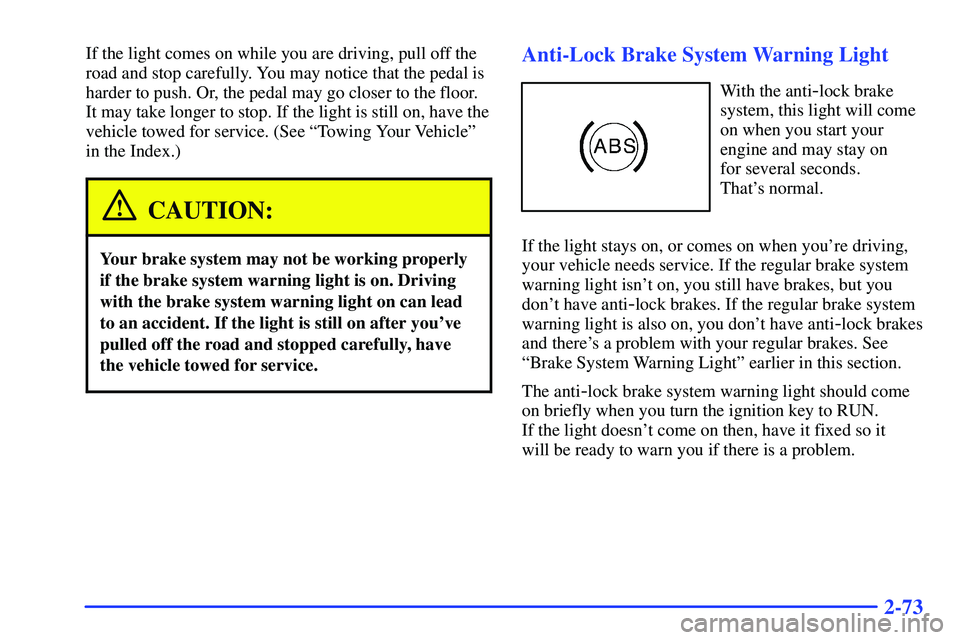
Anti-Lock Brake System Warning Light
With the anti-lock brake
system, this light will come
on when you start your
engine and may stay on
for several seconds.
That's normal.
If the light stays on, or comes on when you're driving,
your vehicle needs service. If the regular brake system
warning light isn't on, you still have brakes, but you
don't have anti
-lock brakes. If the regular brake system
warning light is also on, you don't have anti
-lock brakes
and there's a problem with your regular brakes. See
ªBrake System Warning Lightº earlier in this section.
The anti
-lock brake system warning light should come
on briefly when you turn the ignition key to RUN.
If the light doesn't come on then, have it fixed so it
will be ready to warn you if there is a problem.
Page 164 of 413

2-87 CHANGE ENGINE OIL
This message is displayed
when the engine oil needs
to be changed. The message
is only displayed for
15 seconds at the start of
each ignition cycle.
When you change the engine oil, be sure to reset the
Engine Oil Life System. See ªEngine Oil, When to
Changeº in the Index.
SECURITY
This message is displayed
when the content
theft
-deterrent system
has been activated and
also monitors the
Passlock
� System.
If the security message is displayed continuously while
driving and stays on, there may be a problem with the
Passlock System. Your vehicle will not be protected by
Passlock, and you should see your GM dealer.
SERVICE 4WD (If Equipped)
If the SERVICE 4WD
message comes on, there
may be a problem with the
automatic transfer case and
service is required.
Malfunctions can be indicated by the system before any
problem is apparent, which may prevent serious damage
to the vehicle. This system is also designed to assist your
service technician in correctly diagnosing a malfunction.
LOW WASHER FLUID
This message is displayed
when the vehicle is low on
windshield washer fluid.
The message is only
displayed for 15 seconds
each ignition cycle.
For more information, see ªWindshield Washer Fluidº in
the Index.
Page 166 of 413

3-
3-1
Section 3 Comfort Controls and Audio Systems
In this section, you'll find out how to operate the comfort control and audio systems offered with your vehicle.
Be sure to read about the particular systems supplied with your vehicle.
3
-2 Comfort Controls
3
-3 Heater and Air Conditioning Comfort
Controls (If Equipped)
3
-5 Electronic Climate Control System
(If Equipped)
3
-11 Air Conditioning
3
-12 Heating
3
-12 Defogging and Defrosting
3
-12 Rear Window Defogger (If Equipped)
3
-13 Ventilation System
3
-15 Audio Systems
3
-15 Setting the Clock for Systems with
SET Button
3
-15 Setting the Clock for Systems with HR
and MN Buttons
3
-15 AM-FM Stereo3
-17 AM-FM Stereo with Cassette Tape Player
(If Equipped)
3
-19 AM-FM Stereo with Cassette Tape Player
and Automatic Tone Control (If Equipped)
3
-24 AM-FM Stereo with Compact Disc Player
and Automatic Tone Control (If Equipped)
3
-28 Rear Seat Audio (If Equipped)
3
-29 Remote Compact Disc Player (If Equipped)
3
-31 Theft-Deterrent Feature (If Equipped)
3
-34 Understanding Radio Reception
3
-34 Tips About Your Audio System
3
-35 Care of Your Cassette Tape Player
3
-37 Care of Your Compact Discs
3
-37 Care of Your Compact Disc Player
3
-37 Fixed Mast Antenna
Page 167 of 413

3-2
Comfort Controls
Standard Comfort Controls
Fan Knob
The knob on the left side of the control panel adjusts the
fan speed. To increase airflow, turn the knob clockwise.
To decrease airflow, turn it counterclockwise. To turn
the fan off, turn the knob to OFF.
Temperature Knob
The middle knob on the control panel lets you select the
temperature of the air flowing into the passenger area.
Turn the knob clockwise toward the red area for warmer
air. Turn the knob counterclockwise toward the blue area
for cooler air.Mode Knob
The right knob on the control panel allows you to
choose the direction of air delivery.
VENT: This setting directs the air through the
instrument panel outlets.
BI-LEVEL: Air is delivered through the heater
floor outlets as well as the instrument panel outlets.
The air flow can be divided between VENT and
HEATER depending upon where the knob is placed
between the settings.
HEATER: This setting directs most of the
warmed air through the heater floor outlets, and the rest
of the air is divided between the windshield defroster
outlets and the side window defroster outlets.
BLEND: Airflow is delivered through the heater
floor outlets, the windshield defroster outlets and the
side window defroster outlets. The air flow can be
divided between HEATER and DEFROST depending
upon where the knob is placed between the settings.
DEFROST: This setting directs most air through
the windshield defroster outlets, side window defroster
outlets and some through the heater outlets.
Page 168 of 413

3-3 Heater and Air Conditioning Comfort
Controls (If Equipped)
Fan Knob
The knob on the left side of the control panel adjusts the
fan speed. To increase airflow, turn the knob clockwise.
To decrease airflow, turn it counterclockwise. To turn
the fan off, turn the knob to OFF.
Temperature Knob
The middle knob on the control panel lets you select the
temperature of the air flowing into the passenger area.
Turn the knob clockwise toward the red area for warmer
air. Turn the knob counterclockwise toward the blue area
for cooler air.Mode Knob
The right knob on the control panel allows you to
choose the direction of air delivery.
PANEL: This setting directs the air through the
instrument panel outlets.
BI-LEVEL: Air is delivered through the
instrument panel outlets and the heater floor outlets.
The air flow can be divided between PANEL and
HEATER depending upon where the knob is placed
between the settings. Pressing the A/C button while
in this mode causes cooler air to come out of the
instrument panel outlets and warmer air to come out
of the heater floor outlets.
HEATER: This setting directs most of the
warmed air through the heater floor outlets as well as
some air through the windshield defroster outlets and
side window defroster outlets.
BLEND: Airflow is delivered through the heater
floor outlets, the windshield defroster outlets and the
side window defroster outlets. The air flow can be
divided between HEATER and DEFROST depending
upon where the knob is placed between the settings.
The air conditioning compressor may run to dehumidify
the air to prevent window fogging.
Page 170 of 413

3-5 Electronic Climate Control System
(If Equipped)
Fan Control
The knob on the left side of the electronic climate
control panel controls the fan speed. To manually
increase airflow, move the knob clockwise. To manually
decrease airflow, move it counterclockwise.
OFF: If the knob is in OFF, outside air will still enter
the vehicle, and will be directed based on the position of
the mode knob.
AUTO: If the knob is in AUTO, the fan speed will vary
as the system maintains the selected temperature.When both the Fan Control and Mode Knobs are in
the AUTO position, the system will then automatically
maintain the desired cabin temperature as selected by
Temperature Knob. Manual control of functions is
also available.
Temperature Knob
The middle knob on the control panel lets you select
the desired air temperature in your vehicle. This knob
will allow you to adjust the interior air temperature
independent of the function knob setting. Move the
knob clockwise toward 82 for warmer air. Move the
knob counterclockwise toward 66 for cooler air. When
the system is set for automatic operation, sensors will
control the fan/blower speed.
Full Hot: If you turn the temperature knob past
82�F (28�C), the system will go into the ªfull hotº
mode. The system will remain at that maximum heating
setting and the fan will blow at the speed the fan knob is
set to. If the fan is in AUTO, it will run at full speed.
Full Cold: If you turn the temperature knob past
66�F (19�C), the system will go into the ªfull coldº
mode. The system will remain at that maximum cooling
setting and the fan will blow at the speed the fan knob is
set to. If the fan is in AUTO, it will run at full speed.
Page 174 of 413
3-9
Rear Air Conditioning and Rear Heater
(If Equipped)
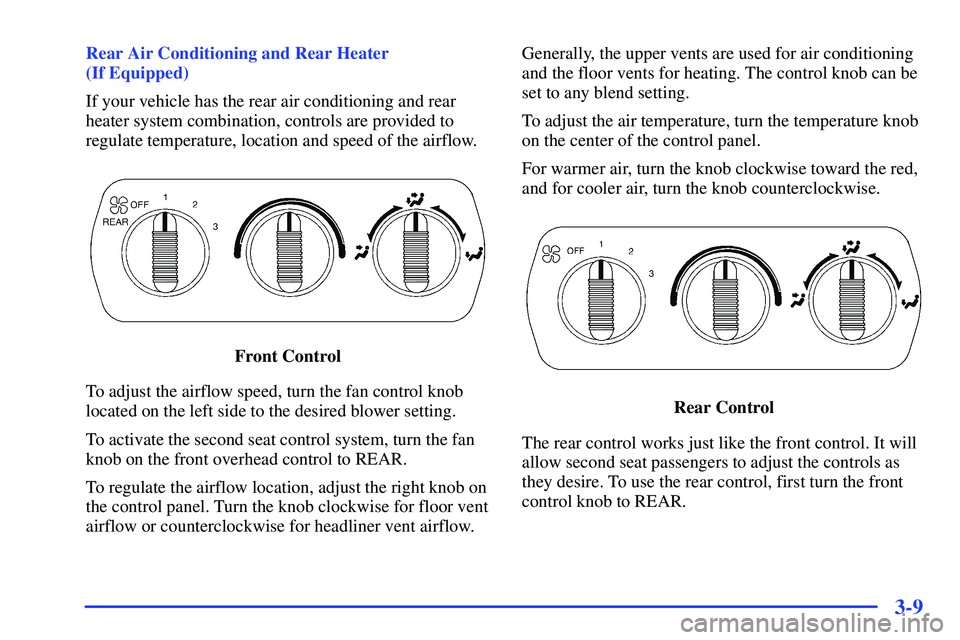
If your vehicle has the rear air conditioning and rear
heater system combination, controls are provided to
regulate temperature, location and speed of the airflow.
Front Control
To adjust the airflow speed, turn the fan control knob
located on the left side to the desired blower setting.
To activate the second seat control system, turn the fan
knob on the front overhead control to REAR.
To regulate the airflow location, adjust the right knob on
the control panel. Turn the knob clockwise for floor vent
airflow or counterclockwise for headliner vent airflow.Generally, the upper vents are used for air conditioning
and the floor vents for heating. The control knob can be
set to any blend setting.
To adjust the air temperature, turn the temperature knob
on the center of the control panel.
For warmer air, turn the knob clockwise toward the red,
and for cooler air, turn the knob counterclockwise.
Rear Control
The rear control works just like the front control. It will
allow second seat passengers to adjust the controls as
they desire. To use the rear control, first turn the front
control knob to REAR.
