yellowblue
3-28
AM-FM: While in the CD mode, press this button to
stop playing the CD and play the radio. The CD symbol
will still display but the word CD will be replaced with
either AM, FM1 or FM2. (If the radio is turned off, the
disc stays in the player and will resume playing at the
point where it stopped.)
CD AUX: To switch between the player and the radio
when a disc is playing, press the AM
-FM button. To
return to the player, press CD AUX. When a disc is
playing, the letters CD and the CD symbol will appear
on the display. (If the radio is turned off, the disc stays
in the player and will resume playing at the point where
it stopped.)
EJECT: Press this button to eject the disc from the
player and play the radio. When the same or a new disc
is inserted, the disc will start playing on track one. If a
compact disc is left sitting in the opening for more than
a few seconds, the player will pull the CD back in. The
radio will continue playing. When the ignition is off,
press this button to load a CD.
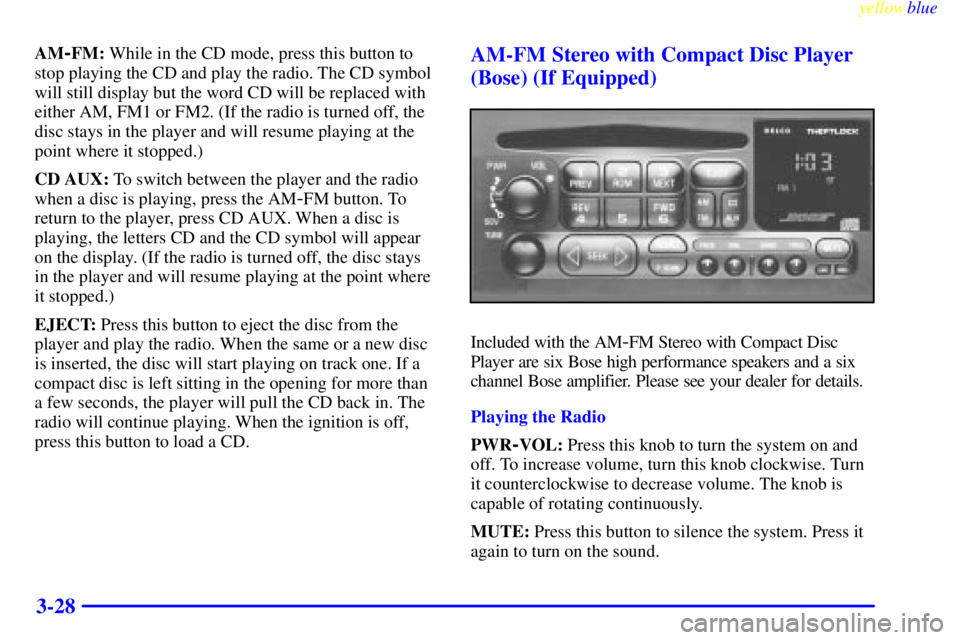
AM-FM Stereo with Compact Disc Player
(Bose) (If Equipped)
Included with the AM-FM Stereo with Compact Disc
Player are six Bose high performance speakers and a six
channel Bose amplifier. Please see your dealer for details.
Playing the Radio
PWR
-VOL: Press this knob to turn the system on and
off. To increase volume, turn this knob clockwise. Turn
it counterclockwise to decrease volume. The knob is
capable of rotating continuously.
MUTE: Press this button to silence the system. Press it
again to turn on the sound.
yellowblue
3-30
P.SCAN: The preset scan button lets you scan through
your favorite stations stored on your pushbuttons. Select
either the AM, FM1 or FM2 mode and then press
P.SCAN. It will scan through each station stored on your
pushbuttons and stop for a few seconds before
continuing to scan through all of the pushbuttons. Press
P.SCAN again or one of the pushbuttons to stop
scanning to listen to a specific stored station. P.SCAN
will light up on the display while in this mode. If one of
the stations stored on a pushbutton is too weak for the
location you are in, the radio display will show the
channel number (P1
-P6) for several seconds before
advancing to the next preset station.
Setting the Tone
BASS: Press lightly on this knob to release it from its
stored position. Turn the knob clockwise to increase
bass and counterclockwise to decrease bass.
TREB: Press lightly on this knob to release it from its
stored position. Turn the knob clockwise to increase treble
and counterclockwise to decrease treble. If a station is
weak or noisy, you may want to decrease the treble.
Push these knobs back into their stored positions when
you're not using them.Adjusting the Speakers
BAL: Press lightly on this knob to release it from its
stored position. Turn the control clockwise to adjust
sound to the right speakers and counterclockwise to
adjust sound to the left speakers. The middle position
balances the sound between the speakers.
FADE: Press lightly on this knob to release it from its
stored position. Turn the control clockwise to adjust the
sound to the front speakers and counterclockwise for the
rear speakers. The middle position balances the sound
between the speakers.
Push these knobs back into their stored positions when
you're not using them.
Playing a Compact Disc
PWR: Press this knob to turn the system on. (Please note
that you can also turn the system on when you insert a
compact disc into the player with the ignition on.)
Insert a disc partway into the slot, label side up. The
player will pull it in. Wait a few seconds and the disc
should play. The letters CD and a CD symbol will
appear on the display. Anytime you are playing a CD,
the letters CD will be next to the CD symbol.