Page 211 of 368
yellowblue
5-5
CAUTION:
Using a match near a battery can cause battery
gas to explode. People have been hurt doing this,
and some have been blinded. Use a flashlight if
you need more light.
Be sure the battery has enough water. You don't
need to add water to the ACDelco Freedom�
battery installed in every new GM vehicle. But if
a battery has filler caps, be sure the right amount
of fluid is there. If it is low, add water to take
care of that first. If you don't, explosive gas could
be present.
Battery fluid contains acid that can burn you.
Don't get it on you. If you accidentally get it in
your eyes or on your skin, flush the place with
water and get medical help immediately.
6. Check that the jumper cables don't have loose or
missing insulation. If they do, you could get a shock.
The vehicles could be damaged, too.Before you connect the cables, here are some
basic things you should know. Positive (+) will
go to positive (+) and negative (
-) will go to a
heavy, unpainted metal engine part. Don't connect
positive (+) to negative (
-) or you'll get a short
that would damage the battery and maybe other
parts, too.
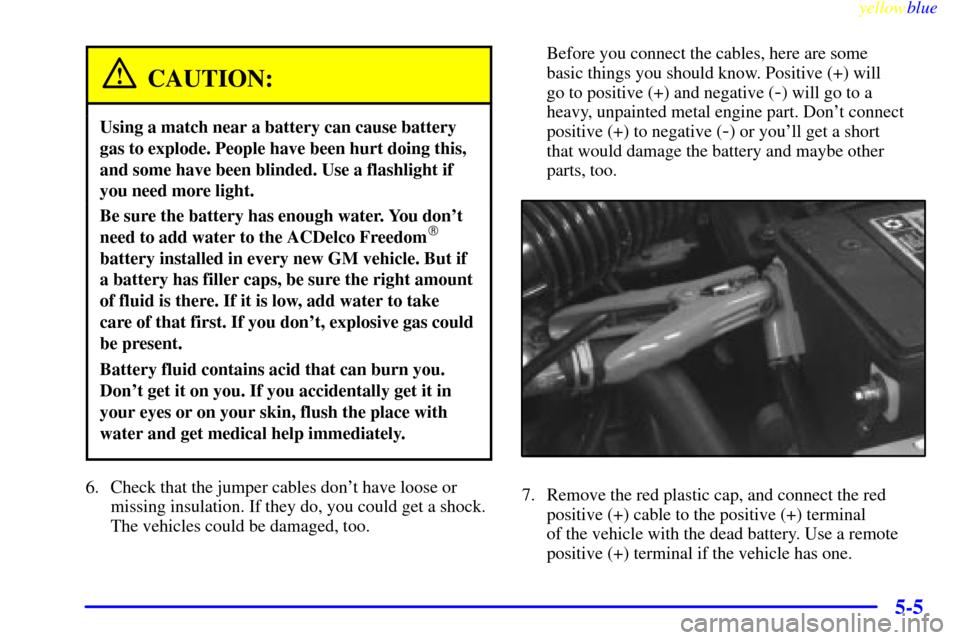
7. Remove the red plastic cap, and connect the red
positive (+) cable to the positive (+) terminal
of the vehicle with the dead battery. Use a remote
positive (+) terminal if the vehicle has one.
Page 212 of 368
yellowblue
5-6
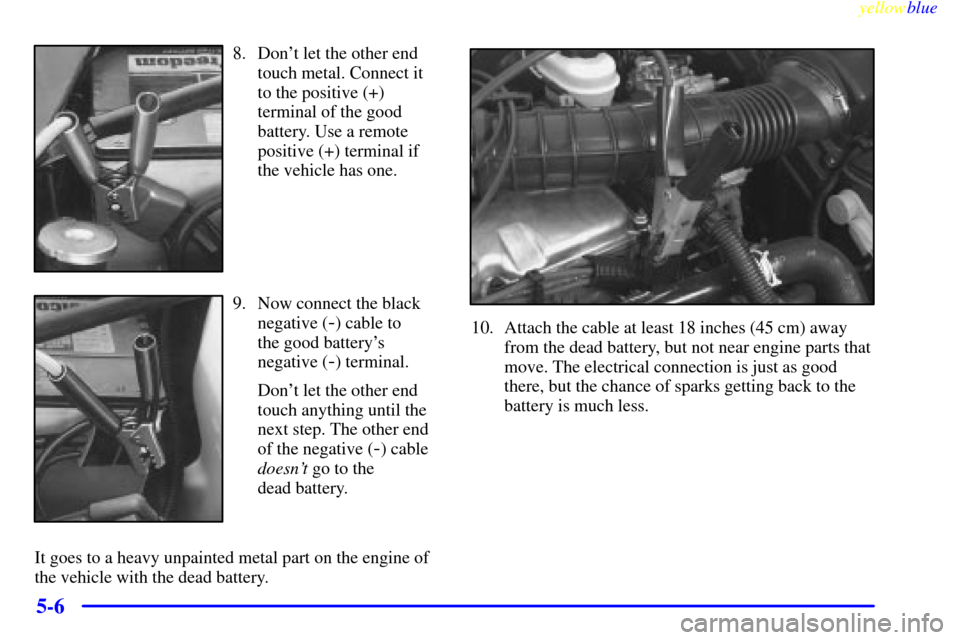
8. Don't let the other end
touch metal. Connect it
to the positive (+)
terminal of the good
battery. Use a remote
positive (+) terminal if
the vehicle has one.
9. Now connect the black
negative (
-) cable to
the good battery's
negative (
-) terminal.
Don't let the other end
touch anything until the
next step. The other end
of the negative (
-) cable
doesn't go to the
dead battery.
It goes to a heavy unpainted metal part on the engine of
the vehicle with the dead battery.
10. Attach the cable at least 18 inches (45 cm) away
from the dead battery, but not near engine parts that
move. The electrical connection is just as good
there, but the chance of sparks getting back to the
battery is much less.
Page 213 of 368
yellowblue
5-7
CAUTION:
Fans or other moving engine parts can injure you
badly. Keep your hands away from moving parts
once the engine is running.
11. Now start the vehicle with the good battery and run
the engine for a while.
12. Try to start the vehicle with the dead battery. If it
won't start after a few tries, it probably needs service.
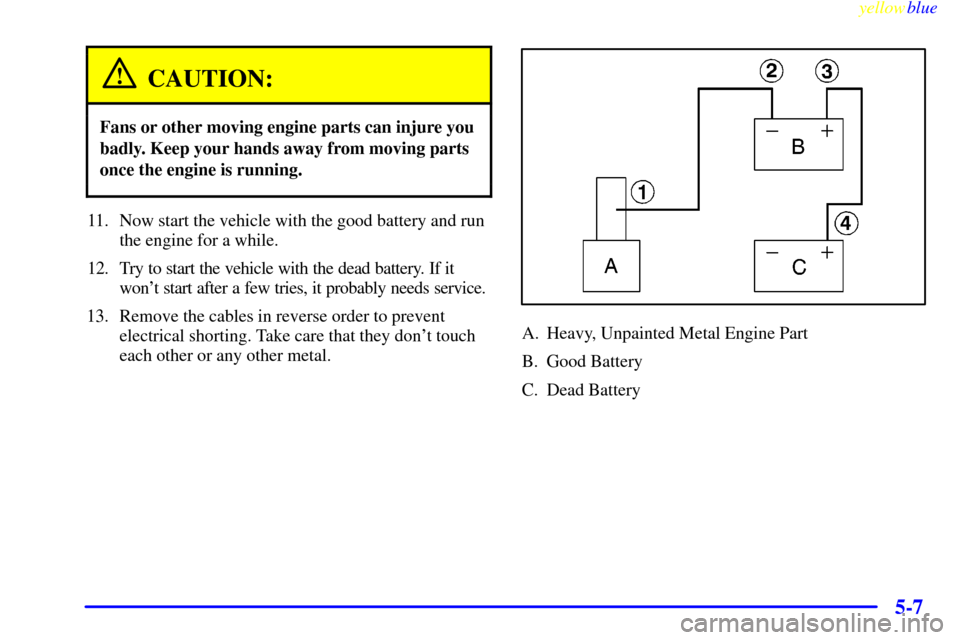
13. Remove the cables in reverse order to prevent
electrical shorting. Take care that they don't touch
each other or any other metal.
A. Heavy, Unpainted Metal Engine Part
B. Good Battery
C. Dead Battery
Page 239 of 368
6-
yellowblue
6-1
Section 6 Service and Appearance Care
Here you will find information about the care of your vehicle. This section begins with service and fuel information,
and then it shows how to check important fluid and lubricant levels. There is also technical information about your
vehicle, and a part devoted to its appearance care.
6
-2 Service
6
-3 Fuel
6
-5 Fuels in Foreign Countries
6
-5 Filling Your Tank
6
-7 Filling a Portable Fuel Container
6
-8 Checking Things Under the Hood
6
-12 Engine Oil
6
-17 Engine Air Cleaner/Filter
6
-18 Automatic Transaxle Fluid
(Three
-Speed Only)
6
-21 Automatic Transaxle Fluid (Four-Speed Only)
6
-22 Manual Transaxle Fluid
6
-24 Hydraulic Clutch
6
-25 Surge Tank Pressure Cap
6
-25 Thermostat
6
-25 Engine Coolant
6
-29 Power Steering Fluid6
-29 Windshield Washer Fluid
6
-31 Brakes
6
-34 Battery
6
-35 Bulb Replacement
6
-40 Tires
6
-48 Appearance Care
6
-49 Cleaning the Inside of Your Vehicle
6
-51 Care of Safety Belts
6
-52 Cleaning the Outside of Your Vehicle
6
-53 Cleaning Your Convertible Top
6
-57 Vehicle Identification Number (VIN)
6
-57 Electrical System
6
-62 Replacement Bulbs
6
-62 Capacities and Specifications
6
-63 Air Conditioning Refrigerants
6
-63 Normal Maintenance Replacement Parts
Page 248 of 368
yellowblue
6-10 2.2L L4 Engine (Code 4)
When you open the hood, you'll see:
A. Coolant Surge Tank
B. Power Steering Fluid Reservoir
C. Engine Oil Fill Cap/Dipstick
D. Brake Fluid ReservoirE. Hydraulic Clutch Fluid
Reservoir (If Equipped)
F. Automatic Transaxle Fluid
Dipstick (If Equipped)G. Engine Air Cleaner/Filter
H. Battery
I. Windshield Washer Fluid
Reservoir
Page 249 of 368
yellowblue
6-11 2.4L L4 Engine (Code T)
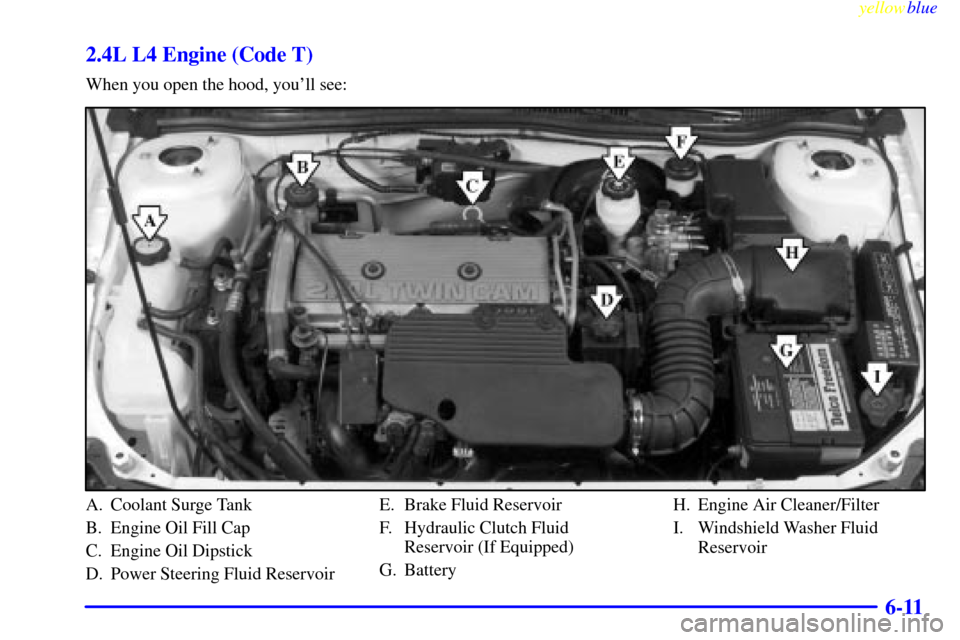
When you open the hood, you'll see:
A. Coolant Surge Tank
B. Engine Oil Fill Cap
C. Engine Oil Dipstick
D. Power Steering Fluid ReservoirE. Brake Fluid Reservoir
F. Hydraulic Clutch Fluid
Reservoir (If Equipped)
G. BatteryH. Engine Air Cleaner/Filter
I. Windshield Washer Fluid
Reservoir
Page 255 of 368
yellowblue
6-17
Engine Air Cleaner/Filter
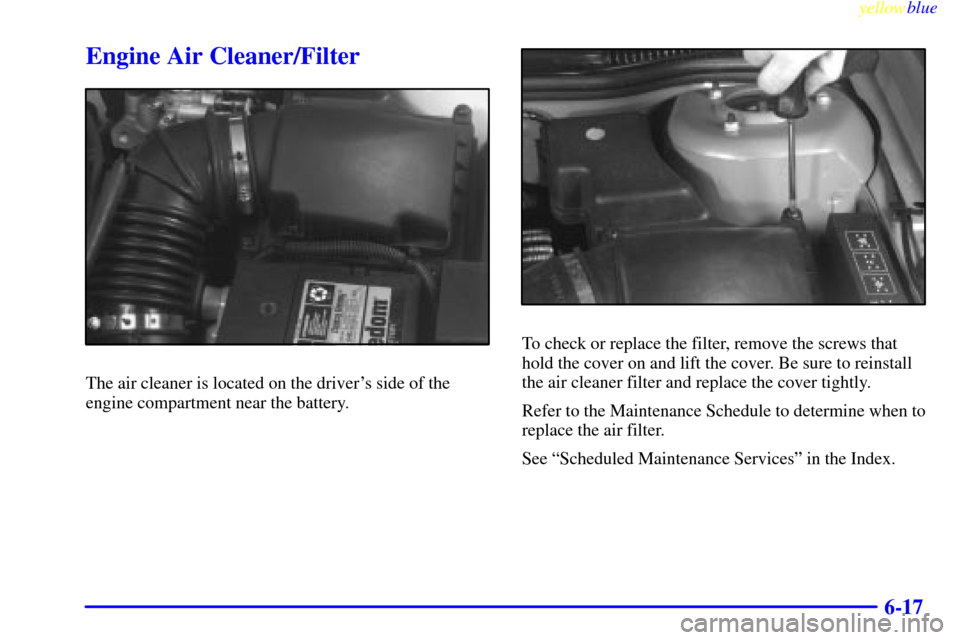
The air cleaner is located on the driver's side of the
engine compartment near the battery.
To check or replace the filter, remove the screws that
hold the cover on and lift the cover. Be sure to reinstall
the air cleaner filter and replace the cover tightly.
Refer to the Maintenance Schedule to determine when to
replace the air filter.
See ªScheduled Maintenance Servicesº in the Index.
Page 272 of 368

yellowblue
6-34 Brake Pedal Travel
See your dealer if the brake pedal does not return to
normal height, or if there is a rapid increase in pedal
travel. This could be a sign of brake trouble.
Brake Adjustment
Every time you make a moderate brake stop, your disc
brakes adjust for wear. If you rarely make a moderate or
heavier stop, then your brakes might not adjust correctly.
If you drive in that way, then
-- very carefully -- make a
few moderate brake stops about every 1,000 miles (1
600 km), so your brakes will adjust properly.
If your brake pedal goes down farther than normal, your
rear drum brakes may need adjustment. Adjust them by
backing up and firmly applying the brakes a few times.
Replacing Brake System Parts
The braking system on a vehicle is complex. Its many
parts have to be of top quality and work well together if
the vehicle is to have really good braking. Your vehicle
was designed and tested with top
-quality GM brake
parts. When you replace parts of your braking system
-- for example, when your brake linings wear
down and you have to have new ones put in
-- be sure
you get new approved GM replacement parts. If you
don't, your brakes may no longer work properly. For
example, if someone puts in brake linings that are wrong
for your vehicle, the balance between your front and
rear brakes can change
-- for the worse. The braking
performance you've come to expect can change in many
other ways if someone puts in the wrong replacement
brake parts.
Battery
Your new vehicle comes with an ACDelco Freedom�
battery. When it's time for a new battery, we recommend
an ACDelco Freedom battery. Get one that has the
replacement number shown on the original
battery's label.
Vehicle Storage
If you're not going to drive your vehicle for 25 days or
more, remove the black, negative (
-) cable from the
battery. This will help keep your battery from
running down.