Page 97 of 352
yellowblue
2-33
Parking Brake
To set the parking brake, hold the regular brake pedal
down with your right foot. Push down the parking brake
pedal with your left foot.
If the ignition is on, the brake system warning light will
come on.
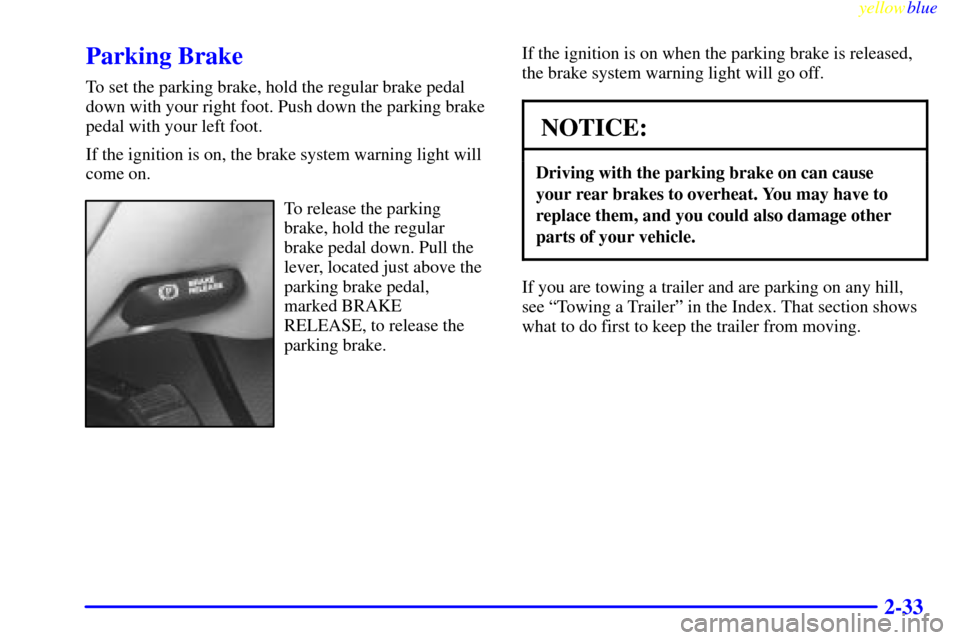
To release the parking
brake, hold the regular
brake pedal down. Pull the
lever, located just above the
parking brake pedal,
marked BRAKE
RELEASE, to release the
parking brake.If the ignition is on when the parking brake is released,
the brake system warning light will go off.
NOTICE:
Driving with the parking brake on can cause
your rear brakes to overheat. You may have to
replace them, and you could also damage other
parts of your vehicle.
If you are towing a trailer and are parking on any hill,
see ªTowing a Trailerº in the Index. That section shows
what to do first to keep the trailer from moving.
Page 98 of 352
yellowblue
2-34
Shifting Into PARK (P)
CAUTION:
It can be dangerous to get out of your vehicle if
the shift lever is not fully in PARK (P) with the
parking brake firmly set. Your vehicle can roll. If
you have left the engine running, the vehicle can
move suddenly. You or others could be injured.
To be sure your vehicle won't move, even when
you're on fairly level ground, use the steps that
follow. With four
-wheel drive, your vehicle will
be free to roll
-- even if your shift lever is in
PARK (P)
-- if your transfer case is in
NEUTRAL. So be sure the transfer case is in a
drive gear
-- not in NEUTRAL. See ªFour-Wheel
Drive (Automatic Transfer Case)º in the Index. If
you're pulling a trailer, see ªTowing a Trailerº in
the Index.
1. Hold the brake pedal down with your right foot and
set the parking brake.
2. Move the shift lever into PARK (P) position
like this:
�Pull the shift lever toward you.
Page 100 of 352

yellowblue
2-36
If you have to leave your vehicle with the engine
running, be sure your vehicle is in PARK (P) and the
parking brake is firmly set before you leave it. After you
move the shift lever into PARK (P), hold the regular
brake pedal down. Then, see if you can move the shift
lever away from PARK (P) without first pulling it
toward you. If you can, it means that the shift lever
wasn't fully locked into PARK (P).
Torque Lock
If you are parking on a hill and you don't shift your
transmission into PARK (P) properly, the weight of the
vehicle may put too much force on the parking pawl in
the transmission. You may find it difficult to pull the
shift lever out of PARK (P). This is called ªtorque lock.º
To prevent torque lock, set the parking brake and then
shift into PARK (P) properly before you leave the
driver's seat. To find out how, see ªShifting Into
PARK (P)º in the Index.
When you are ready to drive, move the shift lever out of
PARK (P) before you release the parking brake.
If torque lock does occur, you may need to have another
vehicle push yours a little uphill to take some of the
pressure from the parking pawl in the transmission, so
you can pull the shift lever out of PARK (P).
Shifting Out of PARK (P)
CAUTION:
Before shifting out of PARK (P) you must fully
apply your regular brakes. Your vehicle can roll.
If you have left the engine running, the vehicle
can move suddenly. You or others could
be injured.
If you're pulling a trailer, see ªTowing a Trailerº
in the Index.
Your vehicle has a Brake-Transmission Shift Interlock
(BTSI) system. You have to fully apply your regular
brakes before you can shift from PARK (P) when the
ignition is in RUN. See ªAutomatic Transmissionº in
the Index.
Page 103 of 352

yellowblue
2-39
CAUTION:
It can be dangerous to get out of your vehicle if
the shift lever is not fully in PARK (P) with the
parking brake firmly set. Your vehicle can roll.
Don't leave your vehicle when the engine is
running unless you have to. If you've left the
engine running, the vehicle can move suddenly.
You or others could be injured. To be sure your
vehicle won't move, even when you're on fairly
level ground, always set your parking brake and
move the shift lever to PARK (P).
Four-wheel drive vehicles with the transfer case
in NEUTRAL will allow the vehicle to roll, even if
your shift lever is in PARK (P). So, be sure the
transfer case is in a drive gear
-- not in
NEUTRAL. Always set your parking brake.
Follow the proper steps to be sure your vehicle won't
move. See ªShifting Into PARK (P)º in the Index.
If you're pulling a trailer, see ªTowing a Trailerº in
the Index.
Locking Rear Axle
Your locking rear axle can give you additional traction
on snow, mud, ice, sand or gravel. It works like a
standard axle most of the time, but when one of the rear
wheels has no traction and the other does, this feature
will allow the wheel with traction to move the vehicle.
Windows
Power Windows
The power window controls are located on each of the
side doors.
Page 106 of 352

yellowblue
2-42 Turn and Lane Change Signals
The turn signal has two upward (for right) and two
downward (for left) positions. These positions allow you
to signal a turn or a lane change.
To signal a turn, move the lever all the way up or down.
When the turn is finished, the lever will return automatically.
An arrow on the instrument
panel will flash in the
direction of the turn or
lane change.
To signal a lane change, just raise or lower the lever
until the arrow starts to flash. Hold it there until you
complete your lane change. The lever will return by
itself when you release it.
If you move the lever all the way up or down and the
arrow flashes at twice the normal rate, a signal bulb may
be burned out and other drivers may not see your
turn signal.
If a bulb is burned out, replace it to help avoid an
accident. If the arrows don't go on at all when you
signal a turn, check for burned
-out bulbs and a blown
fuse (see ªFusesº in the Index).
Headlamp High/Low-Beam Changer
To change the headlamps from low beam to high or high
to low, pull the turn signal lever all the way toward you.
Then release it.
When the high beams are
on, this light on the
instrument panel also will
be on.
Windshield Wipers
You operate the windshield wipers by turning the
control with the wiper symbol on it located on the
multifunction lever.
For a single wiping cycle, turn the control to MIST.
Hold it there until the wipers start, then let go. The
wipers will stop after one cycle. If you want more
cycles, hold the control on MIST longer.
You can set the wiper speed for a long or short delay
between wipes. This can be very useful in light rain or
snow. Turn the control to choose the delay time. The
closer to LOW, the shorter the delay.
Page 117 of 352

yellowblue
2-53
Temperature Display
The temperature can be displayed by pressing the TEMP
switch. Pressing the TEMP switch once briefly will
toggle the temperature reading on and off. To alternate
the temperature reading between Fahrenheit and Celsius,
press and hold the TEMP switch for about eight seconds
until the display shows only F� or C�. Press and release
the TEMP switch to toggle between the Fahrenheit and
Celsius readings. After five seconds of inactivity, the
display will return to normal in the temperature scale
you have selected.
The normal display will show a temperature reading in
degrees Fahrenheit or Celsius. If an abnormal reading is
displayed, please consult your dealer.
Electrochromic Mirror Operation
The TEMP side of the switch, located at the bottom of
the mirror, also turns the electrochromic inside and
outside mirrors on and off. An indicator light, located to
the right of the TEMP switch, will come on when the
electrochromic mirrors are turned on. To turn the
mirrors on, press and hold the TEMP switch for about
15 seconds. The mirrors will darken and remain dark
until the button is released. To turn the mirrors off, press
and hold the TEMP switch for about 15 seconds.Compass Operation
Press the COMP switch once briefly to turn the compass
on or off.
When the ignition and the compass feature are on, the
compass will show two character boxes for
approximately two seconds. After two seconds, the
mirror will display the compass heading.
Cleaning the Mirror
When cleaning the mirror, use a paper towel or similar
material dampened with glass cleaner. Do not spray
glass cleaner directly on the mirror as that may cause the
liquid cleaner to enter the mirror housing.
Compass Calibration
If, after five seconds, the display does not show a
compass heading (ªNº for North, for example), there
may be a strong magnetic field interfering with the
compass. Such interference may be caused by a
magnetic antenna mount, magnetic note pad holder or a
similar magnetic item. If the letter ªCº should ever
appear in the compass window, the mirror may
need calibration.
Page 120 of 352
yellowblue
2-56 Convex Outside Mirror
Your passenger's side mirror is convex. A convex
mirror's surface is curved so you can see more from the
driver's seat.
CAUTION:
A convex mirror can make things (like other
vehicles) look farther away than they really are.
If you cut too sharply into the right lane, you
could hit a vehicle on your right. Check your
inside mirror or glance over your shoulder before
changing lanes.
Storage Compartments
Your vehicle has a variety of storage compartments
designed to store small items.
Glove Box
To open your glove box, move the release button toward
the passenger's side and pull the door open.
Center Overhead Console
Your vehicle has an overhead console. It has a storage
compartment inside it. Your vehicle also has a universal
transmitter. See ªUniversal Transmitterº in the Index.
Rear Compartment
The rear compartment can be used to store a small item,
like a book.
To open the rear compartment, press the release button
located at the rear of the compartment door.
Page 123 of 352
yellowblue
2-59 Cargo Security Shade
CAUTION:
An improperly stored cargo cover could be
thrown about the vehicle during a collision or
sudden maneuver. You or others could be
injured. If you remove the cover, always store it
outside of the vehicle. When you put it back,
always be sure that it is securely reattached.
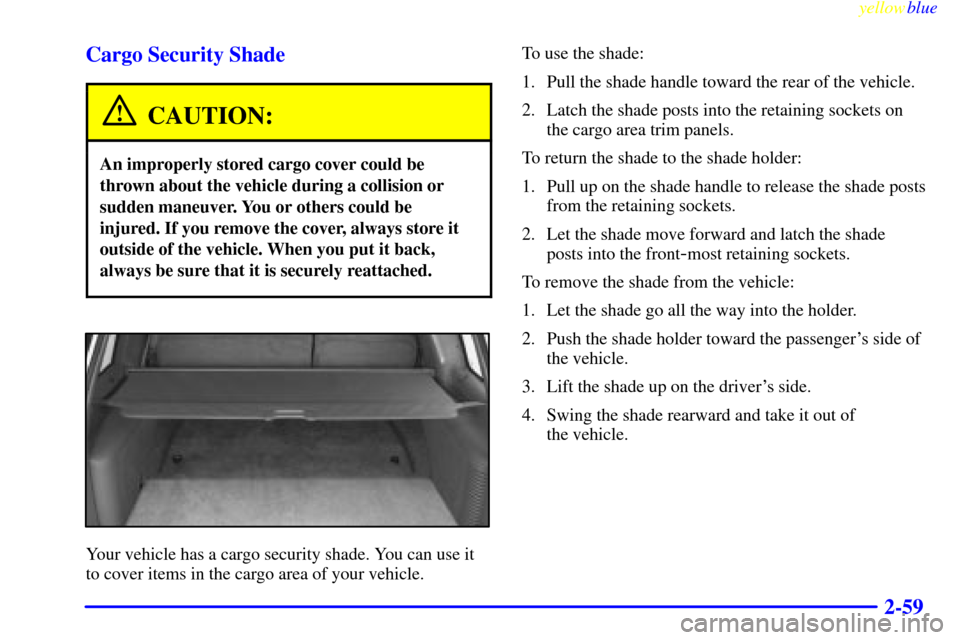
Your vehicle has a cargo security shade. You can use it
to cover items in the cargo area of your vehicle.To use the shade:
1. Pull the shade handle toward the rear of the vehicle.
2. Latch the shade posts into the retaining sockets on
the cargo area trim panels.
To return the shade to the shade holder:
1. Pull up on the shade handle to release the shade posts
from the retaining sockets.
2. Let the shade move forward and latch the shade
posts into the front
-most retaining sockets.
To remove the shade from the vehicle:
1. Let the shade go all the way into the holder.
2. Push the shade holder toward the passenger's side of
the vehicle.
3. Lift the shade up on the driver's side.
4. Swing the shade rearward and take it out of
the vehicle.