Page 48 of 352
yellowblue
1-42
A rear-facing infant restraint (B) positions an infant
to face the rear of the vehicle. Rear
-facing infant
restraints are designed for infants of up to about
20 lbs. (9 kg) and about one year of age. This type
of restraint faces the rear so that the infant's head,
neck and body can have the support they need in a
frontal crash. Some infant seats come in two
parts
-- the base stays secured in the vehicle and
the seat part is removable.
Page 51 of 352
yellowblue
1-45
When choosing a child restraint, be sure the child
restraint is designed to be used in a vehicle. If it is, it
will have a label saying that it meets federal motor
vehicle safety standards.
Then follow the instructions for the restraint. You may
find these instructions on the restraint itself or in a
booklet, or both. These restraints use the belt system in
your vehicle, but the child also has to be secured within
the restraint to help reduce the chance of personal injury.
The instructions that come with the infant or child
restraint will show you how to do that. Both the owner's
manual and the child restraint instructions are important,
so if either one of these is not available, obtain a
replacement copy from the manufacturer.
Where to Put the Restraint
Accident statistics show that children are safer if they
are restrained in the rear rather than the front seat. We at
General Motors therefore recommend that you put your
child restraint in a rear seat. Never put a rear
-facing
child restraint in the right front passenger seat.
Here's why:
CAUTION:
A child in a rear-facing child restraint can be
seriously injured or killed if the right front
passenger's air bag inflates, even though your
vehicle has Next Generation frontal air bags.
This is because the back of the rear
-facing child
restraint would be very close to the inflating air
bag. Always secure a rear
-facing child restraint
in a rear seat.
You may secure a forward-facing child restraint
in the right front seat, but before you do, always
move the front passenger seat as far back as it
will go. It's better to secure the child restraint in
a rear seat.
Wherever you install it, be sure to secure the child
restraint properly.
Keep in mind that an unsecured child restraint can move
around in a collision or sudden stop and injure people in
the vehicle. Be sure to properly secure any child
restraint in your vehicle
-- even when no child is in it.
Page 53 of 352
yellowblue
1-47
CAUTION:
Routing the top strap for a child restraint over or
under the cargo security shade could cause the
shade to come loose and even break. If this
happens, the shade could be thrown about the
vehicle in a collision or sudden maneuver. You or
others could be injured. When anchoring a top
strap to a cargo tiedown, be sure to remove the
cargo security shade from your vehicle. See
ªCargo Security Shadeº in the Index.
Don't use the front set of tie-down brackets. Anchor the
top strap to the rearmost bracket on the same side of the
vehicle as the child restraint. If you need to have an
anchor bracket installed for the center rear seat, you can
ask your dealer to put it in for you. This work will be
done for you free of charge. If you want to install the
anchor yourself, your dealer can tell you how to do it.
Securing a Child Restraint in a Rear
Outside Seat Position
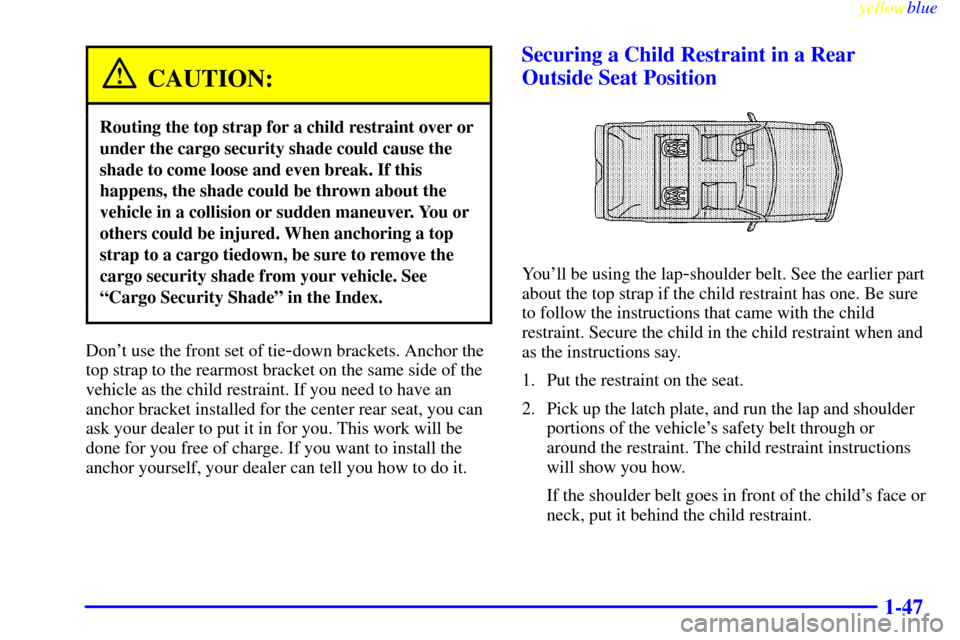
You'll be using the lap-shoulder belt. See the earlier part
about the top strap if the child restraint has one. Be sure
to follow the instructions that came with the child
restraint. Secure the child in the child restraint when and
as the instructions say.
1. Put the restraint on the seat.
2. Pick up the latch plate, and run the lap and shoulder
portions of the vehicle's safety belt through or
around the restraint. The child restraint instructions
will show you how.
If the shoulder belt goes in front of the child's face or
neck, put it behind the child restraint.
Page 55 of 352
yellowblue
1-49
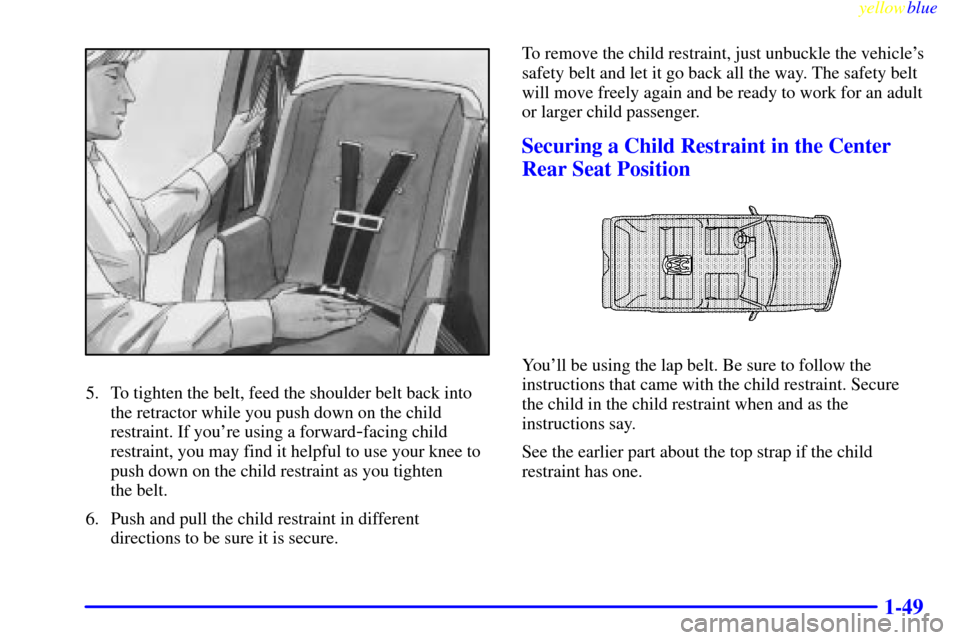
5. To tighten the belt, feed the shoulder belt back into
the retractor while you push down on the child
restraint. If you're using a forward
-facing child
restraint, you may find it helpful to use your knee to
push down on the child restraint as you tighten
the belt.
6. Push and pull the child restraint in different
directions to be sure it is secure.To remove the child restraint, just unbuckle the vehicle's
safety belt and let it go back all the way. The safety belt
will move freely again and be ready to work for an adult
or larger child passenger.
Securing a Child Restraint in the Center
Rear Seat Position
You'll be using the lap belt. Be sure to follow the
instructions that came with the child restraint. Secure
the child in the child restraint when and as the
instructions say.
See the earlier part about the top strap if the child
restraint has one.
Page 57 of 352

yellowblue
1-51
6. Push and pull the child restraint in different
directions to be sure it is secure.
To remove the child restraint, just unbuckle the vehicle's
safety belt. It will be ready to work for an adult or larger
child passenger.
Securing a Child Restraint in the Right
Front Seat Position
Your vehicle has a right front passenger air bag. Never
put a rear
-facing child restraint in this seat. Here's why:
CAUTION:
A child in a rear-facing child restraint can be
seriously injured or killed if the right front
passenger's air bag inflates, even though your
vehicle has Next Generation frontal air bags.
This is because the back of the rear
-facing child
restraint would be very close to the inflating air
bag. Always secure a rear
-facing child restraint
in the rear seat.
Although a rear seat is a safer place, you can secure a
forward
-facing child restraint in the right front seat.
You'll be using the lap
-shoulder belt. See the earlier part
about the top strap if the child restraint has one. Be sure
to follow the instructions that came with the child
restraint. Secure the child in the child restraint when and
as the instructions say.
1. Because your vehicle has a right front passenger air
bag, always move the seat as far back as it will go
before securing a forward
-facing child restraint.
(See ªSeatsº in the Index.)
2. Put the restraint on the seat.
Page 59 of 352
yellowblue
1-53
6. To tighten the belt, feed the lap belt back into the
retractor while you push down on the child restraint.
You may find it helpful to use your knee to push
down on the child restraint as you tighten the belt.
7. Push and pull the child restraint in different
directions to be sure it is secure.
To remove the child restraint, just unbuckle the vehicle's
safety belt and let it go back all the way. The safety belt
will move freely again and be ready to work for an adult
or larger child passenger.
Larger Children
Children who have outgrown child restraints should
wear the vehicle's safety belts.
If you have the choice, a child should sit next to a
window so the child can wear a lap
-shoulder belt and
get the additional restraint a shoulder belt can provide.
Page 70 of 352

yellowblue
2-6 Rear Door Security Locks
With this feature, you can
lock the rear side doors so
they can't be opened from
the inside by passengers.
Move the button up to engage the security feature. Move the
button down to return the door locks to normal operation.
Lockout Prevention
This feature protects you from locking your key in the
vehicle, by stopping the power door locks from locking
when the key is in the ignition in OFF and a door is open.
If the power door lock switch is pressed when a door is open
and the key is in the ignition, none of the doors will lock.
See ªFeature Customizationº in the Index for further
information on turning this feature on and off.
Leaving Your Vehicle
If you are leaving the vehicle, take your keys, open your
door and set the locks from inside. Then get out and
close the door. For information on how to set the door
locks, see ªTheft
-Deterrent Systemº and ªFeature
Customizationº in the Index.
Keyless Entry System
You can lock and unlock your doors, tailgate or panel
doors from about 3 feet (1 m) up to 30 feet (9 m) away
using the remote keyless entry transmitter supplied with
your vehicle.
Your keyless entry system operates on a radio frequency
subject to Federal Communications Commission (FCC)
Rules and with Industry Canada.
This device complies with Part 15 of the FCC Rules.
Operation is subject to the following two conditions:
(1) this device may not cause harmful interference,
and (2) this device must accept any interference received,
including interference that may cause undesired operation.
This device complies with RSS
-210 of Industry Canada.
Operation is subject to the following two conditions: (1) this
device may not cause interference, and (2) this device must
accept any interference received, including interference that
may cause undesired operation of the device.
Page 74 of 352

yellowblue
2-10
To replace the battery:
1. Insert a small coin, or flathead screwdriver, to
separate the bottom of the transmitter from the top.
2. Remove the battery and replace it with a new one,
making sure the positive (+) side of the battery is
facing down.
3. Snap the top and bottom together.
4. Test the operation of the transmitter with your
vehicle. If the transmitter does not work, try
synchronizing the transmitter with the receiver.
Resynchronization
Resynchronization may be necessary due to the security
method used by this system. The transmitter does not
send the same signal twice to the receiver. The receiver
will not respond to a signal it has been sent previously.
This prevents anyone from recording and playing back
the signal from the transmitter.
To resynchronize your transmitter, stand close to your
vehicle and simultaneously press and hold the LOCK
and UNLOCK buttons on the transmitter for at least
eight seconds. The door locks should cycle and the
parking lamps and headlamps should flash to confirm
synchronization. If this does not happen, you may need
to replace the battery in your transmitter or match the
transmitter to your vehicle. If the locks still do not cycle,
see your dealer for service.