Page 139 of 344

yellowblue
2-83
Curb View Assist Mirror (If Equipped
with Memory)
If your vehicle has this personalization feature,
MIRROR TILT IN REV will be the fourth
personalization prompt to display on the DIC.
To program your vehicle, press the SKIP INFO and NO
INFO RESET buttons at the same time for about two
seconds. When MIRROR TILT IN REV appears, a yes
or no response is needed. Press the YES TRIP RESET
button to answer yes or the NO INFO RESET button to
answer no.
FEATURE ON displays when a yes response is made
and FEATURE OFF shows after a no response. If you
do not want this feature, press the SKIP INFO button to
skip to the next personalization feature which is
STORAGE MODE.Storage Mode Personalization
Before you begin programming, make sure that your
vehicle's ignition is in RUN. To begin programming,
press the SKIP INFO and NO INFO RESET buttons at
the same time for about two seconds. The first message
to appear is DOORS LOCK IN GEAR. Press the SKIP
INFO button after this prompt is displayed until
STORAGE MODE prompt appears on the Driver
Information Center (DIC). Press the YES TRIP RESET
button to answer yes or press the NO INFO RESET
button to indicate a no response.
FEATURE ON appears when a yes response is made
and FEATURE OFF shows when a no response is made.
Since this is the last personalization feature available, a
yes or no response will end out of the DIC display.
Once the battery guard has been programmed, your
vehicle will enter the storage mode about 20 minutes
after the ignition key has been turned off.
Page 140 of 344

yellowblue
2-84
Your vehicle will stay in the storage mode until the
ignition key is turned out of LOCK. The system will
ªwake
-upº when the door key is inserted into the door,
however, your vehicle will remain in the storage mode.
The ignition must be out of LOCK before the battery
guard is disabled.
Comfort Controls and Radio System Personalization
These features allow both drivers to personalize their
own climate control settings as well as their radio
settings. For more information, see ªClimate Control
Personalizationº and ªRadio Personalizationº in
the Index.
Continuous Variable Road Sensing
Suspension (CVRSS) (ETC Only)
The CVRSS automatically adjusts the ride of your
vehicle. Automatic ride control is achieved through a
computer used to control and monitor the suspension
system. The controller receives input from various
sensors to determine the proper system response. If the
controller detects a problem within the system, the
Driver Information Center (DIC) will display a
SERVICE RIDE CONTROL message. If this message
appears, have your vehicle serviced at your dealership.
Oil Life Indicator
This feature lets you know when to change the engine
oil. It's based on the engine oil temperatures and your
driving patterns. To see the display, press the SKIP
INFO button several times until XX OIL LIFE LEFT
appears. If you see 99% OIL LIFE LEFT, 99 percent of
your current oil life remains.
Page 151 of 344

yellowblue
3-9
�When you enter a vehicle in cold weather, adjust the
fan to the highest speed for a few moments before
driving off. This helps clear the intake outlets of
snow and moisture, and reduces the chance of
fogging the inside of the windows.
�Keep the air path under the front seats clear of objects.
This helps circulate air throughout your vehicle.
HVAC Steering Wheel Controls
Some heating and cooling
controls can be adjusted at
the steering wheel. Other
touch controls operate some
audio controls. See ªAudio
Steering Wheel Controlsº in
the index.
FAN SPEED: Press the up arrow lever to increase
the fan speed and the down arrow lever to decrease
fan speed.TEMP: Press the up arrow lever to increase
the temperature and the down arrow lever to
decrease temperature.
Climate Control Personalization
(If Equipped)
This feature allows both driver's (driver 1 or 2 depending
on the number on the back of your remote keyless entry
transmitter) to personalize their own climate control
settings. For more information, see ªMemory and
Personalization Featuresº in the Index.
Audio Systems
Your Cadillac audio system has been designed to operate
easily and give years of listening pleasure. You will get
the most enjoyment out of it if you acquaint yourself
with it first. Find out what your audio system can do
and how to operate all its controls, to be sure you're
getting the most out of the advanced engineering that
went into it.
Setting the Clock
Press and hold HR or MN until the time display begins
to change. Release the button as you get close to the
correct time. The time may be set anytime the clock is
displayed. There is a two
-second delay before the clock
goes into time
-set mode.
Page 169 of 344

yellowblue
3-27 Radio Personalization with Home and Away
Feature (If Equipped)
If your vehicle is equipped with the AM-FM Stereo with
Cassette Tape Player and 1 (H or A) or 2 (H or A)
appears in the display when the radio is first turned on,
your vehicle is equipped with this feature. If your
vehicle is equipped with any other audio system and
DRIVER 1 (HOME or AWAY) PRESETS or DRIVER 2
(HOME or AWAY) PRESETS appears in the display
when the radio is first turned on, your vehicle is
equipped with this feature.
With this feature, your vehicle will recall the latest radio
settings as adjusted the last time your vehicle was
operated. This feature allows two different drivers to
store and recall their own radio settings. The settings
recalled by the radio are determined by which Remote
Keyless Entry (RKE) transmitter (ª1º or ª2º) was used
to enter the vehicle. The number on the back of the RKE
transmitter corresponds to driver 1 or to driver 2. The
radio settings will automatically adjust to where they
were last set by the identified driver. The settings can
also be recalled by briefly pressing the MEMORY seat
buttons 1 or 2 located on the driver's door.Your radio can store home and away presets. Home and
away presets allow you to use one set of preset radio
settings in the area where you live, and another set when
you go out of town. That way, you will not need to
reprogram your presets every time you travel. With the
radio off and the clock displayed, use FF and RW to
select home or away presets. To select the away presets,
press and hold FF for five counts until you hear a beep.
The next time the radio comes on, the away presets will
be active. To select the home presets, press and hold RW
for five counts until you hear a beep. The next time the
radio comes on, the home presets will be active.
When battery power is removed and later applied, you
will not have to reset your home radio presets because
the radio remembers them. However, you will have to
reset your away radio presets.
Page 179 of 344

yellowblue
4-3
Drunken Driving
Death and injury associated with drinking and driving is
a national tragedy. It's the number one contributor to the
highway death toll, claiming thousands of victims
every year.
Alcohol affects four things that anyone needs to drive
a vehicle:
�Judgment
�Muscular Coordination
�Vision
�Attentiveness.
Police records show that almost half of all motor
vehicle
-related deaths involve alcohol. In most cases,
these deaths are the result of someone who was drinking
and driving. In recent years, over 17,000 annual motor
vehicle
-related deaths have been associated with the use
of alcohol, with more than 300,000 people injured.
Many adults
-- by some estimates, nearly half the adult
population
-- choose never to drink alcohol, so they
never drive after drinking. For persons under 21, it's
against the law in every U.S. state to drink alcohol.
There are good medical, psychological and
developmental reasons for these laws.The obvious way to solve the leading highway safety
problem is for people never to drink alcohol and then
drive. But what if people do? How much is ªtoo muchº
if the driver plans to drive? It's a lot less than many
might think. Although it depends on each person and
situation, here is some general information on
the problem.
The Blood Alcohol Concentration (BAC) of someone
who is drinking depends upon four things:
�The amount of alcohol consumed
�The drinker's body weight
�The amount of food that is consumed before and
during drinking
�The length of time it has taken the drinker to
consume the alcohol.
According to the American Medical Association, a
180
-lb. (82 kg) person who drinks three 12-ounce
(355 ml) bottles of beer in an hour will end up with a
BAC of about 0.06 percent. The person would reach the
same BAC by drinking three 4
-ounce (120 ml) glasses
of wine or three mixed drinks if each had 1
-1/2 ounces
(45 ml) of a liquor like whiskey, gin or vodka.
Page 205 of 344
yellowblue
4-29
To tow your vehicle, follow these steps:
1. Put the front wheels on a dolly.
2. Put the vehicle in PARK (P).
3. Set the parking brake and then remove the key.
4. Clamp the steering wheel in a straight
-ahead position
with a clamping device designed for towing.
5. Release the parking brake.
Loading Your Vehicle
Two labels on your vehicle show how much weight it
may properly carry. The Tire
-Loading Information label
found on the rear edge of the driver's door tells you the
proper size, speed rating and recommended inflation
pressures for the tires on your vehicle. It also gives you
important information about the number of people that
can be in your vehicle and the total weight that you can
carry. This weight is called the Vehicle Capacity Weight
and includes the weight of all occupants, cargo and all
options not installed in the factory.
Page 216 of 344
yellowblue
5-2
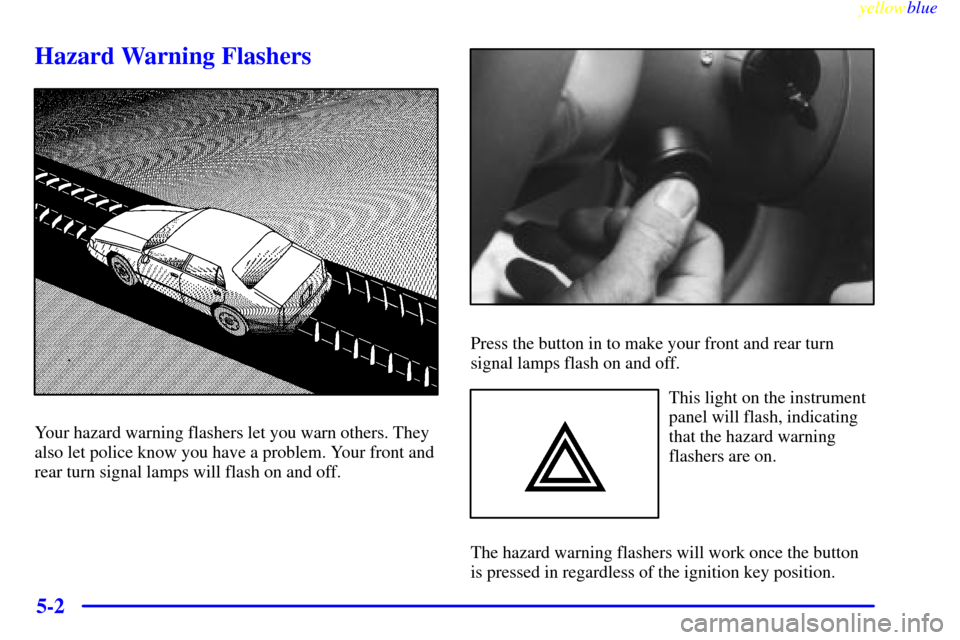
Hazard Warning Flashers
Your hazard warning flashers let you warn others. They
also let police know you have a problem. Your front and
rear turn signal lamps will flash on and off.
Press the button in to make your front and rear turn
signal lamps flash on and off.
This light on the instrument
panel will flash, indicating
that the hazard warning
flashers are on.
The hazard warning flashers will work once the button
is pressed in regardless of the ignition key position.
Page 252 of 344
yellowblue
6-6
CAUTION:
Gasoline vapor is highly flammable. It burns
violently, and that can cause very bad injuries.
Don't smoke if you're near gasoline or refueling
your vehicle. Keep sparks, flames and smoking
materials away from gasoline.
The fuel door release is
located above the radio on
the Driver Information
Center (DIC) and on the
Remote Keyless Entry
(RKE) transmitter.
This button works only when the shift lever is in
PARK (P) or NEUTRAL (N) and the VALET lockout
switch is in the OFF position.
An alternate fuel door
release is located inside of
the trunk on the driver's
side. Pull it to release the
fuel door.
While refueling, hang the cap by the tether from the
hook on the filler door.