Page 96 of 368
yellowblue
2-40
Exterior Lamps
Headlamps
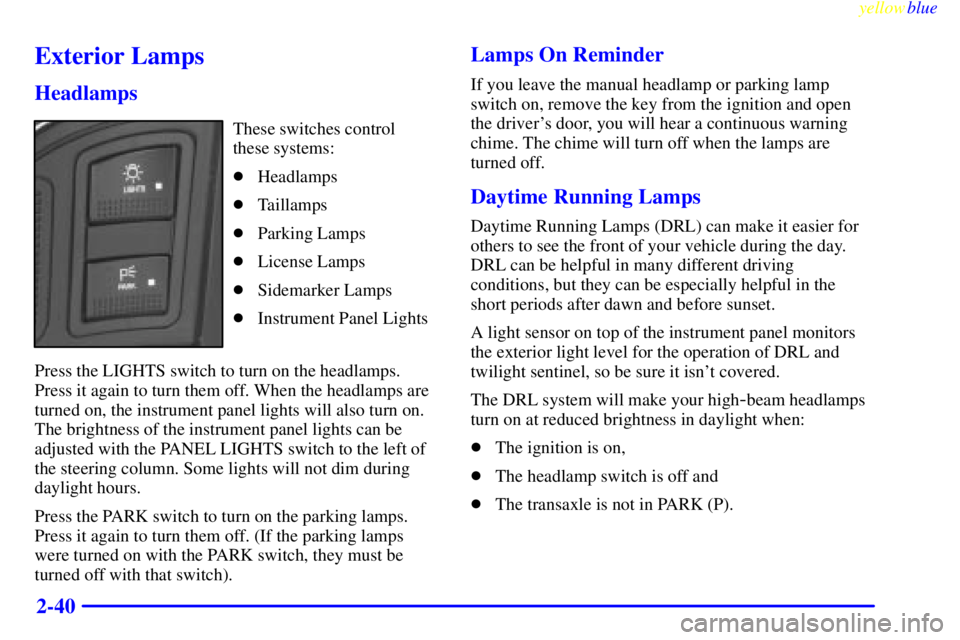
These switches control
these systems:
�Headlamps
�Taillamps
�Parking Lamps
�License Lamps
�Sidemarker Lamps
�Instrument Panel Lights
Press the LIGHTS switch to turn on the headlamps.
Press it again to turn them off. When the headlamps are
turned on, the instrument panel lights will also turn on.
The brightness of the instrument panel lights can be
adjusted with the PANEL LIGHTS switch to the left of
the steering column. Some lights will not dim during
daylight hours.
Press the PARK switch to turn on the parking lamps.
Press it again to turn them off. (If the parking lamps
were turned on with the PARK switch, they must be
turned off with that switch).
Lamps On Reminder
If you leave the manual headlamp or parking lamp
switch on, remove the key from the ignition and open
the driver's door, you will hear a continuous warning
chime. The chime will turn off when the lamps are
turned off.
Daytime Running Lamps
Daytime Running Lamps (DRL) can make it easier for
others to see the front of your vehicle during the day.
DRL can be helpful in many different driving
conditions, but they can be especially helpful in the
short periods after dawn and before sunset.
A light sensor on top of the instrument panel monitors
the exterior light level for the operation of DRL and
twilight sentinel, so be sure it isn't covered.
The DRL system will make your high
-beam headlamps
turn on at reduced brightness in daylight when:
�The ignition is on,
�The headlamp switch is off and
�The transaxle is not in PARK (P).
Page 99 of 368

yellowblue
2-43 Illuminated Entry (If Equipped)
Press the UNLOCK button on the remote keyless entry
transmitter (if equipped) and the interior courtesy lamps
will turn on and stay on for up to one minute. The lamps
will turn off immediately by pressing the LOCK button
on the remote keyless entry transmitter, starting the
engine or activating the power door locks.
Delayed Entry Lighting
When you open the door, the interior lamps will turn on.
When you close the door with the ignition off, the
interior lamps will stay on for 25 seconds or until the
ignition is turned to an on position. Note that locking the
doors will override the delayed entry lighting feature
and the lamps will turn off right away.
Theater Dimming
This feature allows for a three to five-second fade out of
the courtesy lamps instead of immediate turn off.
Delayed Exit Lighting
With this feature, the interior lamps will turn on and stay
on for up to 25 seconds after you remove the key from
the ignition. This will give you time to find the door pull
handle or lock switches.
Perimeter Lighting (If Equipped)
When the UNLOCK button on the remote keyless entry
transmitter is pressed, the headlamps, parking lamps,
back
-up lamps and cornering lamps will turn on if it is
dark enough outside according to the twilight sentinel.
If your vehicle is not equipped with twilight sentinel
and perimeter lighting is active, the lights will turn on
whenever the UNLOCK button on the transmitter
is pressed.
Personal Choice Programming
This feature can be programmed in the on or off mode
for each transmitter.
To turn the feature off:
1. Turn the ignition key to OFF.
2. Press and hold LOCK on the power door lock switch
throughout this procedure. All the doors will lock.
3. Press the instant alarm on the remote keyless entry
transmitter. Perimeter lighting remains on at this
time and the horn will chirp two times.
Page 100 of 368
yellowblue
2-44
4. Press the instant alarm on the remote keyless entry
transmitter again. Perimeter lighting is disabled and
the horn will chirp one time.
5. Release the door lock switch. The perimeter lighting
feature is now off.
To turn the feature on:
1. Turn the ignition key to OFF.
2. Press and hold LOCK on the power door lock switch
throughout this procedure. All the doors will lock.
3. Press the instant alarm on the transmitter again.
Perimeter lighting is now enabled and the horn will
chirp one time.
4. Press the instant alarm on the transmitter again.
Perimeter lighting is now enabled and the horn will
chirp two times.
5. Release the door lock switch. The perimeter lighting
feature is now on.
This procedure only changes the mode for the
transmitter used to change this setting. The procedure
will need to be repeated for the second transmitter.Front Reading Lamps (If Equipped)
Front seat reading lamps are turned on or off by pressing
the LAMP switch.
Page 101 of 368
yellowblue
2-45 Rear Reading Lamps (If Equipped)
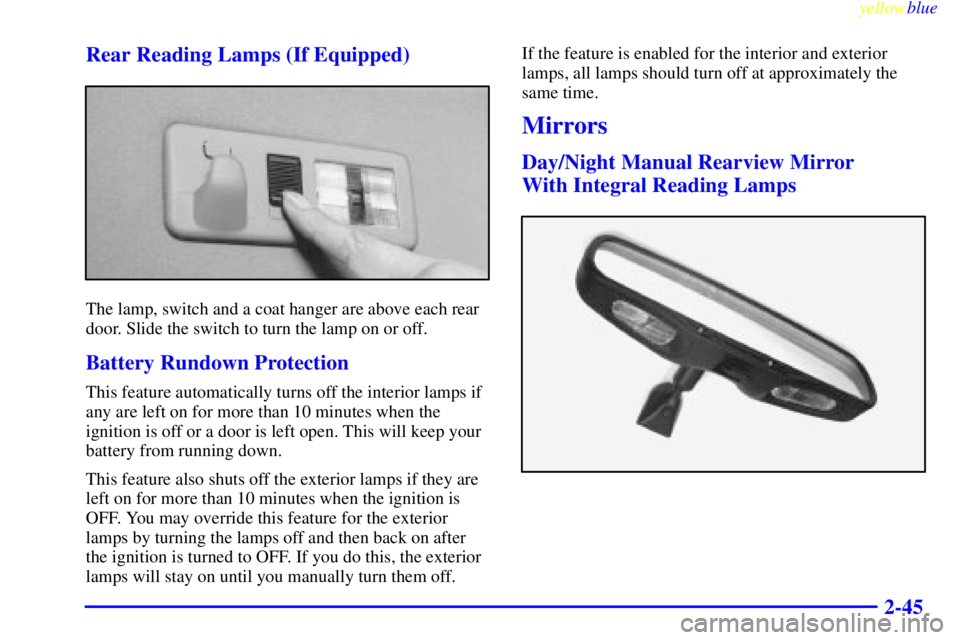
The lamp, switch and a coat hanger are above each rear
door. Slide the switch to turn the lamp on or off.
Battery Rundown Protection
This feature automatically turns off the interior lamps if
any are left on for more than 10 minutes when the
ignition is off or a door is left open. This will keep your
battery from running down.
This feature also shuts off the exterior lamps if they are
left on for more than 10 minutes when the ignition is
OFF. You may override this feature for the exterior
lamps by turning the lamps off and then back on after
the ignition is turned to OFF. If you do this, the exterior
lamps will stay on until you manually turn them off.If the feature is enabled for the interior and exterior
lamps, all lamps should turn off at approximately the
same time.
Mirrors
Day/Night Manual Rearview Mirror
With Integral Reading Lamps
Page 104 of 368

yellowblue
2-48
The right side of the switch located at the bottom of the
mirror turns the electrochromic mirror on and off. To
turn on the automatic dimming feature, press MIRROR.
To turn off automatic dimming, press MIRROR again.
The green indicator light will be illuminated when this
feature is active.
Compass Operation
Press the COMPASS button once to turn the compass on
or off.
When the ignition and the compass feature are on, the
compass will show two character boxes for
approximately two seconds. After two seconds, the
mirror will display the compass heading.
If, after two seconds, the display does not show a
compass heading (ªNº for North, for example), there
may be a strong magnetic field interfering with the
compass. Such interference may be caused by a
magnetic antenna mount, magnetic note pad holder
or a similar magnetic item.Compass Calibration
If the letter ªCº should ever appear in the compass
window, the mirror may need calibration.
The mirror can be calibrated in one of two ways:
�Drive the vehicle in circles at five mph (8 km/h) or
less until the display reads a direction, or
�Drive the vehicle on your everyday routine.
Compass Variance
The mirror is set in zone eight upon leaving the factory.
It will be necessary to adjust the compass to compensate
for compass variance if you live outside zone eight.
Under certain circumstances, as during a long distance
cross
-country trip, it will be necessary to adjust for
compass variance. Compass variance is the difference
between earth's magnetic north and true geographic
north. If not adjusted to account for compass variance,
your compass could give false readings.
To adjust for compass variance:
1. Press and hold the COMPASS button located at the
bottom of the mirror until a zone number appears in
the display.
2. Find your current location and variance zone number
on the following zone map.
Page 111 of 368
yellowblue
2-55
1. Air Outlet
2. Instrument Panel Intensity Control
3. Twilight Sentinel
4. Turn Signal/Multifunction Lever
5. Tilt Steering Wheel Lever
6. Instrument Cluster/Gages
7. Hazard Warning Flasher Switch
8. Audio System9. Glove Box
10. Climate Control System
11. Ashtray and Cigarette Lighter
12. Ignition Switch
13. Traction Control Button
14. Trunk Release Button
15. Hood Release
Page 116 of 368

yellowblue
2-60 Air Bag Readiness Light
There is an air bag readiness light on the instrument
panel, which shows AIR BAG. The system checks the
air bag's electrical system for malfunctions. The light
tells you if there is an electrical problem. The system
check includes the air bag sensors, the air bag modules,
the wiring and the crash sensing and diagnostic module.
For more information on the air bag system, see ªAir
Bagº in the Index.
This light will come on
when you start your engine,
and it will flash for a few
seconds. Then the light
should go out. This means
the system is ready.
If the air bag readiness light stays on after you start the
engine or comes on when you are driving, your air bag
system may not work properly. Have your vehicle
serviced right away.
The air bag readiness light should flash for a few
seconds when you turn the ignition key to RUN. If the
light doesn't come on then, have it fixed so it will be
ready to warn you if there is a problem.
Battery System Warning Light
Standard Cluster Gage Cluster
When you turn the key to RUN, one of these lights will
turn on briefly to show that your generator and battery
charging systems are working.
If the light stays on, you need service and you should
take your vehicle to the dealer at once. To save your
battery until you get there, turn off all accessories and
set your climate control system to OFF.
Page 118 of 368

yellowblue
2-62
CAUTION:
Your brake system may not be working properly
if the brake system warning light is on. Driving
with the brake system warning light on can lead
to an accident. If the light is still on after you've
pulled off the road and stopped carefully, have
the vehicle towed for service.
When the ignition is on, the brake system warning light
will also come on when you set your parking brake.
The light will stay on if your parking brake doesn't
release fully. If you try to drive off with the parking
brake set, a chime will also come on until you release
the parking brake. If the light and chime stay on after
your parking brake is fully released, it means you have
a brake problem.
Anti-Lock Brake System Warning Light
With the anti-lock brake
system, the light(s) will
come on when you start
your engine and may stay
on for several seconds.
That's normal.
If the light stays on, turn the ignition to OFF. Or, if the
light comes on when you're driving, stop as soon as
possible and turn the ignition off. Then start the engine
again to reset the system. If the light still stays on, or
comes on again while you're driving, your vehicle needs
service. If the regular brake system warning light isn't
on, you still have brakes, but you don't have anti
-lock
brakes. If the regular brake system warning light is also
on, you don't have anti
-lock brakes and there's a
problem with your regular brakes. See ªBrake System
Warning Lightº earlier in this section.
The anti
-lock brake system warning light should come
on briefly when you turn the ignition key to RUN. If the
light doesn't come on then, have it fixed so it will be
ready to warn you if there is a problem.