Page 78 of 344

yellowblue
2-18
NOTICE:
If your key seems stuck in LOCK and you can't
turn it, be sure you are using the correct key; if
so, is it all the way in? If it is, then turn the
steering wheel left and right while you turn the
key hard. But turn the key only with your hand.
Using a tool to force it could break the key or the
ignition switch. If none of this works, then your
vehicle needs service.
Starting Your V6 Engine
Move your shift lever to PARK (P) or NEUTRAL (N).
Your engine won't start in any other position
-- that's a
safety feature. To restart when you're already moving,
use NEUTRAL (N) only.
NOTICE:
Don't try to shift to PARK (P) if your vehicle is
moving. If you do, you could damage the
transaxle. Shift to PARK (P) only when your
vehicle is stopped.
1. Without pushing the accelerator pedal, turn your
ignition key to START. When the engine starts, let
go of the key. The idle speed will go down as your
engine gets warm.
NOTICE:
Holding your key in START for longer than
15 seconds at a time will cause your battery to be
drained much sooner. And the excessive heat can
damage your starter motor. Wait about
15 seconds between each try to help avoid
draining your battery or damaging your starter.
Page 81 of 344

yellowblue
2-21
Maximum engine speed is limited on automatic
transaxle vehicles when you're in PARK (P) or
NEUTRAL (N) to protect driveline components from
improper operation.
There are several different positions for your shift lever.
PARK (P): This locks your front wheels. It's the best
position to use when you start your engine because your
vehicle can't move easily.
CAUTION:
It is dangerous to get out of your vehicle if the
shift lever is not fully in PARK (P) with the
parking brake firmly set. Your vehicle can roll.
Don't leave your vehicle when the engine is
running unless you have to. If you have left the
engine running, the vehicle can move suddenly.
CAUTION: (Continued)
CAUTION: (Continued)
You or others could be injured. To be sure your
vehicle won't move, even when you're on fairly
level ground, always set your parking brake and
move the shift lever to PARK (P).
See ªShifting Into PARK (P)º in the Index. If
you're pulling a trailer, see ªTowing a Trailerº in
the Index.
Make sure the shift lever is fully in PARK (P) before
starting the engine. Your vehicle has a Brake
-Transaxle
Shift Interlock (BTSI). You must fully apply your regular
brakes before you can shift from PARK (P) when the
ignition is in RUN. If you cannot shift out of PARK (P),
ease pressure on the shift lever by pushing it all the way
into PARK (P) while keeping the brake pedal pushed
down. See ªShifting Out of PARK (P)º in the Index.
Page 82 of 344

yellowblue
2-22
REVERSE (R): Use this gear to back up.
NOTICE:
Shifting to REVERSE (R) while your vehicle is
moving forward could damage your transaxle.
Shift to REVERSE (R) only after your vehicle
is stopped.
To rock your vehicle back and forth to get out of snow,
ice or sand without damaging your transaxle, see ªIf
You're Stuck: In Sand, Mud, Ice or Snowº in the Index.
NEUTRAL (N): In this position, your engine doesn't
connect with the wheels. To restart when you're already
moving, use NEUTRAL (N) only. Also, use
NEUTRAL (N) when your vehicle is being towed.
CAUTION:
Shifting out of PARK (P) or NEUTRAL (N) while
your engine is ªracingº (running at high speed) is
dangerous. Unless your foot is firmly on the
brake pedal, your vehicle could move very
rapidly. You could lose control and hit people or
objects. Don't shift out of PARK (P) or
NEUTRAL (N) while your engine is racing.
NOTICE:
Damage to your transaxle caused by shifting out
of PARK (P) or NEUTRAL (N) with the engine
racing isn't covered by your warranty.
Page 84 of 344

yellowblue
2-24
SECOND (2): This position gives you more power but
lower fuel economy. You can use SECOND (2) on hills.
It can help control your speed as you go down steep
mountain roads, but then you would also want to use
your brakes off and on.
NOTICE:
Don't drive in SECOND (2) for more than
25 miles (40 km), or at speeds over 55 mph
(90 km/h), or you can damage your transaxle.
Use AUTOMATIC OVERDRIVE (�) or
THIRD (3) as much as possible.
Don't shift into SECOND (2) unless you are going
slower than 65 mph (105 km/h), or you can
damage your engine.
FIRST (1): This position gives you even more power
(but lower fuel economy) than SECOND (2). You can
use it on very steep hills, or in deep snow or mud. If the
shift lever is put in FIRST (1), the transaxle won't shift
into first gear until the vehicle is going slowly enough.
NOTICE:
If your front wheels can't rotate, don't try to
drive. This might happen if you were stuck in
very deep sand or mud or were up against a solid
object. You could damage your transaxle.
Also, if you stop when going uphill, don't hold
your vehicle there with only the accelerator
pedal. This could overheat and damage the
transaxle. Use your brakes or shift into PARK (P)
to hold your vehicle in position on a hill.
Page 92 of 344
yellowblue
2-32
The driver's window switch has an express-down
feature. This switch is labeled AUTO. Tap the rear of
the switch, and the driver's window will open a small
amount. If the rear of the switch is pressed all the way
down, the window will go all the way down.
To stop the window while it is lowering, press the front
of the switch. To raise the window, press and hold the
front of the switch.
The driver's window controls also include a lock
-out
switch. Press LOCK to stop front and rear passengers
from using their window switches. The driver can still
control all the windows with the lock on. Press the other
side of the LOCK button for normal window operation.
Horn
Press anywhere near the horn symbols on your steering
wheel pad to sound the horn.
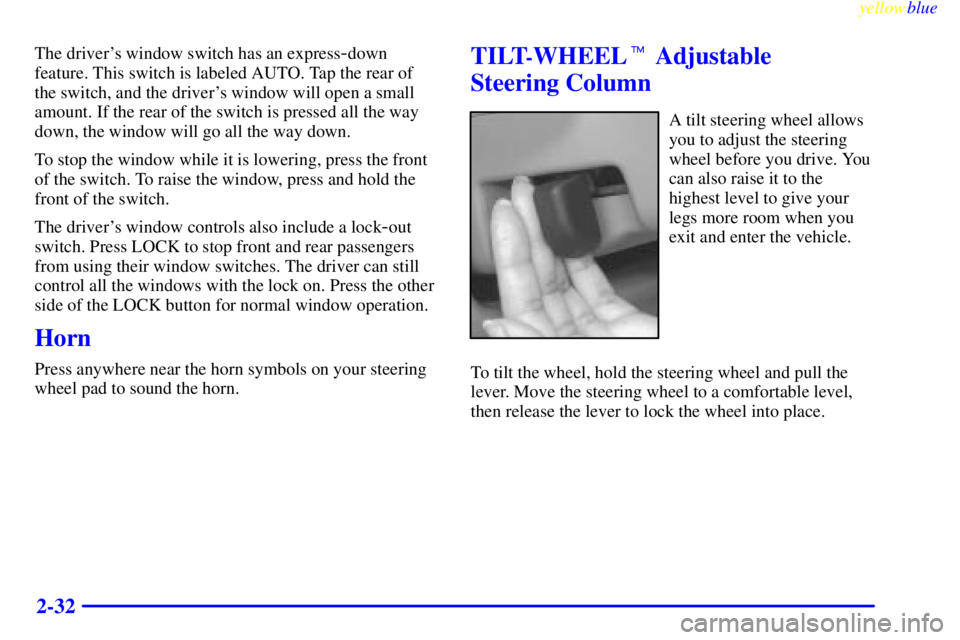
TILT-WHEEL� Adjustable
Steering Column
A tilt steering wheel allows
you to adjust the steering
wheel before you drive. You
can also raise it to the
highest level to give your
legs more room when you
exit and enter the vehicle.
To tilt the wheel, hold the steering wheel and pull the
lever. Move the steering wheel to a comfortable level,
then release the lever to lock the wheel into place.
Page 96 of 344

yellowblue
2-36
Cruise control does not work at speeds below about
25 mph (40 km/h).
When you apply your brakes, the cruise control
shuts off.
CAUTION:
�Cruise control can be dangerous where you
can't drive safely at a steady speed. So,
don't use your cruise control on winding
roads or in heavy traffic.
�Cruise control can be dangerous on
slippery roads. On such roads, fast changes
in tire traction can cause needless wheel
spinning, and you could lose control. Don't
use cruise control on slippery roads.
If your vehicle is in cruise control when the enhanced
traction system begins to limit wheel spin, the cruise
control will automatically disengage. (See ªEnhanced
Traction Systemº in the Index.) When road conditions
allow you to safely use it again, you may turn the cruise
control back on.Setting Cruise Control
CAUTION:
If you leave your cruise control switch on when
you're not using cruise, you might hit a button
and go into cruise when you don't want to. You
could be startled and even lose control. Keep the
cruise control switch off until you want to use it.
1. Move the cruise control switch to ON.
2. Get up to the speed you want.
3. Push in the SET/COAST
button at the end of the
lever and release it. The
CRUISE light on the
instrument panel will
come on.
4. Take your foot off the accelerator pedal.
Page 114 of 344

yellowblue
2-54
�If the Enhanced Traction System warning light
comes on and stays on for an extended period of
time when the system is turned on, your vehicle
needs service. Adjust your driving accordingly.
�The warning light will come on when you set your
parking brake with the engine running, and it will
stay on if your parking brake doesn't release fully.
If the transaxle shift lever is in any position other
than FIRST (1) or SECOND (2) and the warning
light stays on after your parking brake is fully
released, it means there's a problem with the system.
�If the traction control system is affected by an
engine
-related problem, the system will turn off and
the warning light will come on.
When this warning light is on, the system will not limit
wheel spin. Adjust your driving accordingly.
Enhanced Traction System Active Light
The light will come on
when your Enhanced
Traction System is limiting
wheel spin.
You may feel or hear the system working, but this is
normal. Slippery road conditions may exist if this light
comes on, so adjust your driving accordingly.
Page 115 of 344

yellowblue
2-55 Low Traction Light
If you have the Enhanced
Traction System, this light
will also come on when
the system is limiting
wheel spin.
You may feel or hear the system working, but this is
normal. Slippery road conditions may exist if the low
traction light comes on, so adjust your driving
accordingly. The light will stay on for a few seconds
after the Enhanced Traction System stops limiting wheel
spin. See ªEnhanced Traction Systemº in the Index.
The low traction light also comes on briefly when you
turn the ignition key to RUN. If the light doesn't come
on then, have it fixed so it will be there to tell you when
the Enhanced Traction System is active.
Engine Coolant Temperature Light
This light tells you that your
engine coolant has
overheated or your radiator
cooling fan is not working.
The light should come on briefly when your ignition is
turned on to show you that it is working.
If you have been operating your vehicle under normal
driving conditions, you should pull off the road, stop
your vehicle and turn off the engine as soon as possible.
The ªProblems on the Roadº section of this
manual shows what to do. See ªEngine Overheatingº
in the Index.