1999 BMW 540i Oul
[x] Cancel search: OulPage 870 of 1002

Downloaded from www.Manualslib.com manuals search engine
Door Windows
Window anti-trap strip, testing
- To test function of anti-trap strip on any window:
With key
ON and window down, pull up window switch to
second detent, thus activating one-touch close operation.
Insert wooden block or other soft object between glass
and upper door frame.
Window should contact block, then immediately reverse
direction and lower by approximately
25 mm (1 in).
NOTE-
Anti-trap strip is integrated into the molding strip of the door
window frame.
Front window anti-trap strip, removing
- Remove front door panel and vapor barrier as described in
411 Doors.
< Remove window frame mold~ng strlp and peel toward inside
7 of vehrcle.
Separate anti-trap electrical harness connector
top front of door.
NOTE-
Wire color for anti-trap strip is dark gray.
(arrow) at
Page 872 of 1002

Downloaded from www.Manualslib.com manuals search engine
51 2-8
Door Windows
Door window, adjusting
Whenever the door window or window regulator is removed,
window adjustment should be checked. The glass should
contact the top of the window squarely and should seat
against the window seal uniformly.
NOTE-
If the window does not contact the window seal uniformly,
wind noise or water infiltration may result.
- Remove door panel as described in 411 Doors.
- Disconnect negative (-) cable from battery. Remove airbag
unit and vapor barrier from door. See 721 Airbag System
(SRS).
WARNING-
Prior to disconnecting the batteg read the battery discon-
nection cautions given in
001 General Warnings and
Cautions.
Longitudinal adjustment
- Adjustments are made with window in open position.
Loosen window guide rail mounting nuts (arrows), but do not
remove.
Slide window glass in longitudinal direction to adjust
Tighten guide rail nuts.
Tightening torque
Window regulator guide rail to door
10 Nrn (89 in-ib)
Page 880 of 1002

Downloaded from www.Manualslib.com manuals search engine
I lnterior Trim
This repair group covers interior trim removal and installation
procedures.
- Refer to the following repair groups for additional information:
250 Gearshift Linkage
41 1 Doors (interior door panels)
@ 612 Switches
620 Instruments
640 Heating and Air Conditioning [IHKA control panel!
650 Radio
721 Airbag System (SRS)
lnterior trim repairs
lnterior trim and finish panels are clipped or screwed into
place. Many of the trim retaining clips are designed
to be used
only once. When removing trim that is held in place with clips,
it is a good idea to have spare clips on hand before beginning
the job.
WARNING-
Special precautions must be observed when servicing the
BMWSupplementai Restraint System (SRS). Serious inju-
ry may result if system service is attempted by persons un-
familiar with the BMW
SRS and its approved service
procedures. BMW
speciiies that all inspection and service
should be performed by an authorized BMW
dealer.
Before performing any work involving airbags, discon-
nect the negative
() battery cable. See 721 Airbag
System (SRS).
Airbags contain a back-uppowersupply within the SRS
control module. A
5 second discharge period should be
allowed after the battery cable has been disconnected.
CAUTION-
* When working on electrical switclies or lights, always dis-
connect the negative
(-) cable from the battery and insu-
late the cable end to prevent accidental reconnection.
a Prior to disconnecting the battery, read the battery dis-
connection cautions given in
W1 General Warnings
and Cautions.
To prevent marring the trim when working on interior
components, work with plastic prying
tools or wrap the
tips of screwdrivers and pliers with tape before prying
Page 901 of 1002
Downloaded from www.Manualslib.com manuals search engine
Central Locking and Anti-Theft
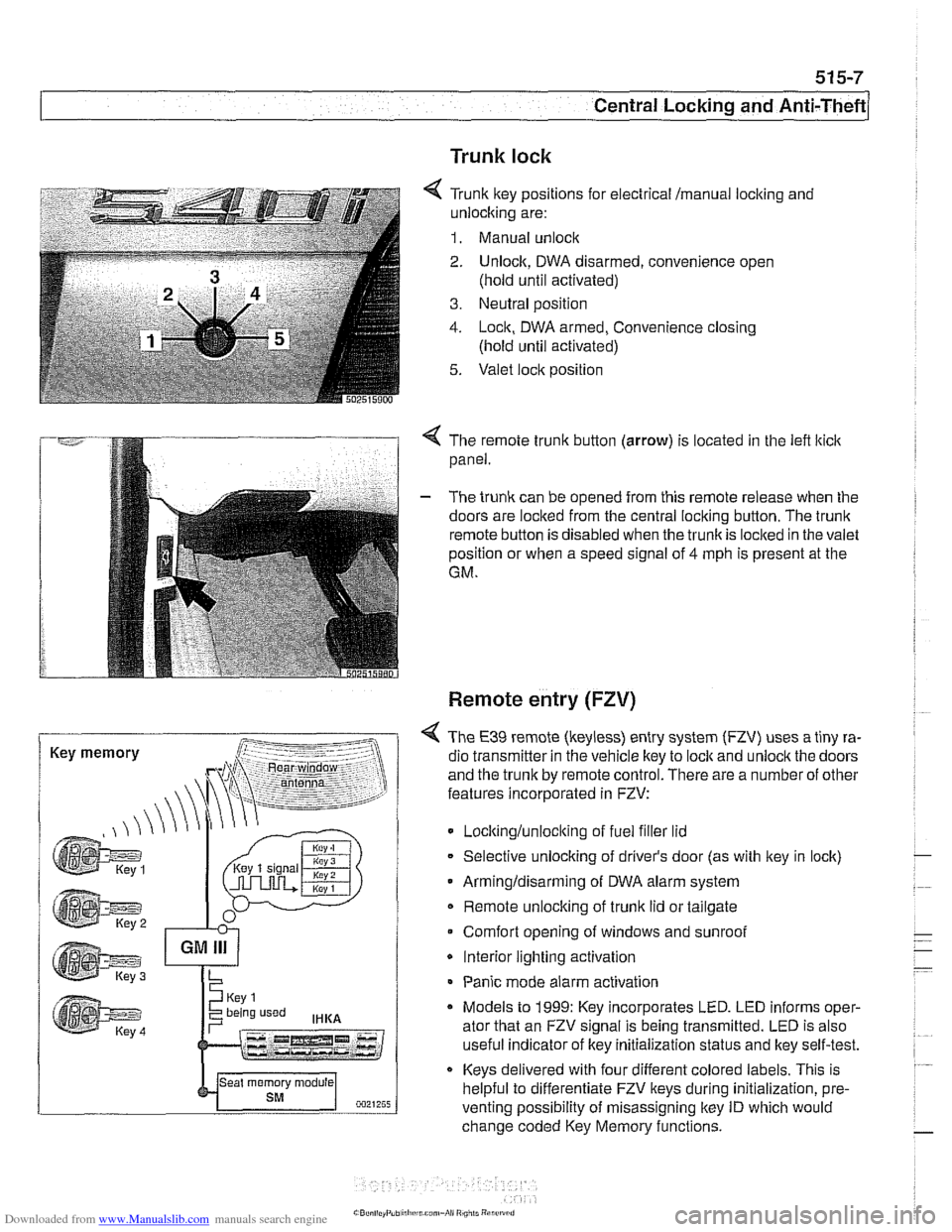
Trunk lock
6 Tr~nk ftey pos~rions for eecir'cal mama, locking and
-nlock~ng are:
1. Manual unock .. - - - ........ - ..- .- ................. s.=.=-- 2. Unlock. DWA oisarmed, conven:ence open
(nold
un1:l aclivaledj
3. Ne~tral posit'on
1. -ocn. DWA armeo, Convenience closng
(hold ~nti activated)
5. Valet .oc,t position
. -- .............-... .- . - -.....
Key memory
< The remote trunk button (arrow) is located in the lefl lticlc
panel.
- The trunk can be opened from this remote release when the
doors are locked from the central locking button. The
trunk
remote button is disabled when the trunkis loclted in the valet
position or when a speed signal of
4 mph is present at the
GM.
Remote entry (FZV)
< The €39 remote (keyless) entry system (FZV) uses a tiny ra-
dio transmitter in the vehicle key to
lock and unlock the doors
and the trunk by remote control. There are a number of other
features incorporated in FZV:
Locltinglunloclting of fuel filler lid
Selective unlocking of driver's door (as with key in lock)
Armingldisarming of DWA alarm system
Remote unlocking of
trunk lid or tailgate
Comfort opening of windows and sunroof
* Interior lighting activation
Panic mode alarm activation
* Models to 1999: Key incorporates LED. LED informs oper-
ator that an FZV signal is being transmitted. LED is also
useful indicator of key initialization status and lkey self-test.
Keys delivered with four different colored labels. This is
helpful to differentiate FZV keys during initialization,
pre.
venting possibility of misassigning key ID which would
change coded Key Memory functions.
Page 903 of 1002

Downloaded from www.Manualslib.com manuals search engine
515-9
Central Locking and ~nti-~heftl
FZV keys
4 FZV key button functions:
Bunon 1 press once:
Unlock driver's door
DWA disarmed
/ lnterior lights on
... - 0021~0~~j
Convenience opening
2000
-
'.-,- /- ..,.
Button 2 press
once:
Button
1 press twice:
a Total
unlocking
Button
1 hold:
* Lock
- DWA armed
lnterior lights ON when vehicle is locked
Button
2 press twice within 10 seconds:
Deactivate interior and tilt monitoring
Button 3 press momentarily:
Trunk lid opens
Button
3 press and hold:
Panic mode (alarm)
LED
(4) provides feedback of system operation and battery
condition. LED is eliminated from 2000 and later
lkeys.
LED flashes indicate the following:
One flash indicates that FZV
lock I unlock signal was sent
and batteries are OK.
Quick flashing LED indicates that convenience opening
signal is being sent.
Slow flashing LED indicates that initialization procedure
was successful.
A steady-on LED [after a self test as described in Trans-
mitter self-test (models to
1999)l indicates that hard-
warelsoftware of transminer are OK.
No LED activity could indicate discharged batteries or de-
fective
transmitter.
Page 905 of 1002

Downloaded from www.Manualslib.com manuals search engine
515-11
Central Lockinq and ~nti-l heft/
4 The initialization procedure is as follows:
Close ail doors and have all keys available
2 LED Using lkey number I, turn ignition switch to KL R (ACCES-
SORY), then switch off within 5 seconds and remove first
key.
. - -- , ..-.---- - Within 30 seconds of turning ignition switch to OFF, press
and hold button
2.
1 While holding button 2, press and release (tap) button 1
three times within 10 seconds. Models to 1999: LED flash-
- If acknowledgement signal (doors lock / unlocking) does not
follow initialization procedure, repeat process. If ignition is
switched on during process, procedure is cancelled.
50251509‘1
NOTE-
The Key Memory function of the GM responds to the ley
identification number of each key If the keys are not initial-
ized
in the same orderprior to initialization, the ley memory
functions activated by the
l(eys will not be assigned correctly.
Always initialize the keys
in the same order.
es momentarily.
Release both buttons. GM immediately locks and unlocits
doors to signal successful initialization.
Remote system coding
* Initialize remaining lteys, repeating steps above.
The E39 remote entry system uses coded signals for security
purposes. The code signal sent by the transmitter is changed
every time the vehicle is lockedlunlocked with the transmitter.
A separate code signal is used for each transmitter that is ini-
tialized to the system. This allows for each transmitterto oper-
ate independently of the others.
Due to the changing of the code each time the buttons are de-
pressed, the system allows for a
lacit of synchronization be-
tween the transmitter and receiver. This would occur
if the
buttons on the transmitter are pressed inadvertently.
Up to
100 erroneous actuations of the transmitter are auto-
matically corrected
forby the control module. If more than 100
actuations are present, the operator need only to press the
button a second time to restore system operation.
Page 916 of 1002

Downloaded from www.Manualslib.com manuals search engine
Central Locking and Anii-Theft
- If the starter engages, the following EWS inputs are function-
ing normally:
Ignition key
Code function
Transmission range switch or clutch position switch
Engine speed sensor
NO JE -
If a vehicle key is lost or stolen, the electronic authorization
for that key
can be cancelled using the BMW scan and di-
agnostic tools
DISplus, GTl or MoDiC.
Force applied to a ley can damage the electronic circuitry
in the key A damaged ley will not start the engine. In that
case, a new key should be purchased and initialized
by an
authorized BMW dealer.
EWS variations
EWS variations used in E39 cars are shown in E39 EWS ap-
plications
table below.
E39
EWS applications
I I Ifling antenna (surrounds ignition switch) I
System
designation
EWS
II
I I l~ransmitter I receiver module located in right side steering column cover I
E39 production
dates
SOP
- 311 997
I I IEWS 111 (3.2) control module incorporates transmitter1 receiver moduie functions /
Main components, changes, improvements
Key with EEPROM transponder
Control moduie located behind glove compartment, in electrical component panel
Control module located to left of steering column, under dashboard
K-Bus input
Transmitter
I receiver module eliminated
EWS 111 (3.2)
Transmission range selection input from automatic transmission control module
3
11997 - 911997
- EWS ill (3.3) Clutch
Hall-effect switch (replaces transmission range switch input)
911997 - 2002 EWS 111 (3.3) control
module with iSN code burned in (cannot be overwritten during
alignment)
Control module located to left of steering column, under dashboard
Page 924 of 1002

Downloaded from www.Manualslib.com manuals search engine
l Seats
Seat repair and component replacement is possible once the
seat has been removed from the vehicle.
Before servicing front seats read safety regulations on han-
dling
airbag modules and pyrotechnic seatbelt tensioners.
See
720 Seat belts and 721 Airbag system (SRS).
WARNING-
. The front seats are equipped with pyrotechnic seat belt
tensioners. These tensioners are powerful devices and
should be handled with exfreme care. Incorrect handling
can trigger off the tensioner and cause injury.
BMW recommends that all repair or replacement
worlc
on pyrotechnic devices must be carried out by a quali-
fied
BMW technician.
Be sure to disconnect the battery and wait
5 seconds
before attempting to work on pyrotechnic devices.
During body straightening and welding with an electric
arc welder, always disconnect the battery and the con-
nection to the pyrotechnic gas generators.
Seat switch and memory module, removing
and installing
- Remove front seat. See Front seats, removing and install-
ing.
- Carefully pull seat adjusting ltnobs straight out to remove.
Remove screw fastener
(A) and trim clips (B), turn side panel
downward to remove.
Disconnect electrical harness connector
(arrow).