Page 3 of 204
1998 COROLLA(U)
3
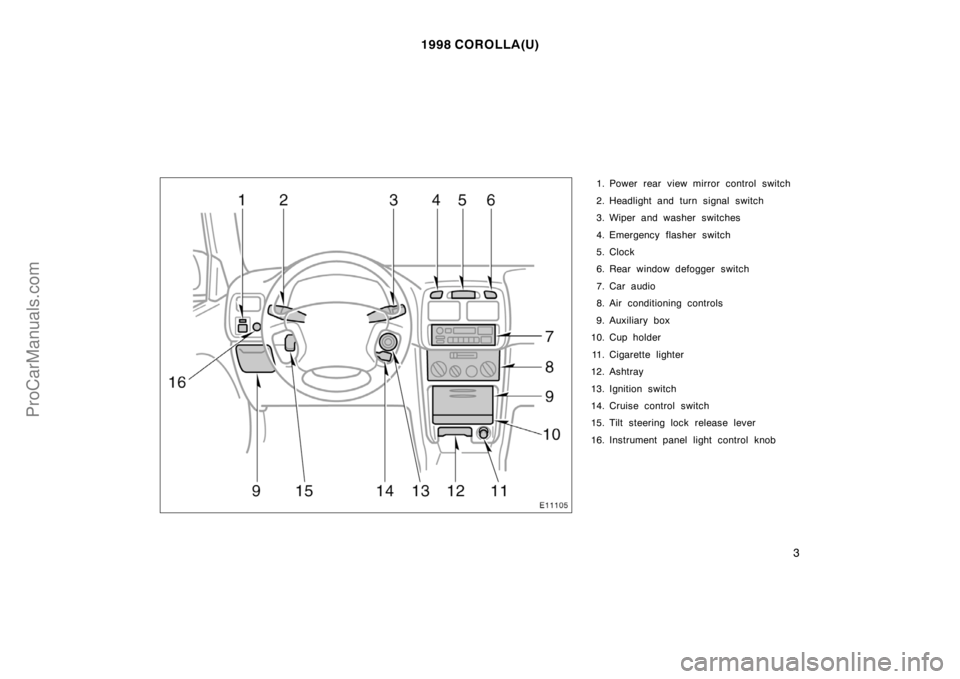
1. Power rear view mirror control switch
2. Headlight and turn signal switch
3. Wiper and washer switches
4. Emergency flasher switch
5. Clock
6. Rear window defogger switch
7. Car audio
8. Air conditioning controls
9. Auxiliary box
10. Cup holder
11. Cigarette lighter
12. Ashtray
13. Ignition switch
14. Cruise control switch
15. Tilt steering lock release lever
16. Instrument panel light control knob
ProCarManuals.com
Page 87 of 204
1998 COROLLA(U)
95
Part 1
OPERATION OF
INSTRUMENTS
AND CONTROLS—
Chapter 1−7
Car audio system
and Air conditioning
system
Car audio system
�Reference
�Using your audio system:
some basics
�Using your audio system:
controls and features
�Car audio system operating hints
Air conditioning system
�Controls
�Air flow selector settings
�Operating tips
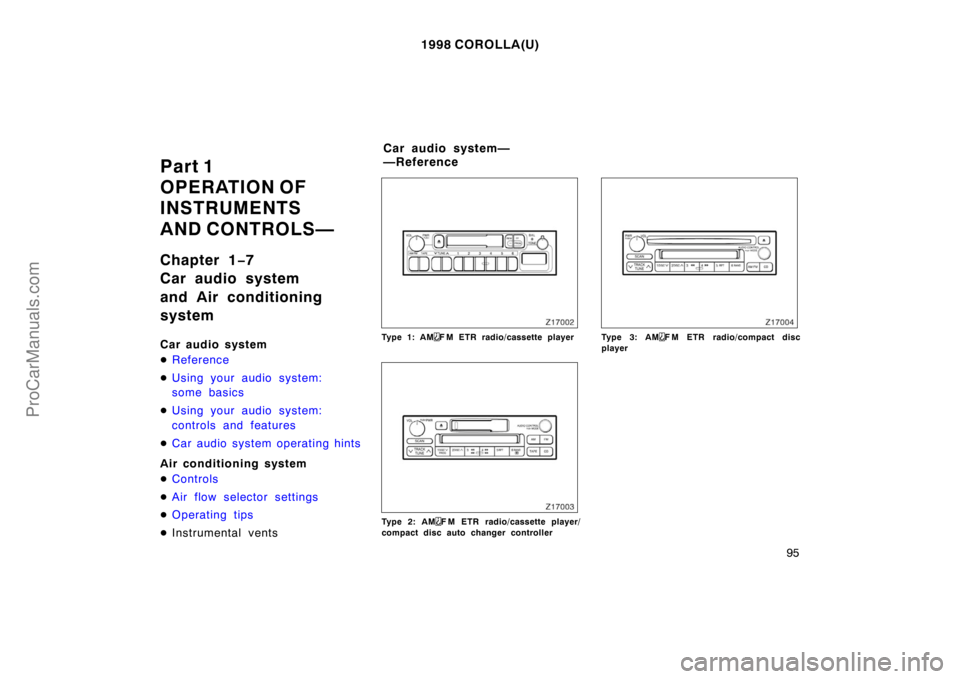
�Instrumental ventsType 1: AMF M ETR radio/cassette player
Type 2: AMF M ETR radio/cassette player/
compact disc auto changer controller
Type 3: AMF M ETR radio/compact disc
player
Car audio system—
—Reference
ProCarManuals.com
Page 105 of 204
1998 COROLLA(U)
11 3
Use high−quality cassettes.
�Low−quality cassette tapes can cause
many problems, including poor sound,
inconsistent playing speed, and
constant auto−reversing. They can also
get stuck or tangled in the cassette
player.
�Do not use a cassette if it has been
damaged or tangled or if its label is
peeling off.
�Do not leave a cassette in the player
if you are not listening to it, especially
if it is hot outside.
�Store cassettes in their cases and out
of direct sunlight.
�Avoid using cassettes with a total play-
ing time longer than 100 minutes (50
minutes per side). The tape used in
these cassettes is thin and could get
stuck or tangled in the cassette player.
CARING FOR YOUR COMPACT DISC
PLAYER AND DISCS
�Use only compact discs labeled as
shown.
�Extremely high temperatures can keep
your compact disc player from working.
On hot days, use the air conditioning
to cool the vehicle interior before you
listen to a disc.
�Bumpy roads or other vibrations may
make your compact disc player skip.
�If moisture gets into your compact disc
player, you may not hear any sound
even though your compact disc player
appears to be working. Remove the
disc from the player and wait until it
dries.
�Handle compact discs carefully, espe-
cially when you are inserting them.
Hold them on the edge and do not
bend them. Avoid getting fingerprints
on them, particularly on the shiny side.
�Dirt, scrapes, warping, pin holes, or
other disc damage could cause the
player to skip or to repeat a section of
a track. (To see a pin hole, hold the
disc up to the light.)
�Remove discs from the compact disc
player when you are not listening
to them. Store them in their plastic
cases away from moisture, heat, and
direct sunlight.
To clean a compact disc: Wipe it with a
soft, lint−free cloth that has been damp-
ened with water. Wipe in a straight line
from the center to the edge of the disc
(not in circles). Dry it with another soft,
lint−free cloth. Do not use a conventional
record cleaner or anti−static device.
ProCarManuals.com
Page 107 of 204
1998 COROLLA(U)
11 5
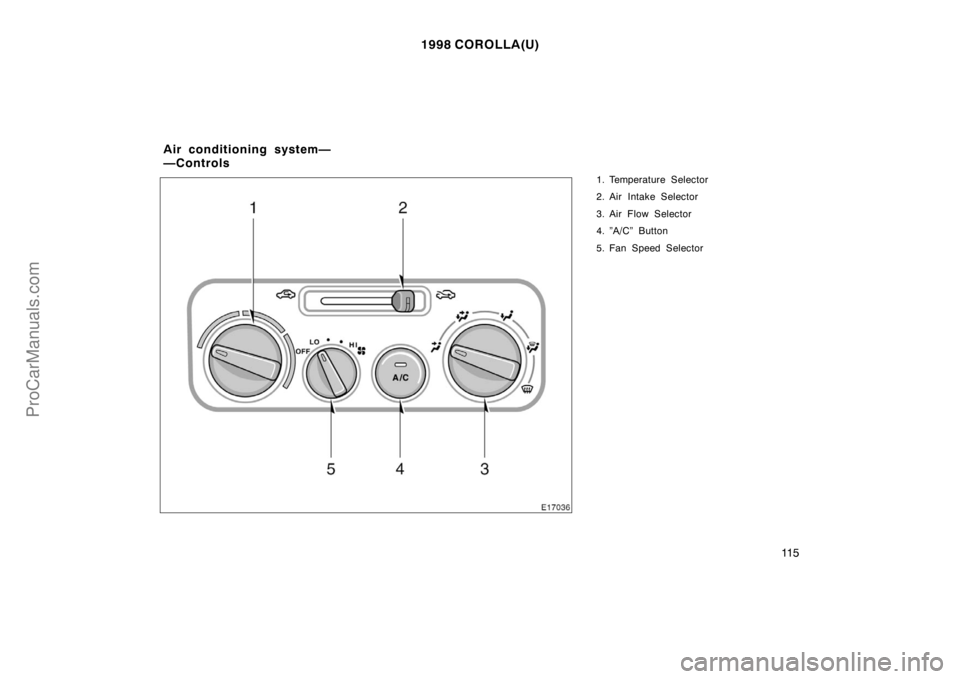
1. Temperature Selector
2. Air Intake Selector
3. Air Flow Selector
4. ”A/C” Button
5. Fan Speed Selector
Air conditioning system—
—Controls
ProCarManuals.com
Page 108 of 204
1998 COROLLA(U)
11 6
Fan speed selector
Turn the knob to adjust the fan speed—to
the right to increase, to the left to de-
crease.
Temperature selector
Turn the knob to adjust the temperature—
to the right to warm, to the left to cool.
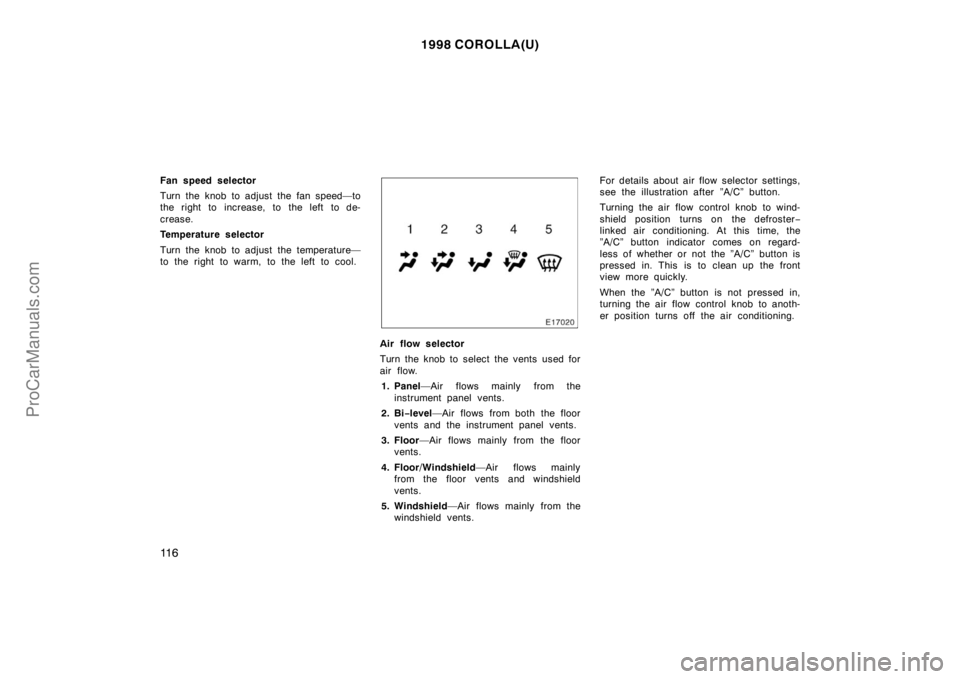
Air flow selector
Turn the knob to select the vents used for
air flow.
1. Panel—Air flows mainly from the
instrument panel vents.
2. Bi−level—Air flows from both the floor
vents and the instrument panel vents.
3. Floor—Air flows mainly from the floor
vents.
4. Floor/Windshield—Air flows mainly
from the floor vents and windshield
vents.
5. Windshield—Air flows mainly from the
windshield vents.For details about air flow selector settings,
see the illustration after ”A/C” button.
Turning the air flow control knob to wind-
shield position turns on the defroster−
linked air conditioning. At this time, the
”A/C” button indicator comes on regard-
less of whether or not the ”A/C” button is
pressed in. This is to clean up the front
view more quickly.
When the ”A/C” button is not pressed in,
turning the air flow control knob to anoth-
er position turns off the air conditioning.
ProCarManuals.com
Page 109 of 204
1998 COROLLA(U)
11 7
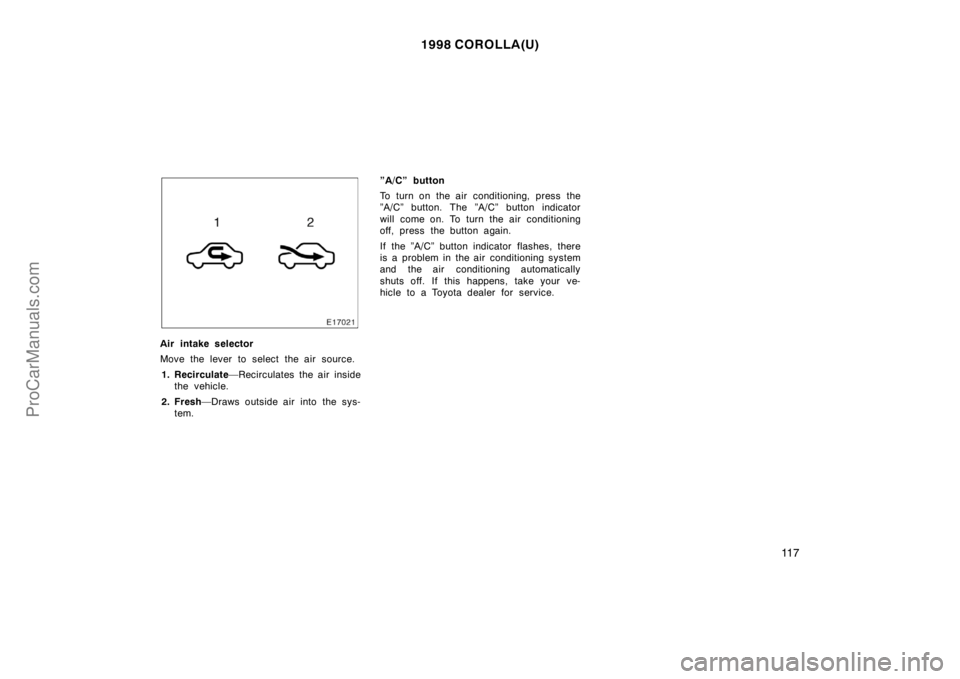
Air intake selector
Move the lever to select the air source.
1. Recirculate—Recirculates the air inside
the vehicle.
2. Fresh—Draws outside air into the sys-
tem.”A/C” button
To turn on the air conditioning, press the
”A/C” button. The ”A/C” button indicator
will come on. To turn the air conditioning
off, press the button again.
If the ”A/C” button indicator flashes, there
is a problem in the air conditioning system
and the air conditioning automatically
shuts off. If this happens, take your ve-
hicle to a Toyota dealer for service.
ProCarManuals.com
Page 110 of 204
1998 COROLLA(U)
11 8
—Air flow selector settings —Operating tips
�To cool off your Toyota after it has
been parked in the hot sun, drive with
the windows open for a few minutes.
This vents the hot air, allowing the air
conditioning to cool the interior more
quickly.
�Make sure the air intake grilles in front
of the windshield are not blocked (by
leaves or snow, for example).
�On humid days, do not blow cold air
on the windshield. The windshield could
fog up because of the difference in air
temperature on the inside and outside
of the windshield.
�Keep the area under the front seats
clear to allow air to circulate through-
out the vehicle.
�On cold days, move the fan speed to
”HI” for a minute to help clear the in-
take ducts of snow or moisture. This
can reduce the amount of fogging on
the windows.
ProCarManuals.com
Page 111 of 204

1998 COROLLA(U)
11 9
Heating
For best results, set controls to:
Fan speed—Any setting except ”OFF”
Temperature—Towards red zone
Air intake—FRESH (outside air)
Air flow—FLOOR
Air conditioning —OFF
�For quick heating, select recirculated
air for a few minutes. To keep the
windows from fogging, select fresh af-
ter the vehicle interior has been
warmed.
�Press the ”A/C” button on for dehumidi-
fied heating.
�Choose floor/windshield air flow to heat
the vehicle interior while defrosting or
defogging the windshield.Air conditioning
For best results, set controls to:
Fan speed—Any setting except ”OFF”
Temperature—Towards blue zone
Air intake—FRESH (outside air)
Air flow—PA N E L
Air conditioning—ON
�For quick cooling, move the air intake
selector to recirculate for a few min-
utes.
Ventilation
For best results, set controls to:
Fan speed—Any setting except ”OFF”
Temperature—Towards blue zone
Air intake—FRESH (outside air)
Air flow—PA N E L
Air conditioning—OFF
Defogging
The inside of the windshield
For best results, set controls to:
Fan speed—Any setting except ”OFF”
Temperature—Towards red zone to heat;
blue zone to cool
Air intake—FRESH (outside air)
Air flow—WINDSHIELD
Turning the air flow control knob to wind-
shield position turns on the defroster−
linked air conditioning. At this time, the
”A/C” button indicator comes on regard-
less of whether or not the ”A/C” button is
pressed in. This is to clean up the front
view more quickly.
When the ”A/C” button is not pressed in,
turning the air flow control knob to anoth-
er position turns off the air conditioning.
�On humid days, do not blow cold air
on the windshield—the difference be-
tween the outside and inside tempera-
tures could make the fogging worse.
ProCarManuals.com