Page 72 of 233
’98 AVALON (USA/CANADA)−U
72
Ty p e A
Ty p e B
To adjust a mirror, use the switches.
1. Master switch—To select the mirror to be adjusted
Place the switch at ”L” (left) or ”R” (right). 2. Control switch—To move the mirror
Push the switch in the desired direction.
If the engine is not running, the key must
be in the ”ACC” position.
NOTICE
If ice should jam the mirror, do not
operate the control or scrape the mir-
ror face. Use a spray de −icer to free
the mirror.
To reduce glare from the headlights of
the vehicle behind you during night
driving, operate the lever on the lower
edge of the mirror.
Daylight driving—Lever at position 1
The reflection in the mirror has greater
clarity at this position.
Night driving—Lever at position 2
Remember that by reducing glare you also
lose some rear view clarity.
—Power rear view mirror
control Anti
−glare inside rear view
mirror
ProCarManuals.com
Page 76 of 233

’98 AVALON (USA/CANADA)−U
76
The lights automatically turn off when the
driver ’s door is opened with the ignition
key in the ”ACC” or ”LOCK” position. To
turn them on again, turn the key to the
”ON” position or actuate the headlight
switch. If you are going to park for over
one week, make sure the headlight switch
is off.
NOTICE
To prevent the battery from being dis-
charged, do not leave the lights on
for a long period when the engine is
not running.
Daytime running light system (Canada
only)
The headlights turn on at reduced intensi-
ty when the parking brake is released with
the engine started, even with the light
switch in the ”OFF” position. They will not
go off until the ignition switch is turned
off.
To turn on the other exterior lights and
instrument panel lights, twist the knob to
the position 1.
Twist the knob to the position 2 to turn
to full intensity for driving at night.
High −Low beams —For high beams, turn
the headlights on and push the lever away
from you (position 1). Pull the lever to-
ward you (position 2) for low beams.
The headlight high beam indicator light
(blue light) on the instrument panel will
tell you that the high beams are on.
Flashing the high beam headlights
(position 3)—Pull the lever all the way
back. The high beam headlights turn off
when you release the lever.
You can flash the high beam headlights
with the knob turned to ”OFF”.TURN SIGNALS
To signal a turn, push the headlight/
turn signal lever up or down to position
1.
The key must be in the ”ON” position.
The lever automatically returns after you
make a turn, but you may have to return
it by hand after you change lanes.
To signal a lane change, move the lever
up or down to the pressure point (position
2) and hold it.
If the turn signal indicator lights (green
lights) on the instrument panel flash faster
than normal, a front or rear turn signal
bulb is burned out.
ProCarManuals.com
Page 77 of 233
’98 AVALON (USA/CANADA)−U
77
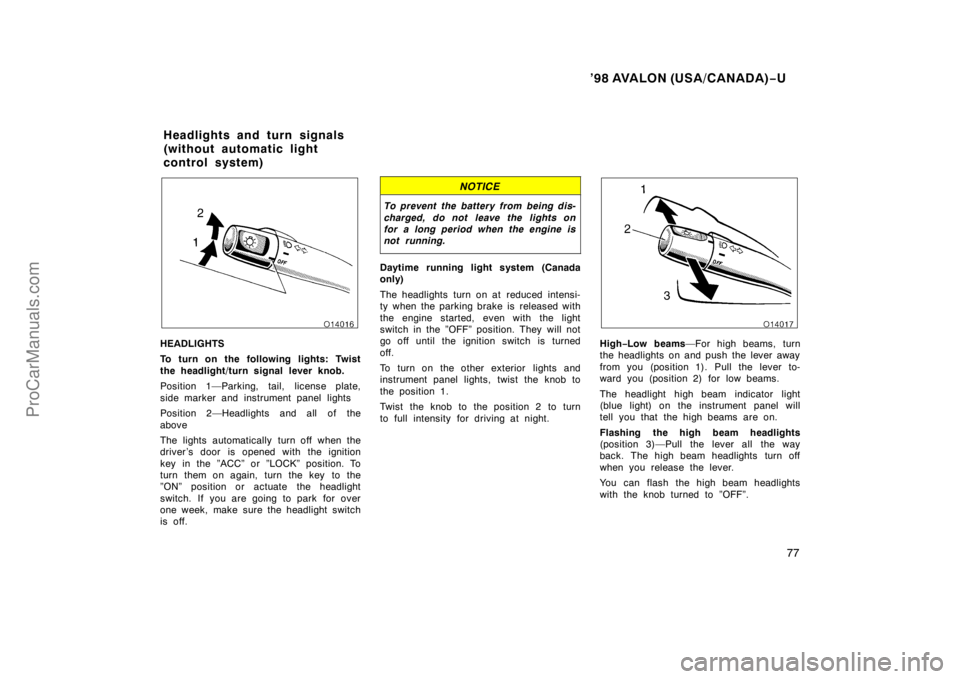
HEADLIGHTS
To turn on the following lights: Twist
the headlight/turn signal lever knob.
Position 1—Parking, tail, license plate,
side marker and instrument panel lights
Position 2—Headlights and all of the
above
The lights automatically turn off when the
driver ’s door is opened with the ignition
key in the ”ACC” or ”LOCK” position. To
turn them on again, turn the key to the
”ON” position or actuate the headlight
switch. If you are going to park for over
one week, make sure the headlight switch
is off.
NOTICE
To prevent the battery from being dis-
charged, do not leave the lights on
for a long period when the engine is
not running.
Daytime running light system (Canada
only)
The headlights turn on at reduced intensi-
ty when the parking brake is released with
the engine started, even with the light
switch in the ”OFF” position. They will not
go off until the ignition switch is turned
off.
To turn on the other exterior lights and
instrument panel lights, twist the knob to
the position 1.
Twist the knob to the position 2 to turn
to full intensity for driving at night.
High −Low beams —For high beams, turn
the headlights on and push the lever away
from you (position 1). Pull the lever to-
ward you (position 2) for low beams.
The headlight high beam indicator light
(blue light) on the instrument panel will
tell you that the high beams are on.
Flashing the high beam headlights
(position 3)—Pull the lever all the way
back. The high beam headlights turn off
when you release the lever.
You can flash the high beam headlights
with the knob turned to ”OFF”.
Headlights and turn signals
(without automatic light
control system)
ProCarManuals.com
Page 78 of 233

’98 AVALON (USA/CANADA)−U
78
TURN SIGNALS
To signal a turn, push the headlight/
turn signal lever up or down to position
1.
The key must be in the ”ON” position.
The lever automatically returns after you
make a turn, but you may have to return
it by hand after you change lanes.
To signal a lane change, move the lever
up or down to the pressure point (position
2) and hold it.
If the turn signal indicator lights (green
lights) on the instrument panel flash faster
than normal, a front or rear turn signal
bulb is burned out.
Emergency flashers
To turn on the emergency flashers,
push the switch.
All the turn signal lights will flash. To turn
them off, push the switch once again.
Turn on the emergency flashers to warn
other drivers if your vehicle must be
stopped where it might be a traffic hazard.
Always pull as far off the road as pos-
sible.
The turn signal light switch will not work
when the emergency flashers are operat-
ing.
NOTICE
To prevent the battery from being dis-
charged, do not leave the switch on
longer than necessary when the en-
gine is not running.
ProCarManuals.com
Page 81 of 233
’98 AVALON (USA/CANADA)−U
81
Rear personal lights
To turn on the rear personal light, push
the switch. To turn the light off, push
the switch once again.
Ignition switch light
For easy access to the ignition switch,
the ignition switch light comes on when
any of the doors are opened.
The light remains on for some time after
all the doors are closed.
Windshield wipers and washer
To turn on the windshield wipers, move
the lever to the desired setting.
The key must be in the ”ON” position.
Lever position
Speed setting
Position 1Intermittent
Position 2Slow
Position 3Fast
The ”INT TIME” band lets you adjust the
wiping time interval when the wiper lever
is in the intermittent position (position 1).
Twist the band upward to increase the
time between sweeps, and downward to
decrease it.
ProCarManuals.com
Page 82 of 233

’98 AVALON (USA/CANADA)−U
82
To squirt washer fluid, pull the lever
toward you.
If the windshield wipers are off, they will
operate a couple of times after the washer
squirts.
For instructions on adding washer fluid,
see ”Adding washer fluid” in Chapter 7 −3.
In freezing weather, warm the windshield
with the defroster before using the washer.
This will help prevent the washer fluid
from freezing on your windshield, which
can block your vision.
NOTICE
Do not operate the wipers if the wind-
shield is dry. It may scratch the
glass.
Headlight cleaner
To spray fluid on the headlights, turn
the headlights on and push the switch.
The key must be in the ”ON” position.
Check the fluid level of the see −through
headlight cleaner tank every so often.
Use washer fluid for replenishment. For
information on adding fluid, see ”Adding
washer fluid” in Chapter 7 −3.
NOTICE
Do not turn the headlight cleaner on
with the tank empty. It may cause the
cleaner motor to overheat.
To defog or defrost the rear window,
push the switch.
The key must be in the ”ON” position.
The thin heater wires on the inside of the
rear window will quickly clear the surface.
An indicator light will illuminate to indicate
the defogger is operating.
On some models, the heater panels in the
outside rear view mirrors will also quickly
clear the surfaces. Keep your hands off
the mirror faces when the switch is on.
Push the switch once again to turn the
defoggers off.
Rear window and outside rear
view mirror defoggers
ProCarManuals.com
Page 88 of 233
’98 AVALON (USA/CANADA)−U
88
The thermometer indicates the outside
air temperatures with the ignition key at
the ”ON” position.
When the instrument panel lights are turned
on, the brightness of the display will be re-
duced.
(a) If parking brake
is off, stop and
check.
(b) Fasten seat belts.
If the indicator or Do this.
buzzer comes on...
(c) Stop and check.
(e) Take vehicle to
Toyota dealer.
(type A)
(type B)
(Indicator and buzzer)
(d) Stop and check.
(g) Take vehicle to
Toyota dealer.
If the indicator or Do this.
buzzer comes on...
(h) Close all doors.
(i) Replace bulb.
(j) Take vehicle to Toyota dealer
immediately.
(type A)
(type B)
(f) Fill up tank.
Service reminder indicators
an d warn in g bu zzers
ProCarManuals.com
Page 89 of 233
’98 AVALON (USA/CANADA)−U
89
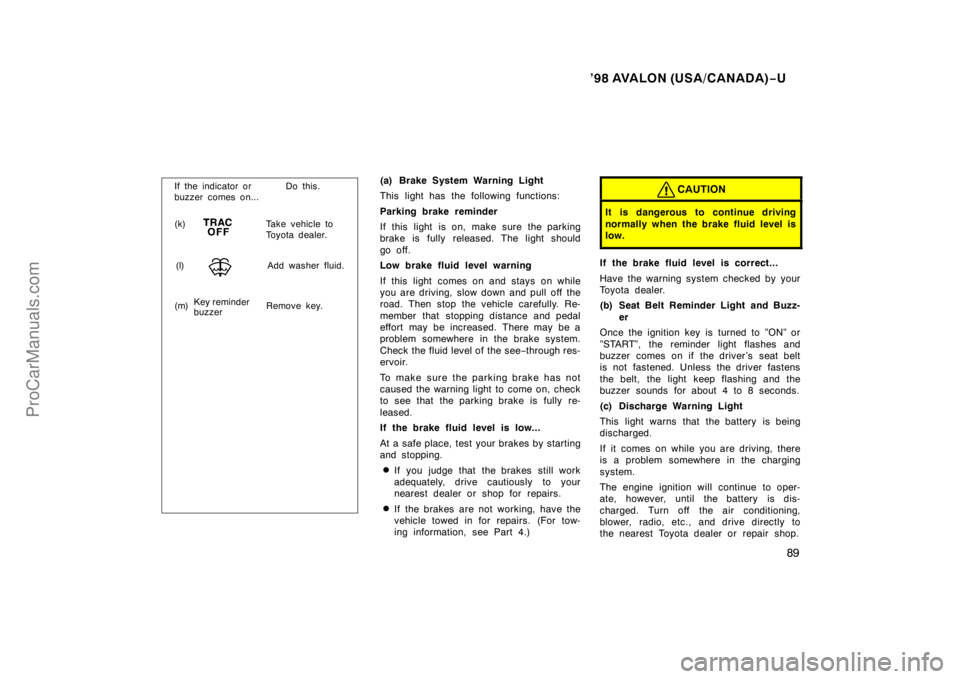
(k) Take vehicle to
Toyota dealer.
If the indicator or Do this.
buzzer comes on...
(m) Remove key. Key reminder
buzzer
(l)
Add washer fluid.
(a) Brake System Warning Light
This light has the following functions:
Parking brake reminder
If this light is on, make sure the parking
brake is fully released. The light should
go off.
Low brake fluid level warning
If this light comes on and stays on while
you are driving, slow down and pull off the
road. Then stop the vehicle carefully. Re-
member that stopping distance and pedal
effort may be increased. There may be a
problem somewhere in the brake system.
Check the fluid level of the see −through res-
ervoir.
To make sure the parking brake has not
caused the warning light to come on, check
to see that the parking brake is fully re-
leased.
If the brake fluid level is low...
At a safe place, test your brakes by starting
and stopping.
�If you judge that the brakes still work
adequately, drive cautiously to your
nearest dealer or shop for repairs.
�If the brakes are not working, have the
vehicle towed in for repairs. (For tow-
ing information, see Part 4.)
CAUTION
It is dangerous to continue driving
normally when the brake fluid level is
low.
If the brake fluid level is correct...
Have the warning system checked by your
Toyota dealer.
(b) Seat Belt Reminder Light and Buzz-
er
Once the ignition key is turned to ”ON” or
”START”, the reminder light flashes and
buzzer comes on if the driver’s seat belt
is not fastened. Unless the driver fastens
the belt, the light keep flashing and the
buzzer sounds for about 4 to 8 seconds.
(c) Discharge Warning Light
This light warns that the battery is being
discharged.
If it comes on while you are driving, there
is a problem somewhere in the charging
system.
The engine ignition will continue to oper-
ate, however, until the battery is dis-
charged. Turn off the air conditioning,
blower, radio, etc., and drive directly to
the nearest Toyota dealer or repair shop.
ProCarManuals.com


