Page 46 of 73
yes
Check the connections between:
air 9 A fluid
conditioning pressure
computer 10 B sensor
Is the wiring in good condition?
c11010.0
AIR CONDITIONING
Fault finding charts
62
KANGOO
ALL TYPES
AFTER
REPAIR
no
CHART 12AAIR CONDITIONING PROBLEMS
No cold air
NOTES
yesRefer to left-hand bargraph 13.
noTop up the coolant circuit.
yes
noRepair the faulty
electrical wiring.
Change the pressure sensor.
Non regulated air conditioning.
The passenger compartment fan operates.
Check that left-hand bargraph 13 is
extinguished. This relates to the inhibiting of
heating/ventilation/air conditioning by the
injection or the automatic gearbox.
Is this bargraph extinguished?
Using the XR25, measure the pressures of the
coolant circuit by entering #16 or use
pressure gauges.
The pressures should be:
- high pressure < 28 bars,
- low pressure > 2 bars.
Is this correct?
Check that the components which were removed are connected correctly.
Check that the system operates correctly.
62-35
Page 50 of 73
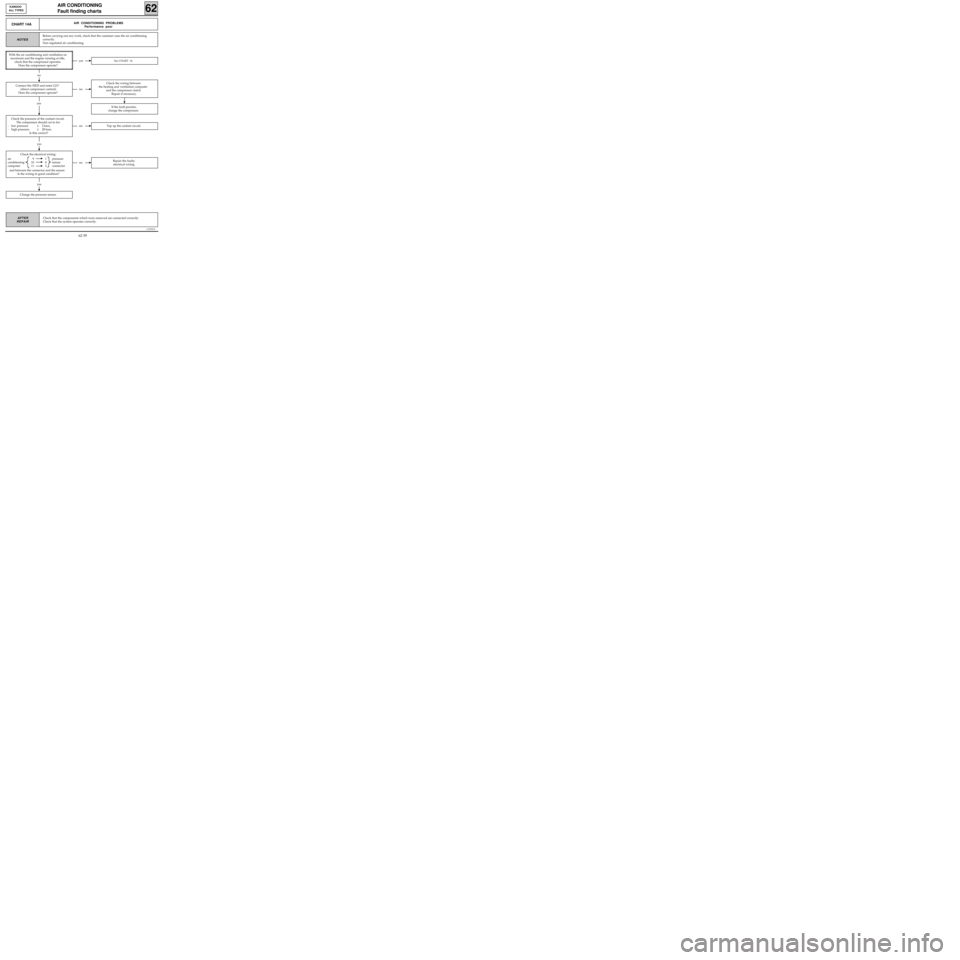
yes
Check the electrical wiring:
air 9 1 pressure
conditioning 10 4 sensor
computer 11 3 connector
and between the connector and the sensor.
Is the wiring in good condition?
c11010.0
AIR CONDITIONING
Fault finding charts
62
KANGOO
ALL TYPES
AFTER
REPAIR
CHART 14AAIR CONDITIONING PROBLEMS
Performance poor
NOTES
yesSee CHART 14.
no
no
If the fault persists,
change the compressor.
yes
noRepair the faulty
electrical wiring.
yes
noTop up the coolant circuit.
Change the pressure sensor.
Before carrying out any work, check that the customer uses the air conditioning
correctly.
Non regulated air conditioning.
With the air conditioning and ventilation on
maximum and the engine running at idle,
check that the compressor operates.
Does the compressor operate?
Connect the XR25 and enter G21*
(direct compressor control).
Does the compressor operate?
Check the pressure of the coolant circuit.
The compressor should cut in for:
- low pressure≥ 2 bars,
- high pressure≤ 28 bars.
Is this correct?
Check the wiring between
the heating and ventilation computer
and the compressor clutch.
Repair if necessary.
Check that the components which were removed are connected correctly.
Check that the system operates correctly.
62-39
Page 51 of 73

Check the electrical wiring between:
air 9 1 pressure
conditioning 10 4 sensor
computer 11 5 connector
and between the connector and the sensor.
Is the electrical wiring in good condition?
c11010.0
AIR CONDITIONING
Fault finding charts
62
KANGOO
ALL TYPES
AFTER
REPAIR
yes
CHART 14BAIR CONDITIONING PROBLEMS
Performance poor
NOTES
no
yes
noRepair the faulty electrical wiring.
yes
noTop up the coolant.
Change the pressure sensor.
Before carrying out any work, check that the customer uses the air conditioning
correctly.
Non regulated air conditioning.
Check the operation of the fan assembly.
Connect the XR25 and enter G22* and G23*
(direct fan assembly control).
Does the fan assembly operate
at low and high speed?
Check the pressure of the coolant circuit.
The fan assembly should be:
- operating for a pressure≥ 10 bars,
- stopped for a pressure≥ 20 bars.
Is this correct?
Check the electrical wiring
between tracks 22 and 23 of the heating and
ventilation computer and the fan assembly.
Repair if necessary.
If the fault persists,
change the fan assembly.
Check that the components which were removed are connected correctly.
Check that the system operates correctly.
62-40
Page 53 of 73
yes
Check the electrical wiring between:
heating and 9 1 inter-
ventilation 10 4 mediate
computer 11 3 connector
and between:
inter- 1 A pressure
mediate 4 C sensor
connector 3 B
Is the wiring in good condition?
c11010.0
AIR CONDITIONING
Fault finding charts
62
KANGOO
ALL TYPES
AFTER
REPAIR
CHART 15
CONT
A
noTop up the coolant circuit.
yes
noRepair the faulty
electrical wiring.
With the air conditioning selected and
ventilation on maximum, check the pressure
of the coolant circuit using the XR25 by
entering #16.
- The fan cuts in at low speed for a pressure
≥ 10 bars,
- The fan cuts in at high speed for a pressure
≥ 20 bars.
Are the pressure values correct?
Change the pressure sensor.
If the fault persists,
change the fan.
Check that the components which were removed are connected correctly.
Check that the system operates correctly.
62-42
Page:
< prev 1-8 9-16 17-24

