1998 OLDSMOBILE BRAVADA change time
[x] Cancel search: change timePage 133 of 380

Remember that in order for the automatic system
to perform
well, it needs A/C to provide
cooling performance.
Air Conditioning
On hot days, open the windows long enough to let hot
inside air escape. This reduces the time
it takes for your
vehicle to cool down. Then keep your windows closed
for the air conditioner to work its best.
For quick cool-down on very hot days, use
MAX A/C
with the temperature knob turned to the left. This setting
should be used to keep odors and/or dust from entering
the vehicle. For normal cooling on hot days, use A/C
with the temperature knob turned to the left.
On cool but sunny days, use BI-LEVEL A/C to deliver
warm air to the floor and cooler air to the instrument
panel outlets.
When the air conditioner is on, you may sometimes notice
slight changes
in your vehicle‘s engine speed and power.
This
is normal because the system is designed to cycle the
compressor on and off to keep the desired temperature.
Heating
The heater works best if you keep your windows closed
while using
it. On cold days, use HEATER with the
temperature knob turned
to the right. BLEND is useful
in cool weather when you have fog or ice on the
windshield or side windows.
If you use the optional engine coolant heater before
starting your engine, your heating system will produce
warmer air faster to heat the passenger compartment in
cold weather. See “Engine Coolant Heater”
in the Index.
Ventilation System
For mild outside temperatures when little heating or
cooling
is needed, use VENT to direct outside air
through your vehicle. Airflow is through the instrument
panel outlets.
Your vehicle’s ventilation system supplies outside air to
the inside of your vehicle when
it is moving. When the
vehicle is
not moving, you can get outside air to flow
through by selecting any mode and any fan speed.
3-5
ProCarManuals.com
Page 136 of 380
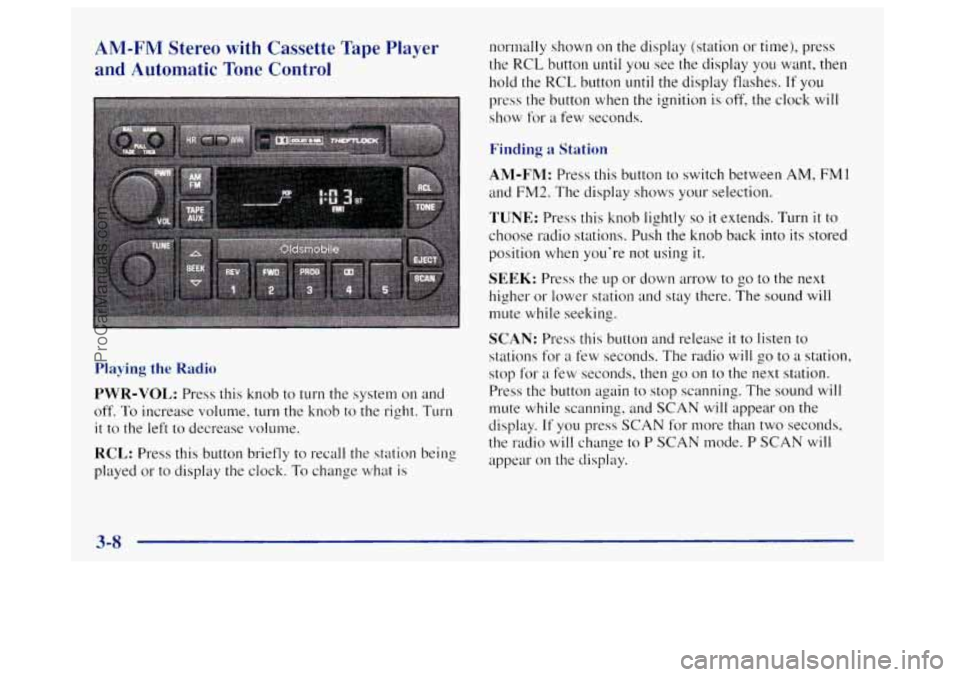
AM-FM Stereo with Cassette Tape Player
and Automatic Tone Control
Playing the Radio
PWR-VOL: Press this knob to turn the system on and
off.
To increase volume, turn the knob to the right. Turn
it to the left to decrease volume.
RCL: Press this button briefly to recall the station being
played or to display the clock.
To change what is normally shown
on the display (station or time),
press
the
RCL button until you see the display you want, then
hold the RCL button until the display flashes. If you
press the button when the ignition is off, the clock will
show for
a few seconds.
Finding a Station
AM-FM: Press this button to switch between AM, FM 1
and FM2. The display shows your selection.
TUNE: Press this knob lightly so it extends. Turn it to
choose radio stations. Push the knob back into its stored
position when you’re not using
it.
SEEK: Press the up or down arrow to go to the next
higher
or lower station and stay there. The sound will
mute while seeking.
SCAN: Press this button and release it to listen to
stations for
a few seconds. The radio will go to a station,
stop for
a few seconds, then go on to the next station.
Press the button again to stop scanning. The sound will
mute while scanning, and
SCAN will appear on the
display.
If you press SCAN for more than two seconds,
the radio
will change to P SCAN mode. P SCAN will
appear on the display.
3-8
ProCarManuals.com
Page 140 of 380

AM-FM Stereo with Cassette Tape and
Compact Disc Player with Automatic Tone
Control
(If Equipped)
Playing the Radio
PWR-VOL: Press this knob to turn the system on and
off.
To increase volume, turn the knob to the right. Turn
it to the left to decrease volume.
RCL: Press this button briefly to recall the station being
played or to display the clock. To change what is normally shown
on the display (station or time), press
the RCL button
until you see the display you want, then
hold the
RCL button until the display flashes. If you
press the button when the ignition is off, the clock will
show for
a few seconds.
Finding a Station
AM-FM: Press this button to switch between AM, FMI
and FM2. The display shows your selection.
TUNE: Press this knob lightly so it extends. Turn it to
choose radio stations. Push the knob back into its stored
position when you’re not using
it.
SEEK: Press the up or down arrow to go to the next
higher or lower station and stay there. The sound will
mute while seeking.
SCAN: Press this button and release it: to listen to
stations for a few seconds. The radio
will go to a station,
stop for a few seconds, then
go on to the next station.
Press the button again
to stop scanning. The sound will
mute while scanning, and SCAN will appear on the
display. If you press SCAN for more than two seconds,
the radio
will change to P SCAN mode. P SCAN will
appear on the display.
3-12
ProCarManuals.com
Page 145 of 380

SCAN: Press this button to listen to each selection for a
few seconds. The disc
will go to the next selection, stop
for a few seconds, then
go on to the next selection. Press
this button again to stop scanning. The sound will mute
while scanning, SCAN
will appear on the display.
RCL: Press this button to see which track is playing.
Press
it again within five seconds to see how long it has
been playing. To change what is normally shown on the
display (track or elapsed time), press the button
until
you see the display you want, then hold the button until
the display flashes. While elapsed time is showing, EL
TM will appear on the display.
AM-FM: Press this button to play the radio when a disc
is
in the player.
TAPE-CD: Press this button to change to the tape or
disc function when the radio is
on and either a tape or
CD is inserted. Press AM-FM to return to the radio
while a CD or tape is playing. The inactive tape or CD
will remain safely inside the radio for future listening. If
you have the optional CD changer and the CD changer
is loaded, the TAPE-CD button will activate the changer
and a box will be lighted around CDC
in the display.
EJECT Press this button to remove the compact disc or
cassette tape. The icon with the box around it on the
display will eject and the radio will play. EJECT may be
activated with either the ignition or radio off. Cassettes
and compact discs may be loaded with the radio
and
ignition off if this button is pressed first.
Theft-Deterrent Feature
THEFTLOCK@ is designed to discourage theft of your
radio.
It works by using a secret code to disable all radio
functions whenever battery power is removed.
The THEFTLOCK feature for the radio may be used or
ignored.
If ignored, the system plays normally and the
radio is not protected by the feature. If THEFTLOCK is
activated, your radio will
not operate if stolen.
When THEFTLOCK
is activated, the radio will display
LOC to indicate
a locked condition anytime battery
power
is removed. If your battery loses power for any
reason, you must unlock
the radio with the secret code
before
it will operate.
3-17
ProCarManuals.com
Page 161 of 380

Remember: Anti-lock doesn’t change the time you need
to get your foot up to the brake pedal or always decrease stopping distance. If you get too close to the vehicle in
front
of you, you won’t have time to apply your brakes
if that vehicle suddenly slows
or stops. Always leave
enough room up ahead to stop, even though you have
anti-lock brakes.
Using Anti-Lock
Don’t pump the brakes. Just hold the brake pedal down firmly and let anti-lock work for you. You may feel the
brakes vibrate, or you may notice some noise, but this
is normal.
Braking in Emergencies
With anti-lock, you can steer and brake at the same
time. In many emergencies, steering can help you more than even
the very best braking.
Steering
Power Steering
If you lose power steering assist because the engine
stops or the system is not functioning, you can steer but
it will take much more effort.
Steering Tips
Driving on Curves
It’s important to take curves at a reasonable speed.
A lot of the “driver lost control” accidents mentioned on
the news happen on curves. Here’s why:
Experienced driver or beginner, each of us is subject to
the same laws of physics when driving on curves. The
traction of the tires against the road surface makes it
possible for the vehicle to change its path when you
turn
the front wheels. If there’s no traction, inertia will keep
the vehicle going in the same direction. If you’ve ever
tried to steer a vehicle on wet ice, you’ll understand this.
4-9
ProCarManuals.com
Page 165 of 380

0 When it looks like a chance to pass is coming up,
start to accelerate but stay in
the right lane and don’t
get too close. Time your move
so you will be
increasing speed as the time comes to move into the
other lane.
If the way is clear to pass, you will have a
“running start” that more than makes up for the
distance you would lose by dropping back. And
if
something happens to cause you to cancel your pass,
you need only slow down and drop back again and
wait for another opportunity.
If other cars are lined up to pass a slow vehicle, wait
your turn. But take care that someone isn’t trying to
pass you as you pull out to pass the slow vehicle.
Remember to glance over your shoulder and check
the blind spot.
0 Check your mirrors, glance over your shoulder and
start your left lane change signal before moving out
of the right lane to pass. When you are far enough
ahead of
the passed vehicle to see its front in your
inside mirror, activate your right lane change signal
and move back into the right lane. (Remember that
your right outside mirror is convex. The vehicle you
just passed may seem to be farther away from you
than
it really is.)
0 Try not to pass more than one vehicle at a time on
two-lane roads, Reconsider before passing the
next vehicle.
0 Don’t overtake a slowly moving vehicle too rapidly.
Even though the brake lamps are not flashing,
it may
be slowing down or starting to turn.
0 If you’re being passed, make it easy for the
following driver to get ahead
of you. Perhaps you
can ease
a little to the right.
4- 1
ProCarManuals.com
Page 170 of 380

Controlling your vehicle is the key to successful
off-road driving. One of the best ways
to control your
vehicle
is to control your speed. Here are some things to
0
0
0
0
keep in mind. At higher speeds:
-
you approach things faster and you have less time
to scan
the terrain for obstacles.
you have less time to react.
you have more vehicle bounce when you drive
over obstacles.
you’ll need more distance for braking, especially
since you’re on an unpaved surface.
’ A CAUTION:
When you’re driving off-road, bouncing and
quick changes in direction can easily throw you
out of position. This could cause you to lose
control and crash.
So, whether you’re driving on
or off the road, you and your passengers should
wear safety belts.
Scanning the Terrain
Off-road driving can take you over many different kinds
of terrain. You need to be familiar with the terrain and its
many different features. Here are some things
to consider.
Sutface Conditicm. Off-roading can take you over
hard-packed dirt, gravel, rocks, grass, sand, mud, snow or
ice. Each of these surfaces affects the steering, acceleration
and braking
of your vehicle in different ways. Depending
upon the kind of surface you are on, you may experience
slipping, sliding, wheel spinning, delayed acceleration,
poor traction and longer braking distances.
Swfc/ce Ubstcrcles. Unseen or hidden obstacles can be
hazardous.
A rock, log, hole, rut or bump can startle you if
you’re not prepared for them. Often these obstacles are
hidden by grass, bushes, snow or even the rise and fall of
the terrain itself. Here are some things
to consider:
Is the path ahead clear?
0 Will the surface texture change abruptly up ahead?
0 Does the travel take you uphill or downhill? (There’s
more discussion of these subjects later.)
0 Will you have to stop suddenly or change
direction quickly?
4-18
ProCarManuals.com
Page 197 of 380

NOTICE:
Pulling a trailer improperly can damage your
vehicle and result in costly repairs not covered by
your warranty.
To pull a trailer correctly, follow
the advice in this part, and see your retailer
for
important information about towing a trailer
with your vehicle.
Every Bravada is ready for some trailer towing. If yours
was built with trailering options,
as many are, it's ready
for heavier trailers.
But trailering is different than just
driving your vehicle by itself. Trailering means changes
in handling, durability and i'uel economy. Successful,
safe trailering takes correct equipment,
and it has to be
used properly.
That's the reason for this part.
In it are many
time-tested, important trailering tips
and saiety rules.
Many of these
are important for your safety and that of
your passengers.
So please read this section carefully
before you
pull a trailer.
If You Do Decide To Pull A Trailer
1.f you do, here are some important points:
0
0
0
a
0
There are many different laws, including speed limit
restrictions, having to
do with trailering. Make sure
your rig will be legal,
not only where you live but
also where you'll be driving. A good source for this
information can be state
or provincial police.
Consider using
a sway control if your trailer will
weigh 2,000 lbs.
(900 kg) or less. You should always
use
a sway control if your trailer will weigh more
than 2,000
Ibs. (900 kg). You can ask a hitch dealer
about sway controls.
Don't tow
;1 trailer at all during the first 500 miles
(800 km) your new vehicle is driven. Your engine,
axle or other parts could be damaged.
Then, during the first 500 miles
(800 km) that you
tow
a trailer, don't drive over SO mph (80 kndh) and
don't make starts at full throttle. This helps your
engine and other parts of your vehicle wear
in at the
heavier loads.
You should use THIRD
(3) (or, as you need to, a
lower gear) when towing a trailer. Operating your
vehicle
in THIRD (3) when towing a trailer will
minimize heat buildup and extend the life of your
transmission.
ProCarManuals.com