Page 235 of 326
DIAGNOSTIC PROCEDURE 6
(NATS release signal check)
Does engine start properly?
Ye s
cNo
Check NATS system.
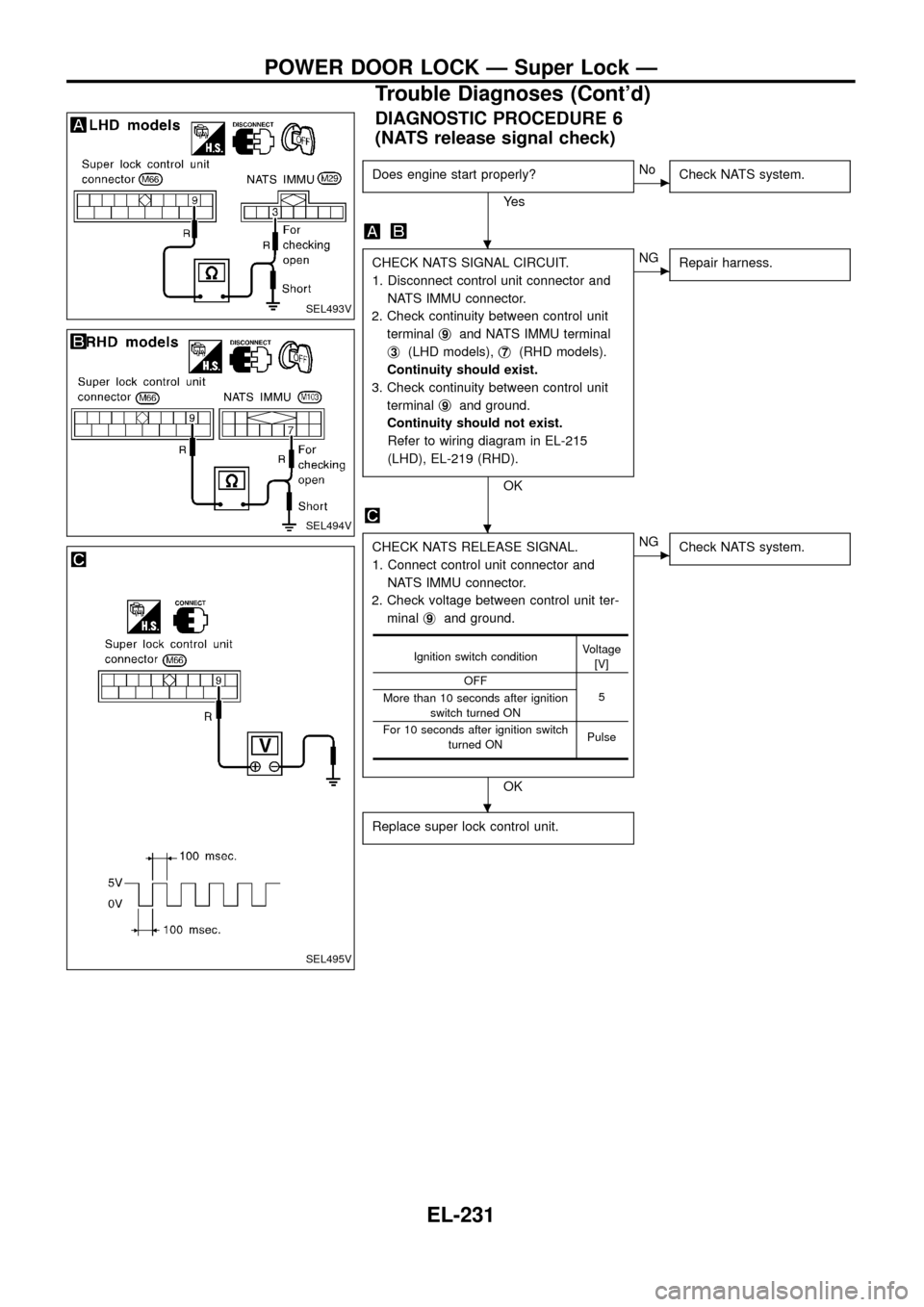
CHECK NATS SIGNAL CIRCUIT.
1. Disconnect control unit connector and
NATS IMMU connector.
2. Check continuity between control unit
terminalj
9and NATS IMMU terminal
j
3(LHD models),j7(RHD models).
Continuity should exist.
3. Check continuity between control unit
terminalj
9and ground.
Continuity should not exist.
Refer to wiring diagram in EL-215
(LHD), EL-219 (RHD).
OK
cNG
Repair harness.
CHECK NATS RELEASE SIGNAL.
1. Connect control unit connector and
NATS IMMU connector.
2. Check voltage between control unit ter-
minalj
9and ground.
OK
cNG
Check NATS system.
Replace super lock control unit.
Ignition switch conditionVoltage
[V]
OFF
5
More than 10 seconds after ignition
switch turned ON
For 10 seconds after ignition switch
turned ONPulse
SEL493V
SEL494V
SEL495V
.
.
.
POWER DOOR LOCK Ð Super Lock Ð
Trouble Diagnoses (Cont'd)
EL-231
Page 243 of 326
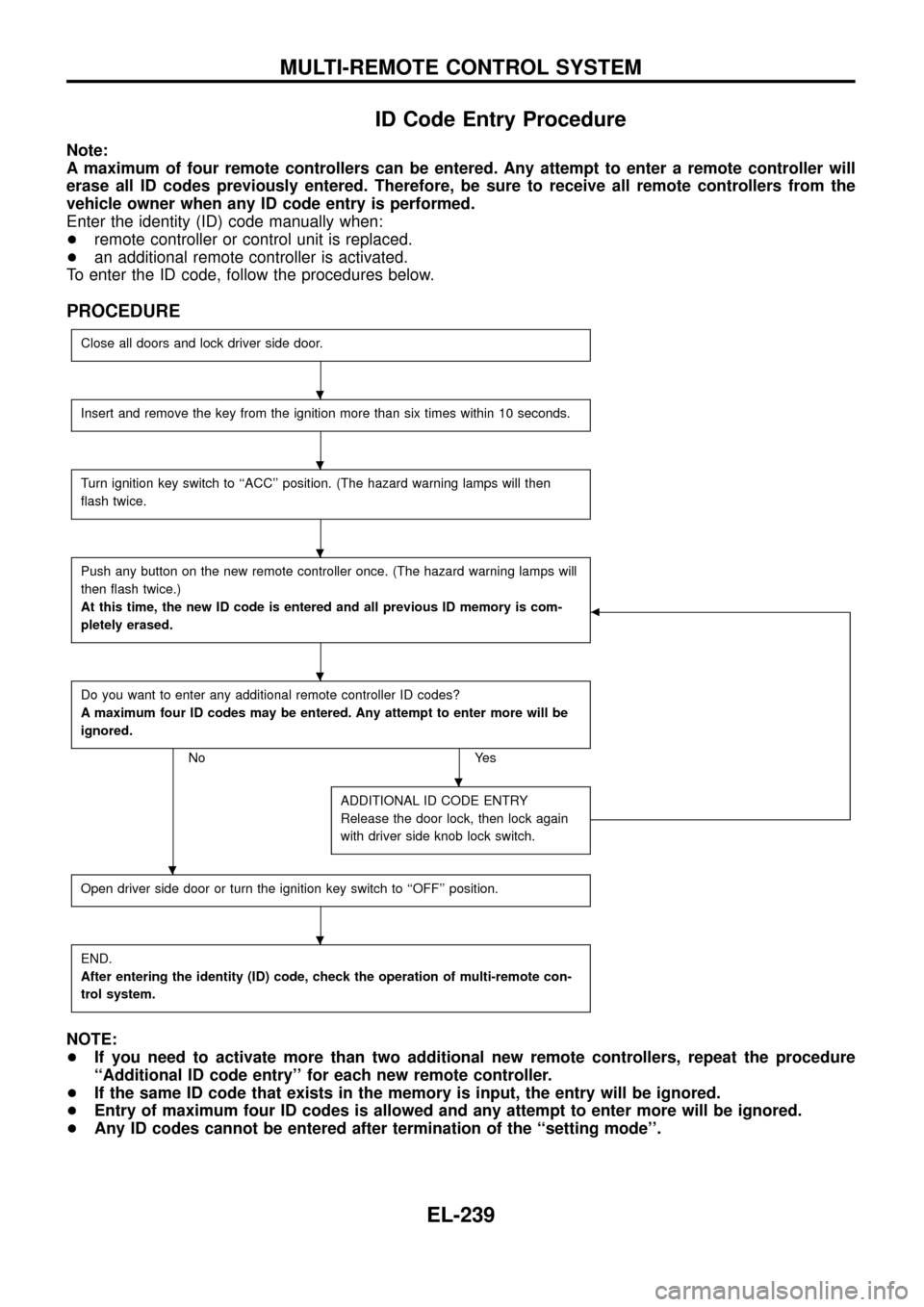
ID Code Entry Procedure
Note:
A maximum of four remote controllers can be entered. Any attempt to enter a remote controller will
erase all ID codes previously entered. Therefore, be sure to receive all remote controllers from the
vehicle owner when any ID code entry is performed.
Enter the identity (ID) code manually when:
+remote controller or control unit is replaced.
+an additional remote controller is activated.
To enter the ID code, follow the procedures below.
PROCEDURE
Close all doors and lock driver side door.
Insert and remove the key from the ignition more than six times within 10 seconds.
Turn ignition key switch to ``ACC'' position. (The hazard warning lamps will then
¯ash twice.
Push any button on the new remote controller once. (The hazard warning lamps will
then ¯ash twice.)
At this time, the new ID code is entered and all previous ID memory is com-
pletely erased.
b
Do you want to enter any additional remote controller ID codes?
A maximum four ID codes may be entered. Any attempt to enter more will be
ignored.
No Yes
ADDITIONAL ID CODE ENTRY
Release the door lock, then lock again
with driver side knob lock switch.
Open driver side door or turn the ignition key switch to ``OFF'' position.
END.
After entering the identity (ID) code, check the operation of multi-remote con-
trol system.
NOTE:
+If you need to activate more than two additional new remote controllers, repeat the procedure
``Additional ID code entry'' for each new remote controller.
+If the same ID code that exists in the memory is input, the entry will be ignored.
+Entry of maximum four ID codes is allowed and any attempt to enter more will be ignored.
+Any ID codes cannot be entered after termination of the ``setting mode''.
.
.
.
.
.
.
.
MULTI-REMOTE CONTROL SYSTEM
EL-239
Page 272 of 326
DIAGNOSTIC PROCEDURE 9
Self-diagnostic results:
``LOCK MODE'' displayed on CONSULT screen
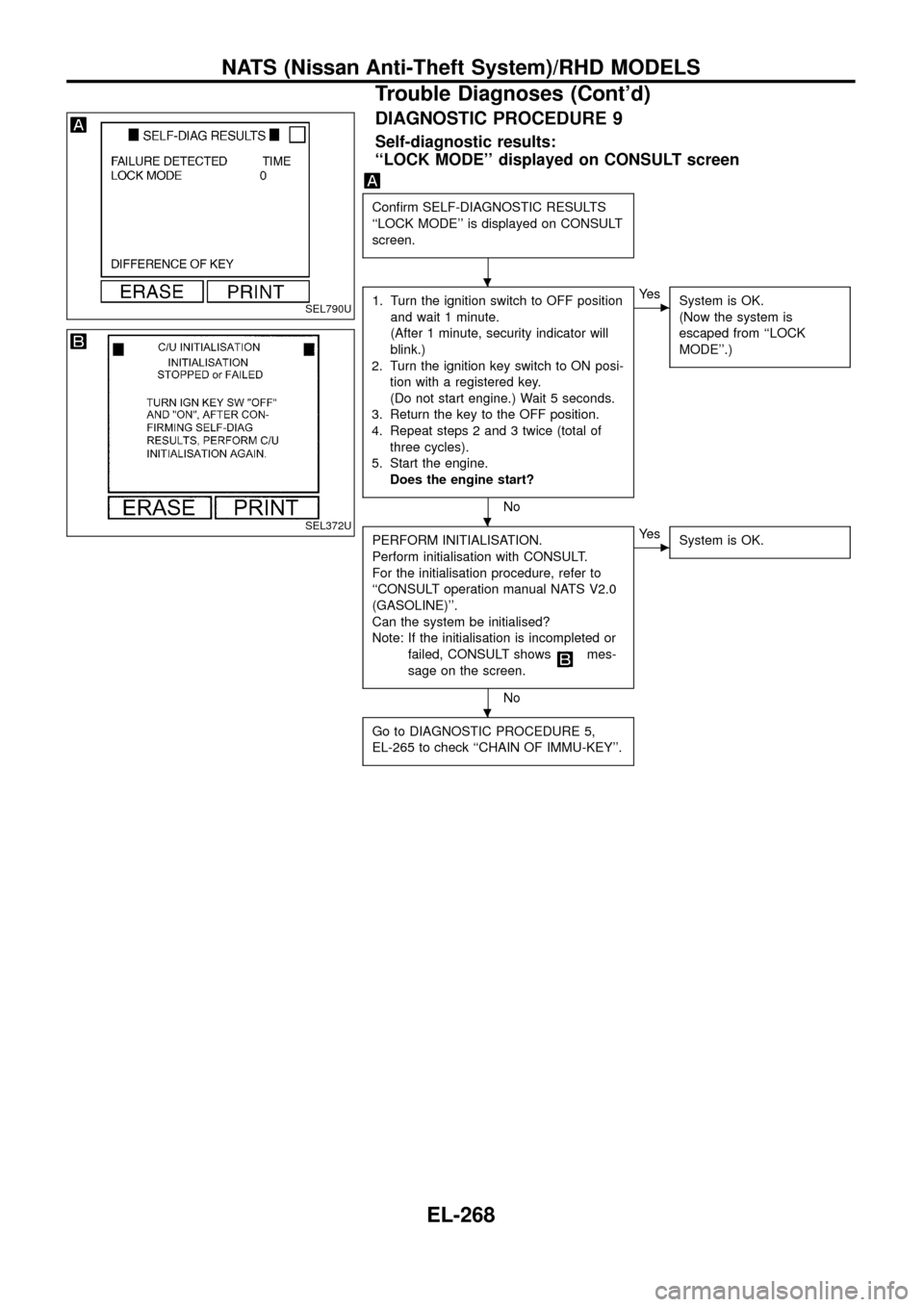
Con®rm SELF-DIAGNOSTIC RESULTS
``LOCK MODE'' is displayed on CONSULT
screen.
1. Turn the ignition switch to OFF position
and wait 1 minute.
(After 1 minute, security indicator will
blink.)
2. Turn the ignition key switch to ON posi-
tion with a registered key.
(Do not start engine.) Wait 5 seconds.
3. Return the key to the OFF position.
4. Repeat steps 2 and 3 twice (total of
three cycles).
5. Start the engine.
Does the engine start?
No
cYe s
System is OK.
(Now the system is
escaped from ``LOCK
MODE''.)
PERFORM INITIALISATION.
Perform initialisation with CONSULT.
For the initialisation procedure, refer to
``CONSULT operation manual NATS V2.0
(GASOLINE)''.
Can the system be initialised?
Note: If the initialisation is incompleted or
failed, CONSULT shows
mes-
sage on the screen.
No
cYe s
System is OK.
Go to DIAGNOSTIC PROCEDURE 5,
EL-265 to check ``CHAIN OF IMMU-KEY''.
SEL790U
SEL372U
.
.
.
NATS (Nissan Anti-Theft System)/RHD MODELS
Trouble Diagnoses (Cont'd)
EL-268