Page 91 of 249
troller and vehicle is more than approx.
49 ft (15 m).
IWhen one of the doors is ajar, only the
unlock function can be operated.
BATTERY REPLACEMENTReplace the battery as follows:
1. Open the lid using a coin.
2. Replace the battery with a new one. Insertthe battery as illustrated above.
Recommended battery: Sanyo CR2025
or equivalent.
3. Close the lid securely.
SPA0650
3-6
Pre-driving checks and adjustments
Z
01.1.31/R50-D
X
Page 93 of 249
1. Pull the hood lock release handle located
below the instrument panel; the hood will
then spring up slightly.
2. Raise the lever at the front of the hood with
your fingertips and raise the hood.3. Insert the assist bar into the slot in the front
edge of the hood.
4. When closing the hood, reset the assist bar
to its original position, then slowly close the
hood and make sure it locks into place.
IMake sure the hood is completely
closed and latched before driving.
Failure to do so could cause the hood
to fly open and result in an accident.
IIf you see steam or smoke comingfrom the engine compartment, to
avoid injury do not open the hood.
SPA0387
HOOD3-8
Pre-driving checks and adjustments
Z
01.1.31/R50-D
X
Page 94 of 249
KEY OPERATION1. Turn the key counterclockwise to unlock the
back door.
2. Pull the opener handle to open the back
door.
3. To lock the back door, push it down firmly
and turn the key clockwise.IAlways check the back door has been
closed securely to prevent it from
opening while driving.IDo not drive with the back door open.
This could allow dangerous exhaust
gases to be drawn into the vehicle.
See ªPrecautions when starting and
drivingº in the ª5. Starting and driv-
ingº section for exhaust gas.
When opening the back door, first open the
spare tire carrier in the sequence shown in the
illustration above. Then insert the stopper into
the hole to secure the carrier in the open
position.IBe certain that there is adequate area
to allow the carrier to open fully.
IOpen and close the spare tire carrier
slowly.
SPA0462
SPA0385
BACK DOOR SPARE TIRE CARRIER
Pre-driving checks and adjustments
3-9
Z
01.1.31/R50-D
X
Page 95 of 249
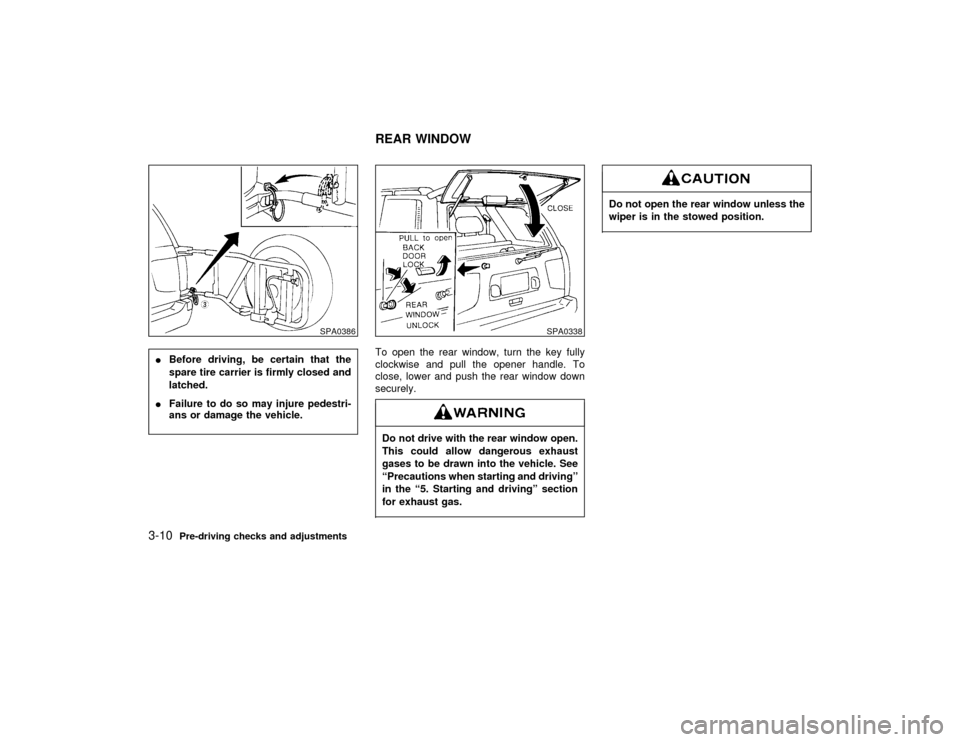
IBefore driving, be certain that the
spare tire carrier is firmly closed and
latched.
IFailure to do so may injure pedestri-
ans or damage the vehicle.To open the rear window, turn the key fully
clockwise and pull the opener handle. To
close, lower and push the rear window down
securely.
Do not drive with the rear window open.
This could allow dangerous exhaust
gases to be drawn into the vehicle. See
ªPrecautions when starting and drivingº
in the ª5. Starting and drivingº section
for exhaust gas.
Do not open the rear window unless the
wiper is in the stowed position.
SPA0386
SPA0338
REAR WINDOW
3-10
Pre-driving checks and adjustments
Z
01.1.31/R50-D
X
Page 96 of 249
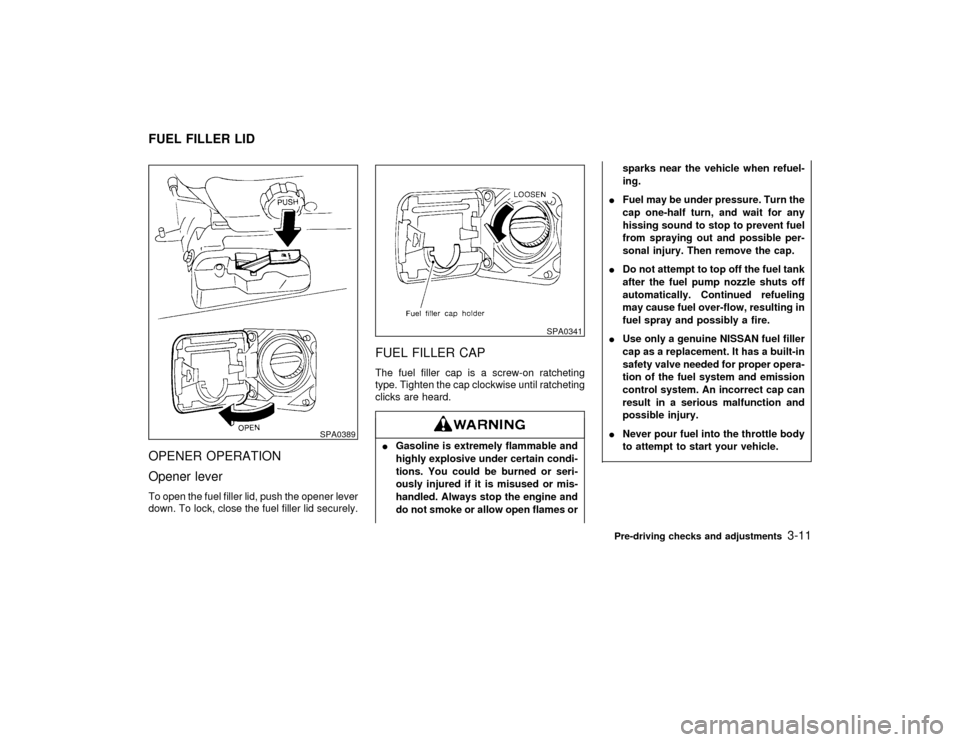
OPENER OPERATION
Opener leverTo open the fuel filler lid, push the opener lever
down. To lock, close the fuel filler lid securely.
FUEL FILLER CAPThe fuel filler cap is a screw-on ratcheting
type. Tighten the cap clockwise until ratcheting
clicks are heard.IGasoline is extremely flammable and
highly explosive under certain condi-
tions. You could be burned or seri-
ously injured if it is misused or mis-
handled. Always stop the engine and
do not smoke or allow open flames orsparks near the vehicle when refuel-
ing.
IFuel may be under pressure. Turn the
cap one-half turn, and wait for any
hissing sound to stop to prevent fuel
from spraying out and possible per-
sonal injury. Then remove the cap.
IDo not attempt to top off the fuel tank
after the fuel pump nozzle shuts off
automatically. Continued refueling
may cause fuel over-flow, resulting in
fuel spray and possibly a fire.
IUse only a genuine NISSAN fuel filler
cap as a replacement. It has a built-in
safety valve needed for proper opera-
tion of the fuel system and emission
control system. An incorrect cap can
result in a serious malfunction and
possible injury.
INever pour fuel into the throttle body
to attempt to start your vehicle.
SPA0389
SPA0341
FUEL FILLER LID
Pre-driving checks and adjustments
3-11
Z
01.1.31/R50-D
X
Page 98 of 249
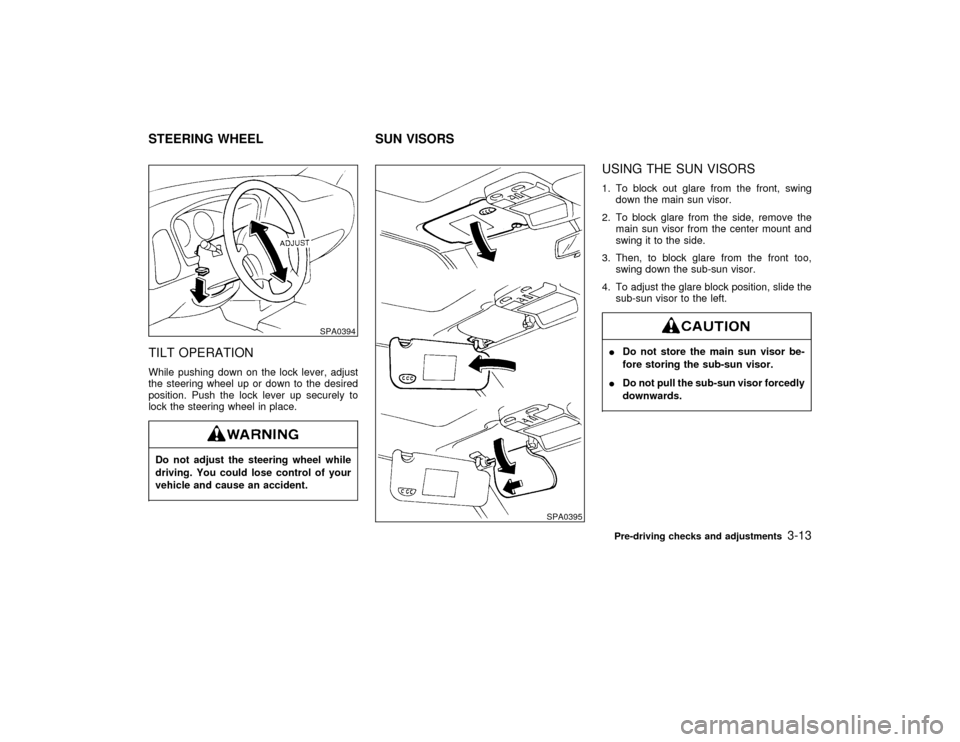
TILT OPERATIONWhile pushing down on the lock lever, adjust
the steering wheel up or down to the desired
position. Push the lock lever up securely to
lock the steering wheel in place.Do not adjust the steering wheel while
driving. You could lose control of your
vehicle and cause an accident.
USING THE SUN VISORS1. To block out glare from the front, swing
down the main sun visor.
2. To block glare from the side, remove the
main sun visor from the center mount and
swing it to the side.
3. Then, to block glare from the front too,
swing down the sub-sun visor.
4. To adjust the glare block position, slide the
sub-sun visor to the left.IDo not store the main sun visor be-
fore storing the sub-sun visor.
IDo not pull the sub-sun visor forcedly
downwards.
SPA0394
SPA0395
STEERING WHEEL SUN VISORS
Pre-driving checks and adjustments
3-13
Z
01.1.31/R50-D
X
Page 116 of 249

FM-AM RADIO WITH CASSETTE
PLAYER
Audio main operationPower/Volume control:
Turn the ignition key to ACC or ON, then push
the Power/Volume control knob. The mode
(radio or cassette) which was playing immedi-
ately before the system was turned off re-
sumes playing. When no cassette is loaded,
the radio comes on. Pushing the
Power/Volume button again turns the system
off.
Turn the Power/Volume control knob to adjust
the volume.
Adjusting tone quality and speaker
balance:
To adjust BASS×TREB×FADER×BAL (Bass,
Treble, Fader, Balance), press the AUDIO
button until the desired mode (BAS, TRE, FAD
or BAL) appears in the display.
Press the
or
button to adjust Bass
(BAS) and Treble (TRE) to the desired level.
Use the
or
button to adjust Fader
or Balance modes. Fader adjusts the sound
level between the front and rear speakers and
Balance (BAL) adjusts the sound level be-
tween the right and left speakers.After 10 seconds, the radio or cassette tape
display reappears. Once the sound quality is
set to the desired level, press the AUDIO
button repeatedly until the radio or cassette
tape display appears.
Clock operation:
Pressing the CLOCK button alternates the
clock and the radio/cassette tape options in
the display.
Radio/Cassette tape priority mode:In this mode, the radio station illuminates in the
display during radio operation. During cassette
tape operation, TAPE illuminates in the dis-
play.FM-AM radio operation
FM-AM band select:
Pushing the FM×AM band select button will
change the band FM on AM.
The FM stereo indicator, ST illuminates during
FM stereo reception. When the stereo broad-
cast signal is weak, the radio automatically
changes from stereo to monaural reception.
SAA0260
Heater, air conditioner and audio systems
4-15
Z
01.1.31/R50-D
X
Page 118 of 249

Do not force the cassette tape into the
tape door. This could cause player
damage.The cassette tape automatically changes di-
rections to play the other side when the first
side is complete. At this time, the moving
digital squares illuminate on the left side of the
display window.
Precaution on cassette player operation:
ITo maintain good quality sound, NISSAN
recommends using cassette tapes of 60
minutes or shorter in length.
ICassette tapes should be removed from the
player when not in use. Store cassettes in
their protective cases and away from direct
sunlight, heat, moisture and magnetic
sources.
IDirect sunlight can cause the cassette to
become deformed. The use of deformed
cassettes may cause the cassette to jam in
the player.
IDo not use cassettes with labels which are
peeling and loose. If used, the label could
jam in the player.IIf a cassette has loose tape, insert a pencil
through one of the cassette hubs and re-
wind the tape firmly around the hubs. Loose
tape may cause tape jamming and waver-
ing sound quality.
IOver a period of time, the playback head,
capstan and pinch roller may collect a tape
coating residue as the tape is played. This
residue accumulation can cause weak or
wavering sound, and should be removed
periodically with a head cleaning tape. If the
residue is not removed periodically, the
player may need to be disassembled for
cleaning.
PLAY/STOP:
Push the
button while the cassette tape
is playing to stop the tape. Push the button
again to play the tape.
FF (fast forward), REW
(rewind):
Push either the
or
button for the
desired direction.
The FF or REW symbol illuminates in the
display.
To stop the FF or REW function, press the
or
again, or the
button.
APS (automatic program
search) FF, APS REW:
Push either theor
button while the
cassette tape is playing. The tape runs quickly,
stops, then plays the next selection. Either the
FF or REW symbol flashes in the display while
searching for the selection.
This system searches at the blank intervals
between selections. If there is a blank interval
within one selection or there is no interval
between selections, the system may not stop
in the desired or expected location.
PROG (program):
Push the
(program) select button. The
moving digital squares illuminate on either the
right or left side of the display window to
indicate the side of program play.
Dolby NR (noise reduction):
Push the
button for Dolby NR encoded
tapes to reduce high frequency tape noise.
The
indicator light comes on.
If in the clock display is in priority mode when
thebutton is pressed,
and TAPE
illuminate in the display window for about 10
seconds. The clock mode then returns to the
display window.
Dolby NR is manufactured under license from
Heater, air conditioner and audio systems
4-17
Z
01.1.31/R50-D
X