Page 16 of 278
Protecting Adults
If your seat belt does not seem to
work as it should, it may not protect you in a crash. Anyone using aninoperative seat belt can be seriously
injured or killed. No one should sit in
a seat with an inoperative seat belt.
Have your Honda dealer check the
belt as soon as possible. See page 40 for additional
information about your seat belt system and how to take care of your
belts.
6. Adjust the Steering Wheel
Adjust the steering wheel, if needed,
so that the wheel points toward your
chest, not toward your face.
Pointing the steering wheel toward
your face decreases the protective capability of the driver's airbag.
See page 64 for how to adjust the
steering wheel.
Driver and Passenger SafetyProCarManuals.comMain Menu Table of Contents s t
Page 18 of 278

Protecting Adults
Advice for Pregnant Women
Because protecting the mother is the
best way to protect her unborn child,
a pregnant woman should always
wear a seat belt whenever she drives or rides in a car.
Remember to keep the lap portion of
the belt as low as possible across
your hips. Pregnant women should also sit as
far back as possible from the steering wheel or dashboard. This
will reduce the risk of injuries to both the mother and her unborn
child that can be caused by a crash
or an inflating airbag.
Each time you have a checkup, ask
your doctor if it's okay for you to drive. Additional Safety Precautions
Two people should never use the
same seat belt. If they do, they
could be very seriously injured in a
crash.
Do not put any accessories on seat
belts. Devices intended to improve
occupant comfort, or reposition
the shoulder part of a seat belt,
can severely compromise the
protective capability of seat belts and increase the chance of serious
injury in a crash.
CONTINUED
Driver and Passenger SafetyProCarManuals.comMain Menu Table of Contents s t
Page 19 of 278
Protecting Adults
Do not place hard or sharp objects
between yourself and an airbag.
Carrying hard or sharp objects on
your lap, or driving with a pipe or other sharp object in your mouth,
can result in injuries if your
airbags inflate.
Keep your hands and arms away
from the airbag covers. If your
hands or arms are close to the SRS
covers in the center of the
steering wheel and on top of the
dashboard, they could be injured if
the airbags inflate.
Driver and Passenger SafetyProCarManuals.comMain Menu Table of Contents s t
Page 44 of 278

Additional Information About Your SRS
SRS Components
Your Supplemental Restraint System (SRS) includes:
Two frontal airbags. The driver'sairbag is stored in the center of
the steering wheel; the front
passenger's airbag is stored in the dashboard. Both are marked
"SRS".
Sensors that can detect a severe
frontal collision. A sophisticated electronic system
that continually monitors thesensors, control unit, the airbag
activators, and all related wiring
when the ignition is ON (II). An indicator light on the
instrument panel to alert you to a
possible problem with the system (see page 45). Emergency backup power in case
your vehicle's electrical system is disconnected in a crash. How Your Airbags Work
If you ever have a severe frontal
collision, the sensors will detect
rapid deceleration and signal the
control unit to instantly inflate the
airbags.
During a crash, your seat belt helps
restrain your lower body and torso.
Your airbag provides a cushion to help restrain and protect your headand chest.
Driver and Passenger Safety
CONTINUEDProCarManuals.comMain Menu Table of Contents s t
Page 50 of 278

Instruments and Controls
This section gives information about the controls and displays that
contribute to the daily operation of
your Honda. All the essential controls are within easy reach.
Control Locations............................ 50
Indicator Lights................................ 51
Gauges.............................................. 56
Speedometer................................ 56
Tachometer.................................. 56
Odometer...................................... 56
Trip Meter.................................... 56
Fuel Gauge................................... 57
Temperature Gauge.................... 57 Maintenance Required Indicator.................................... 58
Controls Near the Steering
Wheel........................................ 59
Headlights.................................... 60
Daytime Running Lights............. 60
Instrument Panel Brightness..... 61
Turn Signals................................. 61
Windshield Wipers...................... 62
Windshield Washers................... 63
Hazard Warning........................... 63
Rear Window Defogger.............. 63
Steering Wheel Adjustment....... 64
Steering Wheel Controls ................ 65
Cruise Control.............................. 65
Keys and Locks................................ 68
Keys...............................................68
Learning Key................................ 69
Immobilizer System..................... 69
Ignition Switch............................. 70
Power Door Locks....................... 72
Lockout Prevention..................... 73
Trunk............................................73
Glove Box.....................................74
Seat Adjustments............................. 75 Front Seat Adjustments.............. 75Driver's Seat Height Adjustment............................... 76
Rear Seat Access .........................
76
Head Restraints...........................
77
Seat Heaters..................................... 78
Folding Rear Seat............................ 79
Power Windows............................... 80
Moonroof..........................................82
Mirrors.............................................. 83
Adjusting the Power Mirrors.....
83
Parking Brake..................................
84
Digital Clock..................................... 85
Beverage Holder.............................. 86 Console Compartment.................... 87
Coin Box........................................... 88
Accessory Power Socket................ 88
Ashtrays............................................ 89
Interior Lights.................................. 89 Ceiling Lights............................... 89
Courtesy Lights........................... 90
Instruments and ControlsProCarManuals.comMain Menu s t
Page 60 of 278
Controls Near the Steering Wheel
The two levers on the steering column contain controls for driving
features you use most often. The left
lever controls the turn signals,
headlights, and high beams. The
right lever controls the windshield
washers and wipers.
The controls under the left air vent are for the moonroof, cruise controland instrument panel brightness.
The switches for the hazard warning lights and rear window defogger are
to the right of the steering column.
The tilt adjustment lever on the underside of the steering columnallows you to tilt the steering wheel.
Instruments and Controls
CRUISE
CONTROL
INSTRUMENT PANEL
BRIGHTNESS HAZARD WARNING
LIGHTS
WINDSHIELD
WIPERS/WASHERS
REAR WINDOW
DEFOGGER
HORN
BUTTONS
TILT
ADJUSTMENT
HEADLIGHTS/
TURN SIGNALS
MOONROOFProCarManuals.comMain Menu Table of Contents s t
Page 61 of 278

Controls Near the Steering Wheel
Headlights
The rotating switch on the left lever controls the lights. Turning this switch to the position turns
on the parking lights, taillights,
instrument panel lights, side-marker
lights, and rear license plate lights. Turning the switch to the
position turns on the headlights. If you leave the lights on with the
ignition switch in ACCESSORY (I)
or LOCK (0), you will hear a
reminder chime when you open the
driver's door.
To change between low beams and high beams, pull the turn signal lever
until you hear a click, then let go.
The blue high beam indicator will light (see page 55). To flash the high beams, pull the
turn signal lever back lightly, then
release it. The high beams will comeon and go off.
The high beams will stay on for as long as you hold the lever back, nomatter what position the headlightswitch is in.
Daytime Running Lights (Canadian Models)
With the headlight switch off, the high beam headlights come on with
reduced brightness when you turn
the ignition switch to ON (II) and
release the parking brake. Theyremain on until you turn the ignition
off, even if you set the parking brake.
The headlights revert to normal operation when you turn them on
with the switch.
Instruments and ControlsProCarManuals.comMain Menu Table of Contents s t
Page 62 of 278
Controls Near the Steering Wheel
Instrument Panel Brightness
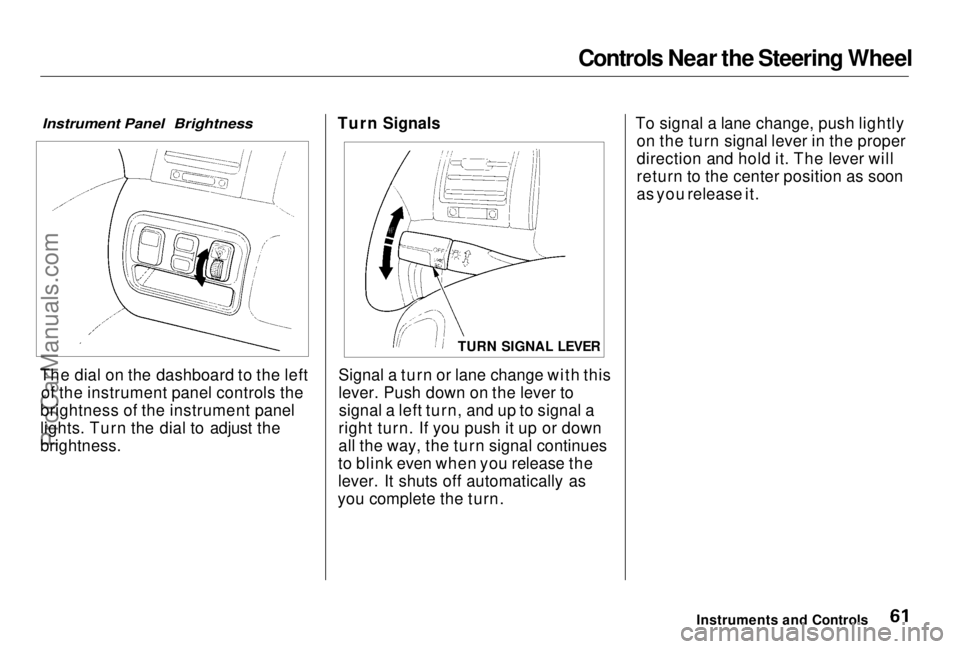
The dial on the dashboard to the left of the instrument panel controls the
brightness of the instrument panel
lights. Turn the dial to adjust the
brightness. Turn Signals
Signal a turn or lane change with this
lever. Push down on the lever tosignal a left turn, and up to signal a
right turn. If you push it up or down
all the way, the turn signal continues
to blink even when you release the
lever. It shuts off automatically as
you complete the turn. To signal a lane change, push lightly
on the turn signal lever in the proper
direction and hold it. The lever will
return to the center position as soon
as you release it.
Instruments and Controls
TURN SIGNAL LEVERProCarManuals.comMain Menu Table of Contents s t