Page 50 of 272

Instruments and Controls
This section gives information about
the controls and displays thatcontribute to the daily operation of
your Honda. All the essential
controls are within easy reach.
Control Locations............................ 50
Indicator Lights................................ 51
Gauges.............................................. 54
Tachometer.................................. 54
Trip Meter.................................... 54
Speedometer................................ 55
Odometer...................................... 55
Temperature Gauge.................... 55
Fuel Gauge................................... 55
Maintenance Required
Indicator.................................... 56
Controls Near the Steering
Wheel........................................ 57
Headlights.................................... 58
Daytime Running Lights............. 58
Instrument Panel Brightness..... 59
Turn Signals................................. 59
Windshield Wipers...................... 60
Windshield Washers................... 61
Rear Window Wiper and
Washer...................................... 61
Hazard Warning........................... 61
Rear Window Defogger.............. 62
Steering Wheel Adjustment....... 62
Steering Wheel Controls ................ 64
Cruise Control.............................. 64
Keys and Locks................................ 67
Keys............................................... 67
Immobilizer System..................... 68
Ignition Switch............................. 69
Power Door Locks....................... 70
Remote Transmitter.................... 71
Childproof Door Locks............... 72
Tailgate......................................... 72
Glove Box..................................... 73
Seats.................................................. 74
Passenger Seating....................... 74
Seat Adjustments......................... 74
Driver's Seat Power Height
Adjustment............................... 75
Armrests....................................... 76
Head Restraints........................... 76
Third Seat Access........................ 77
Removing the Second Seats
in the Six-Passenger Model.... 78
Folding the Second Seats
in the Seven-Passenger
Model.................................... 78
Reclining the Second Seat.......... 79
Folding the Third Seat
in All Models............................ 80
Power Windows............................... 82
Sunroof.............................................. 83
Mirrors.............................................. 84
Adjusting the Power Mirrors..... 84
Parking Brake.................................. 85
Digital Clock..................................... 86 Beverage Holder.............................. 86
Dashboard Compartment............... 88
Center Pocket.................................. 88
Vanity Mirror................................... 88
Cigarette Lighter............................. 89
Ashtrays............................................ 89 Interior Lights.................................. 90
Ceiling Lights............................... 90
Spotlights...................................... 90
Tailgate Light............................... 91 Courtesy Lights........................... 91
Instruments and ControlsProCarManuals.comMain Menu s t
Page 51 of 272
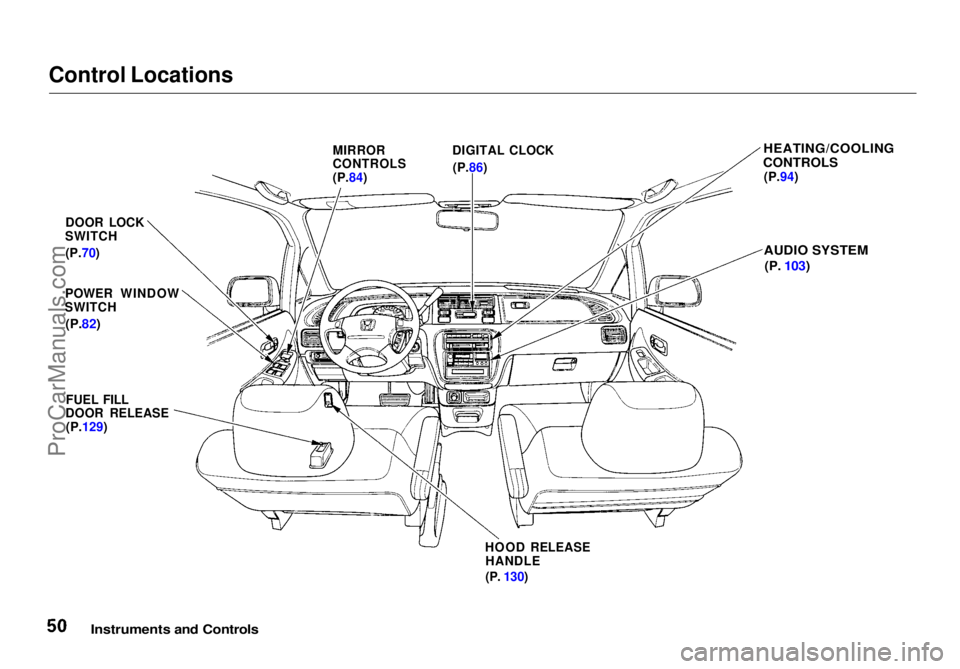
Control Locations
Instruments and Controls
MIRROR
CONTROLS
(P.84)
DIGITAL CLOCK
(P.86)
HEATING/COOLING
CONTROLS
(P.94)
AUDIO SYSTEM
(P.
103)
DOOR LOCK
SWITCH
(P.70)
POWER WINDOW
SWITCH
(P.82)
FUEL FILL
DOOR RELEASE
(P.129)
HOOD RELEASEHANDLE
(P.
130)ProCarManuals.comMain Menu Table of Contents s t
Page 62 of 272
Controls Near the Steering Wheel
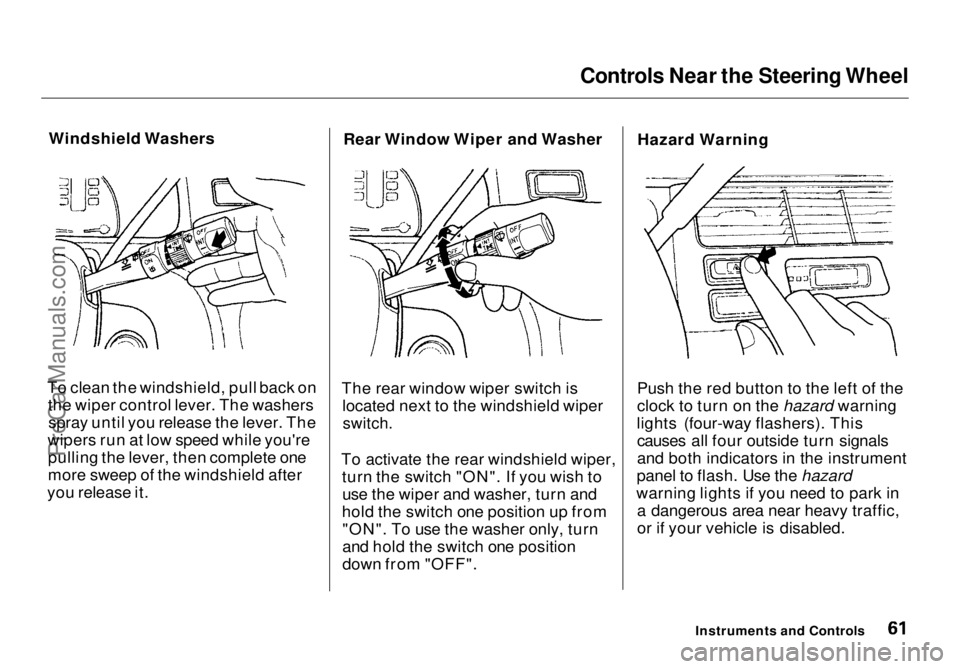
Windshield Washers
To clean the windshield, pull back on the wiper control lever. The washersspray until you release the lever. The
wipers run at low speed while you're pulling the lever, then complete one
more sweep of the windshield after
you release it. Rear Window Wiper and Washer
The rear window wiper switch is located next to the windshield wiper
switch.
To activate the rear windshield wiper, turn the switch "ON". If you wish touse the wiper and washer, turn and
hold the switch one position up from "ON". To use the washer only, turn
and hold the switch one position
down from "OFF". Hazard Warning
Push the red button to the left of the
clock to turn on the hazard warning
lights (four-way flashers). This causes all four outside turn signals
and both indicators in the instrument
panel to flash. Use the hazard
warning lights if you need to park in a dangerous area near heavy traffic,
or if your vehicle is disabled.
Instruments and ControlsProCarManuals.comMain Menu Table of Contents s t
Page 87 of 272
Digital Clock, Beverage Holder
The digital clock displays the time with the ignition switch ON (II).
To set the clock:
1. Turn the ignition switch ON (II) to display the time. 2. Press and hold the HOUR button
until the hour advances to thedesired time.
3. Press and hold the MIN. button until the numbers advance to thedesired time.
You can use the RESET button to quickly set the time to the nearest
hour. If the displayed time is before
the half hour, pressing RESET
button sets the clock back to the
previous hour. If the displayed time
is after the half hour, pressing
RESET button sets the clock for-
ward to the beginning of the next hour.For example: 1:06 would RESET to 1:00.
1:52 would RESET to 2:00.
Beverage Holder
To use the front beverage holder, pull on the front. Push the holder all
the way in to close it.
Instruments and Controls
Digital Clock
HOUR
MIN
RESETProCarManuals.comMain Menu Table of Contents s t
Page 177 of 272
Cooling System
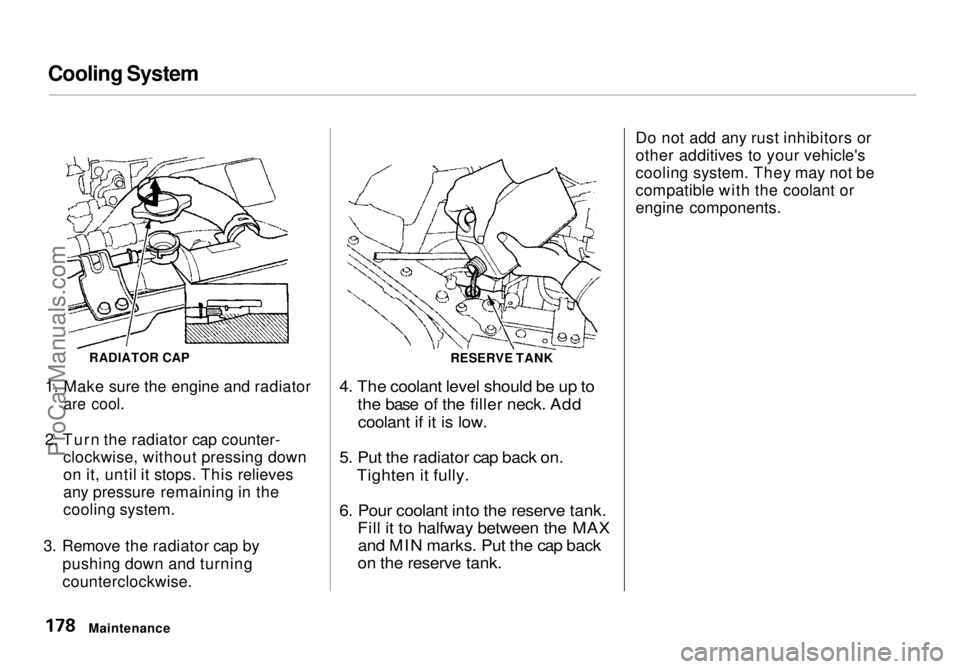
1. Make sure the engine and radiator
are cool.
2. Turn the radiator cap counter- clockwise, without pressing down
on it, until it stops. This relieves
any pressure remaining in the
cooling system.
3. Remove the radiator cap by pushing down and turning
counterclockwise.
4. The coolant level should be up to
the base of the filler neck. Addcoolant if it is low.
5. Put the radiator cap back on. Tighten it fully.
6. Pour coolant into the reserve tank. Fill it to halfway between the MAXand MIN marks. Put the cap back
on the reserve tank.
Do not add any rust inhibitors or
other additives to your vehicle's
cooling system. They may not be
compatible with the coolant or
engine components.
Maintenance RADIATOR CAP
RESERVE TANKProCarManuals.comMain Menu Table of Contents s t
Page 206 of 272
Lights
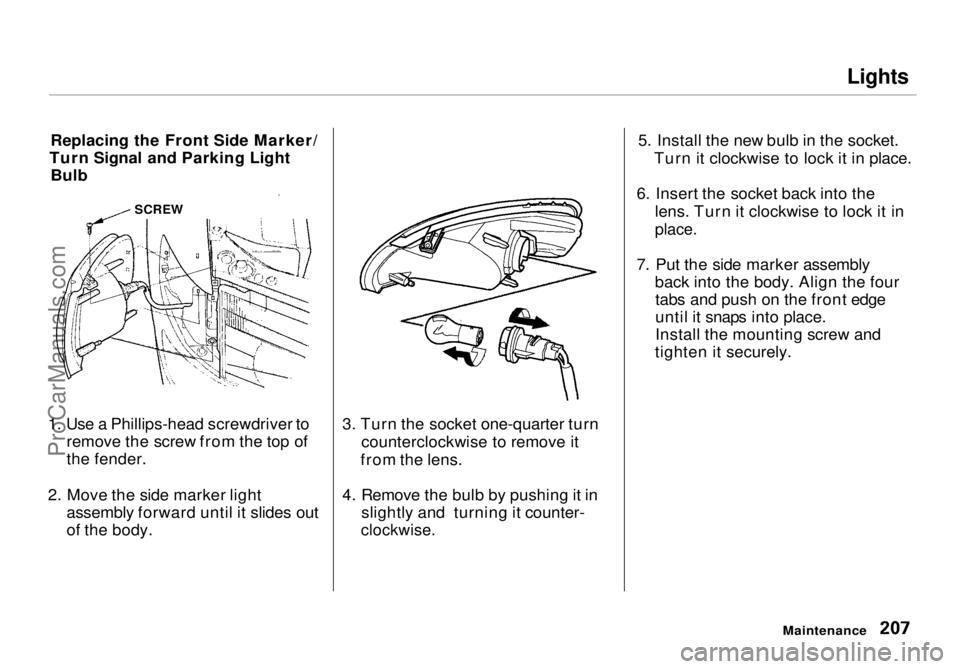
Replacing the Front Side Marker/
Turn Signal and Parking Light Bulb
1. Use a Phillips-head screwdriver to remove the screw from the top of
the fender.
2. Move the side marker light assembly forward until it slides out
of the body. 3. Turn the socket one-quarter turn
counterclockwise to remove it
from the lens.
4. Remove the bulb by pushing it in slightly and turning it counter-
clockwise.
5. Install the new bulb in the socket.
Turn it clockwise to lock it in place.
6. Insert the socket back into the lens. Turn it clockwise to lock it in
place.
7. Put the side marker assembly back into the body. Align the fourtabs and push on the front edge
until it snaps into place.
Install the mounting screw and
tighten it securely.
Maintenance
SCREWProCarManuals.comMain Menu Table of Contents s t
Page 207 of 272
Lights
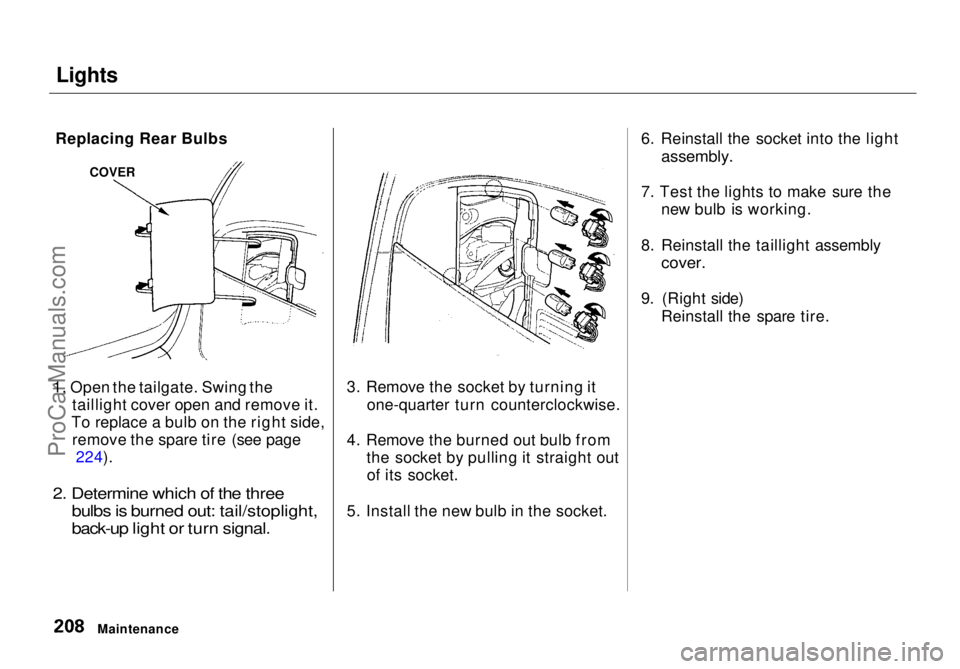
1. Open the tailgate. Swing the taillight cover open and remove it.
To replace a bulb on the right side, remove the spare tire (see page 224).
2. Determine which of the three bulbs is burned out: tail/stoplight,
back-up light or turn signal.
3. Remove the socket by turning it
one-quarter turn counterclockwise.
4. Remove the burned out bulb from the socket by pulling it straight outof its socket.
5. Install the new bulb in the socket. 6. Reinstall the socket into the light
assembly.
7. Test the lights to make sure the new bulb is working.
8. Reinstall the taillight assembly
cover.
9. (Right side) Reinstall the spare tire.
Maintenance
COVER
Replacing Rear BulbsProCarManuals.comMain Menu Table of Contents s t
Page 221 of 272
Changing a Flat Tire
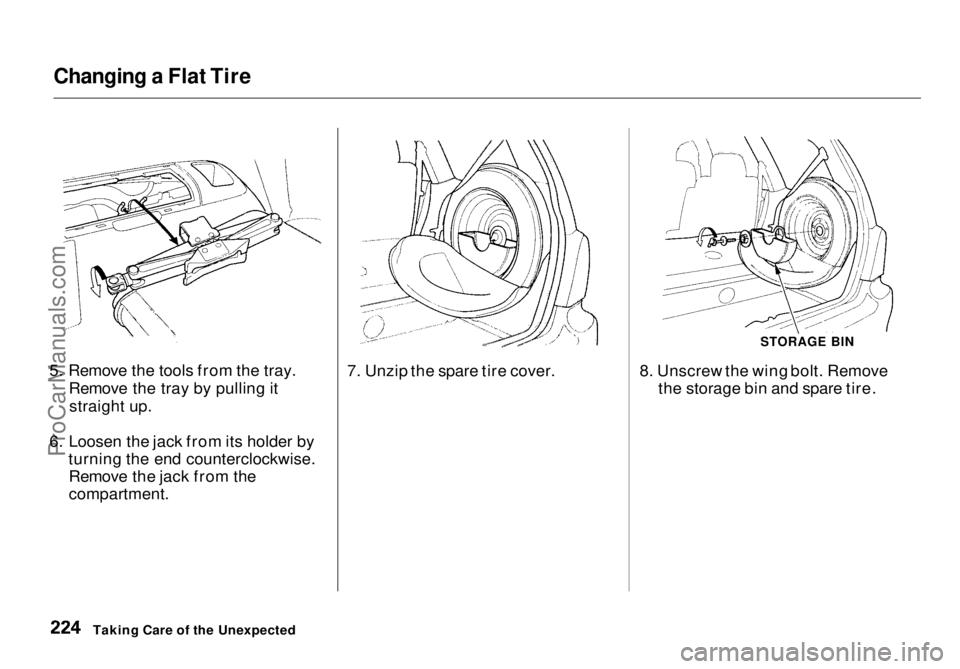
5. Remove the tools from the tray. Remove the tray by pulling itstraight up.
6. Loosen the jack from its holder by turning the end counterclockwise.Remove the jack from the
compartment. 7. Unzip the spare tire cover.
STORAGE BIN
8. Unscrew the wing bolt. Remove the storage bin and spare tire.
Taking Care of the UnexpectedProCarManuals.comMain Menu Table of Contents s t