1998 HONDA INTEGRA airbag
[x] Cancel search: airbagPage 1374 of 1681
Before scrapping any airbags (including those in a whole
car ro be scrappedl, the airbags must be deployed. lf the
car is still within the warranty period, before you deploy
the airbags, the Acura District Technical Manager mustgive approval and/or special instructions. Only after theairbags have been deployed (as the result of vehicle colli-
sion, for example). can they be scrapped.
lf the airbags appear intact (not deployed). treat themwith extreme caution.
Follow this procedure:
Deploying the Airbags: In"vehicle
NOTE: lf an SRS vehicle is to be entirely scrapped. itsairbags should be deployed while still in the vehicle. Theairbags should not be considered as salvageable parts
and should never be installed in another vehicle.
E@ Contirm that each airbsg is securelymounted; otherwise, severe personal iniury could resultfrom deployment.
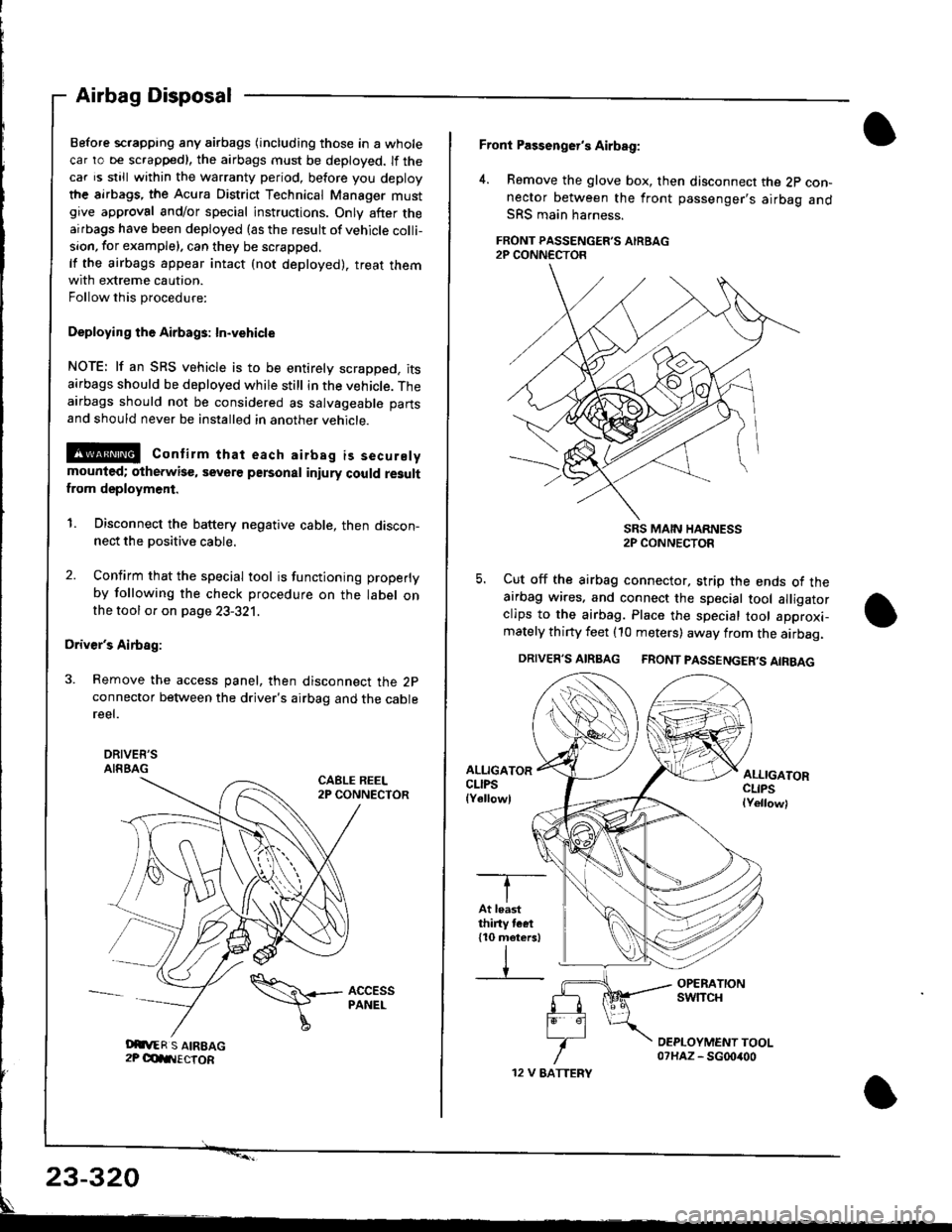
1. Disconnect the battery negative cable, then discon-nect the positive cable.
2. Confirm that the special tool is functioning properly
by following the check procedure on the label onthe tool or on page 23-321.
Driver's Airbag:
3. Remove the access panel, then disconnect the 2pconnector between the driver's airbag and the cablereel.
DRIVEE'SAIRBAGCABLE REEL2P CONNECTOR
Airbag Disposal
Oit,ER S AIREAG2P OdIIIECTOR
\\+- AccEss
I
PANEL
12 V EATTERY
Front Passenger's Airbag:
4. Remove the glove box, then disconnect the 2p con-nector between the front passenger's airbag andSRS main harness.
FRONT PASSENGER'S AIRBAG2P CONN€CTOR
SRS MAIN HARNESS2P CONNECTOR
5. Cut off the airbag connector, strip the ends ot theairbag wires. and connect the special tool alligatorclips to the airbag. Place the special tool approxi-mately thirty feet (10 meters) away from the airbag.
DRIVER'S AIRBAG FRONT PASSENGER'S AIRBAG
ALLIGATORCLIPSlYellowl
ALLIGATORCLIPSlYellowl
-T--
IAt leastthiny tcet110 meters)
IV
23-320
Page 1375 of 1681
)6.
7.
8.
Connect a 12 volt battery to the tool:
. lf the green light on the tool comes on, the alr-
bag igniter circuit is defective and cannot deploy
the airbag. Go to Damaged Airbag Specia I
Procedure.
. lfthe red light on the tool comes on, the airbag is
ready to be deployed.
Push the tool's deployment switch The airbag
should deploy (deployment is both highly audible
and visible; a loud noise and rapid inflation of the
bag, followed by slow deflation).
. lf the airbags deploy and the green light on the
tool comes on, continue with this procedure
. lf an airbag doesn't deploy. yet the green light
comes ON, its igniter is defective. Go to Dam-
aged Airbag Special Procedure.
!!@ During deployment, the airbag c8n
become hot enough to burn you Wait thirtY min-
ut€s after d€ployment befote touching the assem-
blv.
Dispose of the complete airbag. No part of it can be
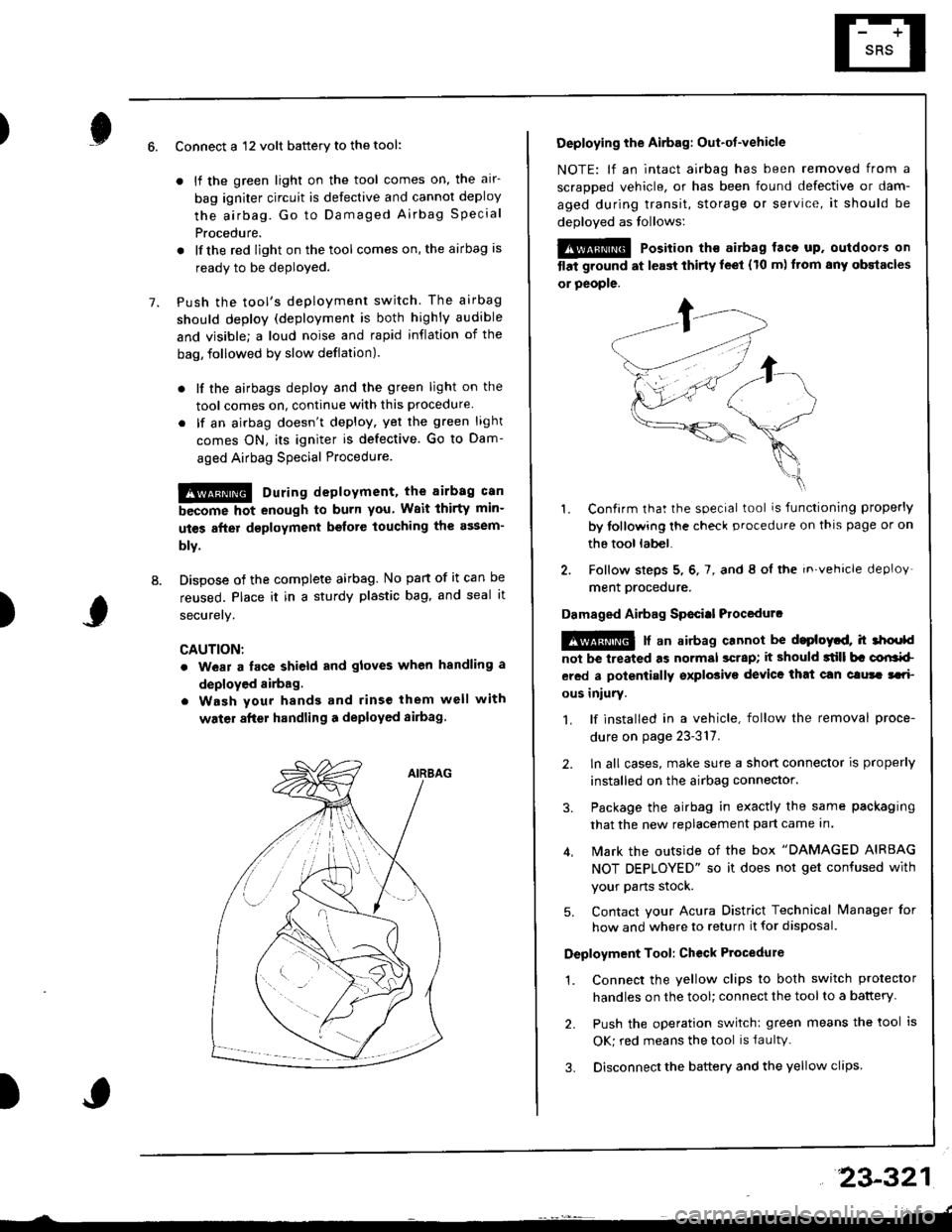
reused. Place it in a sturdy plastic bag, and seal it
securery.
CAUTION:
. wear a lace shield and gloves when handling a
deployed airbag.
. Wash your hands and rinse them well with
water after handling a deployed sirbag
)
Deploying the Airbag: Out-ot-vehicle
NOTE: lf an intact airbag has been removed from a
scraDDed vehicle, or has been found defective or dam-
aged during transit, storage or service, it should be
deoloved as follows:
@@ Position th€ airbag laca up. outdoors on
tlat ground at l€ast thirty leet (10 m) ftom any obstacles
or people.
1. Confirm that the special tool is functioning properly
by tollowing the check procedure on thls page or on
the tool lab€|.
2. Follow steps 5, 6, 7, and 8 ol the in.vehicle deploy'
ment orocedure.
Damaged Airbag Sp€citl Procedurc
!@ [ an airbag cannot be d.ploytd, h 3hoold
not be lreated as normal scrap; it should 3till b. corlrkl
ered a polentially sxplosive device that can clura tari
ous iniury.
1. lf installed in a vehicle, follow the removal proce-
dure on page 23-317.
2. ln all cases, make sure a short connector is properly
installed on the airbag connector.
3. Package the airbag in exactly the same packaging
that the new replacement part came In.
4. Mark the outside of the box "DAMAGED AIRBAG
NOT DEPLOYED" so it does not get confused with
your Parts stock.
5. Contact your Acura District Technical lvanager for
how and where to return it for disposal.
Deployment Tool: Ch€ck Ptocedure
1. Connect the yellow clips to both switch protector
handles on the tool; connect the tool to a battery
2. Push the operation switch: green means the tool is
OK; red means the tool is faultv.
3. Disconnect the battery and the yellow clips
23-321
Page 1376 of 1681
Cable Reel
Replacement
@ store a removed airbag with the pad sur-
tac€ up. lf the airbag is improperly stored face down,
.ccidontal dcployment could propel the unit with
.nough torce to cause serious injury.
CAUTIONT
o Carefully insp€ct the airbag belore installing it. Do
not install an airbag that shows signs of boing
dropped or improperly handled, such as dents,
cracks or deformation.
. Always disconnect the airbag connector(s) when the
harness is disconnectod.
. Do not disassemble or tamper wiih the airbag.
1. Make sure you have the anti-theft code for the radio,
then write down the frequencies for the radio's pr+
set button.
2. Disconnect the battery negative cable, then discon-
nect the positive cable from the battery. and wait at
least three minutes,
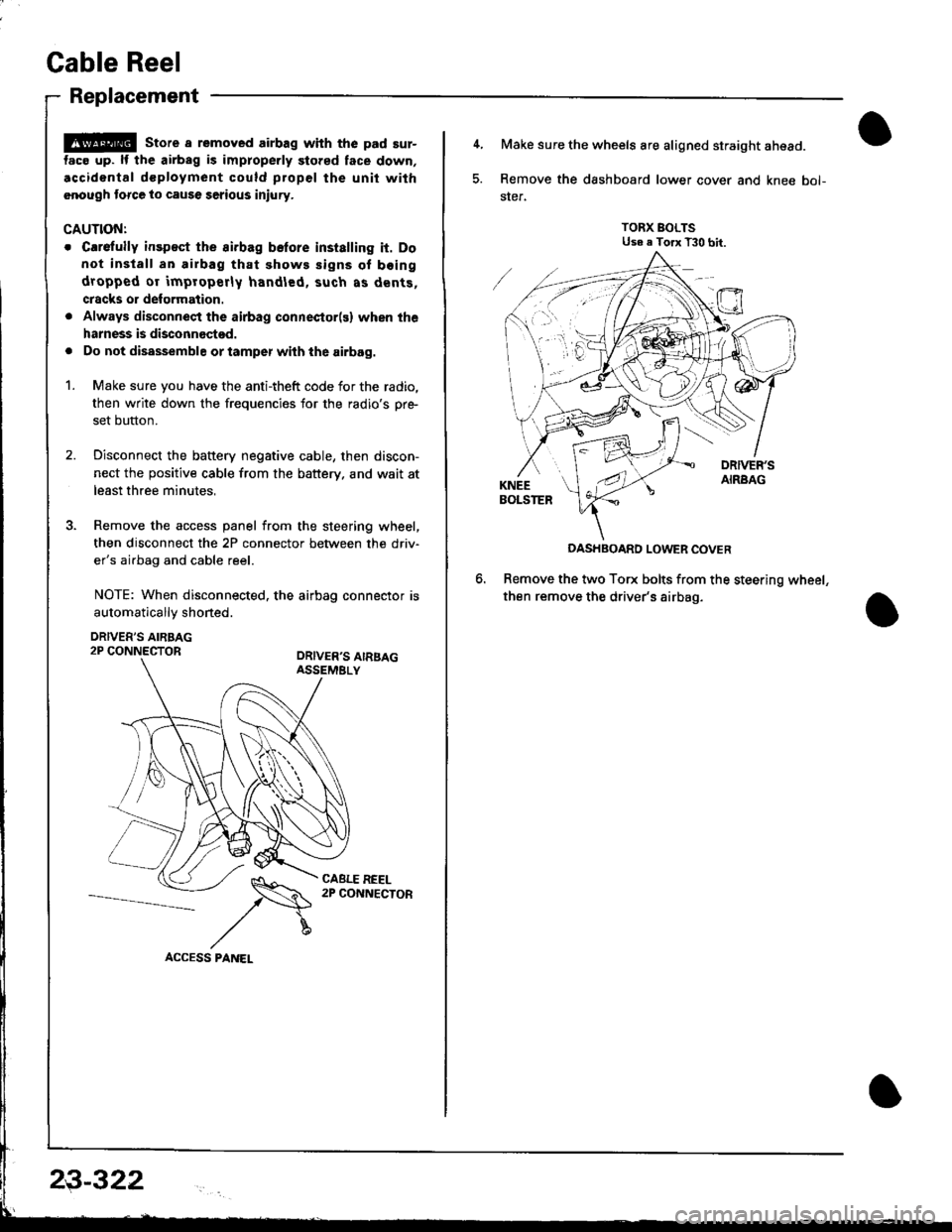
3. Remove the access panel from the steering wheel,
then disconnect the 2P connector between the driv'
er's airbag and cable reel.
NOTE: When disconnected. the airbag connector is
automaticallv shoned.
DRIVER'S AIRBAG2P CONNECTORORIVER'S AIRSAGASSEMELY
CABLE REEL2P CONNECTOR
23-322
4, Make sure the wheels are aligned straight ahead.
5. Remove the dashboard lower cover and knee bol-
ster.
TORX BOLTSUse e Torx T30 bit.
DASHBOARD LOWER COVER
Remove the two Torx bolts from the steering wheel,
then remove the driver's airbag.
Page 1379 of 1681
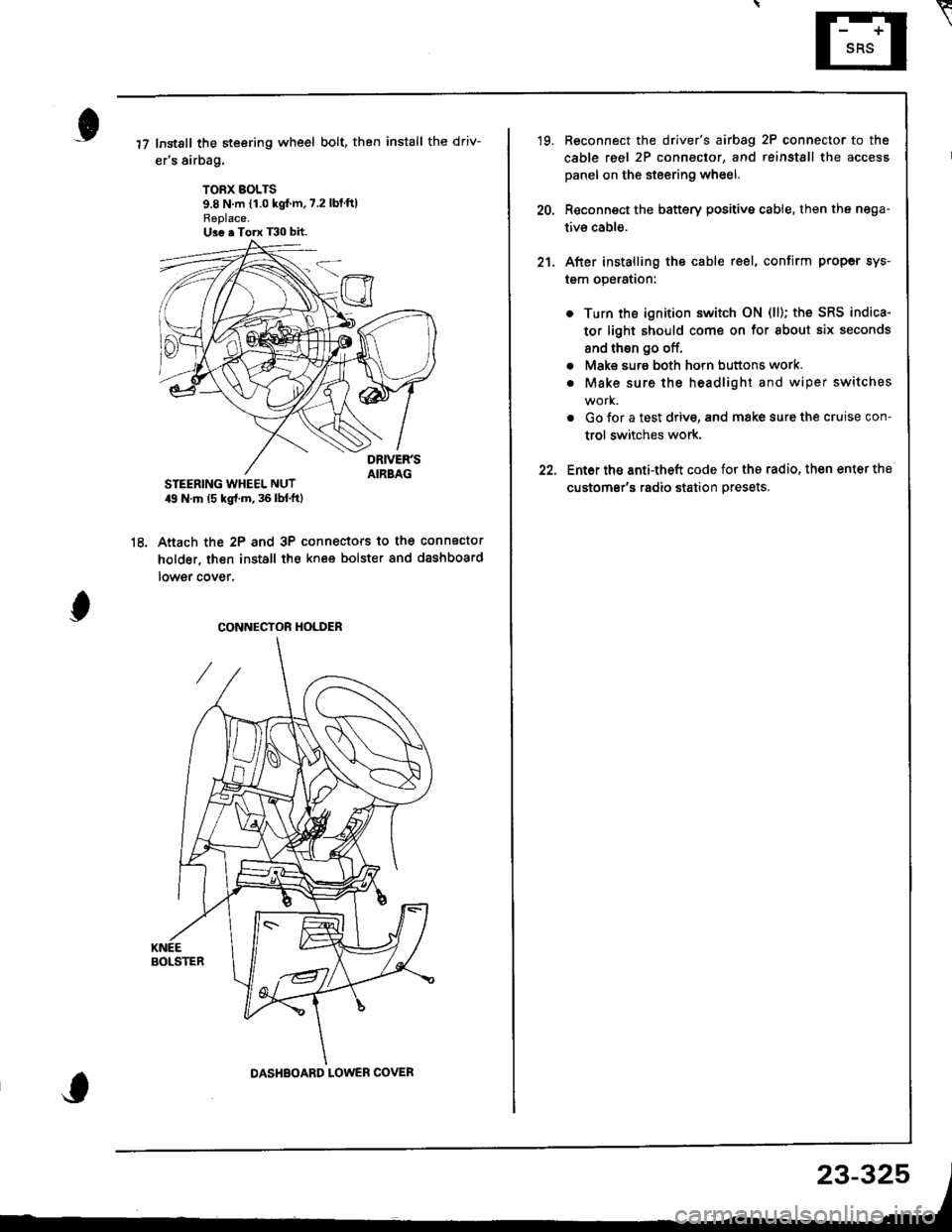
Instsll the steering wheel bolt, then install the driv-
er's airbag.
TORX BOLTS9.8 N m {1.0 kgf'm,7.2 lbtftlReplace.U3e . Torx T30 bit.
STEERING WHEEL NUT19 N.m (5 kgl.m, 36 lbl.ftl
Anach the 2P and 3P connectors to the connector
holder. then install the knee bolster and dashboard
lowgr cover,
le
CONNECTOR HOLDER
DASHBOARD LOWER COVER
23-325
\
'19. Reconnect the driver's aibag 2P connector to the
cable reel 2P connector, and reinstSll the access
panel on the steering wheel.
20, Reconnect the battery positive cable, then the nega-
tivs cable.
21. After installing the cable reel, confirm proper sys-
tgm operation:
Turn the ignition switch ON (ll); the SRS indica-
tor light should come on for about six seconds
and thsn go off.
Make surs both horn buttons work.
Make sure the headlight and wiper switches
Go {or a test drive, and make sure the cruise con-
trol switches work.
Ent6r the anti-theft code for tho radio, then enter the
customsr's radio station presets.
a
a
Page 1380 of 1681
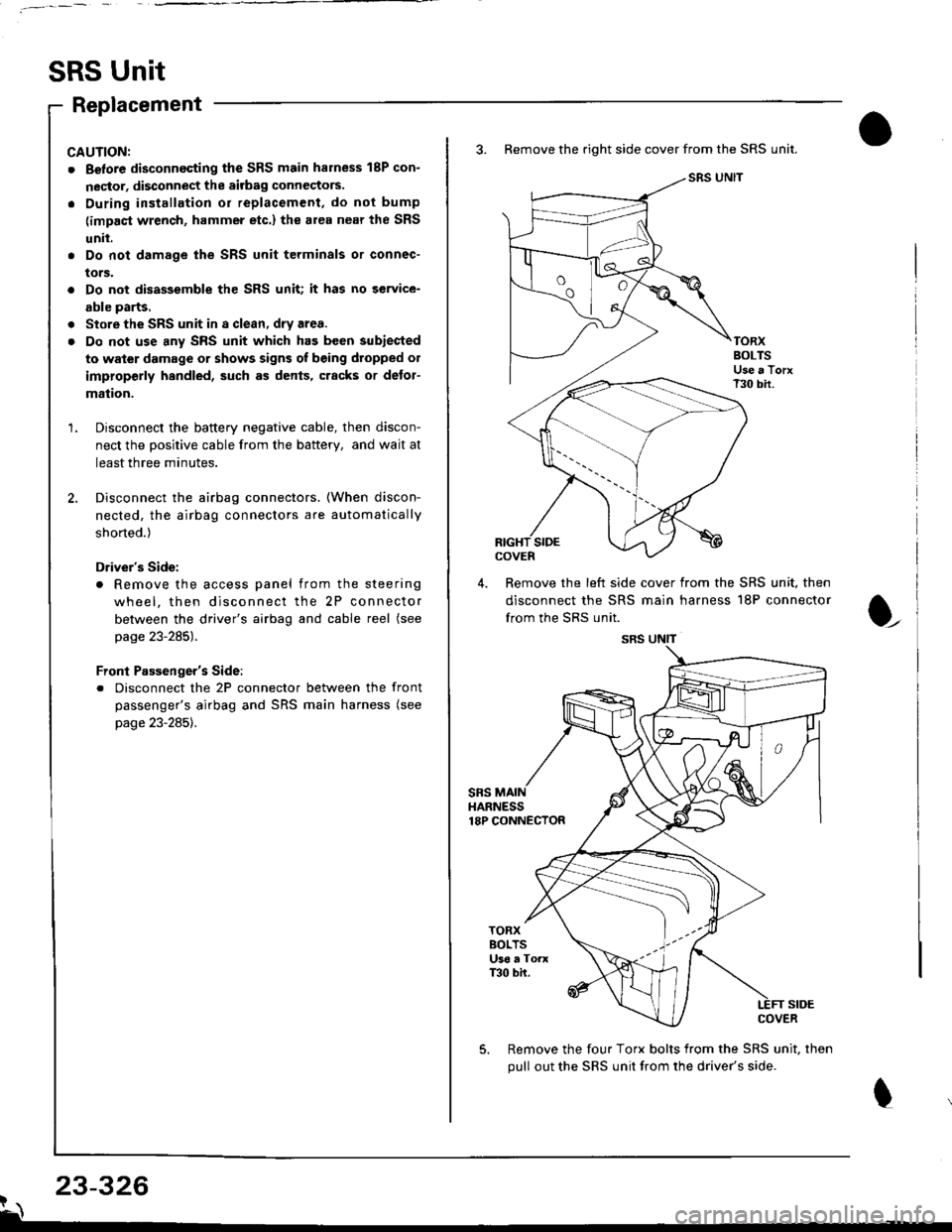
SRS Unit
Replacement
CAUNON:
. Betore disconnecting the SRS main harness 18P con-
nector, disconnect the aitbag connectors.
. During installation or replacement, do not bump
(impact wrench, hammer etc.) the al€a near the SRS
unit.
. Do not damage the SRS unit terminals or connec-
tors.
. Do not disassemble the SRS unit; it has no service-
able parts.
. Store the SRS unit in a clean, dry area.
. Do not use any SRS unit which has been subiected
to water damage or shows signs of being dtopped ol
improperly hsndled, such as dents, cracks or detor-
mation.
Disconnect the baftery negative cable, then discon-
nect the positive cable from the battery, and wait at
least three minutes.
Disconnect the airbag connectors. (When discon-
nected. the airbag connectors are automatically
shorted.)
Driver's Side:
. Remove the access panel from the steering
wheel, then disconnect the 2P connector
between the driver's airbag and cable reel (see
page 23-285).
Front Passenger's Side:
. Disconnect the 2P connector between the front
passenger's airbag and SRS main harness (see
page 23-285).
3. Remove the right side cover from the SRS unit.
SRS UNIT
TORXBOLTSUse a TorxT30 bir.
SIDEcovEn
4. Remove the left side cover from the SRS unit, then
disconnect the SRS main harness 18P connector
from the SRS unit.
sRsHARNESS18P CONNECTOR
t
TORXBOLTSU36 a ToaxT30 bh.
SIDECOVER
Remove the four Torx bolts from the SRS unit, then
pull out the SRS unit from the driver's side.
23-326?\
SRS UNIT
Page 1381 of 1681
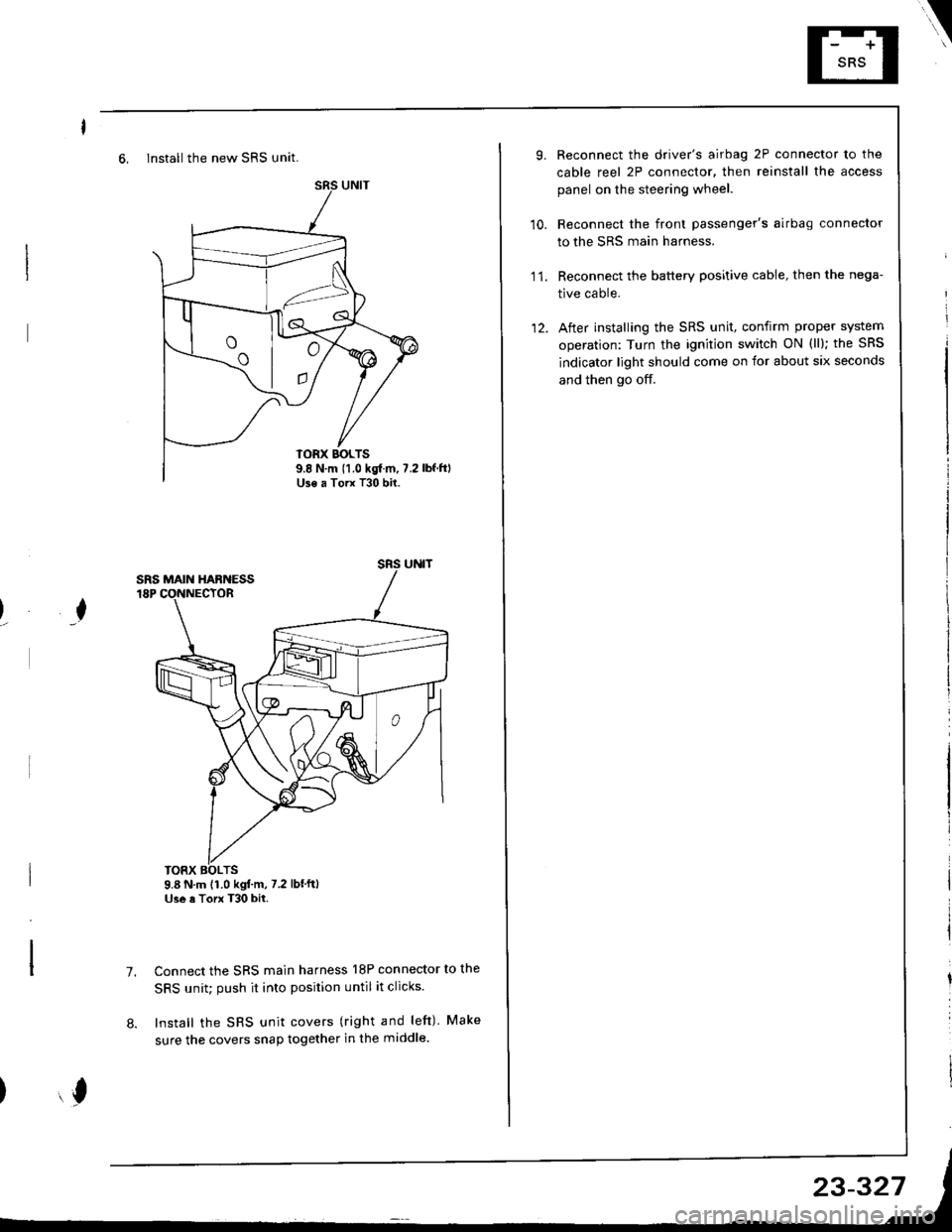
6, Install the new SRS unit.
o^ l- o
9.8 N.m 11.0 kgf m, 7.2Use a Torx T30 bit.
I
TORX BOLTS9.8 N.m 11.0 kgl.m, 7.2 lbf'ftlUse a Torx T30 bit.
7.Connect the SRS main harness l8P connector to the
SRS unit; push it into position until it clicks.
Install the SRS unit covers (right and left) Make
sure the covers snap together in the middle.8.
,l
\
10.
Reconnect the driver's airbag 2P connector to the
cable reel 2P connector, then reinstall the access
panel on the steering wheel.
Reconnect the front passenger's airbag connector
to the SRS main harness.
Reconnect the battery positive cable, then the nega-
tive cable.
After installing the SRS unit, confirm proper system
operation: Turn the ignition switch ON (ll); the SRS
indicator light should come on for about six seconds
and then go off.
11.
12.
Page 1471 of 1681
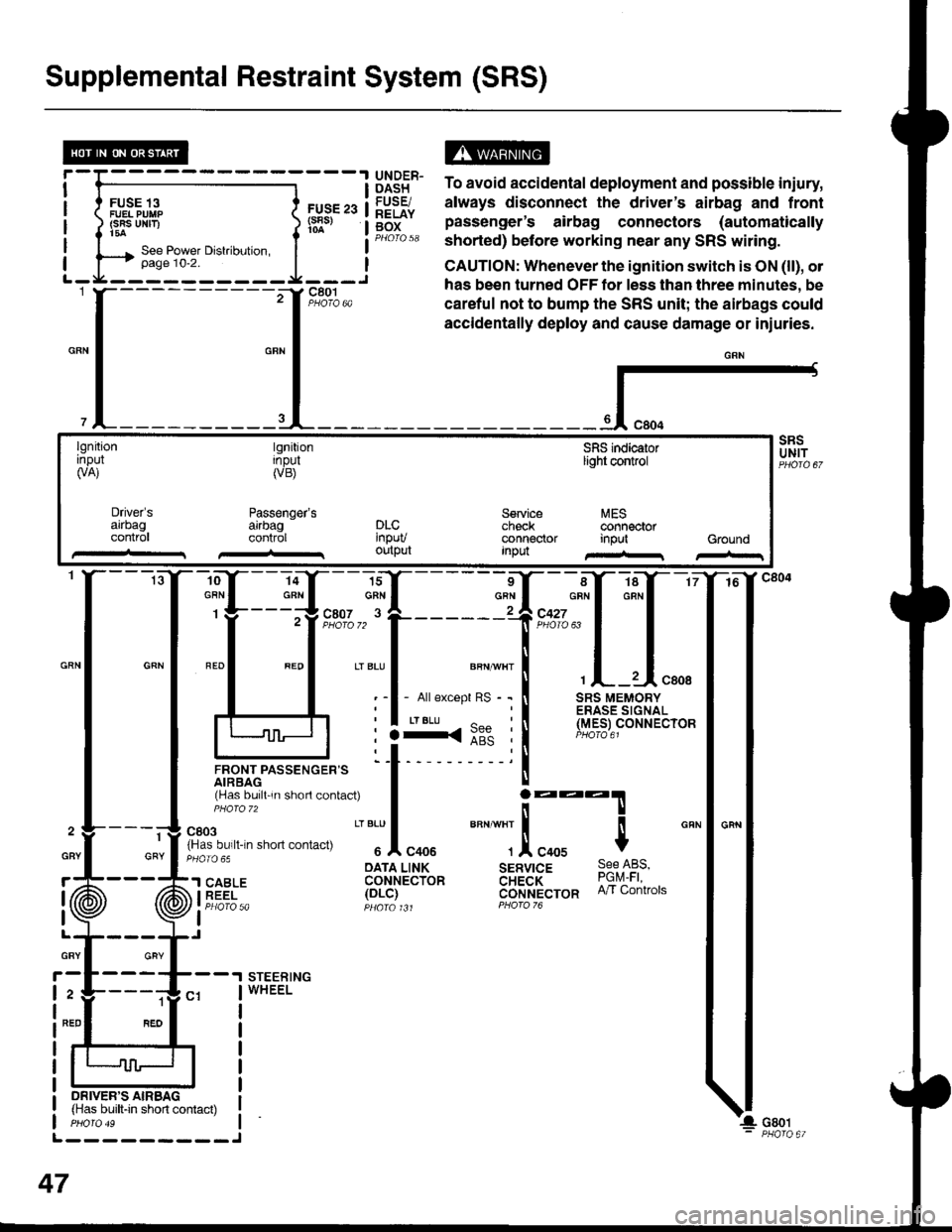
Supplemental Restraint System (SRS)
FUSE 13FUEL PUIIP(SRS UNF)t5a
FUS€ 23(s8s)
ts13t5" To avoid accidental deployment and possible iniury,
lq9Fr. always disconnect the driver's airbag and frontg[f" pas"Lnger's airbag connectors (automaticallyPHorQ 58 shorted) before working near any SRS witing.
CAUTION: Whenever the ignition switch is ON (ll), ol
has been turned OFF tor less than three minutes, be
careful not to bump the SRS unit; the airbags could
accidentally deploy and cause damage or iniuries.
{-
lgnitionrnpul(VA)
tgnitionInpul(VB)
Passenger'sarrbagcontrol
SFIS indicaiorlight control
Service MEScheck @nnectorconnector input GroundInpu
Driver'sarrbagconlr0lDLC'npuvoutput
-ro--Y---la-Y--- 16
:ffi*f:ffq
lJnor,rrpassencen= 'l t- 'i
rHas bu,ll 'n shorl contac0
I j:::T
fn'"o"t. n-n .non "on,""u
" "'Jl
"oou
""" ""]
.!, "oou $
cRN
: :3<::" :l (Y.e_er
oArA LINK sERvrcE 9qe l-qs,'l SABLE coHrecibn aH;a'i- ?9q1i iEEi- 1ot-i1 cijrlt't'ecron n/r contrors
I Pt:OfO 5a pqara t Jt PForo 76
I
STEERINGWHEEL
1
GRY
ON|vER'S AIRBAG(Has built-in short contact)
L---------J
47
GBY
r
I
I
GRY
2
NED
Page 1629 of 1681
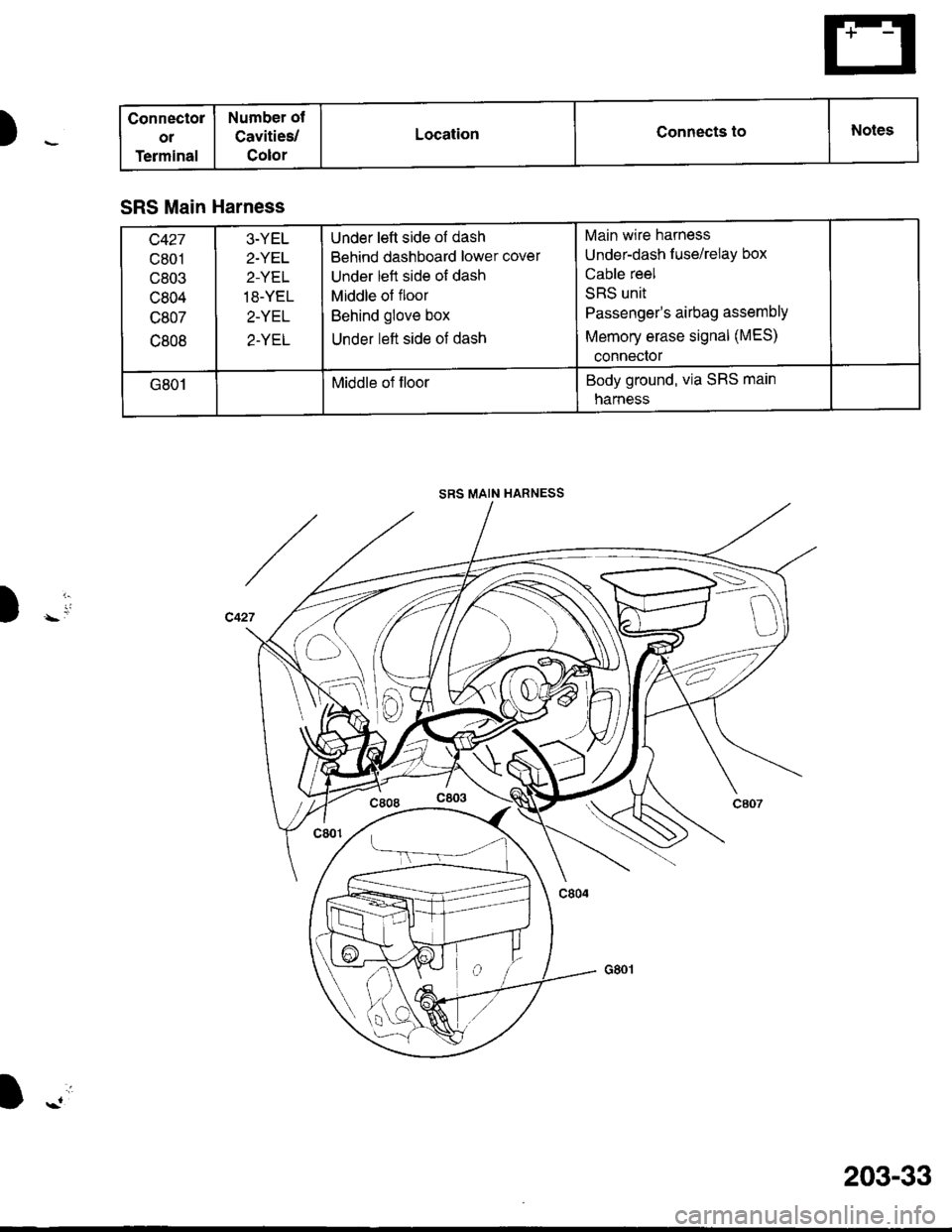
Connectol
ol
Terminal
Number ot
Cavities/
Color
LocationConnects toNotes
SRS Main Harness
c427
c801
c803
c804
c807
c808
3-YEL
2.YET
2-YEL
18-YEL
2-YEL
2-YEL
Under left side of dash
Behind dashboard lower cover
Under left side of dash
Middle of floor
Behind glove box
Under left side of dash
Main wire harness
Under-dash f use/relay box
Cable reel
SRS unit
Passenger's airbag assemblY
Memory erase signal (MES)
conneclor
G801Middle of floorBody ground, via SRS main
narness
SRS MAIN HARNESS
Y1-
D)
I -.'i
203-33