1998 HONDA CIVIC COUPE power steering
[x] Cancel search: power steeringPage 45 of 251
Additional Information About Your SRS
SRS Components
Your Supplemental Restraint System (SRS) includes:
Two frontal airbags. The driver'sairbag is stored in the center of
the steering wheel; the front
passenger's airbag is stored in thedashboard. Both are marked
"SRS".
Sensors that can detect a severe
frontal collision. A sophisticated electronic system
that continually monitors thesensors, control unit, the airbag
activators, and all related wiring
when the ignition is ON (II). An indicator light on the
instrument panel to alert you to a
possible problem with the system (see page 45). Emergency backup power in case
your vehicle's electrical system is disconnected in a crash.
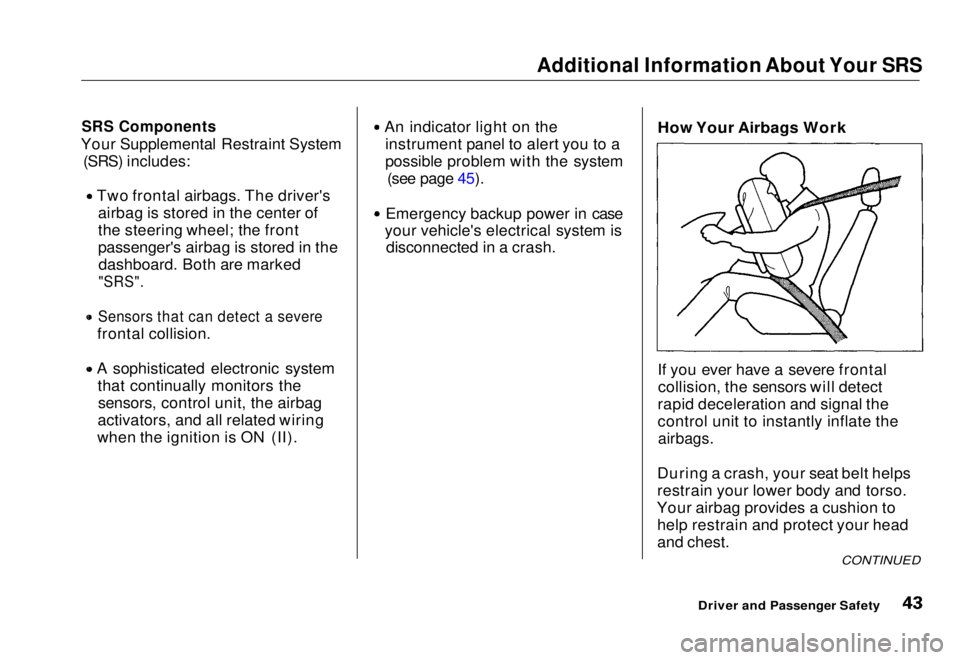
How Your Airbags Work
If you ever have a severe frontal
collision, the sensors will detect
rapid deceleration and signal the
control unit to instantly inflate the
airbags.
During a crash, your seat belt helps
restrain your lower body and torso.
Your airbag provides a cushion to help restrain and protect your head
and chest.
CONTINUED
Driver and Passenger SafetyMain Menu Table of Contents s t
Page 51 of 251
Instruments and Controls
This section gives information about the controls and displays that
contribute to the daily operation of
your Honda. All the essential
controls are within easy reach.
Control Locations............................ 50
Indicator Lights................................ 51
Gauges.............................................. 55
Speedometer................................ 55
Tachometer.................................. 55 Odometer...................................... 55
Trip Meter.................................... 55 Fuel Gauge................................... 56
Temperature Gauge.................... 56
Maintenance Required
Indicator.................................... 57
Controls Near the Steering
Wheel........................................58
Headlights.................................... 59
Daytime Running Lights............. 59
Instrument Panel Brightness..... 60
Turn Signals................................. 60
Windshield Wipers...................... 61
Windshield Washers................... 61
Hazard Warning........................... 62
Rear Window Defogger.............. 62
Steering Wheel Adjustment....... 63
Steering Wheel Controls ................ 64
Cruise Control.............................. 64
Keys and Locks................................ 67
Keys...............................................67
Ignition Switch............................. 67
Door Locks................................... 68
Power Door Locks....................... 69
Remote Transmitter.................... 70
Trunk............................................ 73
Seat Adjustments............................. 74
Front Seat Adjustments.............. 74
Rear Seat Access......................... 75
Head Restraints........................... 75
Folding Rear Seat............................ 76
Power Windows............................... 77
Moonroof.......................................... 79
Mirrors.............................................. 79
Adjusting the Power Mirrors..... 80
Parking Brake.................................. 80
Glove Box......................................... 81
Beverage Holder.............................. 82
Accessory Power Socket................ 83
Ashtrays............................................ 83
Interior Light.................................... 84
Instruments and ControlsMain Menu s t
Page 70 of 251
Keys and Locks
LOCK (0) — You can insert or
remove the key only in this position.
To switch from ACCESSORY to LOCK, you must push the key in
slightly as you turn it. If your vehicle
has an automatic transmission, it
must also be in Park. The anti-theft
lock will lock the steering column
when you remove the key. If the front wheels are turned, the
anti-theft lock may sometimes make
it difficult to turn the key from
LOCK to ACCESSORY. Firmly turn
the steering wheel to the left or to
the right as you turn the key. ACCESSORY (I) — In this position,
you can operate the audio system and the accessory power socket.
ON (II) — This is the normal key
position when driving. All features
and accessories on the vehicle are
usable. Several of the lights on the
instrument panel come on as a test
when you turn the ignition switch
from ACCESSORY to ON (see page 51).
START (III) — Use this position
only to start the engine. The switch
returns to ON (II) when you let go of
the key.
You will hear a reminder beeper if
you leave the key in the ignition switch in the LOCK (0) or
ACCESSORY (I) position and open the driver's door. Remove the key to
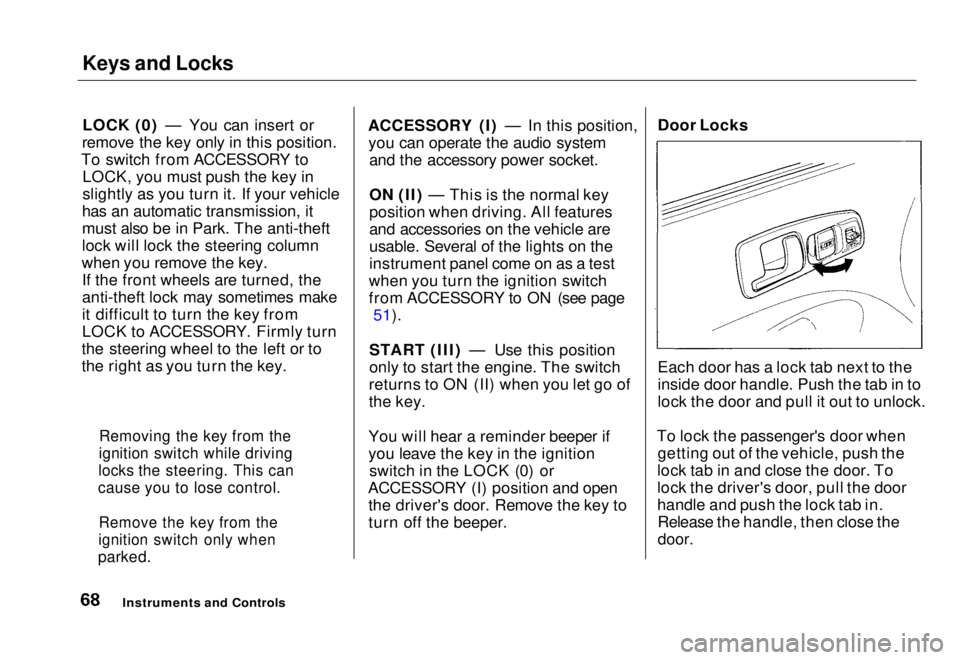
turn off the beeper. Door Locks
Each door has a lock tab next to the
inside door handle. Push the tab in to
lock the door and pull it out to unlock.
To lock the passenger's door when getting out of the vehicle, push the
lock tab in and close the door. To
lock the driver's door, pull the door
handle and push the lock tab in. Release the handle, then close the
door.
Instruments and Controls
Removing the key from the
ignition switch while driving
locks the steering. This can
cause you to lose control.
Remove the key from the
ignition switch only when
parked.Main Menu Table of Contents s t
Page 142 of 251
Maintenance
This section explains why it is important to keep your vehicle well
maintained and to follow basic
maintenance safety precautions.
This section also includes Maintenance Schedules for normaldriving and severe driving conditions,
a Maintenance Record, and instruc-
tions for simple maintenance tasks
you may want to take care of yourself.
If you have the skills and tools to per-
form more complex maintenance tasks on your Honda, you may want
to purchase the Service Manual. See
page 219 for information on how to obtain a copy, or see your Honda
dealer.
Maintenance Safety....................... 142
Important Safety Precautions.. 143
Maintenance Schedule.................. 144
Maintenance Record..................... 151
Owner Maintenance Checks........ 153
Fluid Locations............................... 154
Engine Oil....................................... 155 Adding Oil................................... 155Recommended Oil..................... 155Synthetic Oil............................... 156
Additives..................................... 156
Changing the Oil and Filter...... 157
Cooling System.............................. 159
Adding Engine Coolant............. 159Replacing Engine Coolant........ 161
Windshield Washers..................... 164
Transmission Fluid........................ 164
Automatic
Transmission.......................... 164
5-speed Manual
Transmission.......................... 166
Brake and Clutch Fluid................. 166
Brake System............................. 167Clutch System............................ 167
Power Steering............................... 168
Air Cleaner Element...................... 169 Spark Plugs..................................... 171
Replacement............................... 171
Specifications............................. 172
Battery............................................ 173
Wiper Blades.................................. 175
Air Conditioning System............... 177 Drive Belts...................................... 178
Timing Belt..................................... 178
Tires................................................ 179 Inflation....................................... 179
Recommended Tire Pressures
for Normal Driving............ 180
Inspection................................... 181
Maintenance............................... 181
Tire Rotation.............................. 182
Replacing Tires and Wheels ....
183
Wheels an d
Tires....................... 184
Winter Driving........................... 184 Snow Tires.............................. 184
Tire Chains............................. 185
Lights.............................................. 186 Headlight Aiming...................... 188
Replacing Bulbs......................... 189
Storing Your Vehicle..................... 197
MaintenanceMain Menu s t
Page 155 of 251
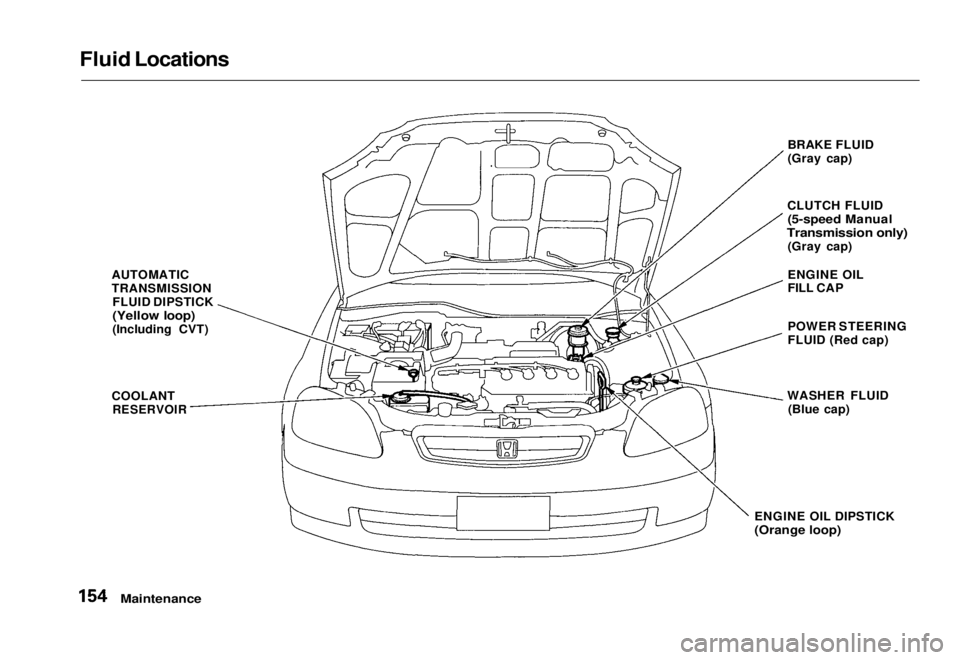
Fluid Locations
AUTOMATIC
TRANSMISSIONFLUID DIPSTICK
(Yellow loop)
(Including CVT)
COOLANT
RESERVOIR
BRAKE FLUID
(Gray cap)
CLUTCH FLUID
(5-speed Manual
Transmission only)
(Gray cap)
ENGINE OIL
FILL CAP
POWER STEERING
FLUID (Red cap)
WASHER FLUID (Blue cap)
ENGINE OIL DIPSTICK
(Orange loop)
MaintenanceMain Menu Table of Contents s t
Page 169 of 251
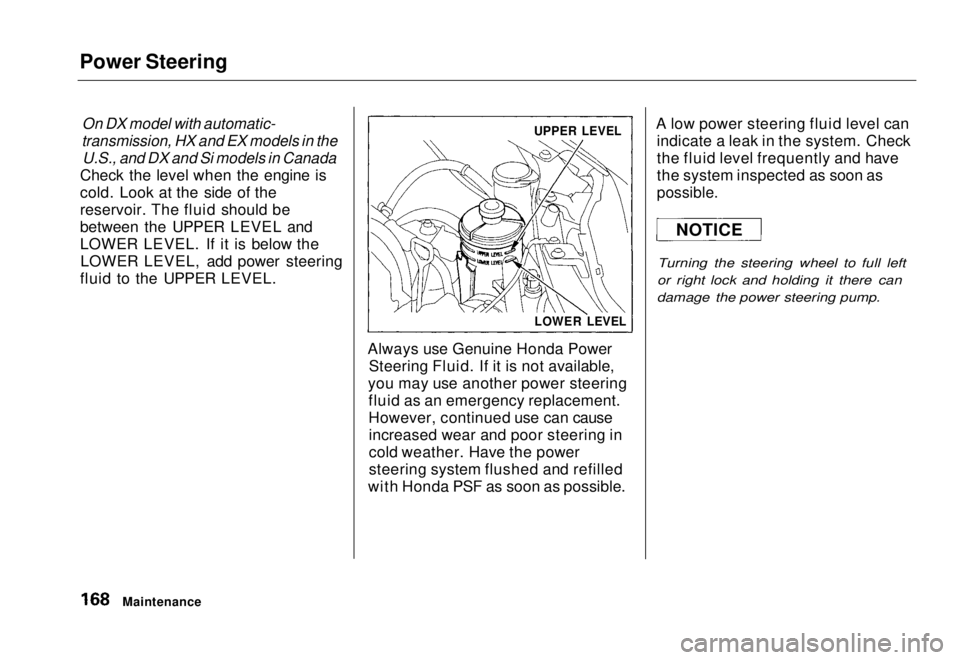
Power Steering
On DX model with automatic-
transmission, HX and EX models in the
U.S., and DX and Si models in Canada
Check the level when the engine is
cold. Look at the side of the
reservoir. The fluid should be
between the UPPER LEVEL and
LOWER LEVEL. If it is below the LOWER LEVEL, add power steering
fluid to the UPPER LEVEL.
Always use Genuine Honda PowerSteering Fluid. If it is not available,
you may use another power steering fluid as an emergency replacement.
However, continued use can causeincreased wear and poor steering in
cold weather. Have the power
steering system flushed and refilled
with Honda PSF as soon as possible. A low power steering fluid level can
indicate a leak in the system. Check
the fluid level frequently and have
the system inspected as soon as
possible.
Turning the steering wheel to full left
or right lock and holding it there can
damage the power steering pump.
Maintenance
UPPER LEVEL
LOWER LEVEL
NOTICEMain Menu Table of Contents s t
Page 179 of 251
Drive Belts, Timing Belt
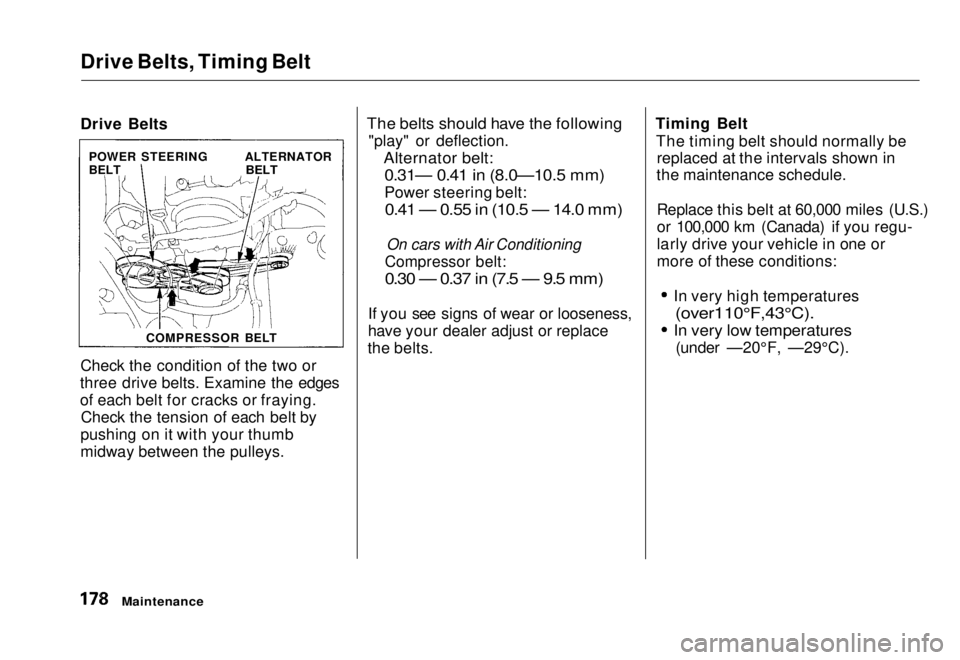
Drive Belts
Check the condition of the two or
three drive belts. Examine the edges
of each belt for cracks or fraying. Check the tension of each belt by
pushing on it with your thumb
midway between the pulleys.
The belts should have the following
"play" or deflection.
Alternator belt:
0.31— 0.41 in (8.0—10.5 mm)
Power steering belt:
0.41 — 0.55 in (10.5 — 14.0 mm)
On cars with Air Conditioning
Compressor belt:
0.30 — 0.37 in (7.5 — 9.5 mm)
If you see signs of wear or looseness,
have your dealer adjust or replace
the belts. Timing Belt
The timing belt should normally be replaced at the intervals shown in
the maintenance schedule.
Replace this belt at 60,000 miles (U.S.)
or 100,000 km (Canada) if you regu-
larly drive your vehicle in one or
more of these conditions: In very high temperatures
(over110°F,43°C).
In very low temperatures
(under —20°F, —29°C).
Maintenance
POWER STEERING
BELT
ALTERNATOR
BELT
COMPRESSOR BELTMain Menu Table of Contents s t
Page 191 of 251
Lights
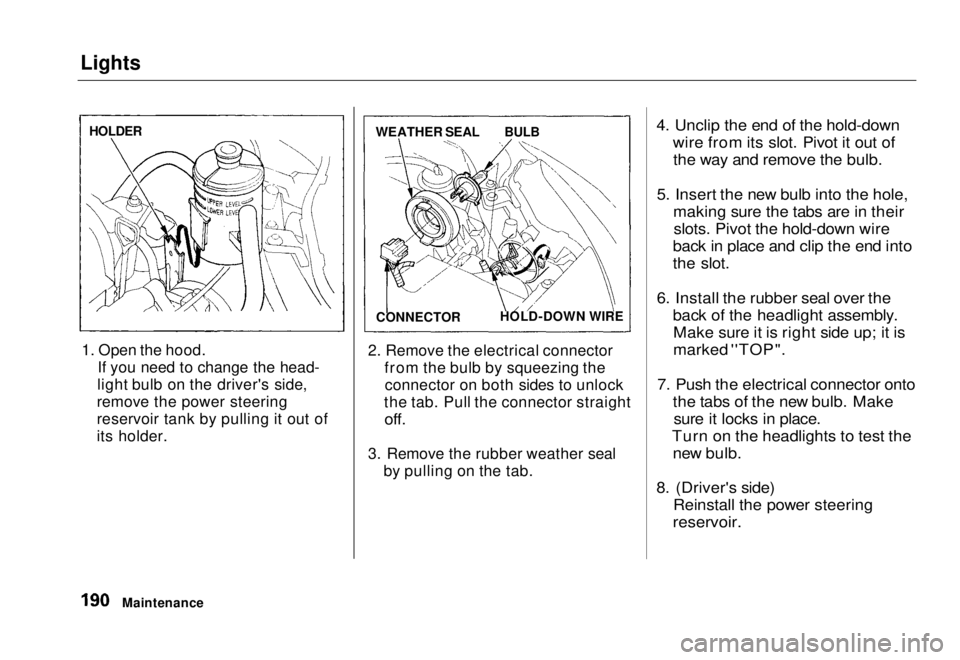
1. Open the hood. If you need to change the head-
light bulb on the driver's side,
remove the power steering
reservoir tank by pulling it out of
its holder. 2. Remove the electrical connector
from the bulb by squeezing theconnector on both sides to unlock
the tab. Pull the connector straight
off.
3. Remove the rubber weather seal by pulling on the tab.
4. Unclip the end of the hold-down
wire from its slot. Pivot it out ofthe way and remove the bulb.
5. Insert the new bulb into the hole, making sure the tabs are in theirslots. Pivot the hold-down wire
back in place and clip the end into
the slot.
6. Install the rubber seal over the back of the headlight assembly.Make sure it is right side up; it is
marked ''TOP".
7. Push the electrical connector onto the tabs of the new bulb. Makesure it locks in place.
Turn on the headlights to test the new bulb.
8. (Driver's side) Reinstall the power steering
reservoir.
Maintenance
HOLDER
WEATHER SEAL
BULB
CONNECTOR HOLD-DOWN WIREMain Menu Table of Contents s t