1998 GMC ENVOY lights
[x] Cancel search: lightsPage 62 of 386

Section 2 Features and Controls
Here you can learn about the many standard and optional features on your vehicle, \
and information on starting,
shifting and braking. Also explained
are the instrument panel and the warning systems that tell you if everything is
working properly
-- and what to do if you have a problem.
2-2 2-4
2-6
2-9 2-10 2-1 1
2-12
2- 13
2- 14
2- 15
2- 16
2-18 2-20
2-2
1
2-23 2-24
2-24
2-25 Keys
Door Locks
Keyless Entry System
LiftgateLiftglass
Theft Content Theft-Deterrent
Passlock@ New Vehicle “Break-In’’
Ignition Positions Starting Your Engine
Engine Coolant Heater
(If Equipped)
Automatic Transmission Operation
Parking Brake Shifting Into PARK (P)
Shifting Out of PARK
(P)
Parking Over Things That Burn
Engine Exhaust Running Your Engine While You’re Parked 2-26
2-26
2-28 2-29
2-30
2-30 2-36
2-39
2-40
2-42
2-49 2-50
2-52 2-52
2-53 2-58 2-60
2-62 Locking Rear Axle
Four-wheel Drive
Windows Horn
Tilt Wheel Turn SignalMultifunction Lever
Exterior Lamps
Interior Lamps
Mirrors Storage Compartments
Ashtrays and Cigarette Lighter
Sun Visors
Accessory Power Outlets Sunroof (If Equipped)
Universal Transmitter Instrument Panel
Instrument Panel Cluster
Warning Lights, Gages and Indicators
2-1
ProCarManuals.com
Page 68 of 386

Operation
UNLOCK: Pressing this button once will unlock the
driver’s door. The parking lamps will flash and the
interior lights will come
on. Pressing this button once
also unlocks the rear liftglass. Pressing
UNLOCK again
within three seconds will cause the remaining doors to
unlock. The parking lamps will flash and
the interior
lights will come on.
LOCK: Pressing this button once will lock all of the
doors. Press LOCK again within three seconds and the
horn will chirp.
REAR: Press this button twice within three seconds to
release the liftglass. The parking lamps will flash and
the interior lights will come on. The transmission must
be PARK
(P) or NEUTRAL (N).
Remote Panic Alarm
When the button with the horn symbol on the key
transmitter is pressed, the horn will sound and
the
headlamps and taillamps will flash for up to 30 seconds.
This can be turned off by pressing the horn button again,
waiting for
30 seconds, or starting the vehicle.
Matching Transmitter(s) To Your Vehicle
Each remote keyless entry transmitter is coded to
prevent another transmitter from unlocking your vehicle.
If
a transmitter is lost or stolen, a replacement can be
purchased through your dealer. Remember
to bring any
remaining transmitters with you
when you go to your
dealer. When the dealer matches the replacement
transmitter
to your vehicle, any remaining transmitters
must also be matched. Once your dealer has coded
the
new transmitter, the lost transmitter will not unlock your
vehicle. Each vehicle can have only four transmitters
matched to it.
2-7
1
ProCarManuals.com
Page 88 of 386

4LO: This setting also engages your front axle to give
you extra traction. You may never need 4LO. It sends
the maximum power to all four wheels.
You might
choose 4LO if you were driving off-road in sand, mud
or deep snow and climbing or descending steep hills.
Indicator lights in the switches show
you which setting
you are in. The indicator lights will come on briefly
when you turn on the ignition and one will stay on.
If the lights do not come on, you should take your
vehicle in for service. An indicator light will flash
while shifting. It will remain illuminated when the
shift is completed.
Shifting from 2HI to 4HI
Press and release the 4HI switch. This can be done at
any speed, and the front axle will lock automatically.
Shifting from 4HI to 2HI
Press and release the 2HI switch. This can be done at
any speed, and the front axle will unlock automatically.
Shifting from 2HI or 4HI to 4LO
To shift from 2HI or 4HI to 4L0, the vehicle must be
stopped
or moving less than 3 mph (4.8 kmh) with the
transmission
in NEUTRAL (N). The preferred method
for shifting into 4LO is to
have your vehicle moving 1 to
2 mph (1.6 to 3.2 kmh). Press and release the 4LO
switch. You must wait for the 4LO indicator light to stop
flashing and remain illuminated before shifting your
transmission into gear.
If the 4LO switch
is pressed when your vehicle is in
gear and/or moving,
the 4LO indicator light will flash
for
30 seconds and not complete the shift unless your
vehicle
is moving slower than 3 mph (4.8 kdh) and the
transmission is in NEUTRAL
(N).
If your transfer case does not shift into 4L0, your
transmission indicator switch may require adjustment.
With your transmission in NEUTRAL (N), press and
release the 4LO switch. While the 4LO indicator light
is
flashing, shift your transmission into PARK (P). Wait
until the 4LO indicator light remains illuminated before
shifting your transmission into gear. This will get you
into 4L0, but you should take your vehicle in for service
to restore normal operation.
2-27
ProCarManuals.com
Page 97 of 386

Passing Another Vehicle While Using Cruise Control Exterior Lamps
Use the accelerator pedal to increase your speed. When
you take your foot off the pedal, your vehicle will slow
down to the cruise control speed you set earlier.
Using Cruise Control on Hills
How well your cruise control will work on hills depends
upon your speed, load and the steepness of the hills.
When going up steep hills, you may want
to step on the
accelerator pedal to maintain your speed. When going
downhill, you may have to brake or shift to a lower gear
to keep your speed down.
Of course, applying the brake
takes you out of cruise control. Many drivers find this to
be too much trouble and don’t use cruise control on
steep hills.
Ending Cruise Control
There are two ways to turn off the cruise control:
Step lightly on the brake pedal.
Move the cruise control switch to OFF.
Erasing Speed Memory
When you turn off the cruise control or the ignition,
your cruise control set speed memory is erased. Your
parking lamp and headlamp switch is on the
driver’s side
of your instrument panel.
Rotate the
knob to the right to the parking lamps symbol
to manually turn on:
Parking Lamps
Sidemarker Lamps
Taillamps
License Plate Lamps
Instrument Panel Lights
2-36
ProCarManuals.com
Page 98 of 386

Rotate the knob to the right to the master lamps symbol
to turn on all the lamps listed as well as
the headlamps.
Rotate the
knob all the way to the left to turn off your
lamps and put the system in automatic headlamp mode.
Automatic Headlamp System
When it is dark enough outside, your automatic
headlamp system will turn on your headlamps at the
normal brightness along with other lamps such as the
taillamps, sidemarker, parking lamps and the instrument
panel lights. The radio lights will also be dim.
Your vehicle is equipped with High Intensity Discharge
(€€ID) headlamps. Your headlamps come on at lower
intensity and gradually increase to full brightness.
Your vehicle is equipped with
a light sensor on the top
of the instrument panel under the radio speaker grille,
so
be sure it is not covered, which will cause the system to
be on whenever the ignition is on.
The system may also turn on your headlamps when
driving through a parking garage, heavy overcast
weather, a tunnel or fueling your vehicle in a low-light
area. This is normal.
There is a delay in the transition between the daytime
and nighttime operation of the Daytime Running Lamps
(DRL) and the automatic headlamp systems
so that driving under bridges or bright overhead street lights
does not affect the system. The DRL and automatic
headlamp system will only be affected when the light
sensor
sees a change in lighting lasting longer than
the delay.
To idle your vehicle with the automatic headlamp
system
off, set the parking brake while the ignition is
off. Then start your vehicle. The automatic headlamp
system will stay off until you release the parking brake.
As with any vehicle, you should turn on the regular
headlamp system when you need it.
Lamps On Reminder
A reminder chime will sound when your headlamps or
parking lamps
are manually turned on and your ignition
is in
OFF, LOCK or ACCESSORY. To disable the
chime, rotate the thumb wheel all the way down. In
the
automatic mode, the headlamps turn off once the
ignition key is in
OFF,
Daytime Running Lamps
Daytime Running Lamps (DRL) can make it easier for
others to see the front of your vehicle during the day.
DRL can be helpful in many different driving
conditions, but they can be especially helpful in the short periods after dawn and before sunset.
2-37
ProCarManuals.com
Page 100 of 386

Interior Lamps
Brightness Control
Rotate the thumbwheel next to the headlamp switch up
to make your instrument panel lights brighter. Turn the
switch all the way up to turn
on the interior lamps.
Front Reading Lamp?
Press the button near each lamp on the overhead console
to turn the reading lamps
on and off. The lamps can be
swiveled to point in the desired direction.
If you have the
mini console, press the lens on each
lamp
to turn it on or off.
Exit Lighting
With exit lighting, the interior lamps will come on when
you remove
the key from the ignition. These lights will
stay
on for a short period of time and then will go out.
Illuminated Entry
Your vehicle is equipped with an illuminated entry feature.
When the doors are opened, the dome lamps will come
on if the DOME OVERRIDE button is out. When all the
doors are closed, or the front door handles are lifted and
released, the lamps will stay
on for a short period of
time and will then go
out. If the dome lamp button is
pressed in, the lamps will
go out immediately.
Dome Lamps
The dome lamps will come on when you open the doors.
You can
also turn the dome lamps on by rotating the
thumbwheel, located next to the parking/headlamps
knob, all the way
LIP. In this position, the dome lamps
will remain on whether the doors are opened or closed.
2-39
ProCarManuals.com
Page 102 of 386
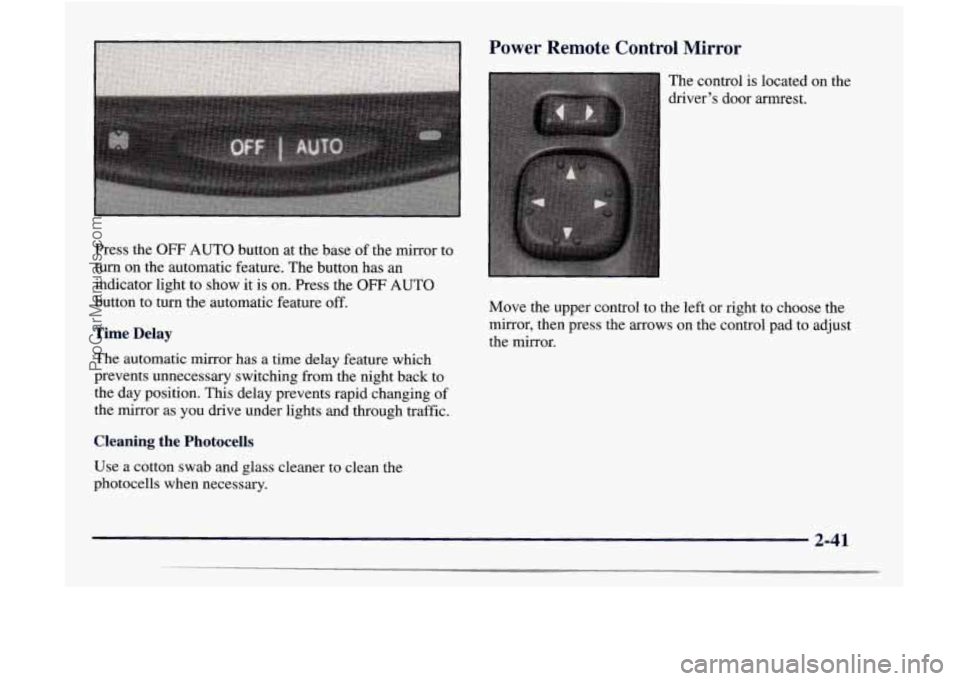
Press the OFF AUTO button at the base of the mirror to
turn on the automatic feature. The button has
an
indicator light to show it is on. Press the OFF AUTO
button to turn the automatic feature
off.
Time Delay
The automatic mirror has a time delay feature which
prevents unnecessary switching from the night back to
the day position. This delay prevents rapid changing of
the mirror as you drive under lights and through traffic.
Cleaning the Photocells
Use a cotton swab and glass cleaner to clean the
photocells when necessary. The
control is located on the
driver’s door armrest.
Move the upper control to the left or right to choose the mirror, then press the
arrows on the control pad to adjust
the mirror.
2-41
ProCarManuals.com
Page 123 of 386

1 ing Lights, Gages and Indicators
This part describes the warning lights and gages that
may be on your vehicle. The pictures will help you
locate them.
Warning lights and gages can signal that something is
wrong before
it becomes serious enough to cause an
expensive repair or replacement. Paying attention to
your warning lights and gages could also save you or
others from injury.
Warning lights come
on when there may be or is a
problem with one
of your vehicle’s functions. As you
will see in the details
on the next few pages, some
warning lights come
on briefly when you start the
engine just to let you know they’re working. If you are
familiar with this section, you should not be alarmed
when this happens.
Gages can indicate when there may be or is a problem
with one
of your vehicle’s functions. Often gages and
warning lights work together to let you know when
there’s
a problem with your vehicle. When
one of the warning lights comes
on and stays on
when you are driving, or when one of the gages shows
there may be
a problem, check the section that tells you
what
to do about it. Please follow this manual’s advice.
Waiting to do repairs can be costly
-- and even
dangerous. So please get to know your warning lights
and gages. They’re a big help.
Safety Belt Reminder Light
When the key is turned to RUN or START, a chime will
come on for about eight seconds to remind people to
fasten their safety belts, unless the driver’s safety belt
is
already buckled.
The safety belt light will
also come on and stay on
for about
20 seconds, then
it will flash for about
55 seconds.
If the driver’s belt is already buckled, neither the chime
nor the light will come on.
2-62
ProCarManuals.com