1998 DODGE RAM 1500 o2 sensor wiring
[x] Cancel search: o2 sensor wiringPage 2214 of 2627

²A flashing operating mode LED for the desired
gear indicates that a shift to that position has been
requested, but all of the driver controllable conditions
have not been met. This is in an attempt to notify the
driver that the transmission needs to be put into NEU-
TRAL, the vehicle speed is too great, or some other con-
dition outlined (other than a diagnostic failure that
would prevent this shift) elsewhere (Refer to 8 - ELEC-
TRICAL/ELECTRONIC CONTROL MODULES/TRANS-
FER CASE CONTROL MODULE - OPERATION) is not
met. Note that this flashing will continue indefinitely
until the conditions are eventually met, or the selector
switch position is changed, or if diagnostic routines no
longer allow the requested shift.
²If the driver attempts to make a shift into transfer
case NEUTRAL, and any of the driver controllable con-
ditions are not met, the request will be ignored until all
of the conditions are met or until the NEUTRAL select
button is released. Additionally the neutral lamp will
flash, or begin to flash while the button is depressed
and operator controllable conditions are not being met.
All of the LED's except the Neutral will flash if any of
the operator controllable conditions for shifting are not
met while the Neutral button is depressed. This9toggle9
type of feature is necessary because the TCCM would
interpret another request immediately after the shift
into transfer case NEUTRAL has completed.
²No LED's illuminated indicate a fault in the
transfer case control system.
SHIFT MOTOR
DESCRIPTION
The shift motor (Fig. 85) consists of a permanent
magnet D.C. motor with gear reduction to convert a
high speed-low torque device into a low speed-high
torque device. The output of the device is coupled to a
shaft which internally moves the mode and range forks
that change the transfer case operating ranges. The
motor is rated at 25 amps maximum at 72É F with 10
volts at the motor leads.
OPERATION
The transfer case shift motor responds to the Transfer
Case Control Module (TCCM) commands to move the
transfer case shift sector bi-directionally, as required, to
obtain the transfer case operating mode indicated by
the instrument panel mounted selector switch.
REMOVAL
NOTE: New shift motor assemblies are shipped in the
2WD/AWD position. If a new shift motor assembly will
be installed, it will be necessary to shift the transfer
case to the 2WD/AWD position prior to motor removal.
(1) Raise the vehicle on a suitable hoist.
(2) Disengage the wiring connectors from the shift
motor and mode sensor.
(3) Remove the bolts holding the shift motor and
mode sensor assembly onto the transfer case.
(4) Separate the shift motor and mode sensor
assembly from the transfer case.
INSTALLATION
(1) Verify that the shift sector o-ring is clean and
properly positioned over the shift sector and against
the transfer case.
NOTE: Verify that the shift motor position and sec-
tor shaft orientation are aligned. It may be neces-
sary to manually shift the transfer case if the shift
motor and sector shaft are not aligned.
(2) Position the shift motor and mode sensor
assembly onto the transfer case.
(3) Install the bolts to hold the assembly onto the
transfer case. Tighten the bolts to 16-24 N´m (12-18
ft.lbs.).
CAUTION: If the original shift motor and mode sen-
sor assembly bolts are reused, be sure to use
MoparTLock & Seal or LoctiteŸ 242 to replenish
the lock patch material originally found on the bolts
(4) Engage the wiring connectors to the shift motor
and mode sensor.
(5) Refill the transfer case as necessary.
(6) Lower vehicle and verify transfer case opera-
tion.
Fig. 85 Shift Motor - Shown Inverted - Typical
1 - SHIFT MOTOR
DRTRANSFER CASE - NV243 21 - 511
SELECTOR SWITCH (Continued)
Page 2244 of 2627

SHIFT MOTOR
DESCRIPTION
The shift motor (Fig. 85) consists of a permanent
magnet D.C. motor with gear reduction to convert a
high speed-low torque device into a low speed-high
torque device. The output of the device is coupled to
a shaft which internally moves the mode and range
forks that change the transfer case operating ranges.
The motor is rated at 25 amps maximum at 72É F
with 10 volts at the motor leads.
OPERATION
The transfer case shift motor responds to the
Transfer Case Control Module (TCCM) commands to
move the transfer case shift sector bi-directionally, as
required, to obtain the transfer case operating mode
indicated by the instrument panel mounted selector
switch.
REMOVAL
NOTE: New shift motor assemblies are shipped in
the 2WD/AWD position. If a new shift motor assem-
bly will be installed, it will be necessary to shift the
transfer case to the 2WD/AWD position prior to
motor removal.
(1) Raise the vehicle on a suitable hoist.
(2) Disengage the wiring connectors from the shift
motor and mode sensor.
(3) Remove the bolts holding the shift motor and
mode sensor assembly onto the transfer case.
(4) Separate the shift motor and mode sensor
assembly from the transfer case.
INSTALLATION
(1) Verify that the shift sector o-ring is clean and
properly positioned over the shift sector and against
the transfer case.
NOTE: Verify that the shift motor position and sec-
tor shaft orientation are aligned. It may be neces-
sary to manually shift the transfer case if the shift
motor and sector shaft are not aligned.
(2) Position the shift motor and mode sensor
assembly onto the transfer case.
(3) Install the bolts to hold the assembly onto the
transfer case. Tighten the bolts to 16-24 N´m (12-18
ft.lbs.).
CAUTION: If the original shift motor and mode sen-
sor assembly bolts are reused, be sure to use
MoparTLock & Seal or LoctiteŸ 242 to replenish
the lock patch material originally found on the bolts
(4) Engage the wiring connectors to the shift motor
and mode sensor.
(5) Refill the transfer case as necessary.
(6) Lower vehicle and verify transfer case opera-
tion.
Fig. 85 Shift Motor - Shown Inverted - Typical
1 - SHIFT MOTOR
DRTRANSFER CASE - NV244 GENII 21 - 541
Page 2278 of 2627

have not been met. This is in an attempt to notify
the driver that the transmission needs to be put into
NEUTRAL, the vehicle speed is too great, or some
other condition outlined (other than a diagnostic fail-
ure that would prevent this shift) elsewhere (Refer to
8 - ELECTRICAL/ELECTRONIC CONTROL MOD-
ULES/TRANSFER CASE CONTROL MODULE -
OPERATION) is not met. Note that this flashing will
continue indefinitely until the conditions are eventu-
ally met, or the selector switch position is changed,
or if diagnostic routines no longer allow the
requested shift.
²
If the driver attempts to make a shift into transfer
case NEUTRAL, and any of the driver controllable con-
ditions are not met, the request will be ignored until all
of the conditions are met or until the NEUTRAL select
button is released. Additionally the neutral lamp will
flash, or begin to flash while the button is depressed
and operator controllable conditions are not being met.
All of the LED's except the Neutral will flash if any of
the operator controllable conditions for shifting are not
met while the Neutral button is depressed. This9toggle9
type of feature is necessary because the TCCM would
interpret another request immediately after the shift
into transfer case NEUTRAL has completed.
²No LED's illuminated indicate a fault in the
transfer case control system.
SHIFT MOTOR
DESCRIPTION
The shift motor (Fig. 96) consists of a permanent
magnet D.C. motor with gear reduction to convert a
high speed-low torque device into a low speed-high
torque device. The output of the device is coupled to
a shaft which internally moves the mode and range
forks that change the transfer case operating ranges.
The motor is rated at 25 amps maximum at 72É F
with 10 volts at the motor leads.
OPERATION
The transfer case shift motor responds to the
Transfer Case Control Module (TCCM) commands to
move the transfer case shift sector bi-directionally, as
required, to obtain the transfer case operating mode
indicated by the instrument panel mounted selector
switch.
REMOVAL
NOTE: New shift motor assemblies are shipped in
the 2WD/AWD position. If a new shift motor assem-
bly will be installed, it will be necessary to shift the
transfer case to the 2WD/AWD position prior to
motor removal.(1) Raise the vehicle on a suitable hoist.
(2) Disengage the wiring connectors from the shift
motor and mode sensor.
(3) Remove the bolts holding the shift motor and
mode sensor assembly onto the transfer case.
(4) Separate the shift motor and mode sensor
assembly from the transfer case.
INSTALLATION
(1) Verify that the shift sector o-ring is clean and
properly positioned over the shift sector and against
the transfer case.
NOTE: Verify that the shift motor position and sec-
tor shaft orientation are aligned. It may be neces-
sary to manually shift the transfer case if the shift
motor and sector shaft are not aligned.
(2) Position the shift motor and mode sensor
assembly onto the transfer case.
(3) Install the bolts to hold the assembly onto the
transfer case. Tighten the bolts to 16-24 N´m (12-18
ft.lbs.).
CAUTION: If the original shift motor and mode sen-
sor assembly bolts are reused, be sure to use
MoparTLock & Seal or LoctiteŸ 242 to replenish
the lock patch material originally found on the bolts
(4) Engage the wiring connectors to the shift motor
and mode sensor.
(5) Refill the transfer case as necessary.
(6) Lower vehicle and verify transfer case
operation.
Fig. 96 Shift Motor - Shown Inverted - Typical
1 - SHIFT MOTOR
DRTRANSFER CASE - NV273 21 - 575
SELECTOR SWITCH (Continued)
Page 2494 of 2627
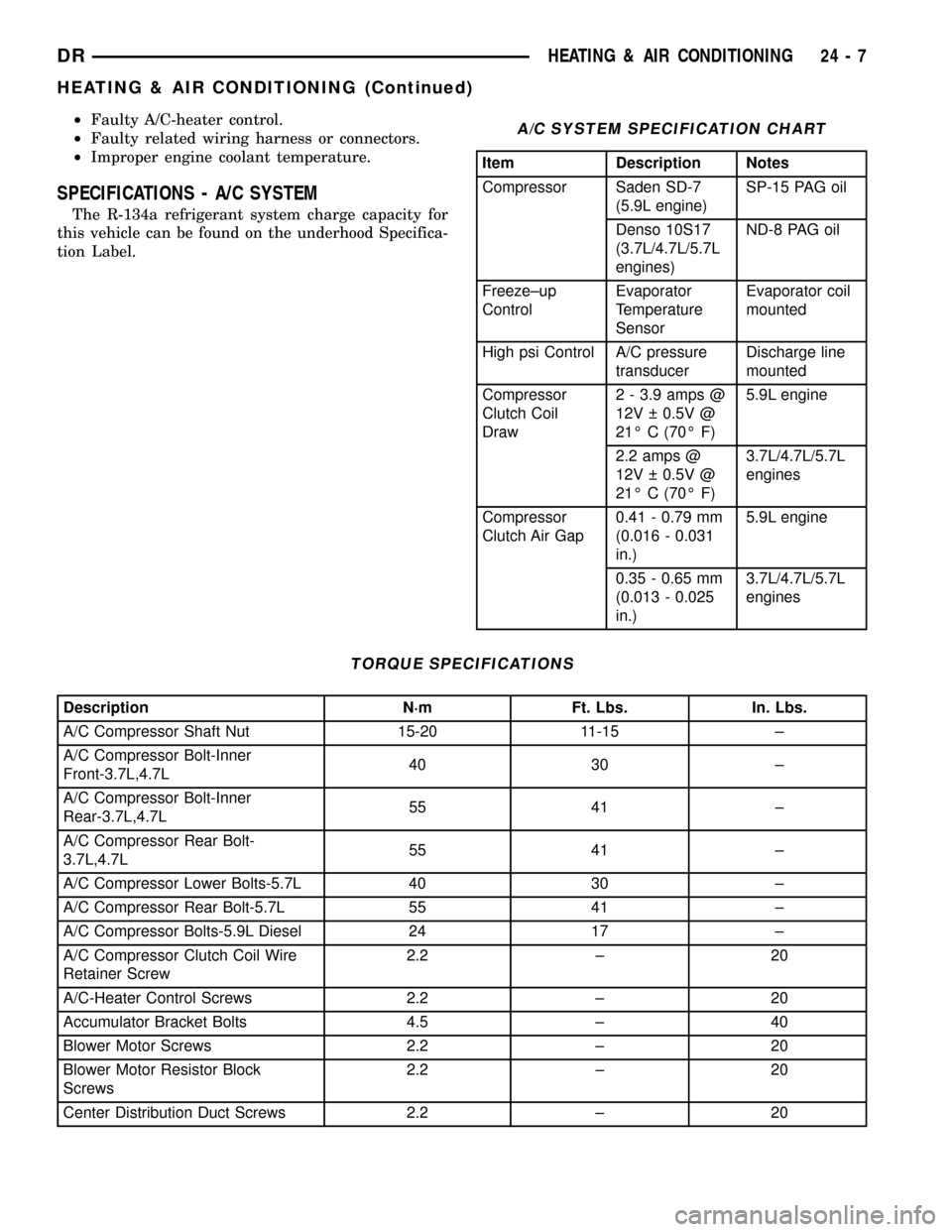
²Faulty A/C-heater control.
²Faulty related wiring harness or connectors.
²Improper engine coolant temperature.
SPECIFICATIONS - A/C SYSTEM
The R-134a refrigerant system charge capacity for
this vehicle can be found on the underhood Specifica-
tion Label.
A/C SYSTEM SPECIFICATION CHART
Item Description Notes
Compressor Saden SD-7
(5.9L engine)SP-15 PAG oil
Denso 10S17
(3.7L/4.7L/5.7L
engines)ND-8 PAG oil
Freeze±up
ControlEvaporator
Temperature
SensorEvaporator coil
mounted
High psi Control A/C pressure
transducerDischarge line
mounted
Compressor
Clutch Coil
Draw2 - 3.9 amps @
12V 0.5V @
21É C (70É F)5.9L engine
2.2 amps @
12V 0.5V @
21É C (70É F)3.7L/4.7L/5.7L
engines
Compressor
Clutch Air Gap0.41 - 0.79 mm
(0.016 - 0.031
in.)5.9L engine
0.35 - 0.65 mm
(0.013 - 0.025
in.)3.7L/4.7L/5.7L
engines
TORQUE SPECIFICATIONS
Description N´m Ft. Lbs. In. Lbs.
A/C Compressor Shaft Nut 15-20 11-15 ±
A/C Compressor Bolt-Inner
Front-3.7L,4.7L40 30 ±
A/C Compressor Bolt-Inner
Rear-3.7L,4.7L55 41 ±
A/C Compressor Rear Bolt-
3.7L,4.7L55 41 ±
A/C Compressor Lower Bolts-5.7L 40 30 ±
A/C Compressor Rear Bolt-5.7L 55 41 ±
A/C Compressor Bolts-5.9L Diesel 24 17 ±
A/C Compressor Clutch Coil Wire
Retainer Screw2.2 ± 20
A/C-Heater Control Screws 2.2 ± 20
Accumulator Bracket Bolts 4.5 ± 40
Blower Motor Screws 2.2 ± 20
Blower Motor Resistor Block
Screws2.2 ± 20
Center Distribution Duct Screws 2.2 ± 20
DRHEATING & AIR CONDITIONING 24 - 7
HEATING & AIR CONDITIONING (Continued)
Page 2497 of 2627

and coil are the only serviced parts on the compres-
sor.
A/C compressor clutch engagement is controlled by
several components: the A/C-heater control, A/C pres-
sure transducer, A/C compressor clutch relay, evapo-
rator temperature sensor and the powertrain control
module (PCM). The PCM may delay compressor
clutch engagement for up to thirty seconds (Refer to
8 - ELECTRICAL/ELECTRONIC CONTROL MOD-
ULES/POWERTRAIN CONTROL MODULE -
DESCRIPTION).
DIAGNOSIS AND TESTING - A/C COMPRESSOR
CLUTCH COIL
For circuit descriptions and diagrams, (Refer to
Appropriate Wiring Information). The battery must
be fully-charged before performing the following
tests. Refer to Battery for more information.
(1) Connect an ammeter (0 to 10 ampere scale) in
series with the clutch coil terminal. Use a voltmeter
(0 to 20 volt scale) with clip-type leads for measuring
the voltage across the battery and the compressor
clutch coil.
(2) With the A/C-heater controls in any A/C mode,
and the blower motor switch in the lowest speed
position, start the engine and run it at normal idle.
(3) The compressor clutch coil voltage should read
within 0.2 volts of the battery voltage. If there is
voltage at the clutch coil, but the reading is not
within 0.2 volts of the battery voltage, test the clutch
coil feed circuit for excessive voltage drop and repair
as required. If there is no voltage reading at the
clutch coil, use a DRB IIItscan tool and (Refer to
Appropriate Diagnostic Information) for testing of thecompressor clutch circuit and PCM control. The fol-
lowing components must be checked and repaired as
required before you can complete testing of the clutch
coil:
²Fuses in the junction block and the power distri-
bution center (PDC)
²A/C-heater control
²A/C compressor clutch relay
²A/C pressure transducer
²Evaporator temperature sensor
²Powertrain control module (PCM)
(4) The compressor clutch coil is acceptable if the
current draw measured at the clutch coil is within
specifications with the electrical system voltage at
11.5 to 12.5 volts (Refer to 24 - HEATING & AIR
CONDITIONING - SPECIFICATIONS). This should
only be checked with the work area temperature at
21É C (70É F). If system voltage is more than 12.5
volts, add electrical loads by turning on electrical
accessories until the system voltage drops below 12.5
volts.
(a) If the clutch coil current reading is above
specifications, the coil is shorted and should be
replaced.
(b) If the clutch coil current reading is zero, the
coil is open and should be replaced.
STANDARD PROCEDURE - A/C COMPRESSOR
CLUTCH BREAK-IN
After a new compressor clutch has been installed,
cycle the compressor clutch approximately twenty
times (five seconds on, then five seconds off). During
this procedure, set the A/C-heater control to the
Recirculation Mode, the blower motor switch in the
highest speed position, and the engine speed at 1500
to 2000 rpm. This procedure (burnishing) will seat
the opposing friction surfaces and provide a higher
compressor clutch torque capability.
REMOVAL
The refrigerant system can remain fully-charged
during compressor clutch, rotor, or coil replacement.
The compressor clutch can be serviced in the vehicle.
(1) Disconnect and isolate the battery negative
cable.
(2) Remove the serpentine drive belt (Refer to 7 -
COOLING/ACCESSORY DRIVE/DRIVE BELTS -
REMOVAL).
(3) Disconnect the compressor clutch coil wire har-
ness connector.
(4) Remove the bolts that secure the compressor to
the mounting bracket.
(5) Remove the compressor from the mounting
bracket. Support the compressor in the engine com-
partment while servicing the clutch.
Fig. 1 Compressor Clutch - Typical
1 - CLUTCH PLATE
2 - SHAFT KEY (not used on KJ)
3 - ROTOR
4 - COIL
5 - CLUTCH SHIMS
6 - SNAP RING
7 - SNAP RING
24 - 10 CONTROLSDR
A/C COMPRESSOR CLUTCH/COIL (Continued)
Page 2522 of 2627

DISASSEMBLY
(1) Remove the HVAC housing from the vehicle
and place it on the workbench (Refer to 24 - HEAT-
ING & AIR CONDITIONING/DISTRIBUTION/HVAC
HOUSING - REMOVAL).
(2) Disconnect the electrical connectors from the
blower motor, blower motor resistor block, evaporator
temperature sensor and each actuator (Fig. 10).
(3) Remove the HVAC wiring harness from the
HVAC housing.
(4) If necessary, remove the blower motor from
the HVAC housing (Refer to 24 - HEATING & AIR
CONDITIONING/DISTRIBUTION/BLOWER
MOTOR - REMOVAL).
(5) If necessary, remove the blower motor resistor
block from the HVAC housing (Refer to 24 - HEAT-
ING & AIR CONDITIONING/CONTROLS/BLOWER
MOTOR RESISTOR BLOCK - REMOVAL).
(6) Carefully remove the foam seals from the
heater core and evaporator coil tube mounting flange
of the HVAC housing. If the either seal is deformed
or damaged, it must be replaced.
(7) Remove the screws that secure the heater core
in the HVAC housing and carefully remove the
heater core from the housing (Refer to 24 - HEAT-
ING & AIR CONDITIONING/PLUMBING/HEATER
CORE - REMOVAL).(8) Use a screwdriver to pry off the four snap clips
that help secure the upper and lower HVAC housing
halves together.
(9) Remove the screws that secure the upper and
lower HVAC housing halves to each other and those
that secure the recirculation housing to the upper
HVAC housing.
(10) Carefully separate the recirculation housing
and the upper HVAC housing from the lower hous-
ing.
ASSEMBLY
(1) Position the upper HVAC housing to the lower
housing. During assembly, be certain of the following:
(a) That each of the door pivot shaft ends are
properly engaged in there pivot holes.
(b) That the evaporator drain opening is clean
and the drain foam seal is properly installed.
(2) Install the screws and snap clips that secure
the upper and lower HVAC housing halves to each
other and those that secure the recirculation housing
to the upper HVAC housing. Tighten the screws to
2.2 N´m (20 in. lbs.).
(3) Install the foam seals on the heater core and
evaporator coil tubes.
(4) If removed, install the blower motor resistor
block (Refer to 24 - HEATING & AIR CONDITION-
Fig. 10 HVAC Housing - Disassembled
1 - RECIRCULATION HOUSING
2 - RECIRC DOOR ACTUATOR
3 - DRIVER SIDE BLEND DOOR ACTUATOR
4 - FLOOR DISTRIBUTION DUCT
5 - DEFROST DOOR ACTUATOR
6 - PANEL DOOR ACTUATOR
7 - UPPER HVAC HOUSING
8 - PASSENGER SIDE BLEND DOOR ACTUATOR9 - HEATER CORE
10 - LOWER HVAC HOUSING
11 - HVAC WIRE HARNESS
12 - DRAIN FOAM SEAL
13 - BLOWER MOTOR
14 - EVAPORATOR FOAM SEAL
15 - EVAPORATOR
16 - HEATER CORE FOAM SEAL
DRDISTRIBUTION 24 - 35
HVAC HOUSING (Continued)
Page 2523 of 2627

ING/CONTROLS/BLOWER MOTOR RESISTOR
BLOCK - INSTALLATION).
(5) If removed, install the blower motor (Refer to
24 - HEATING & AIR CONDITIONING/DISTRIBU-
TION/BLOWER MOTOR - INSTALLATION).
(6) Install the HVAC wire harness. Make sure the
wires are routed through all wiring retainers.
(7) Connect the wire harness to the blower motor,
blower motor resistor block, evaporator temperature
sensor and each actuator.
(8) Install the HVAC housing (Refer to 24 - HEAT-
ING & AIR CONDITIONING/DISTRIBUTION/HVAC
HOUSING - INSTALLATION).
INSTALLATION
WARNING: IF THE VEHICLE IS EQUIPPED WITH AIR
CONDITIONING, REVIEW THE WARNINGS AND
CAUTIONS IN PLUMBING BEFORE PERFORMING
THE FOLLOWING OPERATION. (Refer to 24 - HEAT-
ING & AIR CONDITIONING/PLUMBING - WARNING)
(Refer to 24 - HEATING & AIR CONDITIONING/
PLUMBING - CAUTION) (Refer to 24 - HEATING &
AIR CONDITIONING/PLUMBING - CAUTION -
REFRIGERANT HOSES/LINES/TUBES PRECAU-
TIONS)
(1) Position the HVAC housing into the vehicle. Be
certain that the evaporator condensate drain tube
and the housing mounting studs are inserted into
their correct locations.
(2) Install the two nuts that secure the HVAC
housing to the mounting studs in the passenger com-
partment. Tighten the nuts to 6.2 N´m (55 in. lbs.).
(3) Install the bolt that secures the HVAC housing
to the floor bracket in the passenger compartment.
Tighten the bolt to 6.2 N´m (55 in. lbs.).
(4) Install the instrument panel (Refer to 23 -
BODY/INSTRUMENT PANEL - INSTALLATION).
(5) Install the two nuts that secure the HVAC
housing to the mounting studs in the engine com-
partment. Tighten the nuts to 6.2 N´m (55 in. lbs.).
(6) Install the powertrain control module (PCM)
(Refer to 8 - ELECTRICAL/ELECTRONIC CON-
TROL MODULES/POWERTRAIN CONTROL MOD-
ULE - INSTALLATION).
(7) Unplug or remove the tape from the heater
core tubes and connect the heater hoses to the heater
core tubes.
(8) Unplug or remove the tape from the opened
refrigerant line fittings and the evaporator outlet
tube and install the accumulator (Refer to 24 -
HEATING & AIR CONDITIONING/PLUMBING/AC-
CUMULATOR - INSTALLATION).
(9) Unplug or remove the tape from the liquid line
and the evaporator inlet tube fittings. Connect the
liquid line coupler to the evaporator inlet tube (Referto 24 - HEATING & AIR CONDITIONING/PLUMB-
ING - STANDARD PROCEDURE - A/C LINE COU-
PLERS).
(10) Evacuate the refrigerant system (Refer to 24 -
HEATING & AIR CONDITIONING/PLUMBING -
STANDARD PROCEDURE - REFRIGERANT SYS-
TEM EVACUATE).
(11) Charge the refrigerant system (Refer to 24 -
HEATING & AIR CONDITIONING/PLUMBING -
STANDARD PROCEDURE - REFRIGERANT SYS-
TEM CHARGE).
(12) Fill the engine cooling system (Refer to 7 -
COOLING/ENGINE - STANDARD PROCEDURE).
(13) Connect the battery negative cable.
(14) Start the engine and check for proper opera-
tion of the heating and air conditioning systems.
INSTRUMENT PANEL
DEMISTER DUCTS
REMOVAL
WARNING: ON VEHICLES EQUIPPED WITH AIR-
BAGS, DISABLE THE AIRBAG SYSTEM BEFORE
ATTEMPTING ANY STEERING WHEEL, STEERING
COLUMN, OR INSTRUMENT PANEL COMPONENT
DIAGNOSIS OR SERVICE. DISCONNECT AND ISO-
LATE THE BATTERY NEGATIVE (GROUND) CABLE,
THEN WAIT TWO MINUTES FOR THE AIRBAG SYS-
TEM CAPACITOR TO DISCHARGE BEFORE PER-
FORMING FURTHER DIAGNOSIS OR SERVICE. THIS
IS THE ONLY SURE WAY TO DISABLE THE AIRBAG
SYSTEM. FAILURE TO TAKE THE PROPER PRE-
CAUTIONS COULD RESULT IN ACCIDENTAL AIR-
BAG DEPLOYMENT AND POSSIBLE PERSONAL
INJURY.
(1) Remove the defroster ducts (Refer to 24 -
HEATING & AIR CONDITIONING/DISTRIBUTION/
DEFROSTER DUCTS - REMOVAL).
(2) Remove the two screws that secure the center
distribution duct to the instrument panel support.
(3) Remove the center distribution duct from
instrument panel support, panel ducts and demister
ducts.
(4) Remove the right side panel duct adapter (Fig.
11).
(5) Remove the right side intermediate demister
duct.
(6) Remove the left side intermediate demister
duct.
(7) Remove the left side panel duct adapter.
(8) Remove the instrument panel cover (Refer to
23 - BODY/INSTRUMENT PANEL/INSTRUMENT
PANEL TOP COVER - REMOVAL).
24 - 36 DISTRIBUTIONDR
HVAC HOUSING (Continued)
Page 2562 of 2627

EMISSIONS CONTROL
TABLE OF CONTENTS
page page
EMISSIONS CONTROL
DESCRIPTION
DESCRIPTION - STATE DISPLAY TEST
MODE...............................1
DESCRIPTION - CIRCUIT ACTUATION TEST
MODE...............................1
DESCRIPTION - DIAGNOSTIC TROUBLE
CODES..............................1
DESCRIPTION - TASK MANAGER..........1DESCRIPTION - MONITORED SYSTEMS....2
DESCRIPTION - TRIP DEFINITION.........4
DESCRIPTION - COMPONENT MONITORS . . 4
OPERATION
OPERATION..........................5
OPERATION - TASK MANAGER...........5
OPERATION - NON-MONITORED CIRCUITS . . 8
EVAPORATIVE EMISSIONS................10
EMISSIONS CONTROL
DESCRIPTION
DESCRIPTION - STATE DISPLAY TEST MODE
The switch inputs to the Powertrain Control Mod-
ule (PCM) have two recognized states; HIGH and
LOW. For this reason, the PCM cannot recognize the
difference between a selected switch position versus
an open circuit, a short circuit, or a defective switch.
If the State Display screen shows the change from
HIGH to LOW or LOW to HIGH, assume the entire
switch circuit to the PCM functions properly. Connect
the DRB scan tool to the data link connector and
access the state display screen. Then access either
State Display Inputs and Outputs or State Display
Sensors.
DESCRIPTION - CIRCUIT ACTUATION TEST
MODE
The Circuit Actuation Test Mode checks for proper
operation of output circuits or devices the Powertrain
Control Module (PCM) may not internally recognize.
The PCM attempts to activate these outputs and
allow an observer to verify proper operation. Most of
the tests provide an audible or visual indication of
device operation (click of relay contacts, fuel spray,
etc.). Except for intermittent conditions, if a device
functions properly during testing, assume the device,
its associated wiring, and driver circuit work cor-
rectly. Connect the DRB scan tool to the data link
connector and access the Actuators screen.
DESCRIPTION - DIAGNOSTIC TROUBLE CODES
A Diagnostic Trouble Code (DTC) indicates the
PCM has recognized an abnormal condition in the
system.Remember that DTC's are the results of a sys-
tem or circuit failure, but do not directly iden-
tify the failed component or components.
BULB CHECK
Each time the ignition key is turned to the ON
position, the malfunction indicator (check engine)
lamp on the instrument panel should illuminate for
approximately 2 seconds then go out. This is done for
a bulb check.
OBTAINING DTC'S USING DRB SCAN TOOL
(1) Obtain the applicable Powertrain Diagnostic
Manual.
(2) Obtain the DRB Scan Tool.
(3) Connect the DRB Scan Tool to the data link
(diagnostic) connector. This connector is located in
the passenger compartment; at the lower edge of
instrument panel; near the steering column.
(4) Turn the ignition switch on and access the
ªRead Faultº screen.
(5) Record all the DTC's and ªfreeze frameº infor-
mation shown on the DRB scan tool.
(6) To erase DTC's, use the ªErase Trouble Codeº
data screen on the DRB scan tool.Do not erase any
DTC's until problems have been investigated
and repairs have been performed.
DESCRIPTION - TASK MANAGER
The PCM is responsible for efficiently coordinating
the operation of all the emissions-related compo-
nents. The PCM is also responsible for determining if
the diagnostic systems are operating properly. The
software designed to carry out these responsibilities
is call the 'Task Manager'.
DREMISSIONS CONTROL 25 - 1