1998 DODGE RAM 1500 Body
[x] Cancel search: BodyPage 720 of 2627

OPERATION
The wiper module operation is controlled by the
battery current inputs received by the wiper motor
through the wiper on/off and wiper high/low relays.
The wiper motor speed is controlled by current flow
to either the low speed or the high speed set of
brushes. The park switch is a single pole, single
throw, momentary switch within the wiper motor
that is mechanically actuated by the wiper motor
transmission components. The park switch alter-
nately opens and closes the wiper park switch sense
circuit to ground, depending upon the position of the
wipers on the glass. This feature allows the motor to
complete its current wipe cycle after the wiper sys-
tem has been turned Off, and to park the wiper
blades in the lowest portion of the wipe pattern. The
automatic resetting circuit breaker protects the
motor from overloads. The wiper motor crank arm,
the two wiper linkage members, and the two wiper
pivots mechanically convert the rotary output of the
wiper motor to the back and forth wiping motion of
the wiper arms and blades on the glass.
REMOVAL
(1) Remove both wiper arms from the wiper pivots.
(Refer to 8 - ELECTRICAL/WIPERS/WASHERS/
WIPER ARM - REMOVAL).
(2) Unlatch and open the hood.
(3) Disconnect and isolate the battery negative
cable.
(4) Remove the cowl plenum cover/grille panel
from over the cowl plenum. (Refer to 23 - BODY/EX-
TERIOR/COWL GRILLE - REMOVAL).
(5) Disconnect the left headlamp and dash wire
harness connector for the wiper motor from the
motor pigtail wire connector (Fig. 26).(6) Remove the two screws that secure the wiper
module to the top of the cowl plenum panel at the
pivot brackets.
(7) Remove the two screws that secure the wiper
module to the bottom of the cowl plenum panel.
(8) Remove the wiper module from the cowl ple-
num panel as a unit.
INSTALLATION
(1) Position the wiper module into the cowl ple-
num as a unit (Fig. 26).
(2) Install the two screws that secure the wiper
module to the top of the cowl plenum panel at the
pivot brackets. Tighten the screw on the driver side,
followed by the screw on the passenger side. Tighten
the screws to 7 N´m (60 in. lbs.).
(3) Install and tighten the screws that secure the
wiper module to the bottom of the cowl plenum
panel. Tighten the screw on the passenger side, fol-
lowed by the screw on the driver side. Tighten the
screws to 7 N´m (60 in. lbs.).
(4) Reconnect the left headlamp and dash wire
harness connector for the wiper motor to the motor
pigtail wire connector.
(5) Reinstall the cowl plenum cover/grille panel
over the cowl plenum. (Refer to 23 - BODY/EXTERI-
OR/COWL GRILLE - INSTALLATION).
(6) Reconnect the battery negative cable.
(7) Close and latch the hood.
(8) Reinstall both wiper arms onto the wiper piv-
ots. (Refer to 8 - ELECTRICAL/WIPERS/WASHERS/
WIPER ARMS - INSTALLATION).
DRWIPERS/WASHERS 8R - 23
WIPER MODULE (Continued)
Page 733 of 2627

DESCRIPTION - CIRCUIT FUNCTIONS
All circuits in the diagrams use an alpha/numeric
code to identify the wire and it's function. To identify
which circuit code applies to a system, refer to the
Circuit Identification Code Chart. This chart shows
the main circuits only and does not show the second-
ary codes that may apply to some models.
CIRCUIT IDENTIFICATION CODE CHART
CIRCUIT FUNCTION
A BATTERY FEED
B BRAKE CONTROLS
C CLIMATE CONTROLS
D DIAGNOSTIC CIRCUITS
E DIMMING ILLUMINATION
CIRCUITS
F FUSED CIRCUITS
G MONITORING CIRCUITS
(GAUGES)
H OPEN
I NOT USED
J OPEN
K POWERTRAIN CONTROL
MODULE
L EXTERIOR LIGHTING
M INTERIOR LIGHTING
N NOT USED
O NOT USED
P POWER OPTION (BATTERY
FEED)
Q POWER OPTIONS (IGNITION
FEED)
R PASSIVE RESTRAINT
S SUSPENSION/STEERING
T TRANSMISSION/TRANSAXLE/
TRANSFER CASE
U OPEN
V SPEED CONTROL, WIPER/
WASHER
W OPEN
X AUDIO SYSTEMS
Y OPEN
Z GROUNDS
DESCRIPTION - SECTION IDENTIFICATION AND
INFORMATION
The wiring diagrams are grouped into individual
sections. If a component is most likely found in a par-
ticular group, it will be shown complete (all wires,
connectors, and pins) within that group. For exam-
ple, the Auto Shutdown Relay is most likely to be
found in Group 30, so it is shown there complete. It
can, however, be shown partially in another group if
it contains some associated wiring.
Splice diagrams in Section 8W-70 show the entire
splice and provide references to other sections the
splices serves. Section 8W-70 only contains splice dia-
grams that are not shown in their entirety some-
where else in the wiring diagrams.
Section 8W-80 shows each connector and the cir-
cuits involved with that connector. The connectors
are identified using the name/number on the dia-
gram pages.
WIRING SECTION CHART
GROUP TOPIC
8W-01 thru
8W-09General information and Diagram
Overview
8W-10 thru
8W-19Main Sources of Power and
Vehicle Grounding
8W-20 thru
8W-29Starting and Charging
8W-30 thru
8W-39Powertrain/Drivetrain Systems
8W-40 thru
8W-49Body Electrical items and A/C
8W-50 thru
8W-59Exterior Lighting, Wipers and
Trailer Tow
8W-60 thru
8W-69Power Accessories
8W-70 Splice Information
8W-80 Connector Pin Outs
8W-91 Connector, Ground and Splice
Locations
8W - 01 - 6 8W-01 WIRING DIAGRAM INFORMATIONDR
WIRING DIAGRAM INFORMATION (Continued)
Page 734 of 2627

DESCRIPTION - CONNECTOR, GROUND AND
SPLICE INFORMATION
CAUTION: Not all connectors are serviced. Some
connectors are serviced only with a harness. A typ-
ical example might be the Supplemental Restraint
System connectors. Always check parts availability
before attempting a repair.
IDENTIFICATION
In-line connectors are identified by a number, as
follows:
²In-line connectors located in the engine compart-
ment are C100 series numbers
²In-line connectors located in the Instrument
Panel area are C200 series numbers.
²In-line connectors located in the body are C300
series numbers.
²Jumper harness connectors are C400 series
numbers.
²Grounds and ground connectors are identified
with a ªGº and follow the same series numbering as
the in-line connectors.
²Splices are identified with an ªSº and follow the
same series numbering as the in-line connectors.
²Component connectors are identified by the com-
ponent name instead of a number. Multiple connec-
tors on a component use a C1, C2, etc. identifier.
LOCATIONS
Section 8W-91 contains connector/ground/splice
location illustrations. The illustrations contain the
connector name (or number)/ground number/splice
number and component identification. Connector/
ground/splice location charts in section 8W-91 refer-
ence the figure numbers of the illustrations.
The abbreviation T/O is used in the component
location section to indicate a point in which the wir-
ing harness branches out to a component. The abbre-
viation N/S means Not Shown in the illustrations
WARNING
WARNINGS - GENERAL
WARNINGSprovide information to prevent per-
sonal injury and vehicle damage. Below is a list of
general warnings that should be followed any time a
vehicle is being serviced.
WARNING: ALWAYS WEAR SAFETY GLASSES FOR
EYE PROTECTION.
WARNING: USE SAFETY STANDS ANYTIME A PRO-
CEDURE REQUIRES BEING UNDER A VEHICLE.WARNING: BE SURE THAT THE IGNITION SWITCH
ALWAYS IS IN THE OFF POSITION, UNLESS THE
PROCEDURE REQUIRES IT TO BE ON.
WARNING: SET THE PARKING BRAKE WHEN
WORKING ON ANY VEHICLE. AN AUTOMATIC
TRANSMISSION SHOULD BE IN PARK. A MANUAL
TRANSMISSION SHOULD BE IN NEUTRAL.
WARNING: OPERATE THE ENGINE ONLY IN A
WELL-VENTILATED AREA.
WARNING: KEEP AWAY FROM MOVING PARTS
WHEN THE ENGINE IS RUNNING, ESPECIALLY THE
FAN AND BELTS.
WARNING: TO PREVENT SERIOUS BURNS, AVOID
CONTACT WITH HOT PARTS SUCH AS THE RADIA-
TOR, EXHAUST MANIFOLD(S), TAIL PIPE, CATA-
LYTIC CONVERTER AND MUFFLER.
WARNING: DO NOT ALLOW FLAME OR SPARKS
NEAR THE BATTERY. GASES ARE ALWAYS
PRESENT IN AND AROUND THE BATTERY.
WARNING: ALWAYS REMOVE RINGS, WATCHES,
LOOSE HANGING JEWELRY AND AVOID LOOSE
CLOTHING.
DIAGNOSIS AND TESTING - WIRING HARNESS
TROUBLESHOOTING TOOLS
When diagnosing a problem in an electrical circuit
there are several common tools necessary. These tools
are listed and explained below.
²Jumper Wire - This is a test wire used to con-
nect two points of a circuit. It can be used to bypass
an open in a circuit.
WARNING: NEVER USE A JUMPER WIRE ACROSS
A LOAD, SUCH AS A MOTOR, CONNECTED
BETWEEN A BATTERY FEED AND GROUND.
²Voltmeter - Used to check for voltage on a cir-
cuit. Always connect the black lead to a known good
ground and the red lead to the positive side of the
circuit.
CAUTION: Most of the electrical components used
in today's vehicles are Solid State. When checking
voltages in these circuits, use a meter with a 10 -
megohm or greater impedance rating.
DR8W-01 WIRING DIAGRAM INFORMATION 8W - 01 - 7
WIRING DIAGRAM INFORMATION (Continued)
Page 735 of 2627

²Ohmmeter - Used to check the resistance
between two points of a circuit. Low or no resistance
in a circuit means good continuity.
CAUTION: Most of the electrical components used
in today's vehicles are Solid State. When checking
resistance in these circuits use a meter with a 10 -
megohm or greater impedance rating. In addition,
make sure the power is disconnected from the cir-
cuit. Circuits that are powered up by the vehicle's
electrical system can cause damage to the equip-
ment and provide false readings.
²Probing Tools - These tools are used for probing
terminals in connectors (Fig. 5). Select the proper
size tool from Special Tool Package 6807, and insert
it into the terminal being tested. Use the other end
of the tool to insert the meter probe.
INTERMITTENT AND POOR CONNECTIONS
Most intermittent electrical problems are caused
by faulty electrical connections or wiring. It is also
possible for a sticking component or relay to cause a
problem. Before condemning a component or wiring
assembly, check the following items.
²Connectors are fully seated
²Spread terminals, or terminal push out
²
Terminals in the wiring assembly are fully seated
into the connector/component and locked into position
²Dirt or corrosion on the terminals. Any amount
of corrosion or dirt could cause an intermittent prob-
lem
²Damaged connector/component casing exposing
the item to dirt or moisture
²Wire insulation that has rubbed through causing
a short to ground
²Some or all of the wiring strands broken inside
of the insulation
²Wiring broken inside of the insulation
TROUBLESHOOTING WIRING PROBLEMS
When troubleshooting wiring problems there are
six steps which can aid in the procedure. The steps
are listed and explained below. Always check for non-factory items added to the vehicle before doing any
diagnosis. If the vehicle is equipped with these items,
disconnect them to verify these add-on items are not
the cause of the problem.
(1) Verify the problem.
(2) Verify any related symptoms. Do this by per-
forming operational checks on components that are
in the same circuit. Refer to the wiring diagrams.
(3) Analyze the symptoms. Use the wiring dia-
grams to determine what the circuit is doing, where
the problem most likely is occurring and where the
diagnosis will continue.
(4) Isolate the problem area.
(5) Repair the problem area.
(6) Verify the proper operation. For this step,
check for proper operation of all items on the
repaired circuit. Refer to the wiring diagrams.
STANDARD PROCEDURE
STANDARD PROCEDURE - ELECTROSTATIC
DISCHARGE (ESD) SENSITIVE DEVICES
All ESD sensitive components are solid state and a
symbol (Fig. 6) is used to indicate this. When han-
dling any component with this symbol, comply with
the following procedures to reduce the possibility of
electrostatic charge build up on the body and inad-
vertent discharge into the component. If it is not
known whether the part is ESD sensitive, assume
that it is.
(1) Always touch a known good ground before han-
dling the part. This should be repeated while han-
dling the part and more frequently after sliding
across a seat, sitting down from a standing position,
or walking a distance.
(2) Avoid touching electrical terminals of the part,
unless instructed to do so by a written procedure.
(3) When using a voltmeter, be sure to connect the
ground lead first.
(4) Do not remove the part form it's protective
packing until it is time to install the part.
(5) Before removing the part from it's pakage,
ground the pakage to a known good ground on the
vehicle.
Fig. 5 PROBING TOOL
1 - SPECIAL TOOL 6801
2 - PROBING END
Fig. 6 ELECTROSTATIC DISCHARGE SYMBOL
8W - 01 - 8 8W-01 WIRING DIAGRAM INFORMATIONDR
WIRING DIAGRAM INFORMATION (Continued)
Page 1075 of 2627
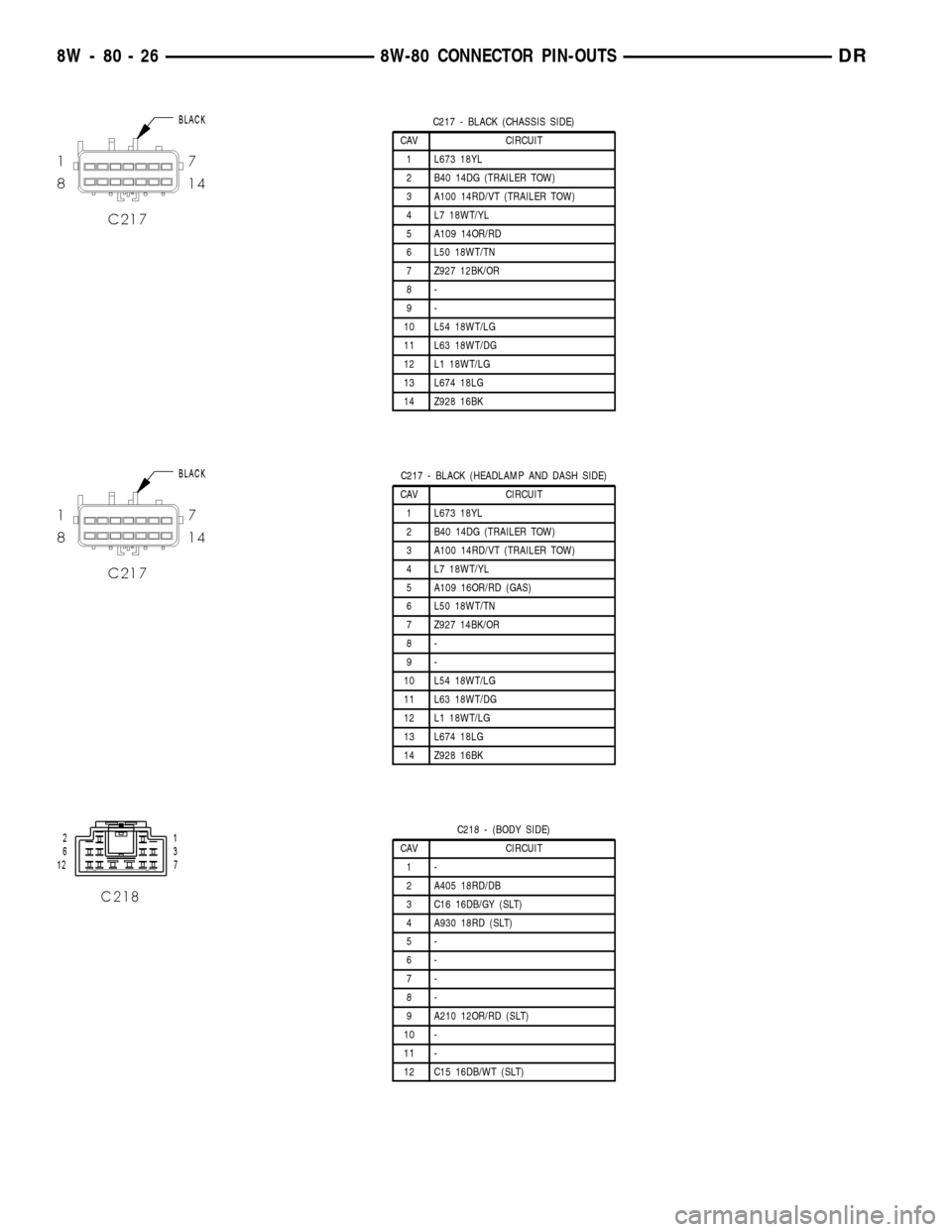
C217 - BLACK (CHASSIS SIDE)
CAV CIRCUIT
1 L673 18YL
2 B40 14DG (TRAILER TOW)
3 A100 14RD/VT (TRAILER TOW)
4 L7 18WT/YL
5 A109 14OR/RD
6 L50 18WT/TN
7 Z927 12BK/OR
8-
9-
10 L54 18WT/LG
11 L63 18WT/DG
12 L1 18WT/LG
13 L674 18LG
14 Z928 16BK
C217 - BLACK (HEADLAMP AND DASH SIDE)
CAV CIRCUIT
1 L673 18YL
2 B40 14DG (TRAILER TOW)
3 A100 14RD/VT (TRAILER TOW)
4 L7 18WT/YL
5 A109 16OR/RD (GAS)
6 L50 18WT/TN
7 Z927 14BK/OR
8-
9-
10 L54 18WT/LG
11 L63 18WT/DG
12 L1 18WT/LG
13 L674 18LG
14 Z928 16BK
C218 - (BODY SIDE)
CAV CIRCUIT
1-
2 A405 18RD/DB
3 C16 16DB/GY (SLT)
4 A930 18RD (SLT)
5-
6-
7-
8-
9 A210 12OR/RD (SLT)
10 -
11 -
12 C15 16DB/WT (SLT)
8W - 80 - 26 8W-80 CONNECTOR PIN-OUTSDR
Page 1080 of 2627
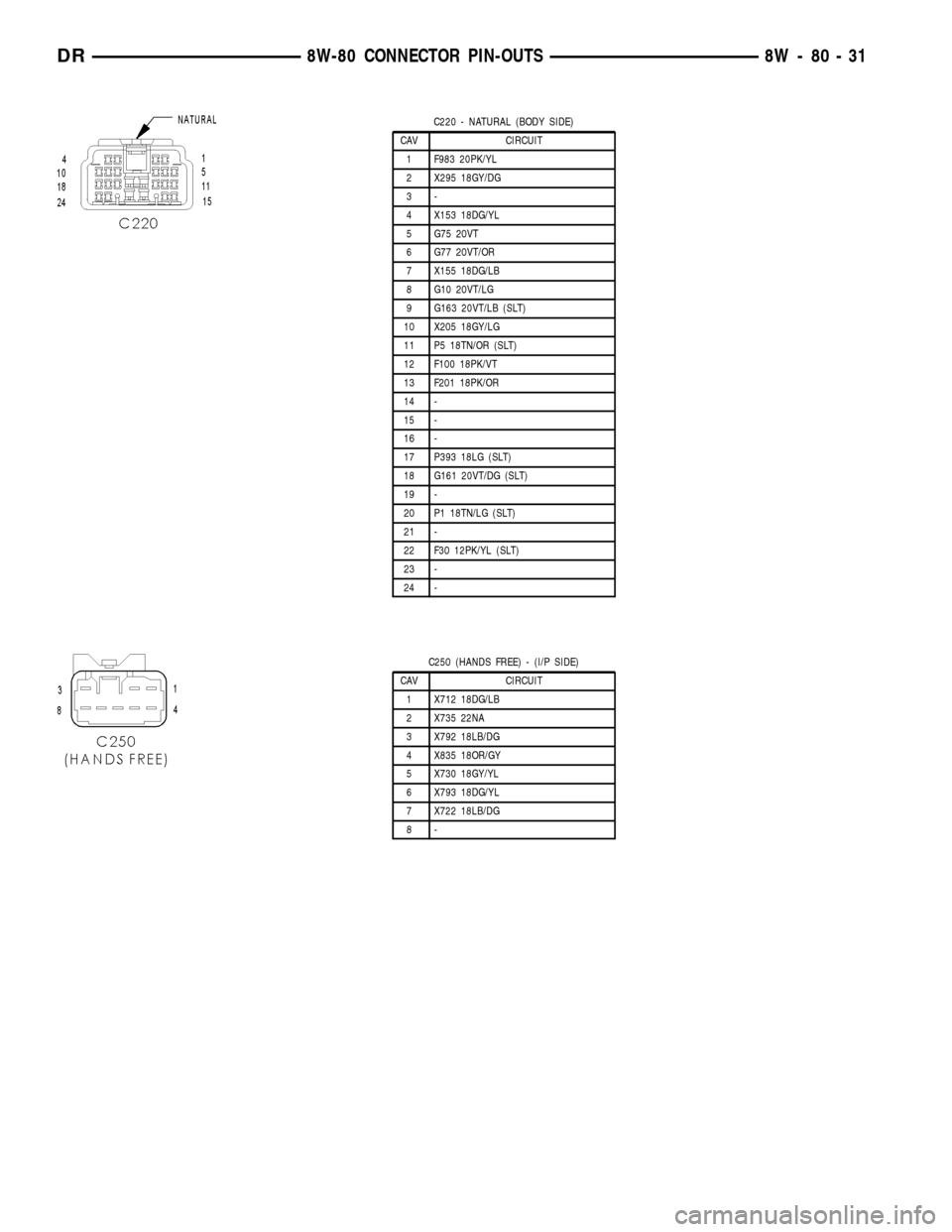
C220 - NATURAL (BODY SIDE)
CAV CIRCUIT
1 F983 20PK/YL
2 X295 18GY/DG
3-
4 X153 18DG/YL
5 G75 20VT
6 G77 20VT/OR
7 X155 18DG/LB
8 G10 20VT/LG
9 G163 20VT/LB (SLT)
10 X205 18GY/LG
11 P5 18TN/OR (SLT)
12 F100 18PK/VT
13 F201 18PK/OR
14 -
15 -
16 -
17 P393 18LG (SLT)
18 G161 20VT/DG (SLT)
19 -
20 P1 18TN/LG (SLT)
21 -
22 F30 12PK/YL (SLT)
23 -
24 -
C250 (HANDS FREE) - (I/P SIDE)
CAV CIRCUIT
1 X712 18DG/LB
2 X735 22NA
3 X792 18LB/DG
4 X835 18OR/GY
5 X730 18GY/YL
6 X793 18DG/YL
7 X722 18LB/DG
8-
DR8W-80 CONNECTOR PIN-OUTS 8W - 80 - 31
Page 1081 of 2627
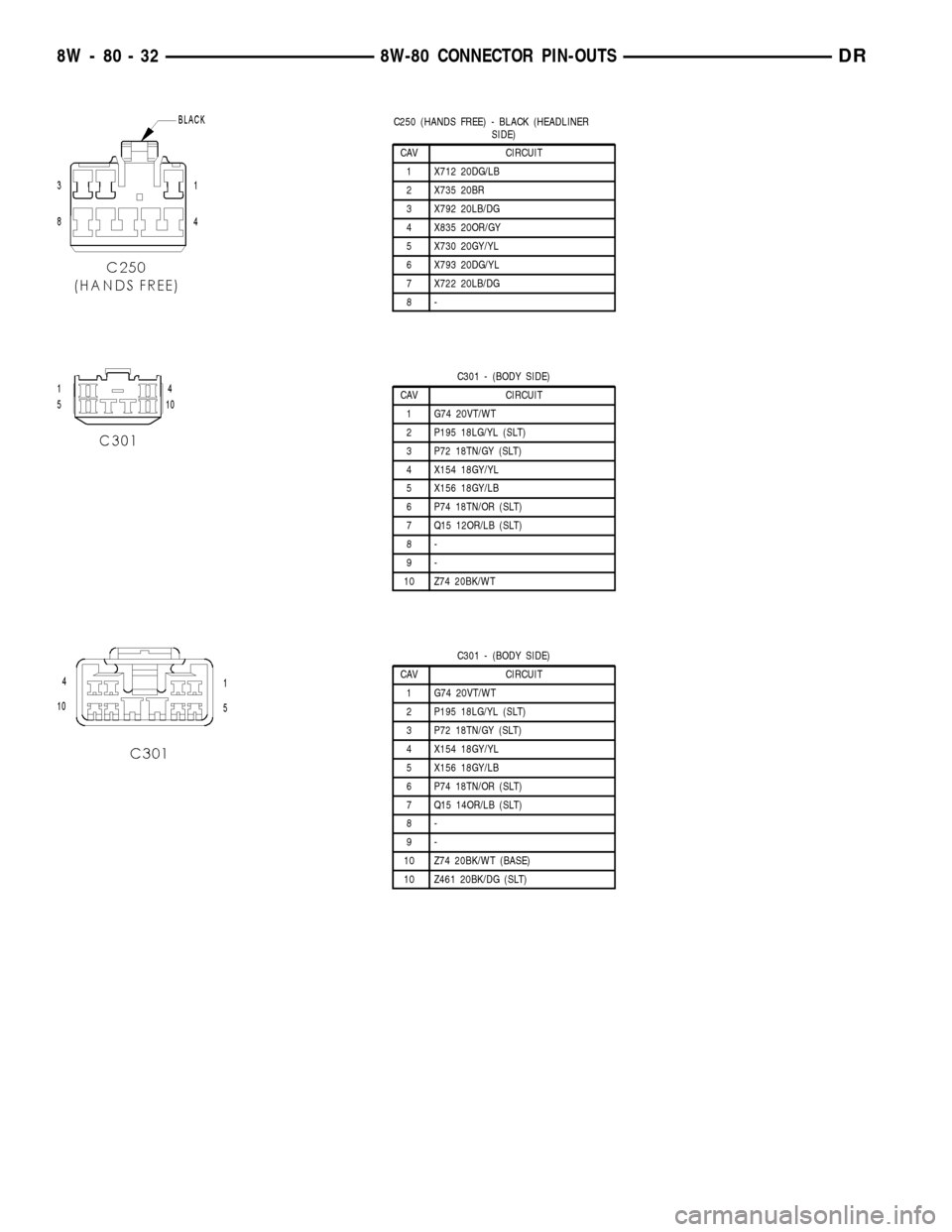
C250 (HANDS FREE) - BLACK (HEADLINER
SIDE)
CAV CIRCUIT
1 X712 20DG/LB
2 X735 20BR
3 X792 20LB/DG
4 X835 20OR/GY
5 X730 20GY/YL
6 X793 20DG/YL
7 X722 20LB/DG
8-
C301 - (BODY SIDE)
CAV CIRCUIT
1 G74 20VT/WT
2 P195 18LG/YL (SLT)
3 P72 18TN/GY (SLT)
4 X154 18GY/YL
5 X156 18GY/LB
6 P74 18TN/OR (SLT)
7 Q15 12OR/LB (SLT)
8-
9-
10 Z74 20BK/WT
C301 - (BODY SIDE)
CAV CIRCUIT
1 G74 20VT/WT
2 P195 18LG/YL (SLT)
3 P72 18TN/GY (SLT)
4 X154 18GY/YL
5 X156 18GY/LB
6 P74 18TN/OR (SLT)
7 Q15 14OR/LB (SLT)
8-
9-
10 Z74 20BK/WT (BASE)
10 Z461 20BK/DG (SLT)
8W - 80 - 32 8W-80 CONNECTOR PIN-OUTSDR
Page 1082 of 2627
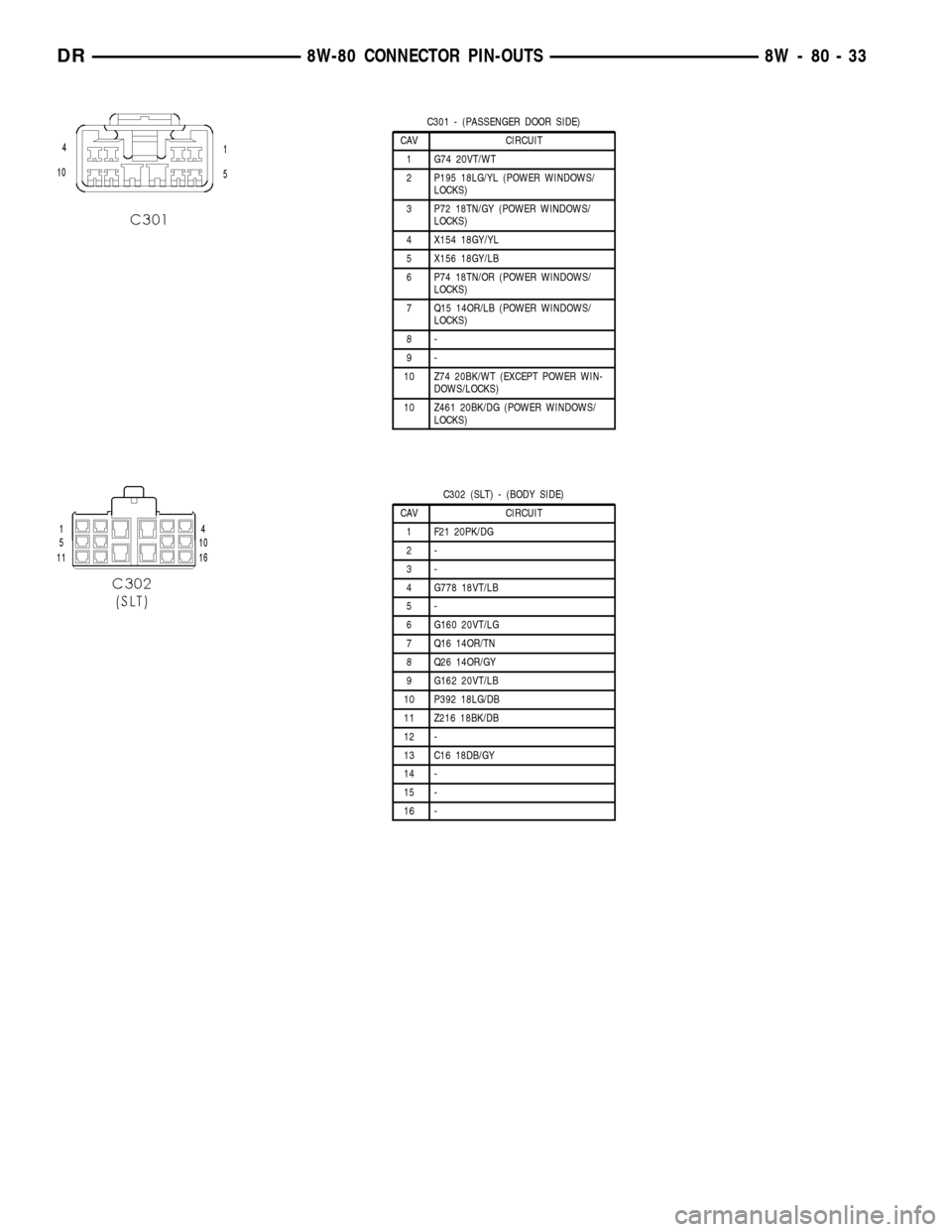
C301 - (PASSENGER DOOR SIDE)
CAV CIRCUIT
1 G74 20VT/WT
2 P195 18LG/YL (POWER WINDOWS/
LOCKS)
3 P72 18TN/GY (POWER WINDOWS/
LOCKS)
4 X154 18GY/YL
5 X156 18GY/LB
6 P74 18TN/OR (POWER WINDOWS/
LOCKS)
7 Q15 14OR/LB (POWER WINDOWS/
LOCKS)
8-
9-
10 Z74 20BK/WT (EXCEPT POWER WIN-
DOWS/LOCKS)
10 Z461 20BK/DG (POWER WINDOWS/
LOCKS)
C302 (SLT) - (BODY SIDE)
CAV CIRCUIT
1 F21 20PK/DG
2-
3-
4 G778 18VT/LB
5-
6 G160 20VT/LG
7 Q16 14OR/TN
8 Q26 14OR/GY
9 G162 20VT/LB
10 P392 18LG/DB
11 Z216 18BK/DB
12 -
13 C16 18DB/GY
14 -
15 -
16 -
DR8W-80 CONNECTOR PIN-OUTS 8W - 80 - 33