1998 DODGE RAM 1500 Tie
[x] Cancel search: TiePage 2418 of 2627
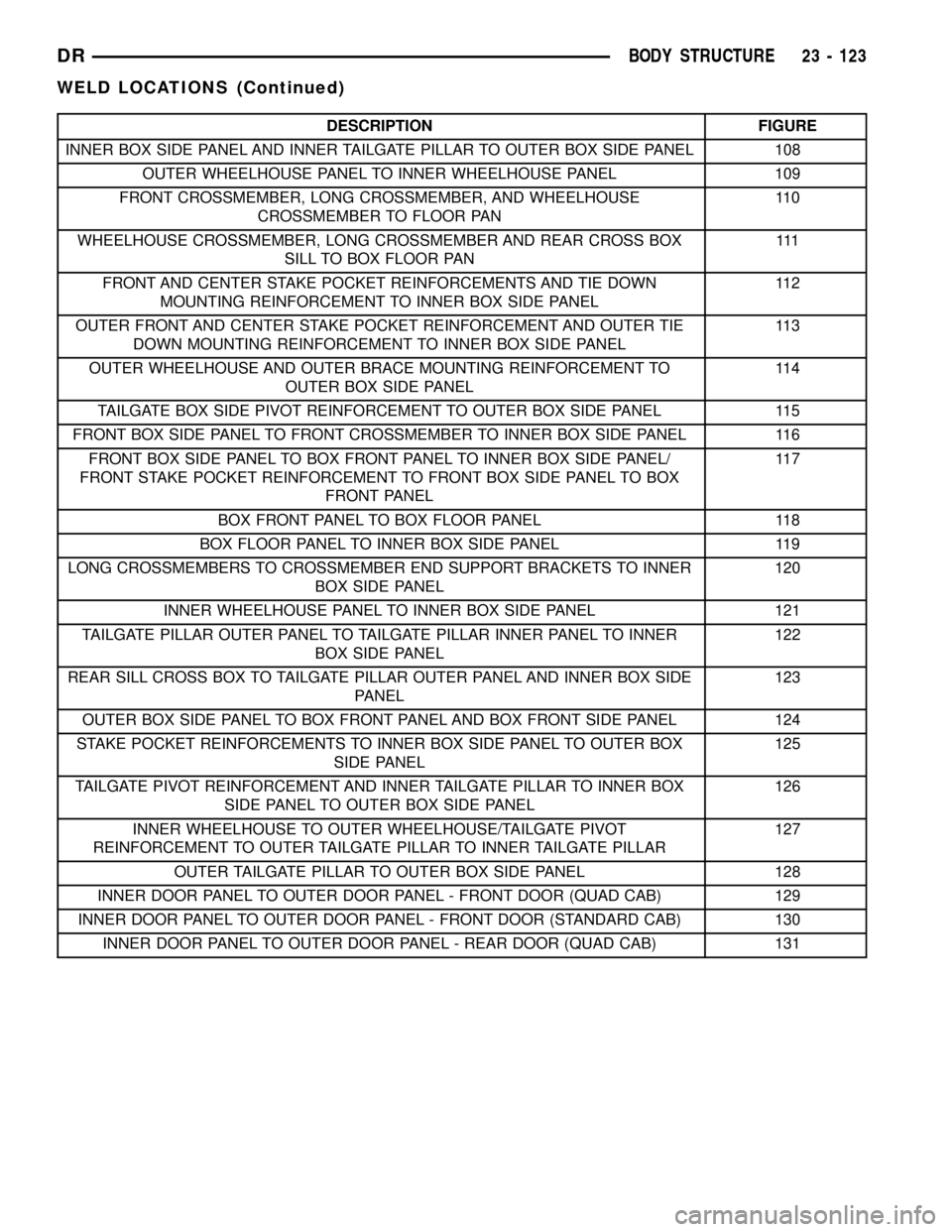
DESCRIPTION FIGURE
INNER BOX SIDE PANEL AND INNER TAILGATE PILLAR TO OUTER BOX SIDE PANEL 108
OUTER WHEELHOUSE PANEL TO INNER WHEELHOUSE PANEL 109
FRONT CROSSMEMBER, LONG CROSSMEMBER, AND WHEELHOUSE
CROSSMEMBER TO FLOOR PAN11 0
WHEELHOUSE CROSSMEMBER, LONG CROSSMEMBER AND REAR CROSS BOX
SILL TO BOX FLOOR PAN111
FRONT AND CENTER STAKE POCKET REINFORCEMENTS AND TIE DOWN
MOUNTING REINFORCEMENT TO INNER BOX SIDE PANEL11 2
OUTER FRONT AND CENTER STAKE POCKET REINFORCEMENT AND OUTER TIE
DOWN MOUNTING REINFORCEMENT TO INNER BOX SIDE PANEL11 3
OUTER WHEELHOUSE AND OUTER BRACE MOUNTING REINFORCEMENT TO
OUTER BOX SIDE PANEL11 4
TAILGATE BOX SIDE PIVOT REINFORCEMENT TO OUTER BOX SIDE PANEL 115
FRONT BOX SIDE PANEL TO FRONT CROSSMEMBER TO INNER BOX SIDE PANEL 116
FRONT BOX SIDE PANEL TO BOX FRONT PANEL TO INNER BOX SIDE PANEL/
FRONT STAKE POCKET REINFORCEMENT TO FRONT BOX SIDE PANEL TO BOX
FRONT PANEL11 7
BOX FRONT PANEL TO BOX FLOOR PANEL 118
BOX FLOOR PANEL TO INNER BOX SIDE PANEL 119
LONG CROSSMEMBERS TO CROSSMEMBER END SUPPORT BRACKETS TO INNER
BOX SIDE PANEL120
INNER WHEELHOUSE PANEL TO INNER BOX SIDE PANEL 121
TAILGATE PILLAR OUTER PANEL TO TAILGATE PILLAR INNER PANEL TO INNER
BOX SIDE PANEL122
REAR SILL CROSS BOX TO TAILGATE PILLAR OUTER PANEL AND INNER BOX SIDE
PANEL123
OUTER BOX SIDE PANEL TO BOX FRONT PANEL AND BOX FRONT SIDE PANEL 124
STAKE POCKET REINFORCEMENTS TO INNER BOX SIDE PANEL TO OUTER BOX
SIDE PANEL125
TAILGATE PIVOT REINFORCEMENT AND INNER TAILGATE PILLAR TO INNER BOX
SIDE PANEL TO OUTER BOX SIDE PANEL126
INNER WHEELHOUSE TO OUTER WHEELHOUSE/TAILGATE PIVOT
REINFORCEMENT TO OUTER TAILGATE PILLAR TO INNER TAILGATE PILLAR127
OUTER TAILGATE PILLAR TO OUTER BOX SIDE PANEL 128
INNER DOOR PANEL TO OUTER DOOR PANEL - FRONT DOOR (QUAD CAB) 129
INNER DOOR PANEL TO OUTER DOOR PANEL - FRONT DOOR (STANDARD CAB) 130
INNER DOOR PANEL TO OUTER DOOR PANEL - REAR DOOR (QUAD CAB) 131
DRBODY STRUCTURE 23 - 123
WELD LOCATIONS (Continued)
Page 2488 of 2627

HEATING & AIR CONDITIONING
TABLE OF CONTENTS
page page
HEATING & AIR CONDITIONING
DESCRIPTION
DESCRIPTION - ENGINE COOLING
SYSTEM REQUIREMENTS...............1
DESCRIPTION - HEATER AND AIR
CONDITIONER........................1
OPERATION - HEATER AND AIR
CONDITIONER........................1
DIAGNOSIS AND TESTING
DIAGNOSIS AND TESTING - A/C
PERFORMANCE.......................3DIAGNOSIS AND TESTING - HEATER
PERFORMANCE TEST..................6
SPECIFICATIONS - A/C SYSTEM............7
CONTROLS.............................9
DISTRIBUTION..........................26
PLUMBING.............................41
HEATING & AIR
CONDITIONING
DESCRIPTION
DESCRIPTION - ENGINE COOLING SYSTEM
REQUIREMENTS
To maintain the performance level of the heating,
ventilation and air conditioning (HVAC) system, the
engine cooling system must be properly maintained.
The use of a bug screen is not recommended. Any
obstructions in front of the radiator or A/C condenser
will reduce the performance of the A/C and engine
cooling systems.
The engine cooling system includes the radiator,
thermostat, radiator hoses and the engine coolant
pump. Refer to Cooling for more information before
opening or attempting any service to the engine cool-
ing system.
DESCRIPTION - HEATER AND AIR
CONDITIONER
A manually controlled single zone type heating-air
conditioning system or a manually controlled dual
zone type heating-air conditioning system is available
on this model.
All vehicles are equipped with a common heater,
ventilation and air conditioning (HVAC) housing (Fig.
1). The system combines air conditioning, heating,
and ventilating capabilities in a single unit housing
mounted within the passenger compartment under
the instrument panel. The HVAC housing includes:
²Blower motor
²Blower motor resistor block²Heater core
²Evaporator coil
²Blend door and actuator
²Defrost door and actuator
²Mode door and actuator
²Recirculation door and actuator
Based upon the system and mode selected, condi-
tioned air can exit the HVAC housing through one or
a combination of the three main housing outlets:
defrost, panel or floor. The defrost outlet is located on
the top of the housing, the panel outlet is located on
the face of the housing and the floor outlet is located
on the bottom of the housing. Once the conditioned
air exits the unit housing, it is further directed
through molded plastic ducts to the various outlets in
the vehicle interior. These outlets and their locations
are as follows:
²Defroster Outlet- A single large defroster out-
let is located in the center of the instrument panel
top cover, near the base of the windshield.
²Side Window Demister Outlets- There are
two side window demister outlets, one is located at
each outboard end of the instrument panel top cover,
near the belt line at the A-pillars.
²Panel Outlets- There are four panel outlets in
the instrument panel, one located near each outboard
end of the instrument panel facing the rear of the
vehicle and two located near the top of the instru-
ment panel center bezel.
²Front Floor Outlets- There are two front floor
outlets, one located above each side of the floor panel
center tunnel near the dash panel.
OPERATION - HEATER AND AIR CONDITIONER
The heating and air conditioning systems pulls
outside (ambient) air through the cowl opening at the
base of the windshield, then into the plenum cham-
DRHEATING & AIR CONDITIONING 24 - 1
Page 2500 of 2627

NOTE: The air gap is determined by the spacer
shims. When installing an original, or a new clutch
assembly, try the original shims first. When install-
ing a new clutch onto a compressor that previously
did not have a clutch, use a 1.0, 0.50, and 0.13 mil-
limeter (0.040, 0.020, and 0.005 inch) shims from the
new clutch hardware package that is provided with
the new clutch.
(9) To complete the procedure (Refer to 24 - HEAT-
ING & AIR CONDITIONING/PLUMBING/A/C COM-
PRESSOR - INSTALLATION).
A/C COMPRESSOR CLUTCH
RELAY
DESCRIPTION
The A/C compressor clutch relay (Fig. 10) is a
International Standards Organization (ISO) micro-re-
lay. Relays conforming to the ISO specifications have
common physical dimensions, current capacities, ter-
minal patterns, and terminal functions. The ISO
micro-relay terminal functions are the same as a con-
ventional ISO relay. However, the ISO micro-relay
terminal pattern (or footprint) is different, the cur-
rent capacity is lower, and the physical dimensions
are smaller than those of the conventional ISO relay.
The A/C compressor clutch relay is located in the
intergrated power module (IPM) in the engine com-
partment. See the fuse and relay layout label affixed
to the inside surface of the IPM cover for A/C com-
pressor clutch relay identification and location.
The black, molded plastic case is the most visible
component of the A/C compressor clutch relay. Fivemale spade-type terminals extend from the bottom of
the base to connect the relay to the vehicle electrical
system, and the ISO designation for each terminal is
molded into the base adjacent to each terminal. The
ISO terminal designations are as follows:
²30 (Common Feed)- This terminal is con-
nected to the movable contact point of the relay.
²85 (Coil Ground)- This terminal is connected
to the ground feed side of the relay control coil.
²86 (Coil Battery)- This terminal is connected
to the battery feed side of the relay control coil.
²87 (Normally Open)- This terminal is con-
nected to the normally open fixed contact point of the
relay.
²87A (Normally Closed)- This terminal is con-
nected to the normally closed fixed contact point of
the relay.
OPERATION
The A/C compressor clutch relay is an electrome-
chanical switch that uses a low current input from
the powertrain control module (PCM) or engine con-
trol module (ECM) depending on engine application,
to control the high current output to the compressor
clutch electromagnetic coil. The movable common
feed contact point is held against the fixed normally
closed contact point by spring pressure. When the
relay coil is energized, an electromagnetic field is
produced by the coil windings. This electromagnetic
field draws the movable relay contact point away
from the fixed normally closed contact point, and
holds it against the fixed normally open contact
point. When the relay coil is de-energized, spring
pressure returns the movable contact point back
against the fixed normally closed contact point. The
resistor or diode is connected in parallel with the
relay coil in the relay, and helps to dissipate voltage
Fig. 9 Check Clutch Air Gap - Typical
1 - FEELER GAUGE
Fig. 10 A/C Compressor Clutch Micro-Relay
30 - COMMON FEED
85 - COIL GROUND
86 - COIL BATTERY
87 - NORMALLY OPEN
87A - NORMALLY CLOSED
DRCONTROLS 24 - 13
A/C COMPRESSOR CLUTCH/COIL (Continued)
Page 2501 of 2627

spikes and electromagnetic interference that can be
generated as the electromagnetic field of the relay
coil collapses.
The A/C compressor clutch relay terminals are con-
nected to the vehicle electrical system through a
receptacle in the integrated power module (IPM). The
inputs and outputs of the A/C compressor clutch
relay include:
²The common feed terminal (30) receives a bat-
tery current input from a fuse in the IPM through a
fused B(+) circuit at all times.
²The coil ground terminal (86) receives a ground
input from the PCM/ECM through the A/C compres-
sor clutch relay control circuit only when the PCM/
ECM electronically pulls the control circuit to
ground.
²The coil battery terminal (85) receives a battery
current input from PTC 1 in the IPM through a
fused ignition switch output (run) circuit only when
the ignition switch is in the On position.
²The normally open terminal (87) provides a bat-
tery current output to the compressor clutch coil
through the A/C compressor clutch relay output cir-
cuit only when the A/C compressor clutch relay coil is
energized.
²The normally closed terminal (87A) is not con-
nected to any circuit in this application, but provides
a battery current output only when the A/C compres-
sor clutch relay coil is de-energized.
Refer to the appropriate wiring information for
diagnosis and testing of the micro-relay and for com-
plete HVAC wiring diagrams.
REMOVAL
(1) Disconnect and isolate the negative battery
cable.
(2) Remove the cover from the integrated power
module (IPM) (Fig. 11).
(3) Refer to the fuse and relay layout label on the
IPM cover for compressor clutch relay identification
and location.
(4) Remove the A/C compressor clutch relay from
the IPM.
INSTALLATION
(1) See the fuse and relay layout label affixed to
the underside of the IPM cover for A/C compressor
clutch relay location.
(2) Position the A/C compressor clutch relay in the
proper receptacle in the IPM.
(3) Align the A/C compressor clutch relay termi-
nals with the terminal cavities in the IPM receptacle.
(4) Push down firmly on the A/C compressor clutch
relay until the terminals are fully seated in the ter-
minal cavities in the IPM receptacle.
(5) Install the cover onto the IPM.(6) Reconnect the negative battery cable.
A/C HEATER CONTROL
DESCRIPTION
The heater and air conditioning systems use elec-
trical controls. These controls provide the vehicle
operator with a number of setting options to help
control the climate and comfort within the vehicle.
The A/C-heater control for the Single Zone system
(Fig. 12) or Dual Zone system (Fig. 13) is located to
the right of the instrument cluster on the instrument
panel.
The Single Zone control panel contains a rotary-
type temperature control switch, a rotary-type mode
control switch and a rotary-type blower motor speed
switch. The A/C-heater control also has a push but-
ton to activate the optional heated side view mirror
defroster elements and to turn the A/C on.
The Dual Zone control panel contains a pair of slid-
er-type temperature control switches, a rotary-type
mode control switch and a rotary-type blower motor
speed switch. The control also has buttons to activate
the optional heated sideview mirror defroster ele-
ments, turn the A/C on and set the system to Max
A/C.
The A/C-heater control panel cannot be repaired. If
faulty or damaged, the entire unit must be replaced.
Fig. 11 Integrated Power Module (IPM)
1 - BATTERY
2 - INTEGRATED POWER MODULE (IPM)
24 - 14 CONTROLSDR
A/C COMPRESSOR CLUTCH RELAY (Continued)
Page 2532 of 2627

STANDARD PROCEDURE
STANDARD PROCEDURE - HANDLING TUBING
AND FITTINGS
CAUTION: The system must be completely empty
before opening any fitting or connection in the
refrigeration system. Open fittings with caution
even after the system has been emptied. If any
pressure is noticed as a fitting is loosened,
retighten fitting and evacuate the system again.
A good rule for the flexible hose lines is to keep the
radius of all bends at least 10 times the diameter of
the hose. Sharper bends will reduce the flow of
refrigerant. The flexible hose lines should be routed
so they are at least 3 inches (80 mm) from the
exhaust manifold. Inspect all flexible hose lines to
make sure they are in good condition and properly
routed.
The use of correct wrenches when making connec-
tions is very important. Improper wrenches or
improper use of wrenches can damage the fittings.
The internal parts of the A/C system will remain sta-
ble as long as moisture-free refrigerant and refrig-
erant oil is used. Abnormal amounts of dirt,
moisture or air can upset the chemical stability.
This may cause operational troubles or even seri-
ous damage if present in more than very small
quantities. Before disconnecting a component,
clean the outside of the fittings thoroughly to pre-
vent contamination from entering the refrigerant
system.
When opening a refrigeration system, have every-
thing you will need to repair the system ready. This
will minimize the amount of time the system must
be opened. Cap or plug all lines and fittings as
soon as they are opened. This will help prevent the
entrance of dirt and moisture. All new lines and
components should be capped or sealed until they
are ready to be used. Before connecting a compo-
nent, clean the outside of the fittings thoroughly to
prevent contamination from entering the refrigerant
system.
All tools, including the refrigerant dispensing mani-
fold, the manifold gauge set, and test hoses should
be kept clean and dry.
Kinks in the refrigerant tubing or sharp bends in
the refrigerant hose lines will greatly reduce the
capacity of the entire system. High pressures are pro-
duced in the system when it is operating. Extreme
care must be exercised to make sure that all connec-
tions are pressure tight. Dirt and moisture can enter
the system when it is opened for repair or replace-
ment of lines or components. The refrigerant oil willabsorb moisture readily out of the air. This moisture
will convert into acids within a closed system.
STANDARD PROCEDURE - DIODE
REPLACEMENT
(1) Disconnect and isolate the battery negative
cable. If the vehicle has dual batteries, remove the
negative cable from both batteries.
(2) Locate the diode in the harness, and remove
the protective covering.
(3) Remove the diode from the harness. Note the
direction of current flow (Fig. 1).
(4) Remove the insulation from the wires in the
harness. Only remove enough insulation to solder in
the new diode.
(5) Install the new diode in the harness, making
sure current flow is correct. If necessary refer to the
appropriate wiring diagram for current flow.
(6) Solder the connections together using rosin
core type solder only.Do not use acid core solder.
(7) Tape the diode to the harness using electrical
tape. Make sure the diode is completely sealed from
the elements.
(8) Reconnect the battery negative cable(s) and
test the affected systems.
Fig. 1 Diode Identification
1 - CURRENT FLOW
2 - BAND INDICATES CURRENT FLOW
3 - DIODE AS SHOWN IN WIRING DIAGRAMS
DRPLUMBING 24 - 45
PLUMBING (Continued)
Page 2535 of 2627

After the system has been tested for leaks and
evacuated, a refrigerant (R-134a) charge can be
injected into the system.
NOTE: When connecting the service equipment
coupling to the line fitting, verify that the valve of
the coupling is fully closed. This will reduce the
amount of effort required to make the connection.
(1) If using a separate vacuum pump close all
valves before disconnecting pump. Connect manifold
gauge set to the A/C service ports.
NOTE: Always refer to the underhood HVAC Speci-
fication label for the refrigerant fill level of the vehi-
cle being serviced.
(2) Measure refrigerant (refer to capacities). Refer
to the instructions provided with the equipment
being used.
(3) Verify engine is shut off. Open the suction and
discharge valves. Open the charge valve to allow the
refrigerant to flow into the system. When the trans-
fer of refrigerant has stopped, close the suction and
discharge valve.
(4) If all of the charge did not transfer from the
dispensing device, put vehicle controls into the fol-
lowing mode:
²Automatic transmission in park or manual
transmission in neutral
²Engine at idle
²A/C mode control set to outside air
²A/C mode control set to panel mode
²A/C temperature control set to full cool
²Blower motor control set on highest speed
²Vehicle windows closed
If the A/C compressor does not engage, test the
compressor clutch control circuit and correct any fail-
ure (Refer to 8 - ELECTRICAL/WIRING DIAGRAM
INFORMATION - DIAGNOSIS AND TESTING).
(5) Open the suction valve to allow the remaining
refrigerant to transfer to the system.
WARNING: TAKE CARE NOT TO OPEN THE DIS-
CHARGE (HIGH-PRESSURE) VALVE AT THIS TIME.
(6) Close all valves and test the A/C system perfor-
mance.
(7) Disconnect the charging station or manifold
gauge set. Install the service port caps.
REFRIGERANT CHARGE CAPACITY
The R-134a refrigerant system charge capacity for
this vehicle can be found on the underhood HVAC
specfication tag.
A/C COMPRESSOR
DESCRIPTION
DESCRIPTION - A/C COMPRESSOR
The A/C system on models equipped with the 5.9L
engine use a Sanden SD-7 reciprocating swash plate-
type compressor. This compressor has a fixed dis-
placement of 165 cubic centimeter (10.068 cubic
inches) and has both the suction and discharge ports
located on the cylinder head.
The A/C system on models equipped with the 3.7L,
4.7L and 5.7L engines use a Denso 10S17 reciprocat-
ing swash plate-type compressor. This compressor
has a fixed displacement of 170 cubic centimeter and
has both the suction and discharge ports located on
the cylinder head.
A label identifying the use of R-134a refrigerant is
located on both A/C compressors.
DESCRIPTION - HIGH PRESSURE RELIEF
VALVE
A high pressure relief valve is located on the com-
pressor cylinder head, which is on the rear of the
compressor. This mechanical valve is designed to
vent refrigerant from the system to protect against
damage to the compressor and other system compo-
nents, caused by condenser air flow restriction or an
overcharge of refrigerant.
OPERATION
OPERATION - A/C COMPRESSOR
The A/C compressor is driven by the engine
through an electric clutch, drive pulley and belt
arrangement. The compressor is lubricated by refrig-
erant oil that is circulated throughout the refrigerant
system with the refrigerant.
The compressor draws in low-pressure refrigerant
vapor from the evaporator through its suction port. It
then compresses the refrigerant into a high-pressure,
high-temperature refrigerant vapor, which is then
pumped to the condenser through the compressor dis-
charge port.
The compressor cannot be repaired. If faulty or
damaged, the entire compressor assembly must be
replaced. The compressor clutch, pulley and clutch
coil are available for service.
OPERATION - HIGH PRESSURE RELIEF VALVE
The high pressure relief valve vents the system
when a discharge pressure of 3445 to 4135 kPa (500
to 600 psi) or above is reached. The valve closes
24 - 48 PLUMBINGDR
PLUMBING (Continued)
Page 2556 of 2627

designs. Useonlyrefrigerant oil of the same type as
recommended to service the refrigerant system
(always refer to the specification tagincluded
with the replacement A/C compressor or the under-
hood A/C system specification tag).
OPERATION
After performing any refrigerant recovery or recy-
cling operation, always replenish the refrigerant sys-
tem with the same amount of the recommended
refrigerant oil as was removed. Too little refrigerant
oil can cause compressor damage, and too much can
reduce air conditioning system performance.
PAG refrigerant oil is much more hygroscopic than
mineral oil, and will absorb any moisture it comes
into contact with, even moisture in the air. The PAG
oil container should always be kept tightly capped
until it is ready to be used. After use, recap the oil
container immediately to prevent moisture contami-
nation.
STANDARD PROCEDURE - REFRIGERANT OIL
LEVEL
WARNING: REFER TO THE APPLICABLE WARN-
INGS AND CAUTIONS FOR THIS SYSTEM BEFORE
PERFORMING THE FOLLOWING OPERATION (Refer
to 24 - HEATING & AIR CONDITIONING/PLUMBING -
WARNING) and (Refer to 24 - HEATING & AIR CON-
DITIONING/PLUMBING - CAUTION).
CAUTION: The refrigerant oil in the R-134a A/C sys-
tem is unique depending on the A/C compressor
used. Use only PAG oils that are designed to work
with R-134a refrigerant and the A/C compressor in
the vehicle. Always refer to the underhood A/C Sys-
tem Specification Label for the correct oil designa-
tion.
It is important to have the correct amount of lubri-
cant in the A/C refrigerant system to ensure proper
lubrication of the A/C compressor. Too little lubricant
will result in damage to the compressor. Too much
lubricant will reduce the cooling capacity of the A/C
system and consequently result in higher discharge
air temperatures.
The lubricant used in the compressor is polyalka-
lene glycol PAG lubricant. Only the refrigerant lubri-
cant approved for use with this vehicle should be
used to service the system. Do not use any other
lubricant. The lubricant container should be kept
tightly capped until it is ready for use. Refrigerant
lubricant will quickly absorb any moisture it comes
in contact with.
It will not be necessary to check the oil level in the
A/C compressor or to add oil, unless there has beenan oil loss. An oil loss may occur due to component
replacement, or a rupture or leak from a refrigerant
line, connector fitting, component or component seal.
If a leak occurs, add 30 milliliters (1 fluid ounce) of
the recommended refrigerant oil to the refrigerant
system after the repair has been made. Refrigerant
oil loss will be evident at the leak point by the pres-
ence of a wet, shiny surface around the leak.
COMPONENT REFRIGERANT OIL LEVEL CHECK
When an air conditioning system is first assembled
at the factory, all components (except the A/C com-
pressor) are refrigerant oil free. After the refrigerant
system has been charged with (R-134a) refrigerant
and operated, the oil in the A/C compressor is dis-
persed through the lines and components. The A/C
evaporator, A/C condenser, and accumulator will
retain a significant amount of oil. Refer to the A/C
Component Refrigerant Oil Capacities table. When a
component is replaced, the specified amount of refrig-
erant oil must be added. When a new A/C compressor
is being installed, drain the lubricant from the used
compressor, measure the amount drained and discard
the used lubricant. Drain the lubricant from the new
A/C compressor into a clean container. Return the
amount of lubricant measured from the used com-
pressor, plus the amount reclaimed from the system
back into the new A/C compressor. When a line or
component has ruptured and oil has escaped, the
accumulator must be replaced along with the rup-
tured component.
A/C COMPONENT REFRIGERANT OIL
CAPACITIES
Component ml. oz.
Total System Fill 180 6
Accumulator 60 2
Condenser 30 1
Evaporator 60 2
Compressor Drain and measure
the oil from the old
compressor - see
text.
COMPRESSOR REFRIGERANT OIL LEVEL CHECK
NOTE: Most reclaim/recycling equipment will mea-
sure the lubricant being removed during recovery.
This amount of lubricant should be added back into
the system. Refer to the reclaim/recycling equip-
ment manufacturers instructions.
(1) Recover the refrigerant from the system.
DRPLUMBING 24 - 69
REFRIGERANT OIL (Continued)
Page 2562 of 2627

EMISSIONS CONTROL
TABLE OF CONTENTS
page page
EMISSIONS CONTROL
DESCRIPTION
DESCRIPTION - STATE DISPLAY TEST
MODE...............................1
DESCRIPTION - CIRCUIT ACTUATION TEST
MODE...............................1
DESCRIPTION - DIAGNOSTIC TROUBLE
CODES..............................1
DESCRIPTION - TASK MANAGER..........1DESCRIPTION - MONITORED SYSTEMS....2
DESCRIPTION - TRIP DEFINITION.........4
DESCRIPTION - COMPONENT MONITORS . . 4
OPERATION
OPERATION..........................5
OPERATION - TASK MANAGER...........5
OPERATION - NON-MONITORED CIRCUITS . . 8
EVAPORATIVE EMISSIONS................10
EMISSIONS CONTROL
DESCRIPTION
DESCRIPTION - STATE DISPLAY TEST MODE
The switch inputs to the Powertrain Control Mod-
ule (PCM) have two recognized states; HIGH and
LOW. For this reason, the PCM cannot recognize the
difference between a selected switch position versus
an open circuit, a short circuit, or a defective switch.
If the State Display screen shows the change from
HIGH to LOW or LOW to HIGH, assume the entire
switch circuit to the PCM functions properly. Connect
the DRB scan tool to the data link connector and
access the state display screen. Then access either
State Display Inputs and Outputs or State Display
Sensors.
DESCRIPTION - CIRCUIT ACTUATION TEST
MODE
The Circuit Actuation Test Mode checks for proper
operation of output circuits or devices the Powertrain
Control Module (PCM) may not internally recognize.
The PCM attempts to activate these outputs and
allow an observer to verify proper operation. Most of
the tests provide an audible or visual indication of
device operation (click of relay contacts, fuel spray,
etc.). Except for intermittent conditions, if a device
functions properly during testing, assume the device,
its associated wiring, and driver circuit work cor-
rectly. Connect the DRB scan tool to the data link
connector and access the Actuators screen.
DESCRIPTION - DIAGNOSTIC TROUBLE CODES
A Diagnostic Trouble Code (DTC) indicates the
PCM has recognized an abnormal condition in the
system.Remember that DTC's are the results of a sys-
tem or circuit failure, but do not directly iden-
tify the failed component or components.
BULB CHECK
Each time the ignition key is turned to the ON
position, the malfunction indicator (check engine)
lamp on the instrument panel should illuminate for
approximately 2 seconds then go out. This is done for
a bulb check.
OBTAINING DTC'S USING DRB SCAN TOOL
(1) Obtain the applicable Powertrain Diagnostic
Manual.
(2) Obtain the DRB Scan Tool.
(3) Connect the DRB Scan Tool to the data link
(diagnostic) connector. This connector is located in
the passenger compartment; at the lower edge of
instrument panel; near the steering column.
(4) Turn the ignition switch on and access the
ªRead Faultº screen.
(5) Record all the DTC's and ªfreeze frameº infor-
mation shown on the DRB scan tool.
(6) To erase DTC's, use the ªErase Trouble Codeº
data screen on the DRB scan tool.Do not erase any
DTC's until problems have been investigated
and repairs have been performed.
DESCRIPTION - TASK MANAGER
The PCM is responsible for efficiently coordinating
the operation of all the emissions-related compo-
nents. The PCM is also responsible for determining if
the diagnostic systems are operating properly. The
software designed to carry out these responsibilities
is call the 'Task Manager'.
DREMISSIONS CONTROL 25 - 1