1998 DODGE RAM 1500 gear
[x] Cancel search: gearPage 188 of 2627

(12)Remove pinion gear from the housing (Fig. 56).
(13) Remove pinion seal with a pry tool or slide-
hammer mounted screw.
(14) Remove front pinion bearing and oil slinger if
equipped.
(15) Remove front pinion bearing cup with
Remover C-4345 and Handle C-4171 (Fig. 57).(16) Remove rear pinion bearing cup from housing
(Fig. 58) with Remover C-4307 and Handle C-4171.
(17) Remove collapsible spacer from the pinion
shaft (Fig. 59).
Fig. 56 PINION GEAR
1 - RAWHIDE HAMMER
Fig. 57 FRONT PINION BEARING CUP
1 - REMOVER
2 - HANDLE
Fig. 58 REAR PINION BEARING CUP
1 - DRIVER
2 - HANDLE
Fig. 59 COLLAPSIBLE SPACER
1 - COLLAPSIBLE SPACER
2 - REAR PINION BEARING
3 - PINION DEPTH SHIM
DRREAR AXLE - 9 1/4 3 - 107
PINION GEAR/RING GEAR/TONE RING (Continued)
Page 189 of 2627

(18) Remove rear pinion bearing (Fig. 60) from the
pinion shaft with Puller C-293-PA and Adapters
C-293-37.
(19) Remove pinion depth shim (Fig. 61) from the
pinion shaft and record shim thickness.
INSTALLATION
NOTE: The ring gear and pinion are serviced in a
matched set. Do not replace one gear without
replacing the other matching gear. If ring and pinion
gears or bearings are replaced, Refer to Adjust-
ments for Pinion Gear Depth Setting.
(1) Apply Mopar Door Ease or equivalent stick
lubricant to outside surface of the pinion bearing
cups.
(2) Install rear pinion bearing cup (Fig. 62) with
Installer C-4308 and Driver Handle C-4171 and ver-
ify cup is seated.
Fig. 60 REAR PINION BEARING
1 - PULLER
2 - VISE
3 - ADAPTERS
4 - PINION SHAFT
Fig. 61 PINION DEPTH SHIM
1 - PINION DEPTH SHIM
2 - PINION GEAR
Fig. 62 REAR PINION BEARING CUP
1 - INSTALLER
2 - HANDLE
3 - 108 REAR AXLE-91/4DR
PINION GEAR/RING GEAR/TONE RING (Continued)
Page 190 of 2627
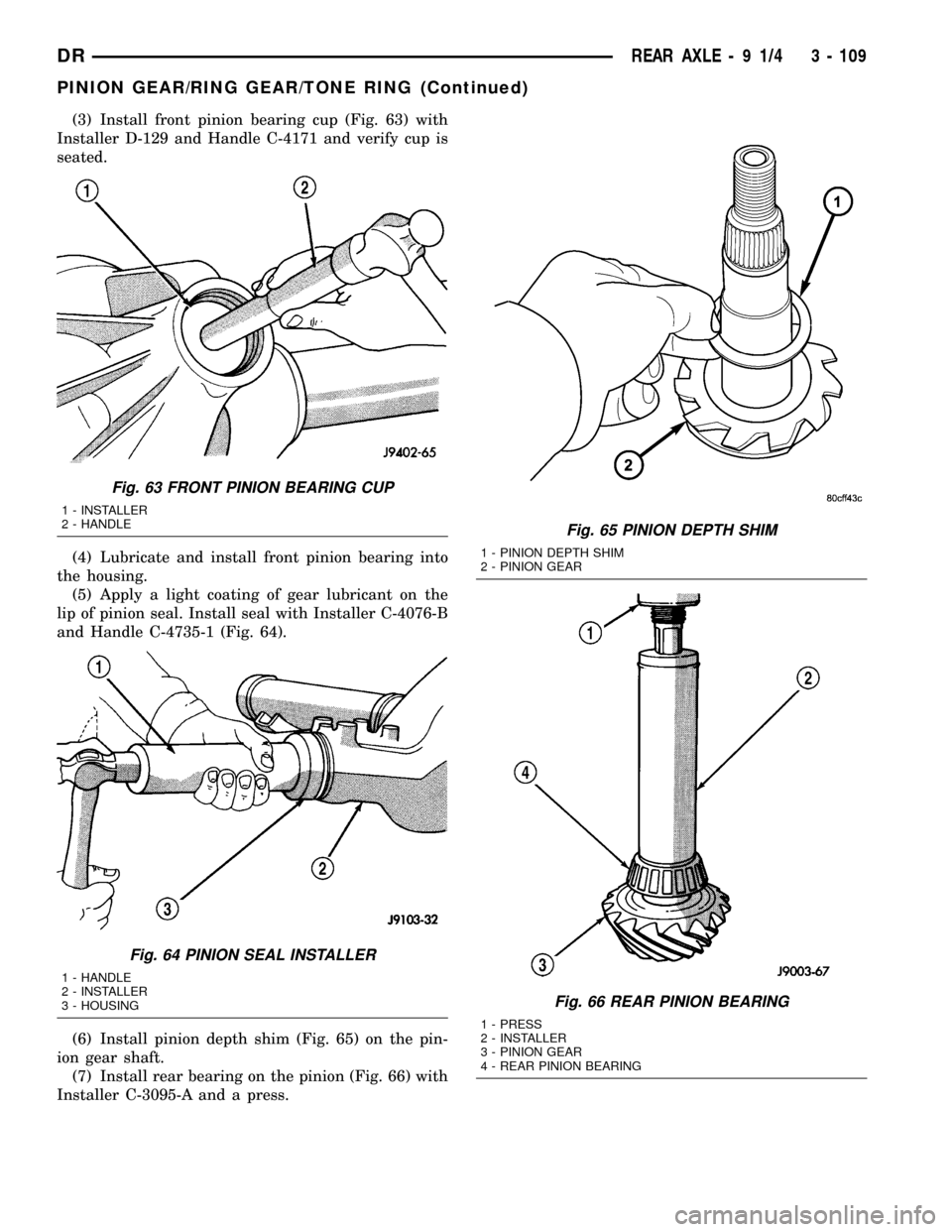
(3) Install front pinion bearing cup (Fig. 63) with
Installer D-129 and Handle C-4171 and verify cup is
seated.
(4) Lubricate and install front pinion bearing into
the housing.
(5) Apply a light coating of gear lubricant on the
lip of pinion seal. Install seal with Installer C-4076-B
and Handle C-4735-1 (Fig. 64).
(6) Install pinion depth shim (Fig. 65) on the pin-
ion gear shaft.
(7) Install rear bearing on the pinion (Fig. 66) with
Installer C-3095-A and a press.
Fig. 63 FRONT PINION BEARING CUP
1 - INSTALLER
2 - HANDLE
Fig. 64 PINION SEAL INSTALLER
1 - HANDLE
2 - INSTALLER
3 - HOUSING
Fig. 65 PINION DEPTH SHIM
1 - PINION DEPTH SHIM
2 - PINION GEAR
Fig. 66 REAR PINION BEARING
1 - PRESS
2 - INSTALLER
3 - PINION GEAR
4 - REAR PINION BEARING
DRREAR AXLE - 9 1/4 3 - 109
PINION GEAR/RING GEAR/TONE RING (Continued)
Page 191 of 2627
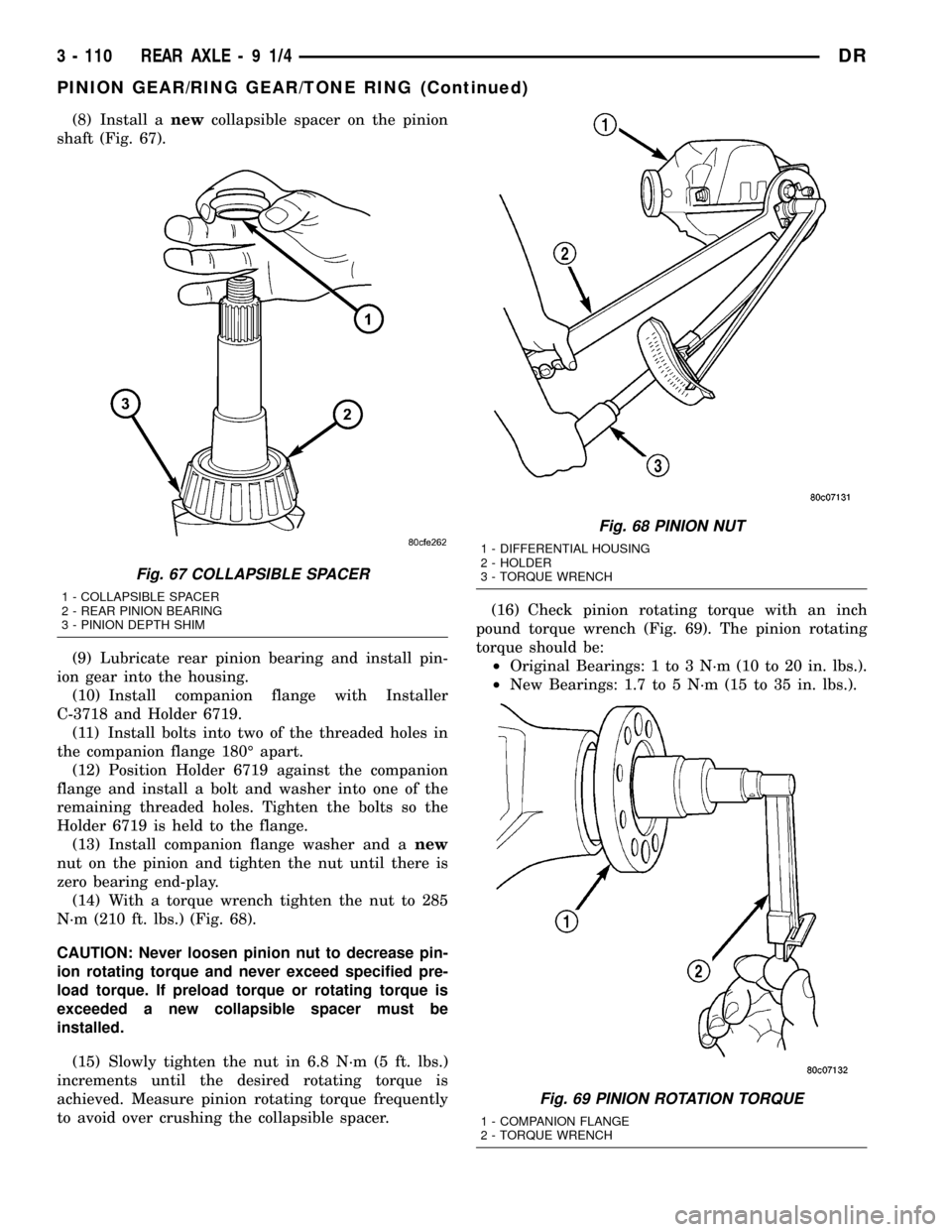
(8) Install anewcollapsible spacer on the pinion
shaft (Fig. 67).
(9) Lubricate rear pinion bearing and install pin-
ion gear into the housing.
(10) Install companion flange with Installer
C-3718 and Holder 6719.
(11) Install bolts into two of the threaded holes in
the companion flange 180É apart.
(12) Position Holder 6719 against the companion
flange and install a bolt and washer into one of the
remaining threaded holes. Tighten the bolts so the
Holder 6719 is held to the flange.
(13) Install companion flange washer and anew
nut on the pinion and tighten the nut until there is
zero bearing end-play.
(14) With a torque wrench tighten the nut to 285
N´m (210 ft. lbs.) (Fig. 68).
CAUTION: Never loosen pinion nut to decrease pin-
ion rotating torque and never exceed specified pre-
load torque. If preload torque or rotating torque is
exceeded a new collapsible spacer must be
installed.
(15) Slowly tighten the nut in 6.8 N´m (5 ft. lbs.)
increments until the desired rotating torque is
achieved. Measure pinion rotating torque frequently
to avoid over crushing the collapsible spacer.(16) Check pinion rotating torque with an inch
pound torque wrench (Fig. 69). The pinion rotating
torque should be:
²Original Bearings: 1 to 3 N´m (10 to 20 in. lbs.).
²New Bearings: 1.7 to 5 N´m (15 to 35 in. lbs.).
Fig. 67 COLLAPSIBLE SPACER
1 - COLLAPSIBLE SPACER
2 - REAR PINION BEARING
3 - PINION DEPTH SHIM
Fig. 68 PINION NUT
1 - DIFFERENTIAL HOUSING
2 - HOLDER
3 - TORQUE WRENCH
Fig. 69 PINION ROTATION TORQUE
1 - COMPANION FLANGE
2 - TORQUE WRENCH
3 - 110 REAR AXLE-91/4DR
PINION GEAR/RING GEAR/TONE RING (Continued)
Page 192 of 2627

(17) Position exciter ring on differential case. With
a brass drift, slowly and evenly tap the exciter ring
into position.
(18) Position ring gear on the differential case and
start two ring gear bolts. This will provide case-to-
ring gear bolt hole alignment.
(19) Invert the differential case in the vise.
(20) Installnewring gear bolts and alternately
tighten to 156 N´m (115 ft. lbs.) (Fig. 70).
CAUTION: Never reuse the ring gear bolts. The
bolts can fracture causing extensive damage.
(21) Install differential in housing and verify gear
mesh, backlash and contact pattern.
(22) Install axle shafts.
(23) Install differential cover and fill with gear
lubricant.
(24) Install propeller shaft with reference marks
aligned.
Fig. 70 RING GEAR BOLTS
1 - TORQUE WRENCH
2 - RING GEAR BOLTS
3 - RING GEAR
4 - DIFFERENTIAL CASE
DRREAR AXLE - 9 1/4 3 - 111
PINION GEAR/RING GEAR/TONE RING (Continued)
Page 193 of 2627

REAR AXLE - 10 1/2 AA
TABLE OF CONTENTS
page page
REAR AXLE - 10 1/2 AA
DIAGNOSIS AND TESTING...............112
REMOVAL............................115
INSTALLATION........................116
ADJUSTMENTS.......................116
SPECIFICATIONS......................120
SPECIAL TOOLS.......................120
AXLE SHAFTS
REMOVAL............................124
INSTALLATION........................124
AXLE BEARINGS
REMOVAL............................125
INSTALLATION........................125
PINION SEAL
REMOVAL............................126
INSTALLATION........................126
DIFFERENTIAL
REMOVAL............................127DISASSEMBLY........................128
ASSEMBLY...........................129
INSTALLATION........................130
DIFFERENTIAL TRAC-RITE
DESCRIPTION........................131
OPERATION..........................131
DISASSEMBLY........................131
CLEANING...........................132
INSPECTION.........................132
ASSEMBLY...........................133
DIFFERENTIAL CASE BEARINGS
REMOVAL............................134
INSTALLATION........................134
PINION GEAR/RING GEAR/TONE RING
REMOVAL............................134
INSTALLATION........................137
REAR AXLE - 10 1/2 AA
DIAGNOSIS AND TESTING
GEAR NOISE
Axle gear noise can be caused by insufficient lubri-
cant, incorrect backlash, incorrect pinion depth, tooth
contact, worn/damaged gears, or the carrier housing
not having the proper offset and squareness.
Gear noise usually happens at a specific speed
range. The noise can also occur during a specific type
of driving condition. These conditions are accelera-
tion, deceleration, coast, or constant load.
When road testing, first warm-up the axle fluid by
driving the vehicle at least 5 miles and then acceler-
ate the vehicle to the speed range where the noise is
the greatest. Shift out-of-gear and coast through the
peak-noise range. If the noise stops or changes
greatly check for:
²Insufficient lubricant.
²Incorrect ring gear backlash.
²Gear damage.
Differential side gears and pinions can be checked
by turning the vehicle. The side gears are loaded dur-
ing turns. They usually do not cause noise during
straight-ahead driving when the gears are unloaded.
A worn pinion shaft can also cause a snapping or a
knocking noise.
BEARING NOISE
The axle shaft, differential and pinion bearings can
all produce noise when worn or damaged. Bearing
noise can be either a whining, or a growling sound.
Pinion bearingshave a constant-pitch noise. This
noise changes only with vehicle speed. Pinion bearing
noise will be higher pitched because it rotates at a
faster rate. Drive the vehicle and load the differen-
tial. If bearing noise occurs, the rear pinion bearing
is the source of the noise. If the bearing noise is
heard during a coast, the front pinion bearing is the
source.
Differential bearingsusually produce a low pitch
noise. Differential bearing noise is similar to pinion
bearing noise. The pitch of differential bearing noise
is also constant and varies only with vehicle speed.
Axle shaft bearingsproduce noise and vibration
when worn or damaged. The noise generally changes
when the bearings are loaded. Road test the vehicle.
Turn the vehicle sharply to the left and to the right.
This will load the bearings and change the noise
level. Where axle bearing damage is slight, the noise
is usually not noticeable at speeds above 30 m.p.h.
LOW SPEED KNOCK
Low speed knock is generally caused by:
²Worn U-joint(s).
²Worn side-gear thrust washers.
²Worn pinion shaft bore.
3 - 112 REAR AXLE - 10 1/2 AADR
Page 194 of 2627

VIBRATION
Vibration at the rear of the vehicle is usually
caused by:
²Damaged drive shaft.
²Missing drive shaft balance weight(s).
²Worn or out-of-balance wheels.
²Loose wheel lug nuts.
²Worn U-joint(s).
²Loose/broken springs.
²Damaged axle shaft bearing(s).
²Loose pinion gear nut.
²Excessive pinion yoke run out.
²Bent axle shaft(s).
Check for loose or damaged front-end components
or engine/transmission mounts. These components
can contribute to what appears to be a rear end
vibration. Do not overlook engine accessories, brack-
ets and drive belts.
NOTE: All driveline components should be exam-
ined before starting any repair.
DRIVELINE SNAP
A snap or clunk noise when the vehicle is shifted
into gear (or the clutch engaged), can be caused by:
²High engine idle speed.
²Transmission shift operation.
²Loose engine/transmission/transfer case mounts.
²Worn U-joints.
²Loose spring mounts.
²Loose pinion gear nut and yoke.
²Excessive ring gear backlash.
²Excessive side gear to case clearance.
The source of a snap or a clunk noise can be deter-
mined with the assistance of a helper. Raise the vehi-
cle on a hoist with the wheels free to rotate. Instruct
the helper to shift the transmission into gear and lis-
ten for the noise. A mechanics stethoscope is helpful
in isolating the source of a noise.
DIAGNOSTIC CHART
Condition Possible Causes Correction
Wheel Noise 1. Wheel loose. 1. Tighten loose nuts.
2. Faulty, brinelled wheel bearing. 2. Replace bearing.
Axle Shaft Noise 1. Misaligned axle tube. 1. Inspect axle tube alignment.
Correct as necessary.
2. Bent or sprung axle shaft. 2. Inspect and correct as necessary.
Axle Shaft Broke 1. Misaligned axle tube. 1. Replace the broken shaft after
correcting tube mis-alignment.
2 Vehicle overloaded. 2. Replace broken shaft and avoid
excessive weight on vehicle.
3. Erratic clutch operation. 3. Replace broken shaft and avoid or
correct erratic clutch operation.
4. Grabbing clutch. 4. Replace broken shaft and inspect
and repair clutch as necessary.
DRREAR AXLE - 10 1/2 AA 3 - 113
REAR AXLE - 10 1/2 AA (Continued)
Page 195 of 2627

Condition Possible Causes Correction
Differential Cracked 1. Improper adjustment of the
differential bearings.1. Replace case and inspect gears
and bearings for further damage. Set
differential bearing pre-load properly.
2. Excessive ring gear backlash. 2. Replace case and inspect gears
and bearings for further damage. Set
ring gear backlash properly.
3. Vehicle overloaded. 3. Replace case and inspect gears
and bearings for further damage.
Avoid excessive vehicle weight.
4. Erratic clutch operation. 4. Replace case and inspect gears
and bearings for further damage.
Avoid erratic use of clutch.
Differential Gears Scored 1. Insufficient lubrication. 1. Replace scored gears. Fill
differential with the correct fluid type
and quantity.
2. Improper grade of lubricant. 2. Replace scored gears. Fill
differential with the correct fluid type
and quantity.
3. Excessive spinning of one
wheel/tire.3. Replace scored gears. Inspect all
gears, pinion bores, and shaft for
damage. Service as necessary.
Loss Of Lubricant 1. Lubricant level too high. 1. Drain lubricant to the correct level.
2. Worn axle shaft seals. 2. Replace seals.
3. Cracked differential housing. 3. Repair as necessary.
4. Worn pinion seal. 4. Replace seal.
5. Worn/scored yoke. 5. Replace yoke and seal.
6. Axle cover not properly sealed. 6. Remove, clean, and re-seal cover.
Axle Overheating 1. Lubricant level low. 1. Fill differential to correct level.
2. Improper grade of lubricant. 2. Fill differential with the correct fluid
type and quantity.
3. Bearing pre-loads too high. 3. Re-adjust bearing pre-loads.
4. Insufficient ring gear backlash. 4. Re-adjust ring gear backlash.
Gear Teeth Broke 1. Overloading. 1. Replace gears. Examine other
gears and bearings for possible
damage.
2. Erratic clutch operation. 2. Replace gears and examine the
remaining parts for damage. Avoid
erratic clutch operation.
3. Ice-spotted pavement. 3. Replace gears and examine
remaining parts for damage.
4. Improper adjustments. 4. Replace gears and examine
remaining parts for damage. Ensure
ring gear backlash is correct.
3 - 114 REAR AXLE - 10 1/2 AADR
REAR AXLE - 10 1/2 AA (Continued)