1998 CHEVROLET CORVETTE battery
[x] Cancel search: batteryPage 138 of 378
Downloaded from www.Manualslib.com manuals search engine I NOTICE:
Damage to your engine from neglected oil
problems can be costly and
is not covered by
your warranty.
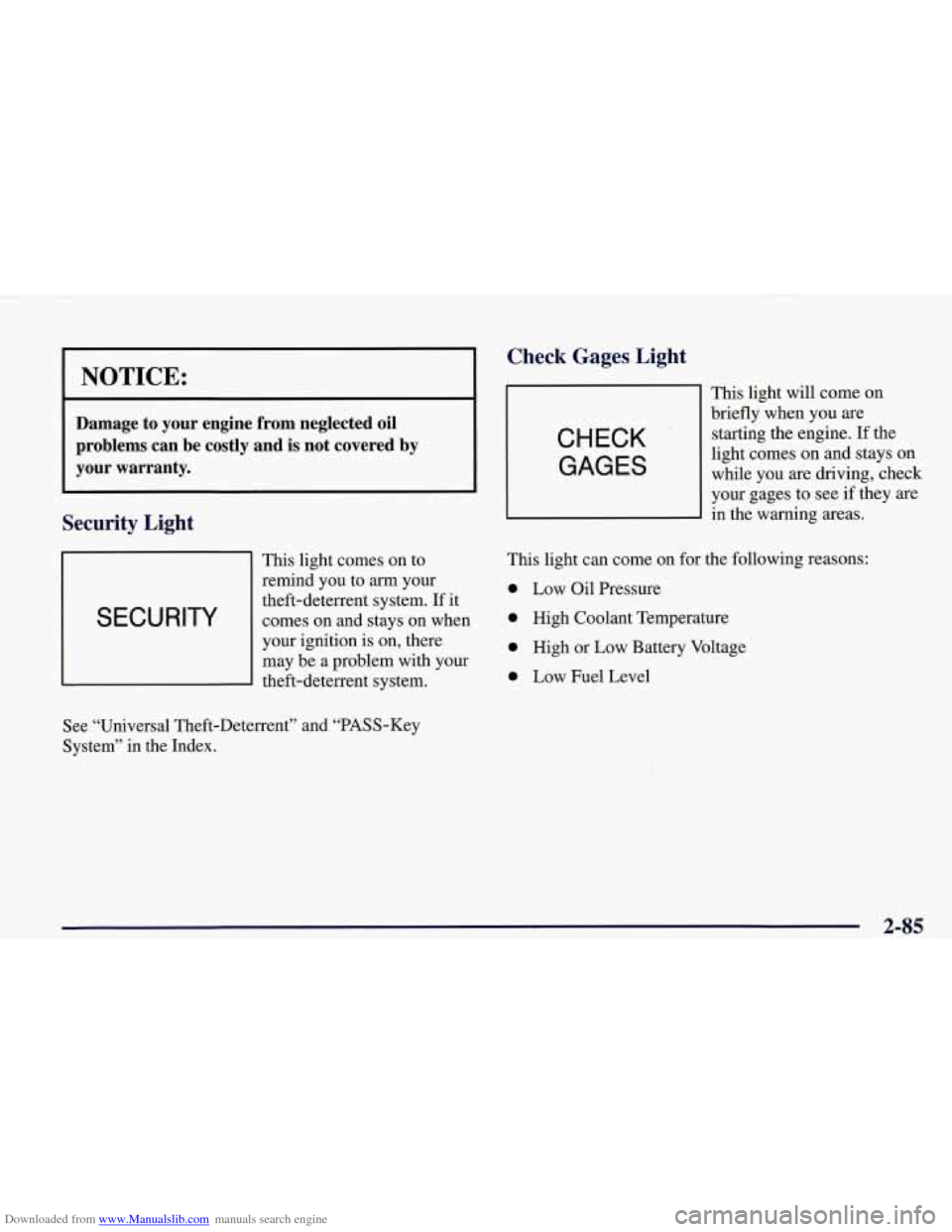
Security Light
This light comes on to
remind you to
arrn your
I SECURITY
theft-deterrent system. If it
comes on and stays on when
I
your ignition is on, there
may be a problem with your
theft-deterrent system.
Check Gages, Light
CHECK
GAGES
This light will come on
briefly when you are
starting the engine. If the
light comes on and stays on
while you are driving, check
your gages to see
if they are
in the warning areas.
This light can come on for the following reasons:
0 Low Oil Pressure
0 High Coolant Temperature
0 High or Low Battery Voltage
0 Low Fuel Level
See “Universal Theft-Deterrent” and “PASS-Key
System” in the Index.
2-85
Page 140 of 378
Downloaded from www.Manualslib.com manuals search engine Driver Information Center (DIC)
The Driver Information Center (DIC) will display
information about how your vehicle is functioning, as
well as warning messages if a system problem is
detected. The DIC display area is located in the
instrument cluster below the speedometer and
tachometer, directly above the steering column.
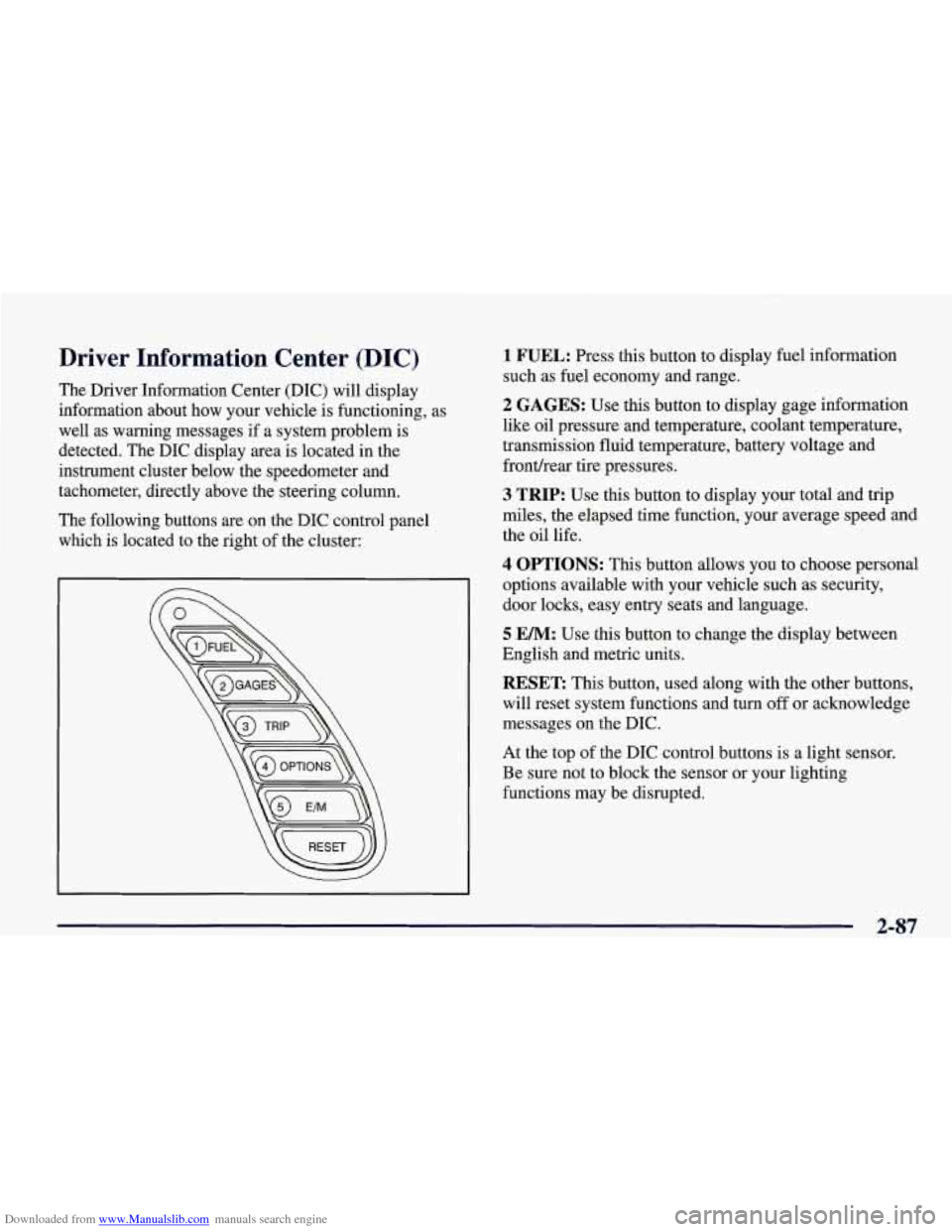
The following buttons are on the DIC control panel which is located to the right of the cluster:
1 FUEL: Press this button to display fuel information
such as fuel economy and range.
2 GAGES: Use this button to display gage information
like oil pressure and temperature, coolant temperature,
transmission fluid temperature, battery voltage and
fronthear tire pressures.
3 TRIP: Use this button to display your total and trip
miles, the elapsed time function, your average speed and
the oil life.
4 OPTIONS: This button allows you to choose personal
options available with your vehicle such as security,
door locks, easy entry seats and language.
5 EM: Use this button to change the display between
English and metric units.
RESET: This button, used along with the other buttons,
will reset system functions and turn
off or acknowledge
messages on the DIC.
At the top of the DIC control buttons is a light sensor.
Be sure not to block the sensor or your lighting
functions may be disrupted.
2-87
Page 142 of 378

Downloaded from www.Manualslib.com manuals search engine Press FUEL again to display instantaneous fuel
economy, such as:
0 INST. 20.1 MPG or
0 INST. 5.3 WlOO km
Press FUEL again to display the range, such as:
0 RANGE 20 MI or
RANGE32km
The range calculates the remaining distance you can
drive without refueling. It's based on fuel economy and
the fuel remaining in the tank.
If the range is lower than 30 miles (48 krn), the display
will read RANGE LOW.
The fuel economy data used to determine fuel range is
an average of recent driving conditions.
As your driving
conditions change, this data is gradually updated.
Resetting the fuel range causes the fuel economy data to
be updated immediately. Press RESET to reset the
fuel range.
2 GAGES
The GAGES button allows you to scroll through the
functions listed below when you press it.
GAGES
2 OIL PRESSURE 40 PSI
- OILTEMP. 234" F
- COOLANT TEMP 123 "F
- TRANS FLUID 123°F
- BATTERY VOLTS 13.5
- FRONT L 34 R 33 PSI
- REAR L 34 R 33 PSI
-,
Press the GAGE button to display the oil pressure,
such as:
0 OIL PRESSURE 40 PSI or
0 OIL PRESSURE 276 kPa
2-89
Page 143 of 378
Downloaded from www.Manualslib.com manuals search engine Press the GAGE button again to display the oil
temperature, such as:
OIL TEMP 234 O F or
OILTEMP 112 O C
Press the GAGE button again to display the coolant
temperature, such as:
COOLANT TEMP 123 O F or
COOLANTTEMP51 O C
Press the GAGE button again to display the transmission
fluid temperature (automatics only), such as:
TRANS FLUID 123 O For
TRANS FLUID 51 O C
Press the GAGE button again to display the battery
voltage, such as:
0 BATTERY 13.5 VOLTS
Press the GAGE button again to display the tire pressure
for the front tires (left and right), such as:
FRONT L34 R33 PSI or
FRONT L 234 R228 kPa
Press the
GAGE button again to display the tire pressure
for the rear tires (left and right), such as:
REAR L34 R33 PSI or
0 REAR L234 R228 kPa
Page 150 of 378
Downloaded from www.Manualslib.com manuals search engine Languages
You can select which language the DIC will display its
messages in. Press the OPTIONS button until the word
LANGUAGES appears on the display, then use the
RESET button to page through the following choices:
0 LANGUAGE ENGLISH
LANGUAGE FRENCH
LANGUAGE GERMAN
LANGUAGE SPANISH
Blank Page
There is a blank page at the end of the OPTIONS menu.
When the blank page is displayed, you can access the
following items:
FOB TRAINING: This option allows you to match the
RFA transmitter(s) to your vehicle. You can access this
option by pressing and holding RESET for two seconds
while you are on the blank page at the end
of the
OPTIONS menu. The message
FOB TRAINING will be
displayed. See “Matching Transmitter(s) To Your
Vehicle” in the Index.
TIRE TRAINING: The Tire Pressure Monitor (TPM)
operates with battery-powered sensors that
are located
inside the valve stems on each tire. Each sensor has a
unique ID code
so the vehicle knows the tire location of
the sensor. When the vehicle reaches a speed
of greater
than
15 mph (24 km/h), the sensors begin to send the
tire pressure readings to a receiver inside the vehicle.
These readings are displayed when using the GAGES
button on the DIC. If you
are unable to display your tire
pressures while the vehicle speed is greater than
15 mph
(24
km/h), you may need to have your sensor ID codes
learned by the vehicle. See your dealer.
DIC Warnings and Messages
The following messages and warnings may appear in the
DIC display. The DIC display area is located in the
instrument cluster below the speedometer and
tachometer, directly above the steering column. You
may receive more than one message at a time. Messages
will appear one behind the other. To acknowledge a
message and remove it from the display, press
RESET.
You may scroll through the messages that may have
been sent at the same time. The message center is
continuously updated with the vehicle
performance status.
2-97
Page 153 of 378
Downloaded from www.Manualslib.com manuals search engine If this message comes on while you are driving, you
may have a problem with the electrical charging system.
It could indicate that you have a loose or broken drive
belt
or another electrical problem. Have it checked right
away. Driving while this light is on could drain
your battery.
If you must drive a short distance with the message on,
be certain to turn
off your accessories, such as the radio
and air conditioner.
TRACTION SYS ACTIVE - : When your traction
control system is limiting wheel spin, the TRACTION
SYS ACTIVE message will be displayed. Slippery road
conditions may exist
if this message is displayed, so
adjust your driving accordingly. The message will stay
on for a few seconds after the traction control system
stops limiting wheel spin.
TRACTION SYSTEM-ON: This message is displayed
when you decide to turn on the TCS by pressing the
switch
on the console. This message will shut off
automatically on its own.
TRACTION SYSTEM-OFF: You will hear a single
quick tone when this message is displayed. This
message comes on and stays on when the TCS button on the console is pressed to turn the system
off. To
acknowledge this message, press
RESET.
SERVICE TRACTION SYSTEM - : If the SERVICE
TRACTION
SYS message is displayed when you are
driving, there is a problem with your Traction Control
System and your vehicle is in need
of service. When this
message is displayed, the system will not limit wheel
spin. Adjust your driving accordingly.
If you have the optional Active Handling System, the SERVICE ACTIVE
HNDLG message will also be
displayed and the instrument cluster car icon will also be
illuminated. The driver can acknowledge both messages
by pressing the reset button two times which
will also
turn
off the instrument cluster icon. When the service
messages are displayed, the computer controlled systems will not assist the driver in controlling the
vehicle. Have the system repaired as soon as possible.
Adjust your driving accordingly.
2-100
Page 184 of 378
Downloaded from www.Manualslib.com manuals search engine An empty magazine is inserted in the CD changer.
Try the magazine again with a disc loaded on one of
the trays.
If any error occurs repeatedly or if an error cannot be
corrected, please contact your dealer.
Theft-Deterrent Feature
THEFTLOCK" is designed to discourage theft of your
radio. It works by using a secret code to disable all radio
functions whenever battery power is removed.
The THEFTLOCK feature for the radio may be used or
ignored.
If ignored, the system plays normally and the
radio is not protected by the feature. If THEFTLOCK is
activated, your radio will not operate if stolen.
When THEFTLOCK is activated, the radio will display
LOC to indicate a locked condition anytime battery
power has been interrupted. If your battery loses power
for any reason, you must unlock the radio with the secret
code before it will operate.
Activating the Theft-Deterrent Feature
The instructions which follow explain how to enter your
secret code to activate the THEFTLOCK system. It is
recommended that you read through
all nine steps
before starting the procedure. NOTE:
If you allow more than 15 seconds to elapse
between any steps, the radio automatically reverts to
time and you must start the procedure over at Step
4.
1. Write down any three or four-digit number from
000 to 1999 and keep it in a safe place separate
from the vehicle.
2. Turn the ignition to ACCESSORY or ON.
3. Turn the radio off.
4. Press the 1 and 4 buttons together. Hold them down
until
--- shows on the display. Next you will use the
secret code number which you have written down.
5. Press MN and
000 will appear on the display.
6. Press MN again to make the last two digits agree
with your code.
7. Press HR to make the first one or two digits agree
with your code.
8. Press AM-FM after you have confirmed that the
code matches the secret code you have written down.
The display will show REP to let you know that you
need to repeat Steps
5 through 7 to confirm your
secret code.
9. Press AM-FM and this time the display will show
SEC to let you know that your radio is secure. The
indicator by the volume control will begin flashing
when the ignition is turned
off.
Page 185 of 378
Downloaded from www.Manualslib.com manuals search engine Unlocking the Theft-Deterrent Feature After a
Power
Loss
Enter your secret code as follows; pause no more than
15 seconds between steps:
1. LOC appears when the ignition is on.
2. Press MN and 000 will appear on the display.
3. Press MN again to make the last two digits agree
with your code.
with your code.
code matches the secret code you have written down.
The display will show SEC, indicating the radio is
now operable and secure.
4. Press HR to make the first one or two digits agree
5. Press AM-FM after you have confirmed that the
If you enter the wrong code eight times, INOP will
appear on the display. You will have to wait an hour
with the ignition on before you can try again. When you
try again, you will only have three chances to enter the
correct code before INOP appears.
If you lose or forget your code, contact your dealer.
Disabling the Theft-Deterrent Feature
1. Turn the ignition to ACCESSORY or ON.
2. Turn the radio off.
3. Press the 1 and 4 buttons together. Hold them down
4. Press MN and 000 will appear on the display.
5. Press MN again to make the last two digits agree
6. Press HR to make the first one or two digits agree
until SEC shows on the display.
with your code.
with your code.
7. Press AM-FM after you have confirmed that the
code matches the secret code you have written down.
The display will show
---, indicating that the radio is
no longer secured.
If the code entered is incorrect, SEC will appear on the
display. The radio will remain secured until the correct
code is entered.
When battery power is removed and later applied to a secured radio, the radio won’t turn on and LOC will
appear on the display.
To unlock a secured radio, see “Unlocking the
Theft-Deterrent Feature After a Power
Loss” earlier in
this section.
Enter your secret code as follows; pause no more than
15 seconds between steps:
3-26