1998 CHEVROLET BLAZER audio
[x] Cancel search: audioPage 11 of 416

Downloaded from www.Manualslib.com manuals search engine Tk:: 1998 Chevrolet Blazer Owner’s Manual
1-1
2- 1
3-1
4- l
5-1
6-1
7-1
8- 1
9- 1
Seats and Restraint Systems
This section tells you how to use your seats and safety belts properly. It also explains the “SIR’ system.
Features and Controls
This section explains how to start and operate your vehicle.
Comfort Controls and Audio Systems
This section tells you how to adjust the ventilation and comfort controls and how to operate your audio system.
Your Driving and the Road
Here you’ll find helpful information and tips about the road\
and how to drive under different conditions.
Problems on the Road
This section tells what to do if you have a problem while driving, such as a flat tire or overheated engine, etc.
Service and Appearance Care
Here the manual tells you how to keep your vehicle running properly and looking good\
.
Maintenance Schedule
This section tells you when to perform vehicle maintenance and what fluids and lubricants to u\
se.
Customer Assistance Information
This section tells you how to contact Chevrolet for assistance and how to get service and owner publications.
It also gives you information on “Reporting Safety Defects” on page
8-10.
Index
Here’s an alphabetical listing of almost every subject in this manual. You can use it to quickly find
something
you want to read.
i
Page 138 of 416

Downloaded from www.Manualslib.com manuals search engine Instrument Panel
A. Air Vents E. Audio System J. Rear Liftgate Release
B. Instrument Cluster E Auxiliary Power Outlets K. Rear Window Washermiper
C. Electronic Transfer Case G. Rear Window Defogger L. Brake Release
(If Equipped)
H. Comfort Controls M. Fog Lamps
D. Glove Box I. Ashtray N. Lamp Controls
2-64
Page 153 of 416

Downloaded from www.Manualslib.com manuals search engine Section 3 Cornfo-t Controls and Audio Systems
In this section, you’ll find out how to operate the comfort control and audio systems offered with your vehicle. Be
sure to read about the particular systems supplied with your vehicle.
3-2 3-2
3-3
3-7
3-7 3-7
3-8
3- 10
3- 10
3-10
3- 10
3-12 Comfort Controls
Standard Climate Control System
Electronic Climate Control (If Equipped)
Air Conditioning
Heating
Ventilation System
Defogging and Defrosting
Audio Systems
Setting the Clock for Systems without
Automatic Tone Control
Setting the Clock
for Systems with Automatic
Tone Control
AM-FM Stereo
AM-FM Stereo with Cassette Tape Player
(If Equipped) 3-15
3-20
3-24
3-26
3-28 3-28
3
-29
3-30
3-30
3-30 AM-FM
Stereo with Cassette Tape and
Automatic Tone Control (If Equipped)
AM-FM Stereo with Compact Disc Player and
Automatic Tone Control (If Equipped)
Remote Cassette Tape Player (If Equipped)
Theft-Deterrent Feature (If Equipped)
Understanding Radio Reception
Tips About Your Audio System
Care of Your Cassette Tape Player
Care of Your Compact Discs
Care of Your Compact Disc Player
Fixed Mast Antenna
Page 162 of 416

Downloaded from www.Manualslib.com manuals search engine Audio Systems
Your Delco Electronics audio system has been designed
to operate easily and give years
of listening pleasure.
You will get the most enjoyment out of it if you acquaint
yourself with it first. Find out what your Delco
Electronics system can do and how to operate all its
controls, to be sure you’re getting the most out
of the
advanced engineering that went into it.
Setting the Clock for Systems without
Automatic Tone
Control
Press SET. Within five seconds, press and hold the
SEEK right arrow until the correct minute appears on
the display. Press and hold the
SEEK left arrow until the
correct hour appears on the display.
Setting the Clock for Systems with
Automatic Tone Control
Press and hold HR until the correct hour appears on the
display. Press and hold
MN until the correct minute
appears
on the display. To display the clock with the
ignition off, press
RECALL or HR/MN and the time
will be displayed for a few seconds. There is an initial
two-second delay before the clock goes into the time-set mode.
AM-FM. Stereo
Playing the Radio
VOLUME: This knob turns the system on and off and
controls the volume.
To increase volume and turn the
radio on, turn the knob to the right.
Turn it to the left to
decrease volume.
RECALL: Display the time with the ignition off by
pressing the recall knob. When the radio is playing,
press this knob
to recall the station frequency.
3-10
Page 167 of 416
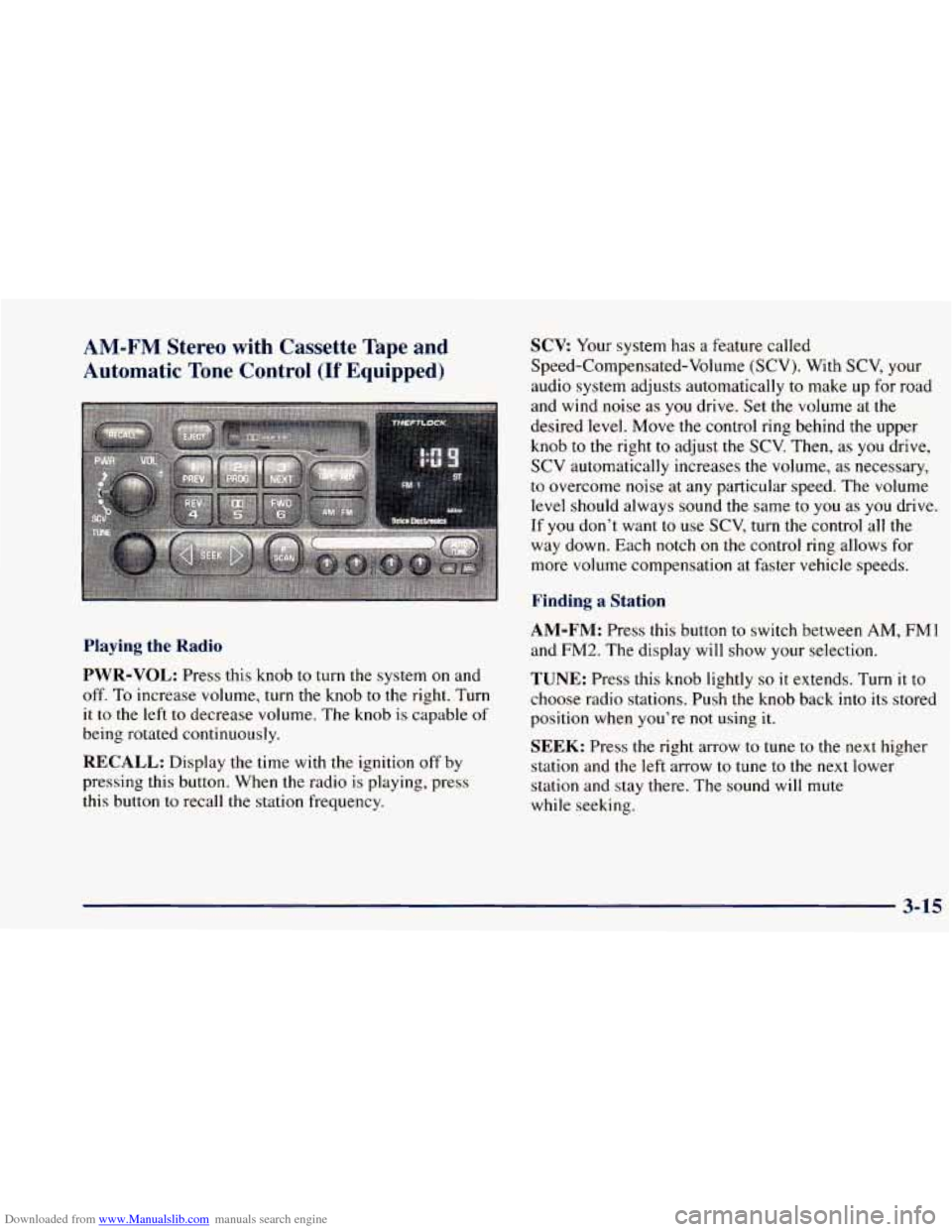
Downloaded from www.Manualslib.com manuals search engine AM-FM Stereo with Cassette Tape and
Automatic
Tone Control (If Equipped)
Playing the Radio
PWR-VOL: Press this knob to turn the system on and
off.
To increase volume, turn the knob to the right. Turn
it to the left to decrease volume. The knob is capable of
being rotated continuously.
RECALL: Display the time with the ignition off by
pressing this button. When the radio is playing, press
this button to recall the station frequency.
SCV Your system has a feature called
Speed-Compensated-Volume (SCV). With SCV, your
audio system adjusts automatically
to make up for road
and wind noise as you drive. Set the volume at the
desired level. Move the control ring behind the upper
knob to the right to adjust the
SCV. Then, as you drive,
SCV automatically increases the volume, as necessary,
to overcome noise at any particular speed. The volume
level should always sound the same to you as you drive.
If you don’t want to use
SCV, turn the control all the
way down. Each notch on the control ring allows for
more volume compensation at faster vehicle speeds.
Finding a Station
AM-FM:
Press this button to switch between AM, FMl
and
FM2. The display will show your selection.
TUNE: Press this knob lightly so it extends. Turn it to
choose radio stations. Push the knob back into its stored
position when you’re not using
it.
SEEK: Press the right arrow to tune to the next higher
station and the left arrow to tune to the next lower
station and stay there. The sound
will mute
while seeking.
3-15
Page 172 of 416

Downloaded from www.Manualslib.com manuals search engine AM-FM Stereo with Compact Disc Player
and Automatic Tone Control
(If Equipped)
Playing the Radio
PWR-VOL:
Press this knob to turn the system on and
off.
To increase volume, turn this knob to the right. Turn
it to the left to decrease volume. The knob is capable of
rotating continuously.
RECALL: Display the time with the ignition off by
pressing this button. When the radio is playing, press
this button
to recall the station frequency.
SCV Your system has a feature called
Speed-Compensated-Volume
(SCV). With SCV, your
audio system adjusts automatically to make up for road
and wind noise as
you drive. Set the volume at the
desired level. Move the control ring behind the upper
knob to the right
to adjust the SCV. Then, as you drive,
SCV automatically increases the volume, as necessary,
to overcome noise at any particular speed.
The volume
level should always sound the same to
you as you drive.
If you don’t want to use SCV, turn the control all the
way down. Each notch
on the control ring allows for
more volume compensation at faster vehicle speeds.
Finding a Station
AM-FM: Press this button to switch between AM, FM1
and
FM2. The display will show your selection.
TUNE: Press this knob lightly so it extends. Turn it to
choose radio stations. Push the knob back into its stored
position when you’re not using it.
SEEK: Press the right arrow to tune to the next higher
station and
the left arrow to tune to the next lower
station and stay there. The sound will mute
while seeking.
3-20
Page 176 of 416

Downloaded from www.Manualslib.com manuals search engine AM-FM: While in the CD mode, press this button to
stop playing the CD and play the radio. The CD symbol
will still display but the word
CD will be replaced with
either AM,
FMl or FM2. (If the radio is turned off, the
disc stays in the player and will resume playing at the
point where it stopped.)
CD AUX: To switch between the player and the radio
when a disc
is playing, press the AM-FM button. To
return to the player, press CD AUX. When a disc is
playing, the letters CD and the
CD symbol will appear
on the display. (If the radio is turned off, the disc stays
in the player and will resume playing at the point where
it stopped.)
EJECT: Press this button to eject the disc from the
player and play the radio. When the same or a new disc
is inserted, the disc will start playing on track one.
If a
compact disc is left sitting in the opening for more than
a few seconds, the player will pull the
CD back in. The
radio will continue playing. When the ignition is off,
press this button
to load a CD.
Remote Cassette Tape Player (If Equipped)
If you have an AM-FM Stereo Audio Compact Disc
Automatic Tone Control System that includes a remote
cassette player, the cassette player is located in the
floor console.
Your tape player is built to work best with tapes that are
30 to 45 minutes long on each side. Tapes longer than
that are
so thin they may not work well in this player.
To load a cassette tape with the ignition
off, first press
EJECT on the remote player. Then, insert the cassette tape.
The tape will play if the ignition is
on but the radio is off.
Once the tape is playing, use the control knobs for VOL,
AUTO TONE, BAL, FADE, BASS and TREB just as
you do for the radio. A lighted tape symbol shows when
a cassette tape is in the player. A lighted arrow will also
appear and show
the direction of play when a tape
is active.
3-24
Page 178 of 416

Downloaded from www.Manualslib.com manuals search engine Theft-Deterrent Feature (If Equipped)
THEFTLOCK@ is designed to discourage theft of your
radio. It works by using a secret code to disable all radio
functions whenever battery power is removed. Your
audio system is equipped with THEFTLOCK if
THEFTLOCK is displayed
on the front of the radio.
The THEFTLOCK feature for the radio may be used or
ignored. If ignored, the system plays normally and the
radio is not protected by the feature. If THEFTLOCK is
activated, your radio will not operate if stolen.
When THEFTLOCK is activated, the radio will display
LOC
to indicate a locked condition anytime battery
power has been interrupted. If your battery loses power
for any reason,
you must unlock the radio with the secret
code before it will operate.
Activating the Theft-Deterrent Feature
The instructions which follow explain how to enter your
secret code to activate the THEFTLOCK system. It is
recommended that
you read through all nine steps
before starting the procedure.
NOTE: If
you allow more than 15 seconds to elapse
between any steps, the radio automatically reverts to
time and you must start the procedure over at Step 4. 1.
2.
3.
4.
5.
6.
7.
8.
9.
Write down any
three or four-digit number from
000 to 1999 and keep it in a safe place separate from
the vehicle.
Turn the ignition to ACCESSORY or RUN.
Turn the radio off.
Press the 1 and
4 buttons together. Hold them down
until
--- shows on the display. Next you will use the
secret code number which
you have written down.
Press MN and
000 will appear on the display.
Press MN again to make the last two digits agree
with your code.
Press HR to make the first one or two digits agree
with your code.
Press AM-FM after
you have confirmed that the
code matches the secret code
you have written down.
The display will show REP to let
you know that you
need to repeat Steps 5 through 7 to confirm your
secret code.
Press AM-FM and this time the display will show
SEC to let you know that your radio is secure. The
indicator by the volume control will begin flashing
when the ignition is turned
off.
3-26