1998 BMW 740I lock
[x] Cancel search: lockPage 128 of 211
127n
RepairsIndexOverview Controls Car care Technology Data
Disc brakesDriving notesWhile driving in wet conditions and in
heavy rain, it is a good idea to apply
light pressure to the brake pedal every
few miles. Watch traffic conditions to
ensure that this maneuver does not en-
danger other road users. The heat gen-
erated in this braking process helps dry
the brake pads and rotors.
Maximum braking force is obtained
while the wheels continue to rotate,
peaking when the wheels remain on the
verge of locking without actually doing
so. ABS maintains this state automati-
cally. If the ABS fails, you should revert
to the staggered braking technique de-
scribed below (refer to page 129).
Extended or steep mountain descents
do not necessarily have to lead to re-
duced braking efficiency; downshift to a
gear in which only minimal periodic
brake applications are required - move
the selector lever to the appropriate
lower range.
You can continue to increase the brak-
ing effect of the engine by selecting a
lower gear - you can select transmis-
sion ranges as low as position 2 for ex-
treme conditions.Should engine braking prove inade-
quate, you should still avoid extended,
continuous braking. Instead of main-
taining low to moderate pressure over
an extended period of time, you should
decelerate the vehicle by applying more
substantial force on the pedal (watch
for following traffic!) and then pausing
before repeating the application. This
staggered braking technique allows the
brakes to cool in the intervals between
active braking phases, preventing over-
heating and ensuring that full braking
capacity remains available at all times.
Do not coast with the transmission
selector lever in neutral. Do not
drive with the engine shut off. The en-
gine provides no braking effect when
the transmission is in neutral, and there
is no power-assist for braking or steer-
ing when the engine is shut off.
Never allow floor mats, carpets or any
other objects to protrude into the area
around the accelerator and brake ped-
als and obstruct their movement.<
Dynamic Brake Control (DBC)
*
If you apply the brakes rapidly, this sys-
tem automatically produces the maxi-
mum braking force boost and thus
helps to achieve the shortest possible
braking distance during "panic stops."
All of the benefits of the ABS system
are exploited under these circum-
stances.
Do not reduce the pressure on the
brake pedal for the duration of the
brake application. When the brake
pedal is released, the DBC is deacti-
vated.
In the event of a malfunction, the
warning lamp comes on with a
yellow light. Conventional brak-
ing efficiency is available with-
out limitations.
Have the system checked and
repaired at your BMW center as soon
as possible.
For "Information for your safety"
covering the ABS system, refer to
page 125. This information also gener-
ally applies for DBC.<
Page 129 of 211

128n
Brake system Winter operationBrake fluid level
The warning lamp for the brake
hydraulic system comes on or
the message "Check Brake
Fluid" appears in the Check
Control:
The brake fluid level is too low in the
reservoir. Refer to page 147.
If the brake fluid level is too low and
brake pedal travel has become notice-
ably longer, there may be a defect in
one of the brake system's hydraulic cir-
cuits.
The remaining circuit continues to pro-
vide adequate brake-system perfor-
mance.
Proceed to the nearest authorized
BMW center. Higher brake appli-
cation pressure may be necessary un-
der these conditions, and brake pedal
travel may be significantly longer.
Please remember to adapt your driving
style accordingly.<
The warning lamp also comes on with
the "Check Brake Pads" message in the
Check Control.
Brake padsThe message "Check Brake Pads" ap-
pears in the Check Control:
The brake pads have reached their min-
imum pad thickness. Proceed to the
nearest authorized BMW center as
soon as possible to have the pads re-
placed.
We recommend the use of original
BMW brake pads and compo-
nents, otherwise driving safety can be
impaired.<
The onset of winter is often accompa-
nied by rapid changes in weather. Ad-
aptations in driving style should be ac-
companied by preparations on the
vehicle itself to ensure that your vehicle
operation through the winter remains
safe and trouble-free.CoolantBe sure that the coolant mixture is kept
at the year-round ratio of 50:50 (water
and antifreeze/corrosion protection).
This mixture provides protection
against freezing down to approx. –347
(–376). Replace the coolant every four
years.LocksBMW door lock deicer can be used to
free the locks if they are frozen. This
deicer also contains lubricant.
After using deicer, treatment with BMW
lock barrel grease is recommended.
Page 130 of 211

129n
RepairsIndexOverview Controls Car care Technology Data
Winter operationRubber seals and componentsIn order to prevent the weather-strip-
ping from freezing, apply rubber treat-
ment or a silicone spray to the seals on
the doors, hood and luggage compart-
ment lid.
A full range of car care products is
available from your BMW center.< Snow chainsBMW snow chains
* can be fitted on
both summer and winter tires in re-
sponse to severe winter road condi-
tions. Mount them in pairs on the rear
wheels only, and be sure to comply with
the manufacturer's safety instructions.
Do not exceed a maximum speed of
30 mph (50 km/h). In this situation
(snow chains mounted), deactivate the
ASC+T or DSC
*. Refer to page 92.
Starting offWhen starting off in deep snow or when
rocking the car to free it, we recom-
mend that you switch the ASC+T or
DSC
* off. Refer to page 92.
Driving on low-traction road
surfacesUse smooth, gentle pressure to control
the accelerator pedal. Avoid excessive
engine speeds and shift to the next
higher gear at an early point. Adapt
your speed and driving style when ap-
proaching grades. Maintain an ade-
quate distance between yourself and
the car ahead.BrakesWinter road conditions substantially re-
duce the amount of traction available
between the tires and the road surface;
the resulting increases in braking dis-
tance are considerable and should be
continually borne in mind.
ABS is intended to prevent the wheels
from locking during brake applications,
thus helping to maintain vehicle stability
and steering response. If the ABS does not respond in a critical
braking situation and the wheels lock:
Reduce the pressure on the brake
pedal until the wheels just start to roll
again while still maintaining enough
force to continue braking.
Following that, increase pedal pressure
again. Reduce the pressure as the
wheels lock, then reapply pressure, etc.
This type of staggered braking will re-
duce the braking distance, and the ve-
hicle still remains responsive to steer-
ing.
You can then attempt to steer around
hazards after you have reduced pres-
sure on the brake pedal.
Do not shift down on slick road
surfaces. Doing so could cause
the rear wheels to lose traction and
skid, which could result in the loss of
vehicle control.<
Page 131 of 211

130n
Winter operation Power steering Level control system
*
Skid controlRelease the accelerator pedal. Coun-
tersteer carefully and attempt to regain
control of the vehicle.ParkingPlace the selector lever in position P
(Park). Engage the parking brake when
parking on hills and inclined surfaces. In
order to prevent the parking brake lin-
ings from locking in the drum due to
frost or corrosion, dry them by gently
applying the parking brake as the vehi-
cle is coming to a stop. Make sure that
following traffic is not endangered.
The brake lamps do not come on
when the parking brake is ap-
plied.<
High steering effort:
Check the fluid level. Refer to
page 148.
High steering effort during sudden tran-
sitions:
Consult your authorized BMW center
immediately for an inspection.Servotronic special
*
If steering becomes lighter as speed in-
creases:
Malfunction in the electronic control
system. Have your BMW center inspect
this system as soon as possible.
If the power steering fails, in-
creased effort will be required to
steer the vehicle.<
If the message "LEVEL CONTROL IN-
ACTIVE" appears in the Check Control,
there is a malfunction in the level con-
trol system.
Stop and inspect the vehicle. If it is
riding significantly lower in the rear
than in the front, or if it is sitting at an
incline (left rear compared to right rear),
consult the nearest authorized BMW
center. Drive with appropriate caution
in the meantime. The vehicle has re-
duced ground clearance or driving
comfort is noticeably reduced.
Even if the attitude of the vehicle is nor-
mal, you should consult the nearest au-
thorized BMW center if the warning
lamp indicates a system fault.
Page 138 of 211
137n
RepairsIndexOverview Controls Car care Technology Data
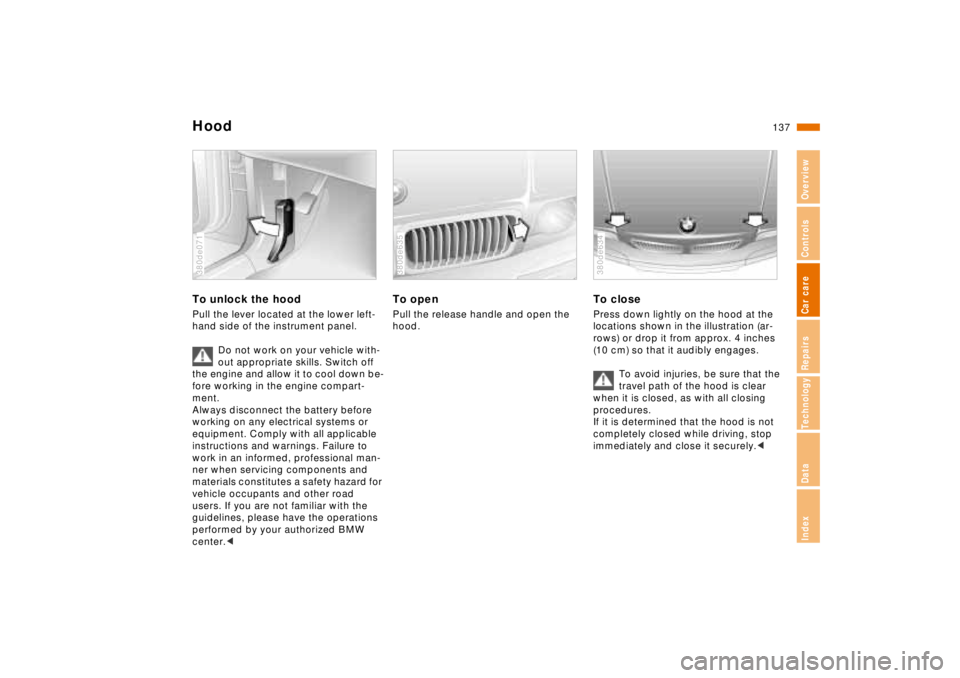
HoodTo unlock the hoodPull the lever located at the lower left-
hand side of the instrument panel.
Do not work on your vehicle with-
out appropriate skills. Switch off
the engine and allow it to cool down be-
fore working in the engine compart-
ment.
Always disconnect the battery before
working on any electrical systems or
equipment. Comply with all applicable
instructions and warnings. Failure to
work in an informed, professional man-
ner when servicing components and
materials constitutes a safety hazard for
vehicle occupants and other road
users. If you are not familiar with the
guidelines, please have the operations
performed by your authorized BMW
center.< 380de071
To openPull the release handle and open the
hood.380de635
To closePress down lightly on the hood at the
locations shown in the illustration (ar-
rows) or drop it from approx. 4 inches
(10 cm) so that it audibly engages.
To avoid injuries, be sure that the
travel path of the hood is clear
when it is closed, as with all closing
procedures.
If it is determined that the hood is not
completely closed while driving, stop
immediately and close it securely.< 380de634
Page 147 of 211
146n
Coolant
Do not add coolant to the cooling
system when the engine is hot.
Escaping coolant can cause burns.
To avoid the possibility of damage later
on, never use anything other than fac-
tory-approved, nitrite and amino-free
extended-duty antifreeze with corrosion
protectant. Your authorized BMW cen-
ter is familiar with the official specifica-
tions.
Antifreeze and anti-corrosion agents
are hazardous to health. Store anti-
freeze and anti-corrosion agents in their
original containers where they are inac-
cessible to children.
Extended-duty antifreeze with corrosion
inhibitor contains ethylene glycol - a
flammable substance. For this reason,
do not spill antifreeze with corrosion in-
hibitor on hot engine components. It
could catch fire and cause serious
burns.<
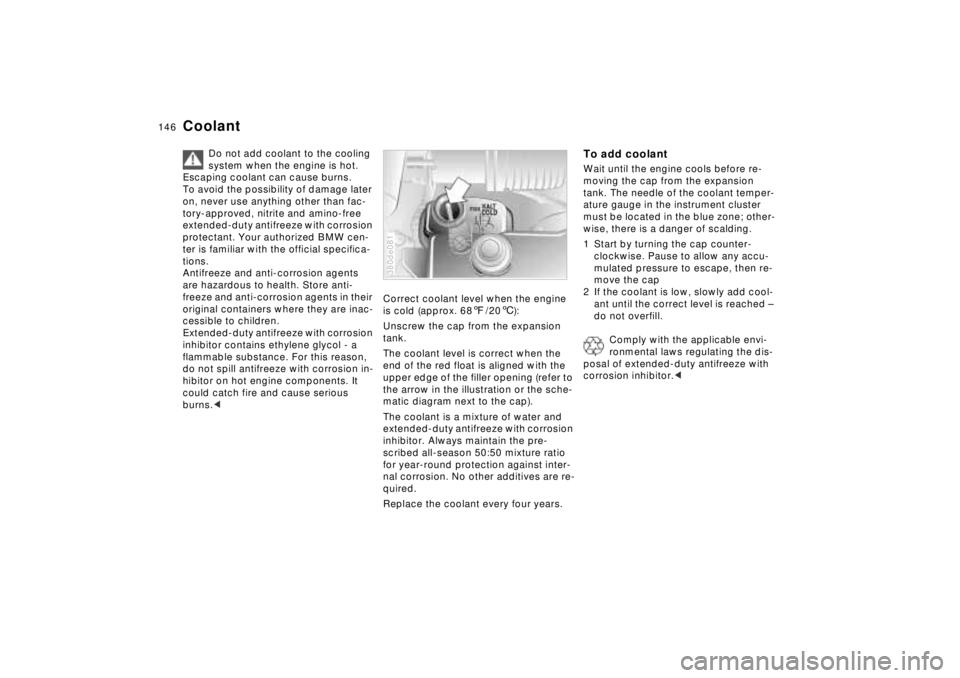
Correct coolant level when the engine
is cold (approx. 687/206):
Unscrew the cap from the expansion
tank.
The coolant level is correct when the
end of the red float is aligned with the
upper edge of the filler opening (refer to
the arrow in the illustration or the sche-
matic diagram next to the cap).
The coolant is a mixture of water and
extended-duty antifreeze with corrosion
inhibitor. Always maintain the pre-
scribed all-season 50:50 mixture ratio
for year-round protection against inter-
nal corrosion. No other additives are re-
quired.
Replace the coolant every four years.380de081
To add coolantWait until the engine cools before re-
moving the cap from the expansion
tank. The needle of the coolant temper-
ature gauge in the instrument cluster
must be located in the blue zone; other-
wise, there is a danger of scalding.
1 Start by turning the cap counter-
clockwise. Pause to allow any accu-
mulated pressure to escape, then re-
move the cap
2 If the coolant is low, slowly add cool-
ant until the correct level is reached –
do not overfill.
Comply with the applicable envi-
ronmental laws regulating the dis-
posal of extended-duty antifreeze with
corrosion inhibitor.<
Page 169 of 211
168n
Remote controlChanging batteryReplace the battery when the message
"REMOTE KEY BATTERY" appears in
the Check Control. The LED no longer
lights up when a button is pressed and
it is no longer possible to lock the car
using the remote key.
Install only a battery of the type that is
specified in the battery compartment
(CR 2016). Be sure the battery is in-
stalled in the correct position.
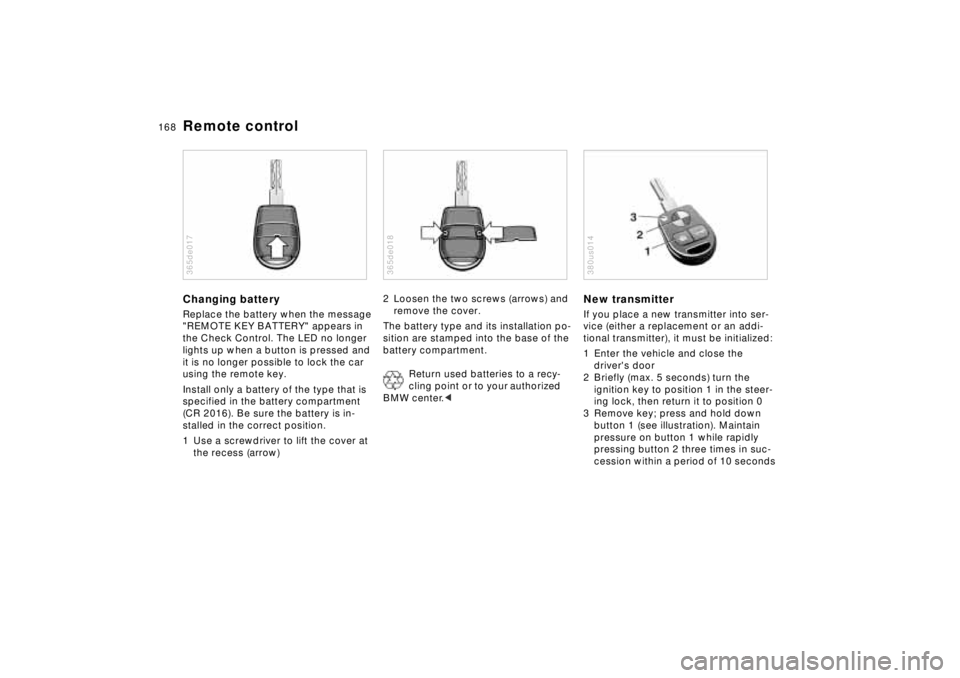
1 Use a screwdriver to lift the cover at
the recess (arrow)365de017
2 Loosen the two screws (arrows) and
remove the cover.
The battery type and its installation po-
sition are stamped into the base of the
battery compartment.
Return used batteries to a recy-
cling point or to your authorized
BMW center.< 365de018
New transmitterIf you place a new transmitter into ser-
vice (either a replacement or an addi-
tional transmitter), it must be initialized:
1 Enter the vehicle and close the
driver's door
2 Briefly (max. 5 seconds) turn the
ignition key to position 1 in the steer-
ing lock, then return it to position 0
3 Remove key; press and hold down
button 1 (see illustration). Maintain
pressure on button 1 while rapidly
pressing button 2 three times in suc-
cession within a period of 10 seconds380us014
Page 170 of 211

169n
RepairsIndexOverview Controls Car care Technology Data
Remote control4 Release button 1, LED 3 will flash
slowly for a maximum of 10 seconds
5 The central locking system activates
and releases all lock mechanisms in
rapid succession to indicate that the
initialization procedure has been
successfully completed.
If the LED does not flash or the central
locking system fails to respond, you
must repeat the initialization procedure.
If you possess additional transmitters
for your vehicle (up to a maximum
of four units), you must now initialize
these as well. Be sure that no more
than 30 seconds is allowed to elapse
between the individual initialization pro-
cedures. Do not actuate the steering
lock during this time.
In the event of a system malfunction,
please contact your authorized BMW
center, who can also provide you with
replacement transmitters.To prevent unauthorized use of the
transmitter, surrender only the
door and ignition key or the spare key
(refer to page 30) for valet parking).<