Page 3 of 198
21. Side vent
2. Instrument cluster
3. Center vents
4. Electronic moon roof switch and
personal lights
5. Glovebox
6. Power door lock switch
7. Power window switches
8. Parking brake lever
9. Automatic transmission selector lever or manual transmissiongear shift lever
10. Ashtray
11. Hood lock release lever
Instrument panel overview
Page 4 of 198
3
1. Instrument panel light control knob
2. Headlight and turn signal switch
3. Wiper and washer switch
4. Clock
5. Center differential lock button or
driving pattern selector buton
6. Air conditioning controls
7. Emergency flasher switch
8. Rear window defogger switch
9. Car audio
10. Cigarette lighter 11. Ignition switch
12. Cruise control switch
13. Tilt steering lock release lever
14. Power rear view mirror control switch
Page 5 of 198
4
1. Speedometer
2. Odometer
3. Fuel gauge4. Service reminder indicators or
indicator lights
5. Engine coolant temperature gauge
6. Tachometer 7. Trip meter reset knob
8. Trip meter
Instrument cluster overview
Page 6 of 198
Indicator symbols on the instrument panel5
Anti-lock brake system warning light * 1Brake system warning light * 1
Seat belt reminder light* 1
Discharge warning light* 1
Low oil pressure warning light* 1
Malfunction indicator light* 1
Low fuel level warning light * 1 Open door warning light*
1
SRS airbag warning light* 1
Automatic transmission fluid
temperature warning light* 1
Turn signal indicator lights
Headlight high beam indicator light
Over-drive indicator light
Page 7 of 198
6
Driving pattern indicator light
Center differential lock indicator light Cruise control indicator light *2
*1
: For details, see Service reminder indicators and warning
buzzersº in Chapter 1-5.
* 2
: If this light flashes, see Cruise controlº in Chapter 1-6.
Page 11 of 198

10
The windows can be operated with the
switch on each door.
The power windows work when the igni- tion switch is in the ONº position. Howev-
er, if both doors are closed, they work for 45 seconds even after the ignition switch
is turned off. They stop working when ei-ther door is opened.
OPERATING THE DRIVER'S WINDOW
Use the switch on the driver's door.
Normal operation: The window moves
as long as you hold the switch.
To open: Lightly push down the switch.
To close: Pull up the switch.Automatic operation (to open only):
Push the switch completely down and
then rel ease it. The window will fully open.
To stop the window partway, lightly pull the
switch up and then release it.OPERATING THE PASSENGERS' WINDOWS
Use the switch on each passengers'
door or the switches on the dirver's
door that control each passengers'
window.
The windows move as long as you hold the switch.
To open: Push down the switch.
To close: Pull up the switch.
If you push in the window lock button on
the driver's door, the passenger's win-
dows cannot be operated.
Power windows
Page 13 of 198
12
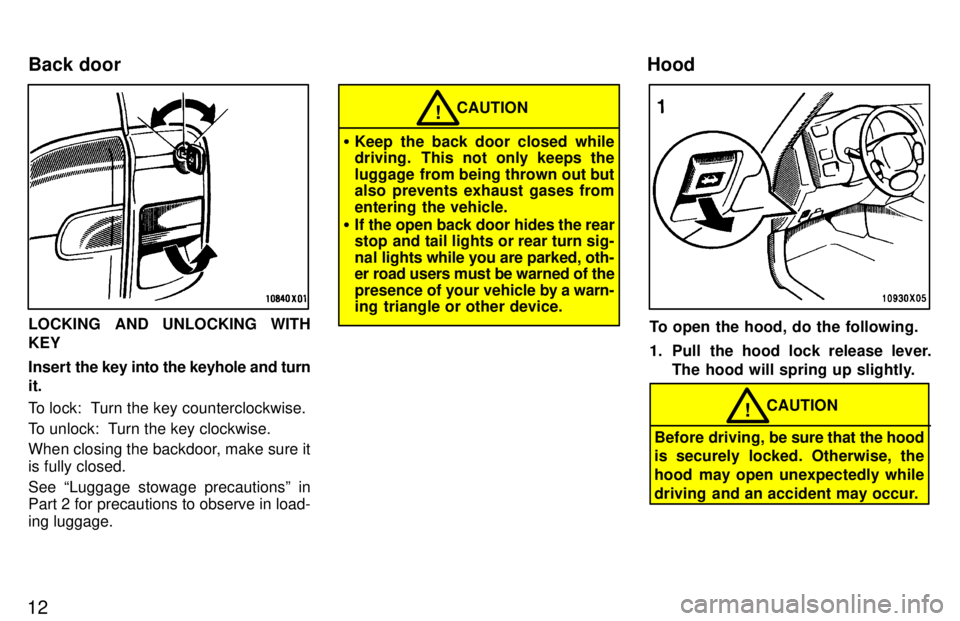
LOCKING AND UNLOCKING WITH KEY
Insert the key into the keyhole and turn
it.
To lock: Turn the key counterclockwise.
To unlock: Turn the key clockwise.
When closing the backdoor, make sure it is fully closed. See Luggage stowage precautionsº in
Part 2 for precautions to observe in load- ing luggage.
CAUTION!
Keep the back door closed while
driving. This not only keeps the
luggage from being thrown out but
also prevents exhaust gases from
entering the vehicle.
If the open back door hides the rear
stop and tail lights or rear turn sig-
nal lights while you are parked, oth- er road users must be warned of the
presence of your vehicle by a warn-
ing triangle or other device.
To open the hood, do the following.
1. Pull the hood lock release lever.
The hood will spring up slightly.
Before driving, be sure that the hood
is securely locked. Otherwise, the
hood may open unexpectedly while
driving and an accident may occur.
CAUTION!
Back door
Hood
Page 15 of 198

14
1. To open the fuel filler door, pull thelever up.
CAUTION!
Do not smoke, cause sparks or al-
low open flames when refuelling.
The fumes are flammable.
When opening the cap, do not re-
move the cap quickly. In hot weath-
er, fuel under pressure could cause
injury by spraying out of the filler
neck if the cap is suddenly re- moved.
2. To remove the fuel tank cap, turn
the cap slowly counterclockwise,
then pause slightly before remov-
ing it. After removing the cap, hang
it on the cap hanger.
It is not unusual to hear a slight swoosh
when the cap is opened. When installing,
turn the cap clockwise till you hear a click.
If the cap is not tightened securely, themalfunction indicator lamp comes on.
Make sure the cap is tightened securely.
The indicator lamp goes off after driving several times. If the indicator lamp does
not go off, contact your Toyota dealer as soon as possible.
CAUTION!
Make sure the cap is tightened se-
curely to prevent fuel spillage in
case of an accident.
Use only a genuine Toyota fuel tankcap for replacement. It has a built incheck valve to reduce fuel tank vac- uum.
Fuel tank cap