Page 3978 of 4133
Integrated V60 Digital Cellular Phone
In-Vehicle Operation Guide
Mercedes-Benz
Mercedes-Benz USA, LLC
One Mercedes Drive
Montvale, New Jersey 07645
© 2001 Mercedes-Benz USA, LLC
Technical Information
Order Number S-2790-02A
Printed in the USA
All illustrations and specifications contained in this folder
are based on the latest product information available at the
time of publication approval.
Mercedes-Benz reserves the right to make changes at any
time, without notice.6809437A95-O
10/01-RGC
Page 3979 of 4133
DCAG Ref. No.
This bulletin has been created and maintained in accordance with MBUSA-SLP 5.1, Document and Data Control, and
MBUSA-SLP 16.1, Control of Quality Records.
© 2002 Mercedes-Benz USA, LLC All rights reserved. Reproduction or translation in whole
Mercedes-Benz Canada, Inc. or in part is not permitted without authorization from the
Technical Information publisher. Printed in the USA.
www.MBUSA.com 1-800-FOR-MERCedes
�
�� ��
�� �
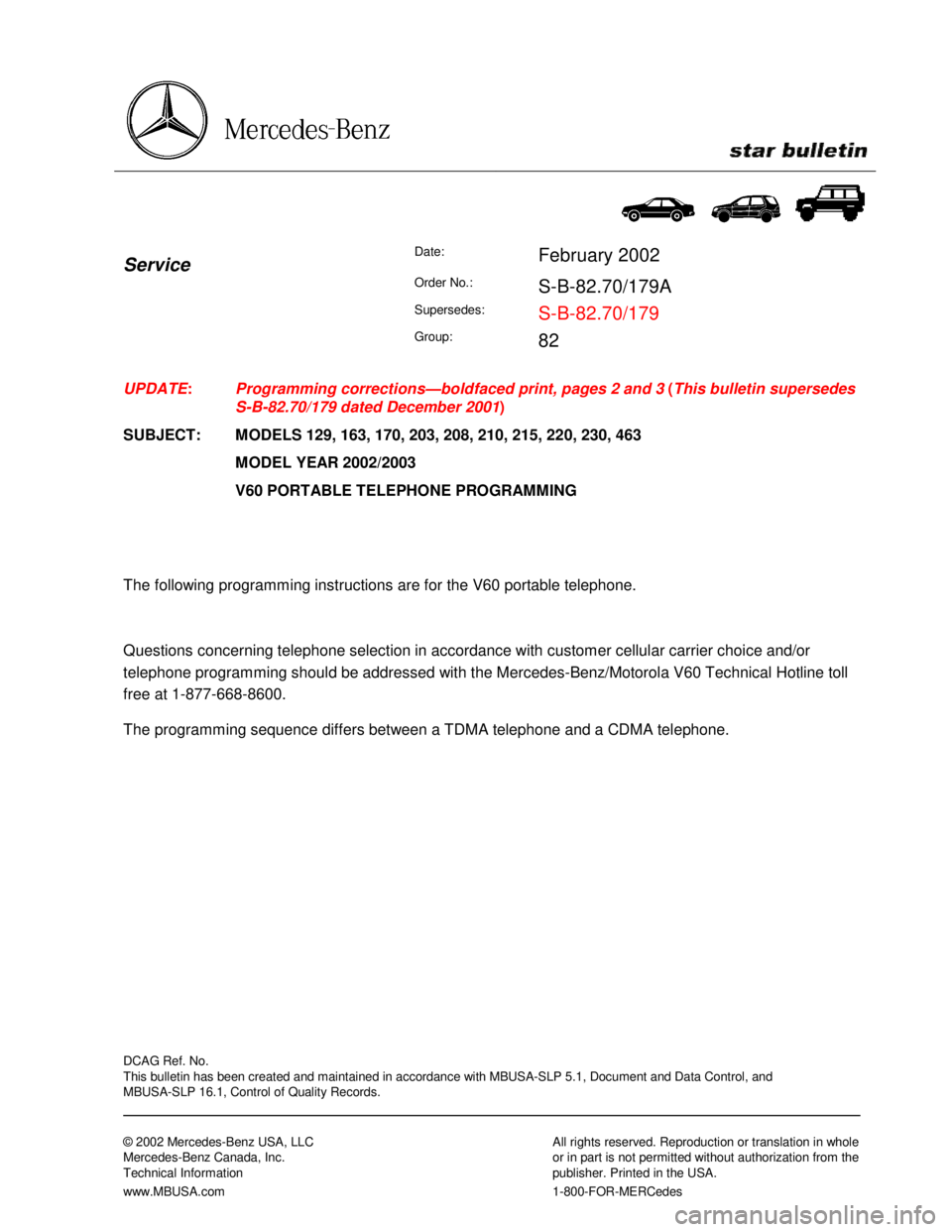
ServiceDate:February 2002
Order No.:S-B-82.70/179A
Supersedes:S-B-82.70/179
Group:82
UPDATE:
SUBJECT:Programming corrections—boldfaced print, pages 2 and 3 (This bulletin supersedes
S-B-82.70/179 dated December 2001)
MODELS 129, 163, 170, 203, 208, 210, 215, 220, 230, 463
MODEL YEAR 2002/2003
V60 PORTABLE TELEPHONE PROGRAMMING
The following programming instructions are for the V60 portable telephone.
Questions concerning telephone selection in accordance with customer cellular carrier choice and/or
telephone programming should be addressed with the Mercedes-Benz/Motorola V60 Technical Hotline toll
free at 1-877-668-8600.
The programming sequence differs between a TDMA telephone and a CDMA telephone.
Page 3980 of 4133
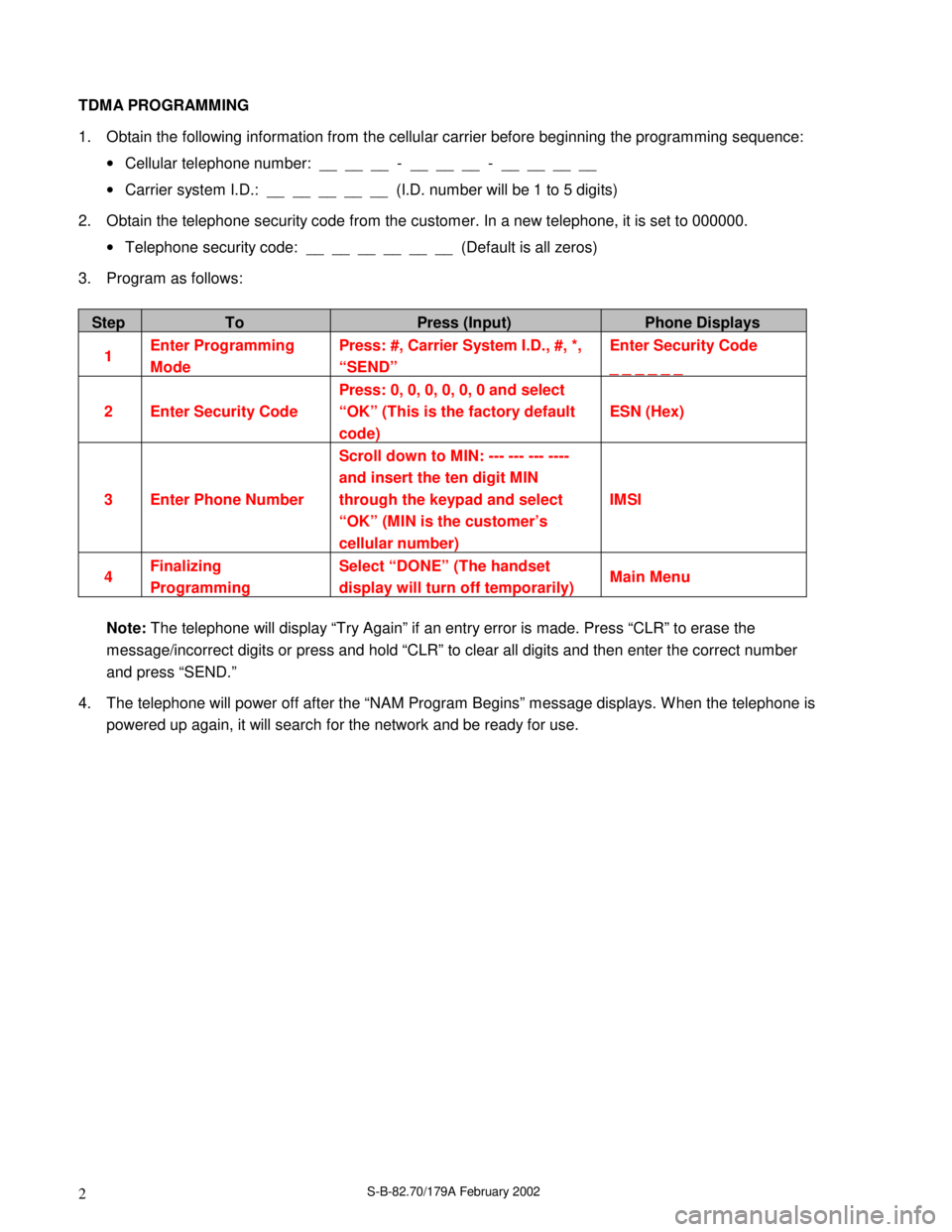
S-B-82.70/179A February 20022 TDMA PROGRAMMING
1. Obtain the following information from the cellular carrier before beginning the programming sequence:
• Cellular telephone number: __ __ __ - __ __ __ - __ __ __ __
• Carrier system I.D.: __ __ __ __ __ (I.D. number will be 1 to 5 digits)
2. Obtain the telephone security code from the customer. In a new telephone, it is set to 000000.
• Telephone security code: __ __ __ __ __ __ (Default is all zeros)
3. Program as follows:
StepToPress (Input)Phone Displays
1Enter Programming
ModePress: #, Carrier System I.D., #, *,
“SEND”Enter Security Code
_ _ _ _ _ _
2 Enter Security CodePress: 0, 0, 0, 0, 0, 0 and select
“OK” (This is the factory default
code)ESN (Hex)
3 Enter Phone NumberScroll down to MIN: --- --- --- ----
and insert the ten digit MIN
through the keypad and select
“OK” (MIN is the customer’s
cellular number)IMSI
4Finalizing
ProgrammingSelect “DONE” (The handset
display will turn off temporarily)Main Menu
Note: The telephone will display “Try Again” if an entry error is made. Press “CLR” to erase the
message/incorrect digits or press and hold “CLR” to clear all digits and then enter the correct number
and press “SEND.”
4. The telephone will power off after the “NAM Program Begins” message displays. W hen the telephone is
powered up again, it will search for the network and be ready for use.
Page 3981 of 4133
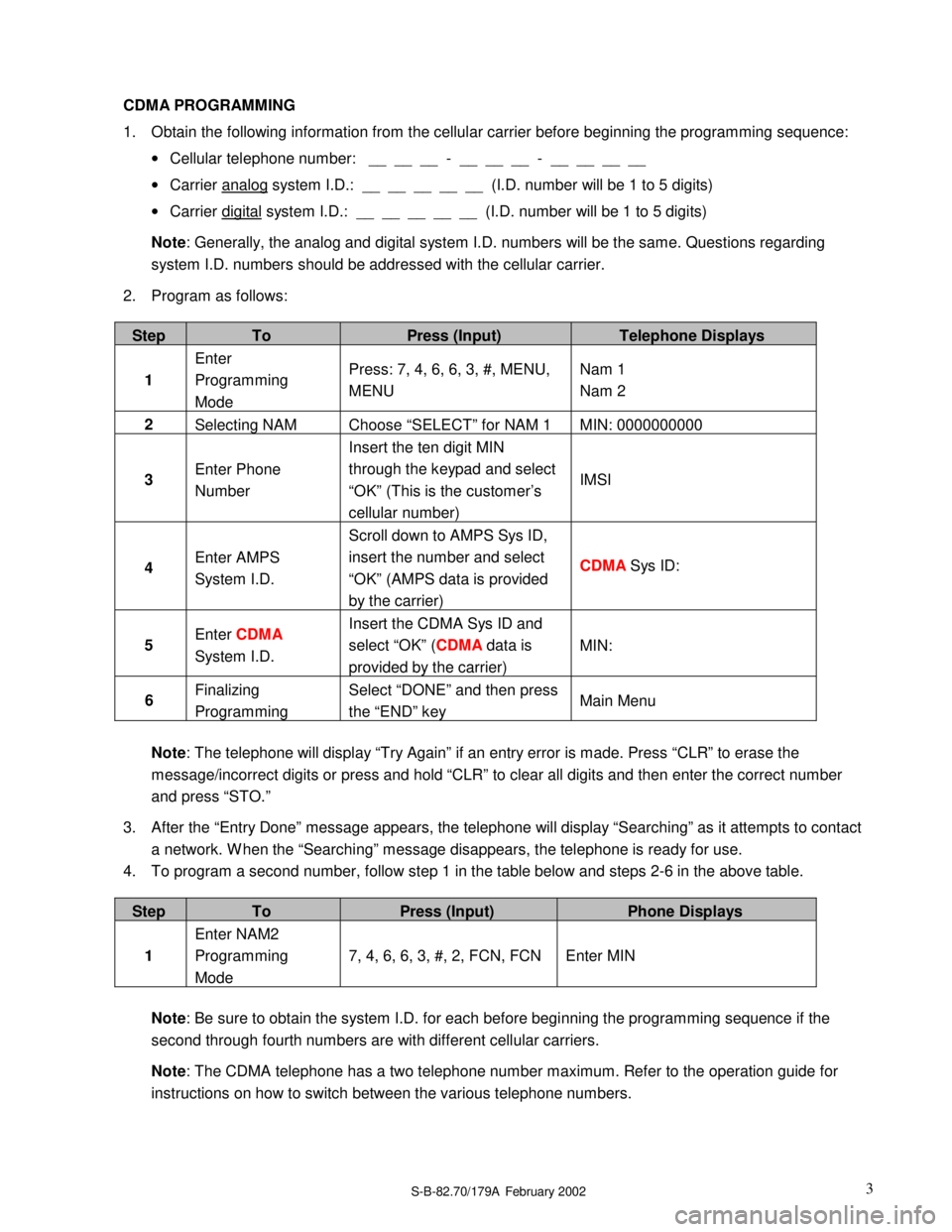
S-B-82.70/179A�February 20023 CDMA PROGRAMMING
1. Obtain the following information from the cellular carrier before beginning the programming sequence:
• Cellular telephone number: __ __ __ - __ __ __ - __ __ __ __
• Carrier analog system I.D.: __ __ __ __ __ (I.D. number will be 1 to 5 digits)
• Carrier digital system I.D.: __ __ __ __ __ (I.D. number will be 1 to 5 digits)
Note: Generally, the analog and digital system I.D. numbers will be the same. Questions regarding
system I.D. numbers should be addressed with the cellular carrier.
2. Program as follows:
StepToPress (Input)Telephone Displays
1Enter
Programming
ModePress: 7, 4, 6, 6, 3, #, MENU,
MENUNam 1
Nam 2
2
Selecting NAM Choose “SELECT” for NAM 1 MIN: 0000000000
3Enter Phone
NumberInsert the ten digit MIN
through the keypad and select
“OK” (This is the customer’s
cellular number)IMSI
4Enter AMPS
System I.D.Scroll down to AMPS Sys ID,
insert the number and select
“OK” (AMPS data is provided
by the carrier)CDMA Sys ID:
5Enter CDMA
System I.D.Insert the CDMA Sys ID and
select “OK” (CDMA data is
provided by the carrier)MIN:
6Finalizing
ProgrammingSelect “DONE” and then press
the “END” keyMain Menu
Note: The telephone will display “Try Again” if an entry error is made. Press “CLR” to erase the
message/incorrect digits or press and hold “CLR” to clear all digits and then enter the correct number
and press “STO.”
3. After the “Entry Done” message appears, the telephone will display “Searching” as it attempts to contact
a network. W hen the “Searching” message disappears, the telephone is ready for use.
4. To program a second number, follow step 1 in the table below and steps 2-6 in the above table.
StepToPress (Input)Phone Displays
1Enter NAM2
Programming
Mode7, 4, 6, 6, 3, #, 2, FCN, FCN Enter MIN
Note: Be sure to obtain the system I.D. for each before beginning the programming sequence if the
second through fourth numbers are with different cellular carriers.
Note: The CDMA telephone has a two telephone number maximum. Refer to the operation guide for
instructions on how to switch between the various telephone numbers.
Page 3984 of 4133
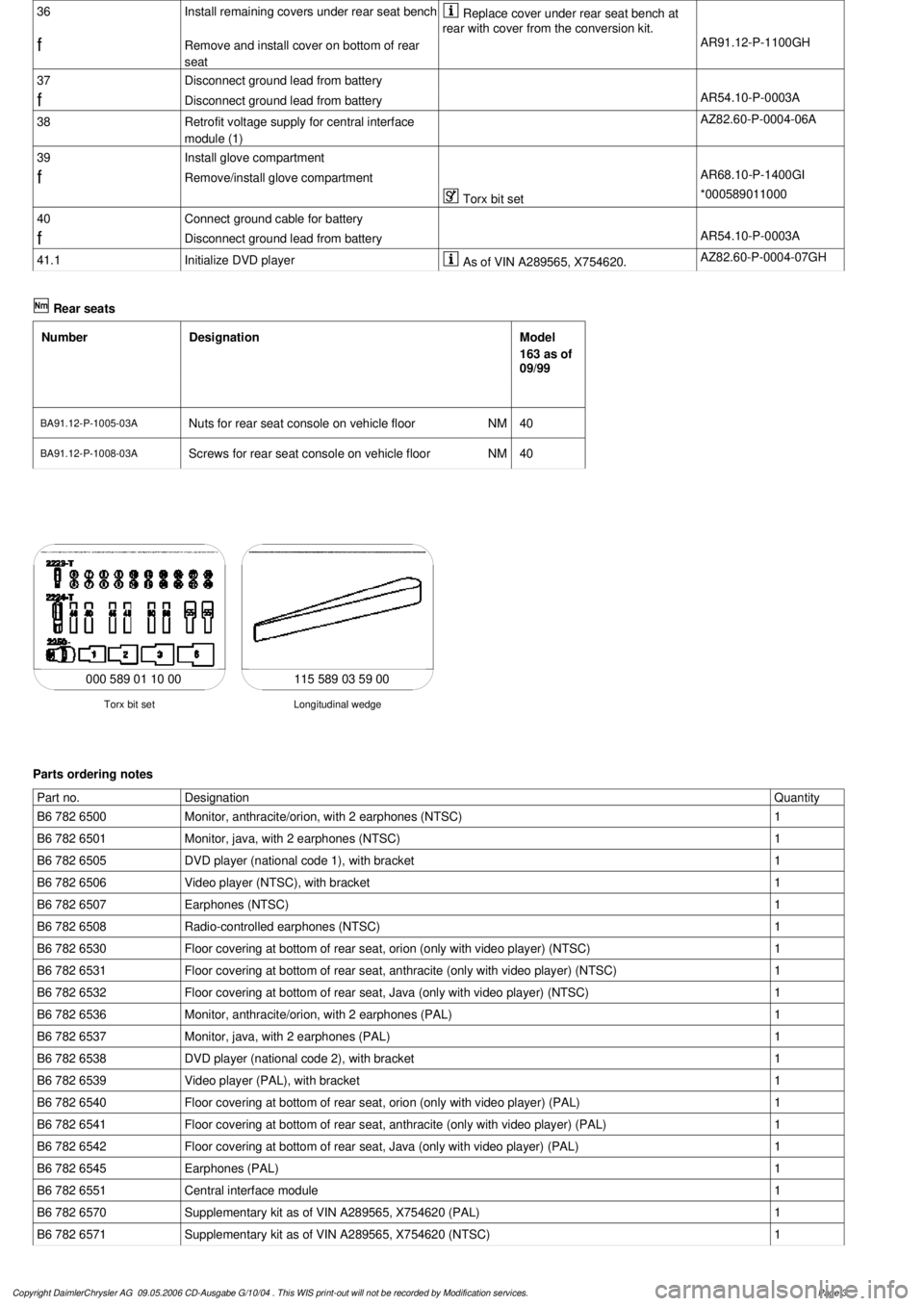
36
Install remaining covers under rear seat bench
Replace cover under rear seat bench at
rear with cover from the conversion kit.
f
Remove and install cover on bottom of rear
seat
AR91.12-P-1100GH
37
Disconnect ground lead from battery
f
Disconnect ground lead from battery
AR54.10-P-0003A
38
Retrofit voltage supply for central interface
module (1)
AZ82.60-P-0004-06A
39
Install glove compartment
f
Remove/install glove compartment
AR68.10-P-1400GI
Torx bit set
*000589011000
40
Connect ground cable for battery
f
Disconnect ground lead from battery
AR54.10-P-0003A
41.1
Initialize DVD player
As of VIN A289565, X754620.
AZ82.60-P-0004-07GH
Rear seats
Number
Designation
Model
163 as of
09/99
BA91.12-P-1005-03A
Nuts for rear seat console on vehicle floor
NM
40
BA91.12-P-1008-03A
Screws for rear seat console on vehicle floor
NM
40
115 589 03 59 00
Longitudinal wedge
Torx bit set
000 589 01 10 00
Parts ordering notes
Part no.
Designation
Quantity
B6 782 6500
Monitor, anthracite/orion, with 2 earphones (NTSC)
1
B6 782 6501
Monitor, java, with 2 earphones (NTSC)
1
B6 782 6505
DVD player (national code 1), with bracket
1
B6 782 6506
Video player (NTSC), with bracket
1
B6 782 6507
Earphones (NTSC)
1
B6 782 6508
Radio-controlled earphones (NTSC)
1
B6 782 6530
Floor covering at bottom of rear seat, orion (only with video player) (NTSC)
1
B6 782 6531
Floor covering at bottom of rear seat, anthracite (only with video player) (NTSC)
1
B6 782 6532
Floor covering at bottom of rear seat, Java (only with video player) (NTSC)
1
B6 782 6536
Monitor, anthracite/orion, with 2 earphones (PAL)
1
B6 782 6537
Monitor, java, with 2 earphones (PAL)
1
B6 782 6538
DVD player (national code 2), with bracket
1
B6 782 6539
Video player (PAL), with bracket
1
B6 782 6540
Floor covering at bottom of rear seat, orion (only with video player) (PAL)
1
B6 782 6541
Floor covering at bottom of rear seat, anthracite (only with video player) (PAL)
1
B6 782 6542
Floor covering at bottom of rear seat, Java (only with video player) (PAL)
1
B6 782 6545
Earphones (PAL)
1
B6 782 6551
Central interface module
1
B6 782 6570
Supplementary kit as of VIN A289565, X754620 (PAL)
1
B6 782 6571
Supplementary kit as of VIN A289565, X754620 (NTSC)
1
Copyright DaimlerChrysler AG 09.05.2006 CD-Ausgabe G/10/04 . This WIS print-out will not be recorde
d by Modification services.
Page 3