Page 62 of 321
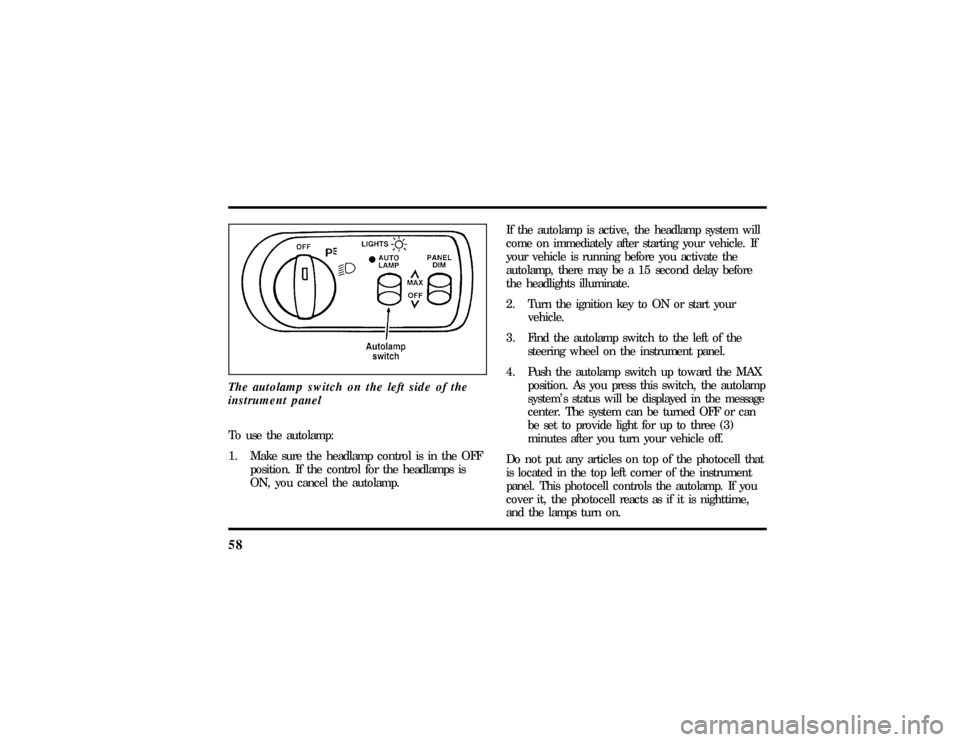
58The autolamp switch on the left side of the
instrument panelTo use the autolamp:
1. Make sure the headlamp control is in the OFF
position. If the control for the headlamps is
ON, you cancel the autolamp.If the autolamp is active, the headlamp system will
come on immediately after starting your vehicle. If
your vehicle is running before you activate the
autolamp, there may be a 15 second delay before
the headlights illuminate.
2. Turn the ignition key to ON or start your
vehicle.
3. Find the autolamp switch to the left of the
steering wheel on the instrument panel.
4. Push the autolamp switch up toward the MAX
position. As you press this switch, the autolamp
system's status will be displayed in the message
center. The system can be turned OFF or can
be set to provide light for up to three (3)
minutes after you turn your vehicle off.
Do not put any articles on top of the photocell that
is located in the top left corner of the instrument
panel. This photocell controls the autolamp. If you
cover it, the photocell reacts as if it is nighttime,
and the lamps turn on.
File:05fncfc.ex
Update:Fri Sep 6 14:53:57 1996
Page 66 of 321

62NOTE:The combination of FIRM RIDE CONTROL
and LOW STEERING EFFORT is undesirable and
cannot be selected.IgnitionUnderstanding the Positions of the
IgnitionThe positions of the key in the ignitionACC allows some of your vehicle's electrical
accessories such as the radio and the windshield
wipers to operate while the engine is not running.NOTE:Your vehicle is also equipped with an
accessory timer. This allows some of your
accessories to remain on for up to 10 minutes after
the ignition is turned to the OFF position. The
accessory timer is cancelled if any door is opened,
the dimmer switch is used, or the ignition is turned
to the ON position.
The automatic transaxle gearshift must be in P
(Park) to move the key to the LOCK position.
LOCK locks the steering wheel. It also locks the
gearshift lever.
LOCK is the only position that allows you to
remove the key. The LOCK feature helps to protect
your vehicle from theft.
OFF allows you to shut off the engine and all
accessories without locking the steering wheel, or
the gearshift lever.
File:05fncfc.ex
Update:Fri Sep 6 14:53:57 1996
Page 73 of 321
69
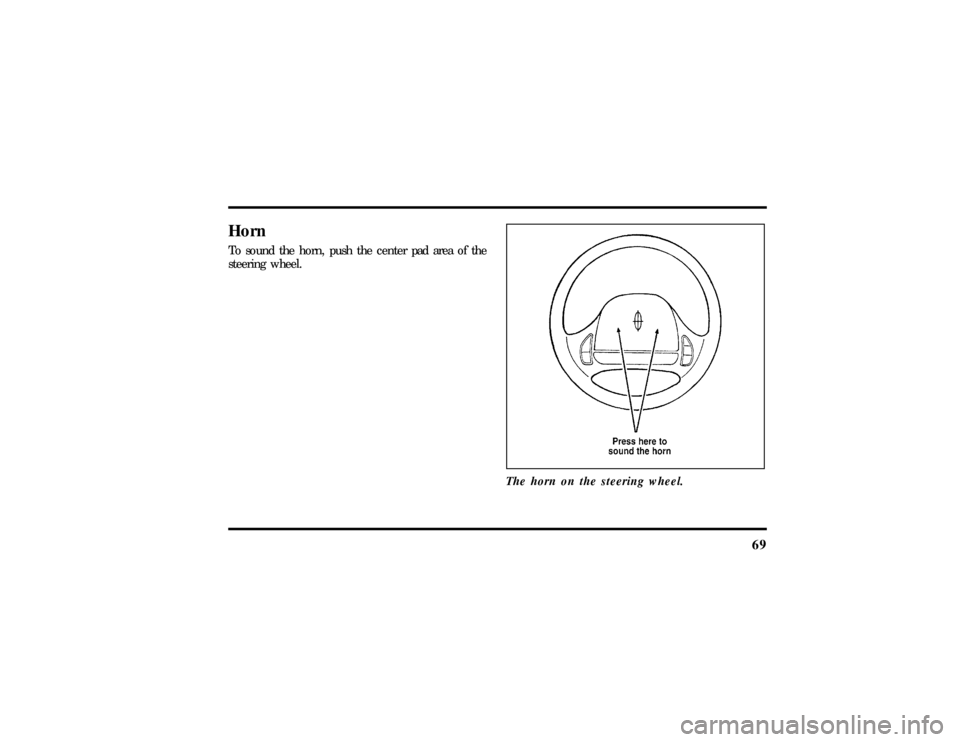
HornTo sound the horn, push the center pad area of the
steering wheel.
The horn on the steering wheel.
File:05fncfc.ex
Update:Fri Sep 6 14:53:57 1996
Page 75 of 321

71
To change the position of the steering wheel, pull
the release lever on the column toward you. Tip
the steering wheel to the desired position. Release
the lever to lock the steering wheel in place.Speed ControlThe speed of the vehicle cannot be automatically
controlled until the vehicle speed is at or above 30
mph (48 km/h).
Use of radio transmitting equipment that is not
Federal Communications Commission (FCC) or in
Canada the Canadian Radio and
Telecommunications Commission (CRTC) approved
may cause the speed control to malfunction.Therefore, use only properly installed FCC (CRTC in
Canada) approved radio transmitting equipment in
your vehicle.
NOTE:Since your vehicle has an Automatic
Overdrive Transaxle, you may want to drive in D
(Drive) when driving in hilly terrain, at higher
altitudes, or when pulling a trailer. This will
improve speed control performance.
NOTE:Do not shift to N (Neutral) when using the
speed control. This will cause the engine to
overspeed.
File:05fncfc.ex
Update:Fri Sep 6 14:53:57 1996
Page 76 of 321
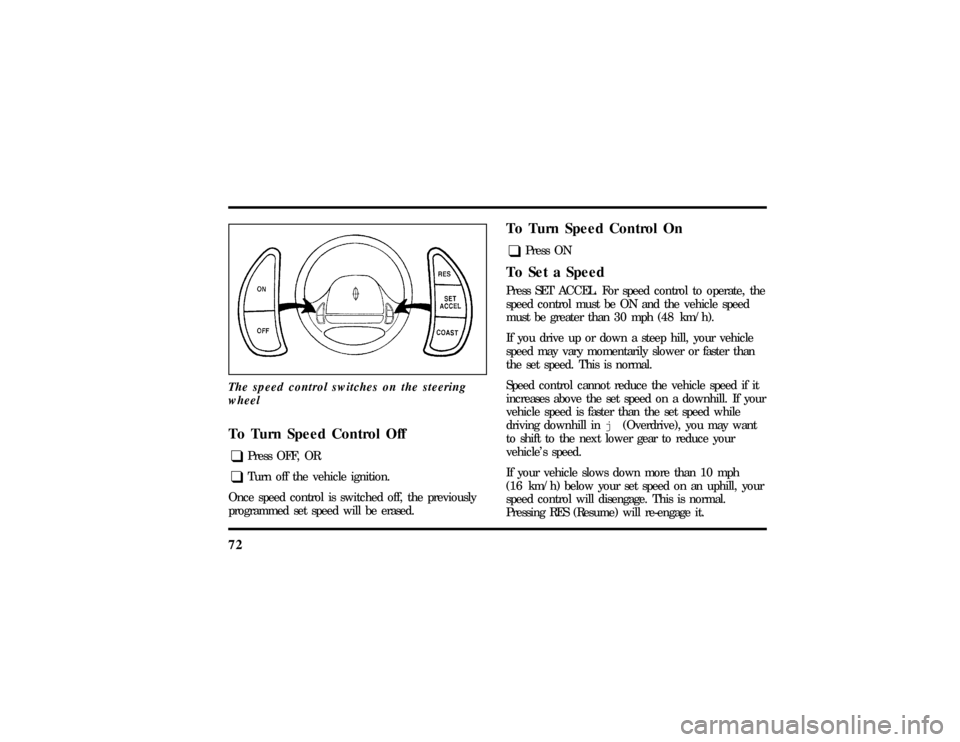
72The speed control switches on the steering
wheelTo Turn Speed Control Offq
Press OFF, OR
q
Turn off the vehicle ignition.
Once speed control is switched off, the previously
programmed set speed will be erased.
To Turn Speed Control Onq
Press ON
To Set a SpeedPress SET ACCEL. For speed control to operate, the
speed control must be ON and the vehicle speed
must be greater than 30 mph (48 km/h).
If you drive up or down a steep hill, your vehicle
speed may vary momentarily slower or faster than
the set speed. This is normal.
Speed control cannot reduce the vehicle speed if it
increases above the set speed on a downhill. If your
vehicle speed is faster than the set speed while
driving downhill inj(Overdrive), you may want
to shift to the next lower gear to reduce your
vehicle's speed.
If your vehicle slows down more than 10 mph
(16 km/h) below your set speed on an uphill, your
speed control will disengage. This is normal.
Pressing RES (Resume) will re-engage it.
File:05fncfc.ex
Update:Fri Sep 6 14:53:57 1996
Page 137 of 321
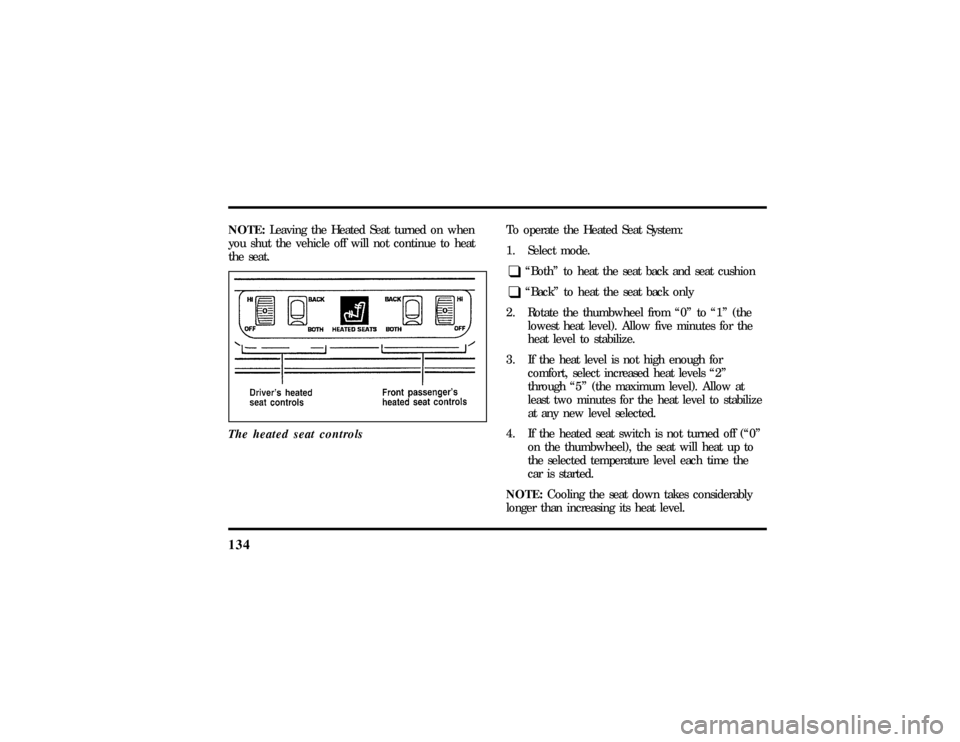
134NOTE:Leaving the Heated Seat turned on when
you shut the vehicle off will not continue to heat
the seat.
The heated seat controls
To operate the Heated Seat System:
1. Select mode.q
ªBothº to heat the seat back and seat cushion
q
ªBackº to heat the seat back only
2. Rotate the thumbwheel from ª0º to ª1º (the
lowest heat level). Allow five minutes for the
heat level to stabilize.
3. If the heat level is not high enough for
comfort, select increased heat levels ª2º
through ª5º (the maximum level). Allow at
least two minutes for the heat level to stabilize
at any new level selected.
4. If the heated seat switch is not turned off (ª0º
on the thumbwheel), the seat will heat up to
the selected temperature level each time the
car is started.
NOTE:Cooling the seat down takes considerably
longer than increasing its heat level.
File:06fnssc.ex
Update:Mon Jun 17 14:19:23 1996
Page 168 of 321

1663. Make sure that the gearshift is in P (Park) and
the parking brake is set before you turn the
key.
Before you start your vehicle, you should test the
warning lights on the instrument panel to make
sure that they work. Refer to theInstrumentation
chapter.Starting Your EngineTo start your engine:
1. Follow the steps underPreparing to Start Your
Vehicleat the beginning of this section.
2. Turn the ignition key to the ON position.
3. DO NOT depress the accelerator pedal when
starting your engine. DO NOT use the
accelerator while the vehicle is parked.4. Turn the key to the START position (cranking)
until the engine starts. Allow the key to return
to the ON position after the engine has started.
If you have difficulty in turning the key, rotate
the steering wheel slightly because it may be
binding.
For a cold engine:
q
At temperatures10ÊF(-12ÊC) andbelow:If
the engine does not start infifteen (15)
secondson the first try, turn the key to OFF,
wait approximately ten (10) seconds so you do
not flood the engine, then try again.
q
At temperaturesabove10ÊF(-12ÊC):If the
engine does not start infive (5) secondson
the first try, turn the key to OFF, wait
approximately ten (10) seconds so you do not
flood the engine, then try again.
File:08fntoc.ex
Update:Mon Jun 17 14:19:30 1996
Page 173 of 321

171
DrivingBrakesApplying the BrakesYour vehicle has anti-lock disc brakes on all four
wheels. They adjust automatically as the brake pads
wear down.
When you press down hard on the brake pedal, the
wheels will not lock and slide. The Anti-lock Brake
System (ABS) automatically starts releasing and
reapplying the front brakes independently and the
rear brakes together whenever your wheels start to
lock. When this happens, you will feel the brake
pedal pulsate. This is an indication that the ABS is
working correctly and is normal.
Each time you turn the ignition key to the ON
position, the anti-lock brake system will function
through one test cycle. When this happens, the
ANTI-LOCK light will come on for up to fiveseconds and a clunk may be felt in the pedal. If the
light stays on longer than five seconds, shut off the
engine and restart. If it remains on, it means the
anti-lock brake system is disabled and should be
serviced immediately to restore the benefits of the
anti-lock feature. Normal braking is not affected
unless the brake warning light is also lit.
The Anti-lock Brake System has self-check
capabilities. As described above, the system turns on
the ANTI-LOCK light each time you start your
engine. After the engine is started and the
ANTI-LOCK light turns off, the system performs
another test the first time the vehicle reaches 14
m.p.h. (22 km/h). The system turns on the ABS
pump motor for approximately 1/2 second. At this
time, a mechanical noise may be heard. This is a
normal part of the self-check feature. If a
malfunction is found during this check the
ANTI-LOCK light will come on.
File:09fngfc.ex
Update:Fri Sep 6 08:48:49 1996