1997 CADILLAC ELDORADO clock
[x] Cancel search: clockPage 76 of 361
Downloaded from www.Manualslib.com manuals search engine ACCESS PANEL RETAINER
TRUNK
SPARE
SPARE
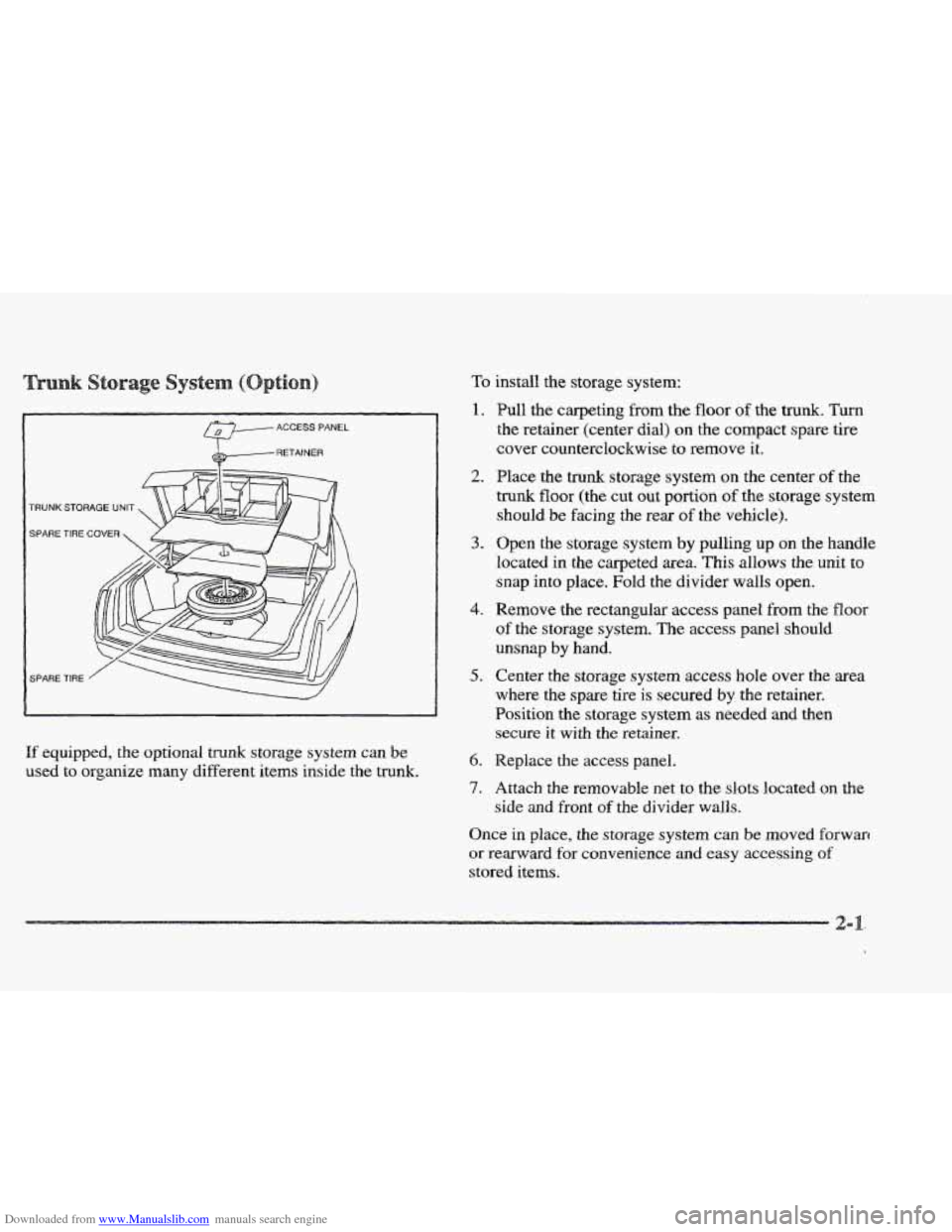
If equipped, the optional trunk storage system can De
used to organize many different items inside the trunk.
To install the storage system:
1.
2.
3.
4.
5.
6.
7.
Pull the carpeting from the floor of the trunk. Turn
the retainer (center dial) on the compact spare tire
cover counterclockwise to remove it.
Place the trunk storage system
on the center of the
trunk floor (the cut out portion of the storage system
should
be facing the rear of the vehicle).
Open the storage system
by pulling up on the handle
located in the carpeted area. This allows the
unit to
snap
into place. Fold the divider walls open.
Remove the rectangular access panel
from the floor
of the storage system. The access panel should
unsnap
by hand.
Center the storage
system access hole over the area
where the spare tire
is secured by the retainer.
Position the storage system
as needed and then
secure it with the retainer.
Replace the access panel.
Attach the removable net
to the slots located on the
side and front of the divider walls.
Once in place, the storage system can be moved forwarr
or rearward for convenience and easy accessing of
stored items.
Page 77 of 361
Downloaded from www.Manualslib.com manuals search engine The following steps explain how to remove the trunk
storage system for cleaning or in case you need to access
the spare tire. Follow all
of these steps if the storage
system
is in the closed position. Begin with Step 2 if
the system is already open.
1. Open the storage system by pulling up on the handle
located in the carpeted area. This allows
the unit to
snap into place. Fold the divider walls open.
2. Remove the rectangular access panel from the floor
of the storage system. The access panel should
unsnap
by hand.
3. Center the storage system access hole over the
area where the spare tire
is secured by the retainer.
Position the storage system
as needed and
then remove the retainer
(turn the retainer
counterclockwise to remove
it).
4. Replace the access panel and remove the storage system.
Your car may have an automatic pull-down
feature that helps close the trunk electronically.
Your fingers
can be trapped under the trunk lid
as it goes down. Your fingers could be injured,
and
you would need someone to help you free
them. Keep your fingers
away from the trunk lid
as you close it and as it is going down.
With the automatic pull-down feature, you never have to
slam
the trunk lid in order to close the trunk. Instead,
gently lower the trunk lid until it
is nearly shut -- the
automatic pull-down unit will take over and lock the
trunk firmly.
Page 118 of 361
Downloaded from www.Manualslib.com manuals search engine Your passenger’s side mirror is convex. A convex
mirror’s
surface is curved so you can see more from
the driver’s seat.
This mirror does not have a
dimming feature.
vehicles) look farther away than they really are.
If you cut too sharply into the right lane, you
could hit a vehicle on ~QW right. Check your
inside mirror
or glance over shoulder before
e
The glove box is located in front of the passenger’s seat.
To lock the glove box door, insert the oval key into the
lock cylinder and turn it clockwise. Turn
the key
counterclockwise to unlock the
door.
.. ..
This feature is on vehicles without the optional
astroroof.
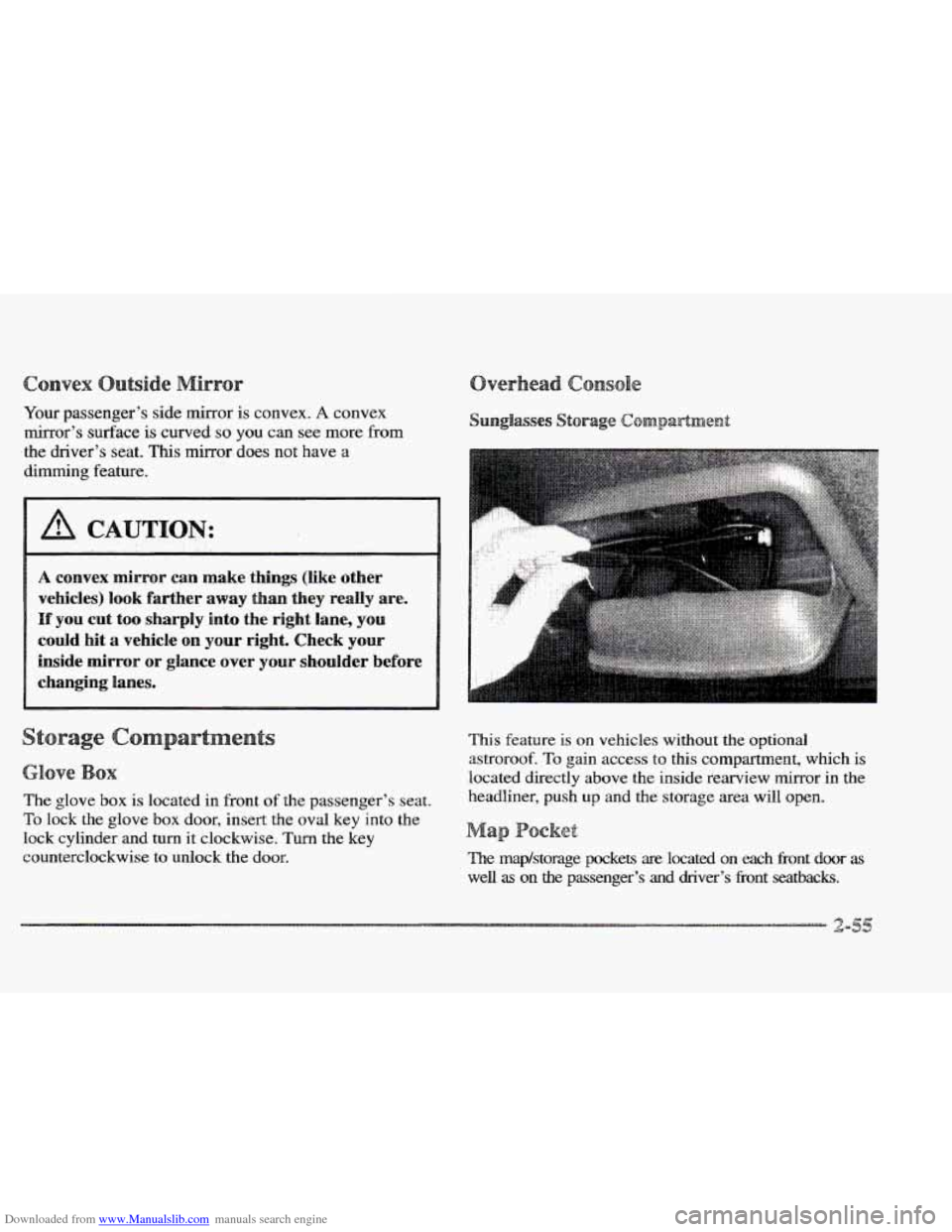
To gain access to this compartment, which is
located directly above the inside rearview mirror in the
headliner, push
up and the storage area will open.
a
The map/storage pockets are located on each Eront door as
well as on the passenger’s and driver’s fi-ont seatbacks.
Page 145 of 361

Downloaded from www.Manualslib.com manuals search engine TRIP SET By using this button, you can tell how far
you’ve gone since you last set the
TRIP SET back to
zero. To reset, press and hold the button
until zeros
appear. If your vehicle is domestic, the trip odometer
will return to zero after 999.9 miles
( 1 609 km). If your
vehicle is Canadian, the
trip odometer will return to zero
after
1 999.9 km (1,242 miles).
INFORMATION: Pressing this button repeatedly will
display the MPG
AVG, MPG INST, GAL FUEL USED,
AVG MPH, ENGINE
RPM, BATTERY VOLTS,
COOLANT TEMP and
OIL LIFE LEFT.
TIMER: This feature is like a stopwatch, in that
you can clock the time it takes to get from one point
to another.
To operate, press the TIMER button until
TIMER OFF
0O:OO:OO is displayed on the DIC. Each of the fields for
the hours, minutes and seconds are two numeric digits.
Once TIMER
OFF 0O:OO:OO is displayed, press the
TIMER button to start the timing feature. Press the
TIMER button again to stop
it. If you will be starting
and stopping your Cadillac, during
a trip for instance,
the
TIMER feature will automatically start timing where
it left
off when you last stopped. To reset it, press and
hold the
RESET button until the display reads TIMER
0O:OO:OO. Press the INFORMATION button to exit from
the TIMER function.
RESET Pressing this button will reset the MPG AVG,
MPG INST, GAL FUEL USED, AVG MPH and OIL
LIFE LEFT. Pressing RESET when a non-resettable
display appears
will cause a “recall” mode to occur.
When this happens, all DIC warning messages that have
been displayed since the ignition key was turned to
RUN will redisplay. If no messages were displayed, a
MONITORED SYSTEMS
OK message will appear.
MPG AVG (Reset): Press the INFORMATION button
to display the MPG
AVG (Average Fuel Economy), then
press and hold the
IRESET button until 0.0 MPG AVG
is displayed.
FUEL USED (Reset): Press the INFORMATION
button to display the
GAL FUEL USED on the DIC,
then press and hold the
RESET button until 0.0 GAL
FUEL USED is displayed.
AVG MPH (Reset): Press the INFORMATION button
to display the AVG
MPH (Average Speed), then press
and hold the RESET button until
0.0 AVG MPH
is displayed.
OIL LIFE LEFT (Reset): Press the INFORMATION
button to display the OIL LIFE LEFT, then press and
hold the
RESET button until 100% OIL LIFE LEFT is
displayed. (This only needs to be reset after you have
had the oil changed.)
Page 146 of 361

Downloaded from www.Manualslib.com manuals search engine TRIP RESET By using this button, you can tell how
far you’ve gone since you last set the TRIP RESET back
to zero.
To reset, press and hold the button until zeros
appear.
If your vehicle is domestic, the trip odometer
will return to zero after 999.9 miles
(1 609 km). If your
vehicle is Canadian, the
trip odometer will return to zero
after
1 999.9 km (1,242 miles).
INFO RESET: Pressing this button will reset the MPG
AVG, GAL FUEL USED, AVG MPH, TIMER, OIL
LIFE LEFT and ENGLISHMETRIC RESET. Pressing
INFO RESET when a non-resettable display appears
will cause a “recall” mode to occur. When this happens,
all
DIC warning messages that have been displayed
since the ignition key was turned to
RUN will redisplay.
If no messages were displayed, a MONITORED
SYSTEMS QK message will appear.
MPG AVG (Reset): Press the INFO button to display
the
MPG AVG (Average Fuel Economy), then press and
hold the
INFO RESET button until 0.0 MPG AVG
is displayed.
GAL FUEL USED (Reset): Press the INFO button to
display the
GAL FUEL USED on the DIC, then press
and hold the
INFO RESET button until 0.0 GAL FUEL
USED is displayed.
AVG MPH (Reset): Press the INFO button to display
the AVG MPH (Average Speed), then press and hold the
INFO RESET button until 0.0 AVG MPH is displayed.
TIMER: lhs feature is like a stopwatch, in that you can
clock the time it takes to get from one point to another.
To operate, press the INFO button to display TIMER.
Each of the fields for the hours, minutes and seconds are
two numeric digits.
Once TIMER OFF O0:OO:OO is displayed, press the
INFO RESET button to start the timing feature. Press
the
INFO RESET button again to stop it. If you will be
starting and stopping your Cadillac, during a trip
for
instance, the TIMER feature will automatically start
timing where it left off when you last stopped. To reset
it, press and hold the INFO FESET button until the
display reads
TIMER 0O:OO:OO. Press the INFO button
to exit from the
TIMER function.
Page 156 of 361

Downloaded from www.Manualslib.com manuals search engine 3-2
3-2
3-6
3-6
3-6
3-7
3-8 3-8
3-9
3-9
3 -9
3-9
3-10
3-13
Comfort Controls
Climate Control Panel
Electronic Solar Sensor
Air Conditioning
Heating
Ventilation System
Defrosting
Rear Window Defogger
HVAC Steering Wheel Controls
Climate Control Personalization
Audio Systems
Setting the Clock
AM-FM Stereo with Cassette Tape Player and
Optional Compact Disc Player
Bose
TM AM-FM Stereo with Cassette Tape
and Compact Disc Player
In this section, you’ll find out how to operate the comfort control and audio systems offered with your Cadillac. Be
sure to read about the particular systems supplied with your vehicle.
3- 17
3-2 1
3-24
3-24
3-25
3-25
3-25
3-26
3-27
3-27
Bose TM AM-FM Stereo with Cassette
Tape and Compact Disc Player with Digital
Signal Processing
Trunk Mounted CD Changer
Radio Personalization
Theft-Deterrent Feature
Audio Steering Wheel
Controls
Understanding Radio Reception
Tips About Your Audio System
Care
of Your Cassette Tape Player
Care of Your Compact Discs
Power Antenna Mast Care
Page 157 of 361
Downloaded from www.Manualslib.com manuals search engine This section tells you how to make your air system work
for you. Your Electronic Climate Control (ECC) system
uses ozone-friendly
R- 134a refrigerant.
With the
ECC system, you can control the heating,
cooling and ventilation in your Cadillac.
Your vehicle
also has a flow-through ventilation system described
later in this section.
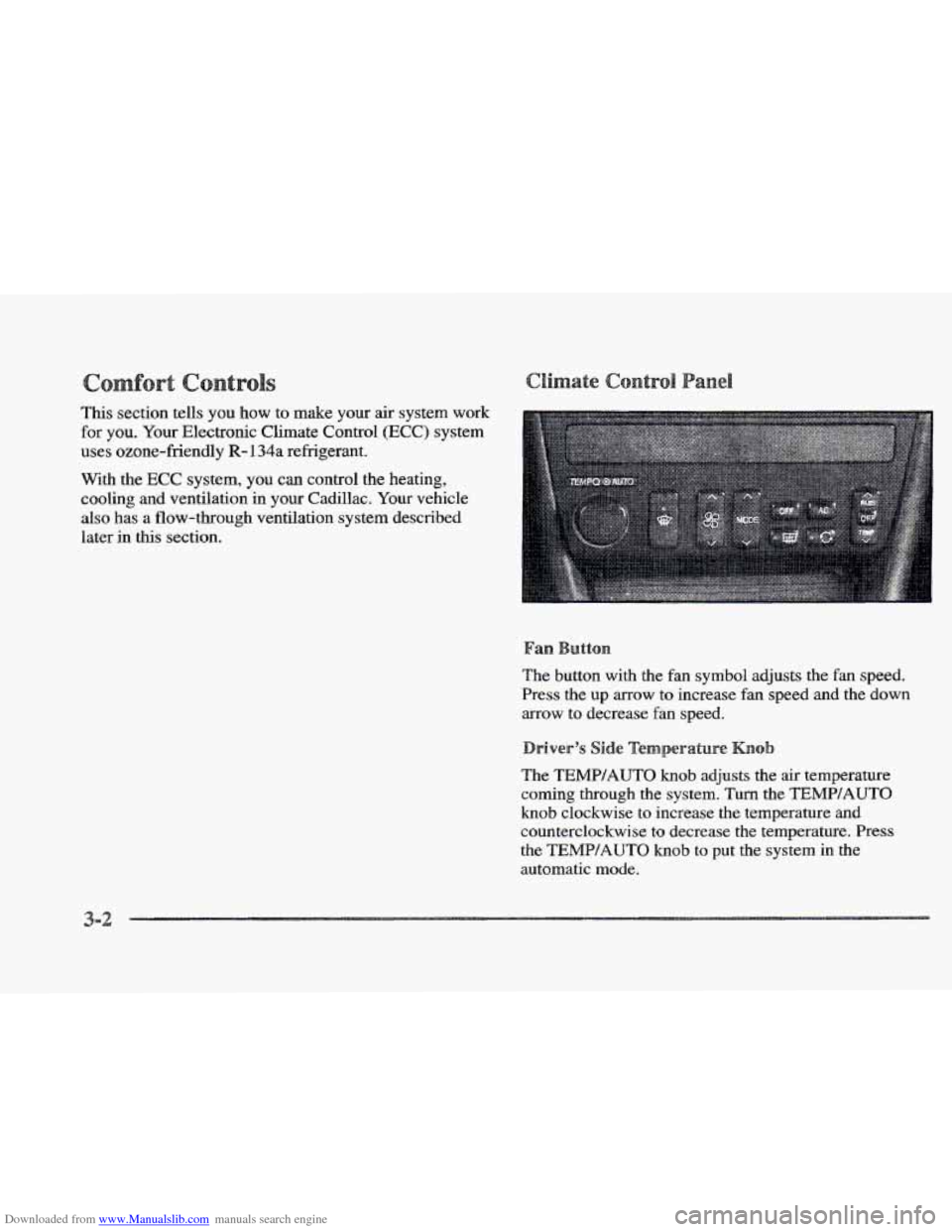
The button with the
fan symbol adjusts the fan speed.
Press the up arrow to increase fan speed and the down
arrow to decrease fan speed.
The
TEMP/AUTO knob adjusts the air temperature
coming through the system. Turn the TEMPIAUTO
knob clockwise to increase the temperature and
counterclockwise to decrease
the temperature. Press
the TEMP/AUTQ knob to put the system in the
automatic mode.
3-2
Page 164 of 361

Downloaded from www.Manualslib.com manuals search engine Some heating and cooling
controls can be adjusted at
the steering wheel. Other
touch controls operate some audio controls. See “Audio
Steering Wheel Controls”
later
in this section.
8 FAN SPEED: Press the up arrow lever to increase
the
fan speed and the down arrow lever to decrease
fan speed.
TEMP: Press the up arrow lever to increase
the temperature and the down arrow lever to
decrease temperature.
With
this feature, your vehicle will recall the latest
climate control settings as adjusted the last time your
vehicle was operated.
This feature allows two different drivers-
to store and recall
their own climate control
settings. The settings recalled by the climate control
system
are determined by which RKE transmitter (“ 1 ”
or “2”) was used to enter the vehicle. The number on the.
back of the
RKE transmitter corresponds to driver 1 or
to driver
2. After the unlock button is pressed on the
RKE transmitter or the ignition key is placed in the
ignition, the climate control settings will automatically
adjust to where’ they were last set. The settings can
also
be changkd by briefly pressing the memory seat buttons
1 or 2 located on the driver’s door.
dio sys
Your Cadillac. audio system has been designed to operate
easily
and give years of listening pleasure. You will get
the most enjoyment
out of it if you acquaint yourself
with it first. Find out what your audio system can do
and how to operate
all its controls, to be sure you’re
getting the most out
of the advanced engineering that
went into it.
Press and hold
HR or MN until the time display begins
to change. Release the button as you get close
to the
correct time. The time may be set anytime. the clock
is
displayed.. There is a two-second delay before the clock
goes into time-set mode.
3-