1997 BUICK PARK AVENUE change time
[x] Cancel search: change timePage 174 of 420
!
RECALL: Press this button briefly to recall the station
being played or to display the clock. To change what
is
normally shown on the display (station or time), press
the RECALL button until you
see the display you want,
then hold the RECALL button until the display flashes.
If you press the button when the ignition is off, the clock
will show for
a few seconds.
Finding a Station
AM-FM:
Press this button to switch between AM, FM1
and FM2. The display shows your selection.
TUNE: Press the up or down arrow to choose
radio stations.
SEEK: Press the up or down arrow to go to the next
higher or lower station and stay there. The sound will
mute while seeking.
SCAN: Press one of the SEEK arrows for two seconds
and SCAN will appear
on the display. Use SCAN to
listen to stations for a few seconds. The radio will go to
a station, stop for a few seconds, then go on to the next
station. Press one of the
SEEK arrows again to stop
scanning. The sound will mute while scanning.
PUSHBUTTONS: The six numbered pushbuttons let
you return to your favorite stations. You can set up to
18 stations (six AM, six FMl and six FM2). Just:
1. Turn the radio on.
2. Press AM-FM to select the band.
3. Tune in the desired station.
4. Press TONE to select the setting you prefer.
5. Press and hold one of the six numbered buttons. The
sound will mute. When it returns, release the button.
Whenever you press that numbered button, the
station you set will return and the tone you selected
will be automatically selected for that button.
6. Repeat the steps for each pushbutton.
P SCAN: Press this button to listen to each of your
preset stations for a few seconds. The radio will
go to
the first preset station, stop for a few seconds, then go
on to the next preset station. Press
P SCAN again to
stop scanning.
If a preset station has weak reception,
the radio will not stop at the preset station.
3-22
ProCarManuals.com
Page 178 of 420

-
1 I
The SEEK down and up arrows will also find the
previous and next selections on the disc.
44 (3): Press and hold this button to quickly reverse
within a track. You will hear sound.
.. (4): Press and hold this button to quickly advance
within a track. You will hear sound.
RAND (4): Press this button to hear the tracks in
random, rather than sequential, order. Press RAND
again to turn off random play.
RECALL: Press this button to see which track is
playing. Press it again within five seconds to see how
long it has been playing.
To change what is normally
shown on the display (track or elapsed time), press the
RECALL button until you see the display you want,
then hold the RECALL button until the display flashes.
AM-FM: Press this button to play the radio when a disc
is in the player.
SOURCE: Press this button to change to the disc
function when the radio
is on. When a disc is inserted,
the disc will play until you press AM-FM. Then the disc
will stop playing and the radio will play. Press SOURCE
again to play a disc again. CD PLAY will show on
the display.
EJECT Press this button to remove the disc. The radio
will play.
If you turn off the ignition or radio with a disc in the
player, it will stay in the player. When you turn on the
ignition or system, the disc will start playing where it
stopped, if it was the last-selected audio source.
Also, as a protection feature, if a CD is ejected and left
in the player, it will be pulled back in the player with the
ignition on or off. If you leave a compact disc
in the
player while listening to the radio, it may become warm.
3-26
ProCarManuals.com
Page 181 of 420
The air is very humid. If so, wait about an hour and
0 The CD changer door is open. Completely close the
try
again.
door to restore normal operation.
An empty magazine is inserted in the CD changer.
Try the magazine again with a disc loaded on one of
the trays.
If any error occurs repeatedly or if an error cannot be
corrected, please contact your dealer. If your radio
displays
an error number other than the error codes
listed previously, write it down and provide it to your
dealer when reporting the problem.
Playing a Compact Disc
PREV (1): Press this button to go to the start of the
current track, if more than eight seconds have played.
If you hold the button or press it more than once, the
player will continue moving back through the disc to the
previous track. The sound will mute while seeking.
NEXT (2): Press this button to go to the next track on the
disc. If you hold the button or press it more
than once, the
player will continue moving forward through the disc to
the next track. The sound will mute while
seeking.
44 (3): Press and hold this button to quickly reverse
within a track. You will hear sound.
bb (4): Press and hold this button to quickly advance
within a track. You will hear sound.
SIDE (5): Press this button to select the next disc in the
magazine. Each time you press SIDE, the disc number on
the radio display will increment to the next available CD.
If a CD cannot be played, its number will be skipped
when selecting discs while using the SIDE button.
RAND (6): Press this button to enter the random play
mode. RAND will appear
on the display. While in this
mode, tracks and discs will be played in random order.
Press the button again to turn off the random feature and
return to normal operation.
RECALL: Press this button to see what track is
currently playing. Press RECALL again within five
seconds to see how long the track has been playing.
EL TM will appear on the display when in elapsed time
mode. When a new track starts to play, the track number
will also appear. Press RECALL a third time and the
time of day will be displayed.
SOURCE: Press this button to play a CD if you have a
magazine loaded in the changer and the radio is playing.
To return to the radio while a CD is playing, press
AM-FM. You can also press this button to switch
between a cassette tape, CD or the CD changer if all
three are loaded.
ProCarManuals.com
Page 197 of 420
Remember: Anti-lock doesn’t change the time you need
to get your foot up to the brake pedal or always decrease
stopping distance. If you get too close to the vehicle in
front of you, you won’t have time to apply your brakes
if that vehicle suddenly slows
or stops. Always leave
enough room up ahead to stop, even though you have
anti-lock brakes.
Using Anti-Lock
Don’t pump the brakes. Just hold the brake pedal down and let anti-lock work for you. You may feel the system
working, or you may notice some noise, but this is normal.
Traction Control System (If Equipped)
Your vehicle may have a traction control system that
limits wheel spin. This is especially useful in slippery
road conditions. The system operates only if it senses
that one or both of the front wheels are spinning or
beginning to lose traction. When this happens, the
system works the front brakes and reduces engine power
to
limit wheel spin.
You may feel or hear the system working, but
this is normal.
If your vehicle is in cruise control when the traction
control system begins to limit wheel spin, the cruise
control will automatically disengage. When road conditions allow
you to safely use it again, you may
re-engage the cruise control. (See “Cruise Control” in
the Index.)
TRAC
OFF
When the system is on, this
warning light will come on
to let you know if there’s
a
problem with your traction
control system.
I
See “Traction Control System Warning Light” in the
Index. When this warning light is on, the system will not
limit wheel spin. Adjust your driving accordingly.
The traction control system automatically comes on
whenever you start your vehicle. To limit wheel spin,
especially in slippery road conditions, you should
always leave the system on. But you can turn the
traction control system off
if you ever need to. (You
should turn the system off if your vehicle ever gets stuck
in sand, mud, ice or snow. See “Rocking Your Vehicle”
in the Index.)
4-9
ProCarManuals.com
Page 202 of 420
Do not get too close to the vehicle you want to pass
while you’re awaiting an opportunity. For one thing,
following too closely reduces your area of vision,
especially if you’re following a larger vehicle.
Also, you won’t have adequate space if the vehicle
ahead suddenly slows or stops. Keep back a
reasonable distance.
When it looks like a chance to pass is coming up,
start to accelerate but stay in the right lane and
don’t get too close. Time your move
so you will be
increasing speed as the time comes to move into the
other lane. If the way is clear to pass, you will have a
“running start” that more than makes up for the
distance you would lose by dropping back. And if
something happens to cause you to cancel your pass,
you need only slow down and drop back again and
wait for another opportunity.
0 If other cars are lined up to pass a slow vehicle, wait
your turn. But take care that someone isn’t trying to
pass you as you pull out to pass the slow vehicle.
Remember to glance over your shoulder and check
the blind spot.
0
0
0
0
Check your mirrors, glance over your shoulder, and
start your left lane change signal before moving out
of the right lane to pass. When you are far enough
ahead
of the passed vehicle to see its front in your
inside mirror, activate your right lane change signal
and move back into the right lane. (Remember that
your right outside mirror is convex. The vehicle you
just passed may seem to be farther away from you
than it really is.)
Try not to pass more than one vehicle at a time on
two-lane roads. Reconsider before passing the
next vehicle.
Don’t overtake a slowly moving vehicle too rapidly.
Even though the brake lamps are not flashing,
it may
be slowing down or starting to turn.
If you’re being passed, make it easy for the
following driver to get ahead
of you. Perhaps you
can ease a little to the right.
4-14
ProCarManuals.com
Page 221 of 420
NOTICE:
Pulling a trailer improperly can damage your
vehicle and result in costly repairs not covered by
your warranty.
To pull a trailer correctly, follow
the advice in this part, and see your Buick dealer for important information about towing a trailer
with your vehicle.
Your vehicle can tow a trailer if it is equipped with the
proper trailer towing equipment. To identify what the
vehicle trailering capacity is for your vehicle, you
should read the information in “Weight of the Trailer”
that appears later in this section. But trailering is
different than just driving your vehicle by itself.
Trailering means changes in handling, durability and
fuel economy. Successful, safe trailering takes correct
equipment, and it has to be used properly.
That’s the reason for
this part. In it are many time-tested,
important trailering tips and safety rules. Many of these are
important for your safety and that of your passengers.
So
please read this section carefully before you pull a trailer.
Load-pulling components such as the engine, transaxle,
wheel assemblies and tires are forced to work harder
against the drag of the added weight. The engine is required to operate at relatively higher speeds and under
greater loads, generating extra heat. What’s more, the
trailer adds considerably to wind resistance, increasing
the pulling requirements.
If You Do Decide To Pull A Trailer
If you do, here are some important points:
0
0
0
0
0
There are many different laws, including speed limit
restrictions, having to do with trailering. Make sure
your rig will be legal, not only where you live but
also where you’ll be driving.
A good source for this
infomation can be state or provincial police.
Consider using a sway control. You can ask a hitch
dealer about sway controls.
Don’t tow a trailer at all during the first
1,000 miles
(1 600 km) your new vehicle is driven. Your engine,
axle or other parts could be damaged.
Then, during the first
500 miles (800 km) that you tow
a trailer, don’t drive over
50 mph (80 km/h) and don’t
make starts at full throttle. This helps your engine and
other parts of your vehicle wear
in at the heavier loads.
Obey speed limit restrictions when towing a trailer.
Don’t drive faster than the maximum posted speed
for trailers (or no more than
55 mph (90 km/h)) to
save wear on your vehicle’s parts.
1 mm 4-55
ProCarManuals.com
Page 225 of 420

Backing Up
Hold the bottom of the steering wheel with one hand.
Then, to move the trailer to the left, just move that hand
to the left.
To move the trailer to the right, move your
hand to the right. Always back up slowly and, if
possible, have someone guide you.
Making Turns
I NOTICE:
Making very sharp turns while trailering could
cause the trailer to come in contact with the
vehicle. Your vehicle could be damaged. Avoid
making very sharp turns while trailering.
When you’re turning with a trailer, make wider turns than
normal.
Do this so your trailer won’t strike soft shoulders,
curbs, road signs, trees or other objects. Avoid jerky or
sudden maneuvers. Signal well in advance.
Turn Signals When Towing a Trailer
The green arrows on your instrument panel will flash
whenever you signal a turn or lane change. Properly
hooked up, the trailer lamps will also flash, telling other
drivers you’re about to turn, change lanes or stop.
When towing a trailer, the green arrows on your
instrument panel will flash for turns even if the bulbs on
the trailer are burned out. Thus, you may think drivers
behind you are seeing your signal when they are not. It’s
important to check occasionally
to be sure the trailer
bulbs are still working.
Your vehicle has bulb warning lights. When you plug a
trailer lighting system into your vehicle’s lighting
system, its bulb warning lights may not let you know if
one of your lamps goes out.
So, when you have a trailer
lighting system plugged in, be sure to check your
vehicle and trailer lamps from time to time to be sure
they’re all working. Once you disconnect the trailer
lamps, the bulb warning lights again can tell you if
one of your vehicle lamps is out.
ProCarManuals.com
Page 256 of 420
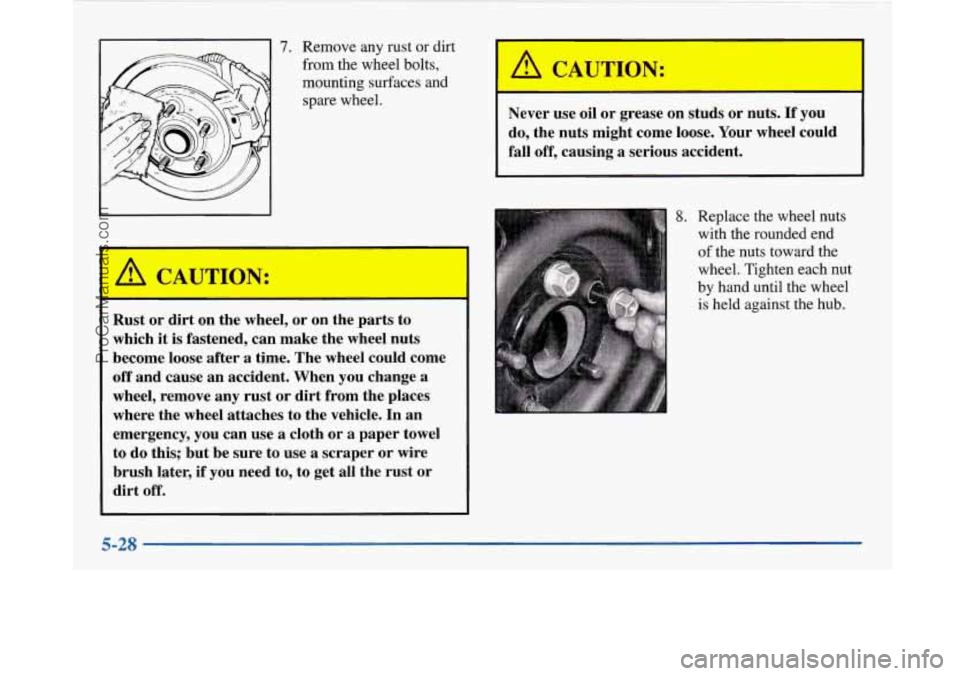
' 7. Remove any rust or dirt
from the wheel bolts,
mounting surfaces and spare wheel.
Rust or dirt on the wheel, or on the parts to
which
it is fastened, can make the wheel nuts
become loose after
a time. The wheel could come
off and cause an accident. When
you change a
wheel, remove any
rust or dirt from the places
where the wheel attaches
to the vehicle. In an
emergency,
you can use a cloth or a paper towel
to do this; but be sure to use
a scraper or wire
brush later, if you need to, to get all the rust
or
dirt off.
/1 CAUTMN:
Never use oil or grease on studs or nuts. If you
do, the nuts might come loose. Your wheel could
fall off, causing a serious accident.
8. Replace the wheel nuts
with the rounded end
of the nuts toward the
wheel. Tighten each nut
by hand until the wheel
is held against the hub.
A CAUTION: I
I
5-28
~
ProCarManuals.com