1997 BUICK PARK AVENUE key
[x] Cancel search: keyPage 66 of 420
Customizing Your Memory Door Locks Feature
You can program the memory door locks feature to
change to the following modes:
Mode Operation
0 No automatic door lock or unlock.
1
2
3
All doors automatically lock when
shifted out of PARK (P).
No automatic
door unlock.
All doors automatically lock when shifted out of PARK (P). Only the driver’s door
automatically unlocks when shifted into
PARK (P).
All doors automatically lock when shifted
out
of PARK (P). All doors automatically
unlock when shifted into PARK
(P).
Vehicles are delivered programmed in Mode 3; however,
each Remote Keyless Entry transmitter can be
programmed
to a different mode according to the
user’s preference.
To change modes:
1. Close all doors and turn the ignition on. Keep all
doors closed throughout this procedure.
driver’s door through Step
4.
3. Press the LOCK button on the Remote Keyless
Entry transmitter to enter the programming mode.
The memory door lock mode will remain in the
current mode.
2. Press and hold the power door lock switch on the
4. Press the LOCK button on the transmitter again.
Each time the transmitter’s LOCK button is pressed,
the mode will advance by one, going from mode
3 to
mode
0 to mode 1, etc.
For each press of the LOCK button, the door locks will activate
in the same manner they would activate in the
corresponding memory door lock mode. For example,
pressing the LOCK button on the transmitter to advance to mode
2 would result in all doors locking
and then,
only the driver’s door would unlock. For
mode
0, no locking or unlocking will occur.
5. Release the power door lock switch and turn the
ignition off. The automatic door locks will remain in
the most recent mode selected.
2-6
ProCarManuals.com
Page 68 of 420

Lockout Protection
The power door locks will not work if the key is left in
the ignition, the ignition is turned to OFF and the
driver's door is open.
You can override this feature
by holding the power door lock switch for more than
three seconds.
Leaving Your Vehicle
If you are leaving the vehicle, take your keys, open your
door and set the locks from inside, then get out and close
the door.
Remote Keyless Entry System
With the remote keyless entry system, you can lock
and unlock your doors or unlock your trunk from about
3 feet (1 m) up to 30 feet (9 m) away using the remote
keyless entry transmitter supplied with your vehicle. Your
remote keyless
entry system operates
on a radio frequency
subject to Federal
Comunications
Commission (FCC)
Rules and with Industry and Science Canada.
This device complies with Part
15 of the FCC Rules.
Operation is subject to the following two conditions:
(1) this device may not cause harmful interference,
and
(2) this device must accept any interference
received, including interference that may cause
undesired operation.
This device complies with RSS-210 of Industry and
Science Canada. Operation is subject
to the following
two conditions:
(1) this device may not cause
interference, and (2) this device must accept any
interference received, including interference that may
'
cause undesired operation of the device.
2-8
ProCarManuals.com
Page 69 of 420
This system has a range of about 3 feet (1 m) up to
30 feet (9 m). At times you may notice a decrease in
range. This is normal for any remote keyless entry
system. If the transmitter does not work or if you have
to stand closer to your vehicle for the transmitter to
work, try this:
0
0
0
0
Check to determine if battery replacement is
necessary. See the instructions that follow.
Check the distance. You may be too far from your
vehicle. You may need to stand closer during rainy
or snowy weather.
Check the location. Other vehicles or objects may be
blocking the signal. Take a few steps to the left or
right, hold the transmitter higher, and try again.
If you’re still having trouble, see your Buick dealer
or a qualified technician for service.
Changes
or modifications to this system by other than an
authorized service facility could void authorization to
use this equipment.
Operation
The driver’s door will unlock when UNLOCK is
pressed. If pressed again within five seconds, all doors
will unlock. Pressing any button will also illuminate the
interior lamps (see “Illuminated Entry”
in the Index).
All doors will lock when LOCK
is pressed.
The trunk will unlock when the trunk button is pressed,
and the ignition is in LOCK or
OFF. The trunk button
will also work when the ignition is on, but only while in
PARK (P).
Instant Alarm
When the button with the horn symbol on the remote
keyless entry transmitter is pressed, the horn will sound
and the headlamps and taillamps will flash for up to
30 seconds. This can be turned off by pressing the
instant alarm button again or by turning the ignition on.
If your vehicle is equipped with the Content
Theft-Deterrent feature, you may also turn
off the
instant alarm by unlocking the vehicle with a key.
2-9
ProCarManuals.com
Page 70 of 420

Synchronization
If only the instant alarm button works, the transmitter
needs to be resynchronized to the receiver. Do this by
pressing and holding both the LOCK and
UNLOCK
buttons on the transmitter for about eight seconds; you
must be within range of the vehicle.
Once the transmitter has been resynchronized, the horn
will chirp and the exterior lamps will flash once. The
system should now operate properly.
Theft-Deterrent System
The remote keyless entry transmitter will arm the
theft-deterrent system whenever the doors are
closed and you push the
LOCK button when the
ignition is
OFF. It will disarm the system when you
push UNLOCK.
Personal Choice Features (If Equipped)
-Each remote keyless entry transmitter can be
programmed to the driver’s preference for memory door locks, security feedback, delayed locking and perimeter
lighting. See each feature in the Index. You can also
personalize your comfort control temperature, mode and
fan settings. See “Comfort Controls Personal Choice” in
the Index.
If your vehicle is equipped with the Driver Information
Center (DIC), you can also program these features
through the DIC. See “Driver Information Center” in
the Index.
2-10
ProCarManuals.com
Page 71 of 420
Security Feedback
This provides feedback to the driver when the vehicle
receives a command from the remote keyless entry
transmitter. The following modes may be selected:
Mode
0
1
2
3
4
5
Security Feedback
No feedback when locking or
unlocking vehicle.
No feedback when locking; exterior
lamps flash when unlocking vehicle.
Exterior lamps flash when locking; no
feedback when unlocking vehicle.
Exterior lamps flash when locking and
when unlocking vehicle.
Exterior lamps flash and horn chirps
when locking; no feedback when
unlocking vehicle.
Exterior lamps flash and horn chirps
when locking; exterior lamps flash when
unlocking vehicle. Vehicles
are delivered programmed in Mode
5; however,
each remote keyless entry transmitter can be
programmed to
a different mode according to the user’s
preference.
To change to another mode:
1.
2.
3.
4.
Press and hold the power door lock switch on the
door throughout the procedure.
Press the trunk button on the transmitter.
The horn
will chirp and the transmitter will remain in its
current mode.
Press the trunk button again. Each time the trunk
button is pressed, the horn will chirp and the
transmitter will advance to the next mode.
Release the power door lock switch.
If your vehicle is equipped with the Driver Information
Center (DIC), you can also program these features
through the DIC. See “Driver Information Center” in
the Index.
Delayed Locking
Note: This feature has been activated for your vehicle;
however, each transmitter must be turned on using the
following procedure.
2-11
ProCarManuals.com
Page 72 of 420

This feature lets the driver delay the actual locking of
the vehicle. When the power door lock switch
is pressed
with the key removed from the ignition and the driver’s
door open, a chime will sound three times to signal that
the lock delay mode is active. When all doors have been
closed, the doors will lock automatically after five
seconds.
If any door is opened before this, the
five-second timer will reset itself once all the doors have
been closed again.
Pressing the door lock switch twice within two seconds
will override this feature.
The delayed locking feature can be turned on or
off for
each remote keyless entry transmitter.
To turn the feature on:
1.
2.
3.
4.
Press and hold the power door lock switch on the door
throughout this procedure.
All the doors will lock.
Press the UNLOCK button on the transmitter to
enter the programming mode. The lock delay is still
off and all doors will remain locked.
Press the UNLOCK button on the transmitter again.
Lock delay is now active and all doors will unlock.
Release the power door lock switch.
If your vehicle is equipped with the Driver Information
Center (DIC),
you can also program these features
through the DIC. See “Driver Information Center” in
the Index.
To
turn this feature off, repeat the above procedure.
Matching Transmitter(s) To Your Vehicle
Each remote keyless entry transmitter is coded to
prevent another transmitter from unlocking your vehicle.
If a transmitter is lost or stolen, a replacement can be
purchased through your dealer. Remember to bring any
remaining transmitters with you when you go to your
dealer. When the dealer matches the replacement
transmitter to your vehicle, any remaining transmitters
must also be matched. Once your dealer has coded the
new transmitter, the lost transmitter will not unlock your
vehicle. Each vehicle can have up to four transmitters
matched to it.
See your dealer to match additional transmitters to
your vehicle.
2-12
ProCarManuals.com
Page 73 of 420
Battery Replacement
Under normal use, the battery in your remote keyless
entry transmitter should last about four years.
You can tell the battery is weak
if the transmitter won’t
work at the normal range in any location.
If you have to
get close to your vehicle before the transmitter works,
it’s probably time to change the battery.
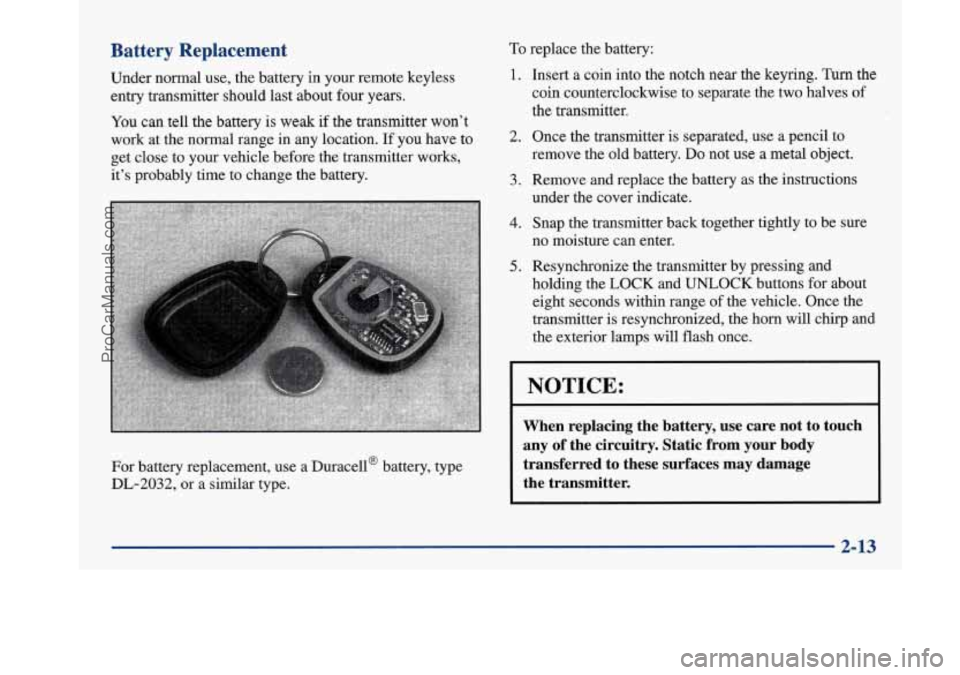
For battery replacement, use a Duracella battery, type
DL-2032, or a similar type.
To replace the battery:
1.
2.
3.
4.
5.
Insert a coin into the notch near the keyring. Turn the
coin counterclockwise to separate the two halves of
the transmitter.
Once the transmitter
is separated, use a pencil to
remove the
old battery. Do not use a metal object.
Remove and replace the battery as the instructions
under the cover indicate.
Snap the transmitter back together tightly to be sure
no moisture can enter.
Resynchronize the transmitter by pressing and
holding the
LOCK and UNLOCK buttons for about
eight seconds within range
of the vehicle. Once the
transmitter is resynchronized, the horn will chq
and
the exterior lamps will flash once.
NOTICE:
When replacing the battery, use care not to touch
any of the circuitry. Static from your body
transferred to these surfaces may damage
the transmitter.
2-13
ProCarManuals.com
Page 74 of 420
Trunk
Trunk Lock Release
To unlock the trunk from the outside, insert the master
doorhgnition key and turn it.
Remote Trunk Release
Press the TRUNK release button located to the left of
the steering column to release the trunk lid.
The trunk will open if the transaxle
is in PARK (P) or
NEUTRAL (N) and the trunk release lockout
is in the
unlocked position.
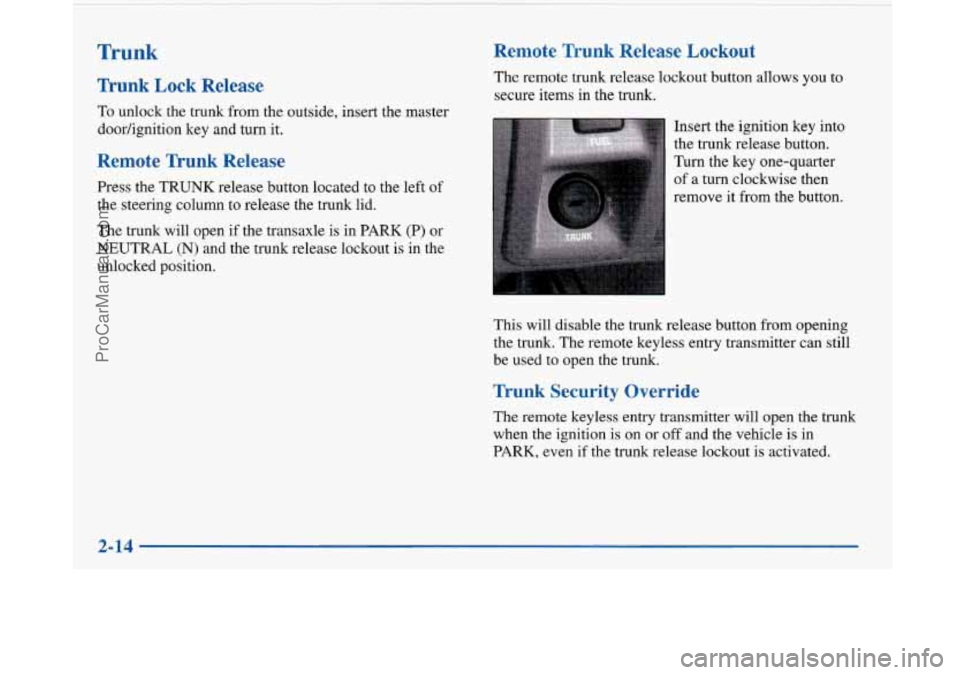
Remote Trunk Release Lockout
The remote trunk release lockout button allows you to
secure items in the trunk.
Insert the ignition key into
the trunk release button.
Turn the key one-quarter
of
a turn clockwise then
remove it from the button.
This will disable the trunk release button from opening
the trunk. The remote keyless entry transmitter can still
be used to open the trunk.
Trunk Security Override
The remote keyless entry transmitter will open the trunk
when the ignition is on or off and the vehicle
is in
PARK, even if the trunk release lockout is activated.
I
2-14
ProCarManuals.com