Page 47 of 203
40
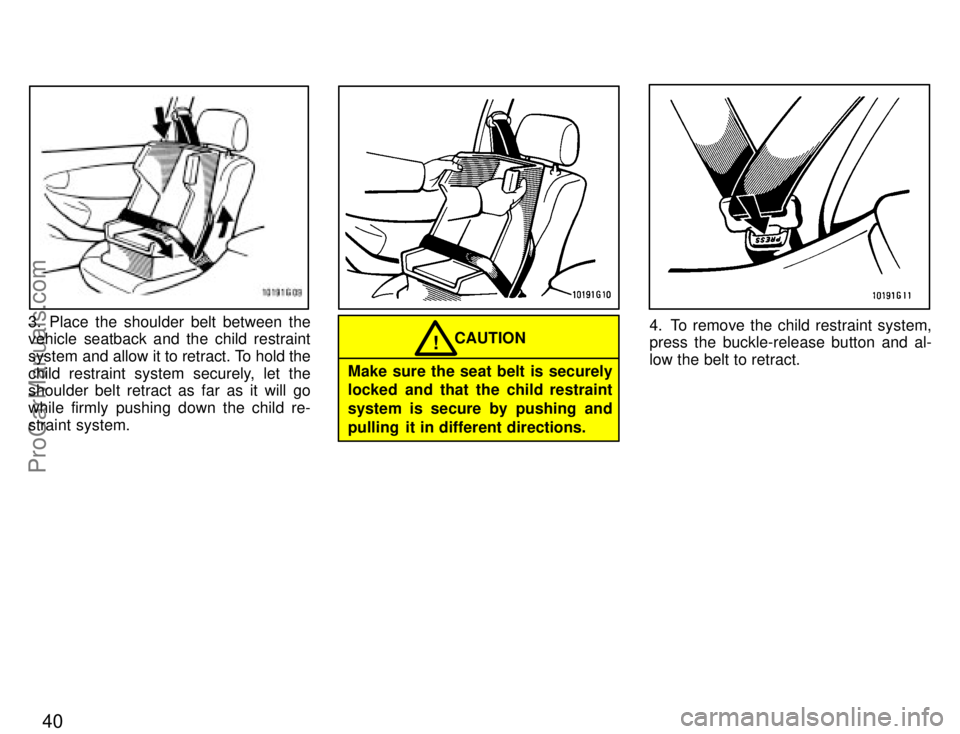
3. Place the shoulder belt between the
vehicle seatback and the child restraint
system and allow it to retract. To hold the
child restraint system securely, let the
shoulder belt retract as far as it will go
while firmly pushing down the child re-
straint system.
CAUTION!
Make sure the seat belt is securely
locked and that the child restraint
system is secure by pushing and
pulling it in different directions.
4. To remove the child restraint system,
press the buckle-release button and al-
low the belt to retract.
ProCarManuals.com
Page 67 of 203
60
(d) Parking
1. Bring the vehicle to a complete stop.
2. Pull the parking brake lever up fully to
securely apply the parking brake.
3. With the brake pedal pressed down,
shift the selector lever to the Pº position.
While the vehicle is moving, never
attempt to move the selector lever
into Pº position under any circu-
mstances. Serious mechanical da-
mage and loss of vehicle control
may result.CAUTION
!
(e) Good driving practice
�
If the transmission is repeatedly up-
shifted and downshifted between third
gear and overdrive when climbing a
gentle slope, the overdrive switch
should be turned off. Be sure to turn
the switch on immediately afterward.
� When towing a trailer, in order to main-
tain engine braking efficiency, do not
use overdrive.
Always keep your foot on the brake
pedal while stopped with the engine
running. This prevents the vehicle
from creeping. CAUTION
!
NOTICE
Do not hold the vehicle on an upgrade with the accelerator pedal.
It can cause the transmission tooverheat. Always use the brake
pedal or parking brake.
(f) If you cannot shift the selector lever
out of Pº position
If you cannot shift the selector lever from
the Pº position even though the brake
pedal is depressed, use the shift lock
override button. For instructions, see If
you cannot shift automatic transmission
selector leverº in Part 4.
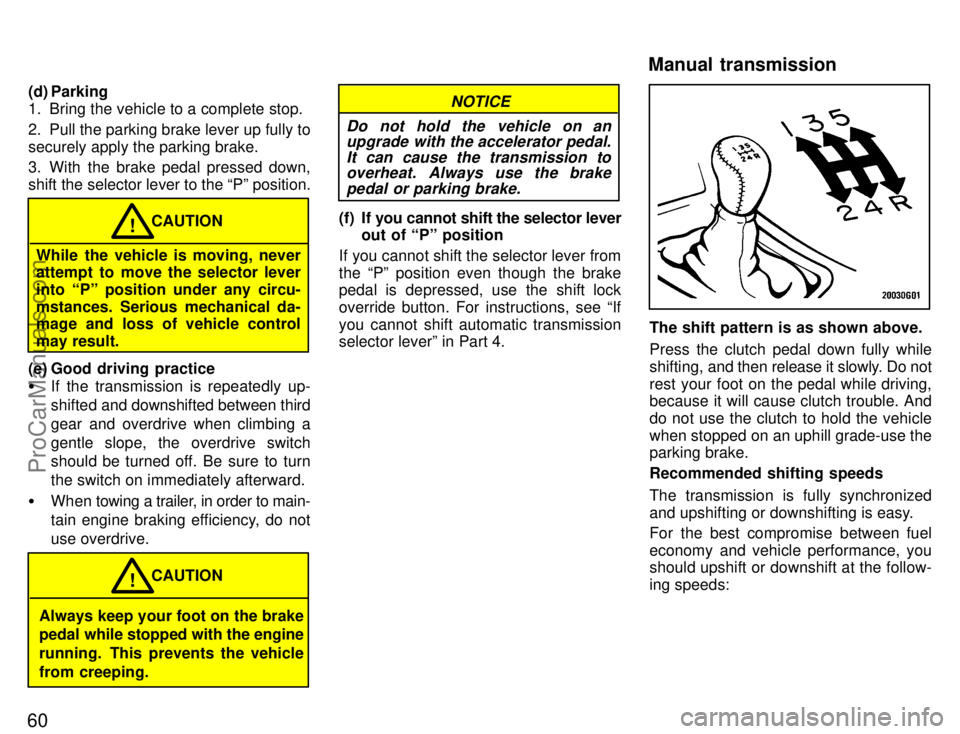
The shift pattern is as shown above.
Press the clutch pedal down fully while
shifting, and then release it slowly. Do not
rest your foot on the pedal while driving,
because it will cause clutch trouble. And
do not use the clutch to hold the vehicle
when stopped on an uphill grade-use the
parking brake.
Recommended shifting speeds
The transmission is fully synchronized
and upshifting or downshifting is easy.
For the best compromise between fuel
economy and vehicle performance, you
should upshift or downshift at the follow-
ing speeds:
Manual transmission
ProCarManuals.com
Page 90 of 203

83
The anti-theft system prevents the audio
system from working after it has been dis-
connected. To activate the system, you
must set a three-digit security code. After
the system is set, SECº will appear in the
display each time the ignition is turned
from LOCKº to ACCº or ONº. Also, the
anti-theft light flashes every few seconds
while the ignition key is in the LOCKº
position.
You will need to know your security code
to reactivate your radio after electrical ser-
vice is performed on your vehicle.
Choose a security code that is easy to re-
member and keep a copy of it (not in your
Toyota).
NOTICE
If you pushed any wrong buttons on the anti-theft system, the following
messages will appear on thedisplay.
�ErrºÐYou have pushed wrongbuttons.
�1-9ºÐIndicates the number oferrors you have made. You maymake up to nine errors, but nomore!
�HELPºÐThe number of errors
you can make was exceeded. Theaudio sytem is completely inoper-
able. Contact you Toyota dealer.
Setting a security code for the first
time.
1. Turn off the audio system.
Turn ignition key to ACCº.
Simultaneously push and hold in 1º, 6º,
and PWR/VOLº until SECº appears on
the display.2. While you are holding in the ~º side of
TUNEº, push 1º.
The display will read - - -.
On some modes, � º and �º will also
turn on.
ÐAnti-theft system
(Type 2-2 and 3 only)
ProCarManuals.com
Page 91 of 203
84
3. Input the three digit code.
You have 10 seconds to enter each digit.
For example, 209º:
To set the first digit: Push 1º until the digit
you want appears on the display.
To set the second digit: Push 2º until the
digit you want appears on the display.
To set the third digit: Push 3º until the digit
you want appears on the display.4. The three-digit code should be on the
display.
Push and hold in SCANº until the display
goes dark. (At first, SECº will appear on
the display.)If you pushed any wrong buttons,
Errº and the number of errors you
have made will appear on the display
before SECº does. Go back to step 2
and try again. If the display returns to
- - -º while you are entering the code,
go back to step 3.
To make sure the security code has been
accepted, turn the ignition to LOCKº and
then
back to ACC.º SECº should appear
on the display.
Choose a security code that is easy to re-
member and keep a copy of it (not in your
Toyota).
ProCarManuals.com
Page 92 of 203
85
Changing the security code
1. Turn off the audio system.
Turn the ignition key to ACCº.
Simultaneously push and hold in 1º, 6º,
and PWR/VOLº until SECº appears in
the display.2. While you are holding in the ~º side of
TUNEº push 1º.
The display will read - - -º.
On some models, �º and �º will also
turn on.3. Input the existing three-digit code.
You have 10 seconds to enter each digit.
For example, 209º:
To set the first digit: Push 1º until the digit
you want appears on the display.
To set the second digit: Push 2º until the
digit you want appears on the display.
To set the third digit: Push 3º until the digit
you want appears on the display.
ProCarManuals.com
Page 93 of 203
86
4. The three-digit code should be on the
display.
Push SCANº.
The display will read - - -º.
5. Repeat steps 2 and 3, this time enter-
ing your new code. You can use digits 0º
through 9º.6. The new three-digit code should be on
the display.
Push and hold in SCANº until the display
goes dark. (At first, SECº will appear on
the display.)If you pushed any wrong buttons,
Errº and the number of errors you
have made will appear on the display
before SECº does. Go back to step 2
and try again. If the display returns to
- - - while you are entering the code,
go back to step 3.
To make sure the security code has been
accepted, turn the ignition to LOCKº and
then
back to ACCº. SECº should appear
on the display.NOTICE
A tenth error will activate the anti-theft system and HELPº will
appear on the display. The audiosystem will be completely inop-erable. At this time, the anti-theftlight also comes on. If this occurs,contact your Toyota dealer.
ProCarManuals.com
Page 94 of 203
87
Clearing the security code.
1. Turn off the audio system.
Turn the ignition key to ACCº.
Simultaneously push and hold in 1º, 6º,
and PWR/VOLº until SECº appears on
the display.2. While you are holding in the ~º side of
TUNEº, push 1º.
The display will read - - -.
On some models, �º and � º will also
turn on.3. Input the existing three-digit code.
You have 10 seconds to enter each digit.
For example, 209º:
To set the first digit: Push 1º until the digit
you want appears on the display.
To set the second digit: Push 2º until the
digit you want appears on the display.
To set the third digit: Push 3º until the digit
you want appears on the display.
ProCarManuals.com
Page 95 of 203
88
4. The three-digit code should be on the
display.
Push SCANº.
The display will read - - -º.
5. Wait for 10 seconds until the security
system is deactivated and the display
goes dark.If you pushed any wrong buttons,
Errº and the number of errors you
have made will appear on the display
before SECº does. Go back to step 2
and try again. If the display returns to
к while you are entering the code,
go back to step 3.
NOTICE
A tenth error will activate the anti-theft system and HELPº will
appear on the display. The audiosystem will be completely inop-erable. At this time, the anti-theftlight also comes on. If this occurs,contact your Toyota dealer.
Reactivating a disabled audio system
1. Turn the ignition switch to ACCº.
2. While you are holding in the ~º side of
TUNEº, push 1º.
The dispay will read - - -º.
On some models, � º and �º will also
turn on.
ProCarManuals.com