Page 102 of 372
If you have power windows, the switches on the driver's
door armrest control the front windows (when the ignition
is on). The left switch controls the driver's window. The
right switch controls
the passenger's window.
The driver's power window switch has two down
positions. Hold the rear
of the switch in the first position
to lower the window normally.
To activate the auto-down feature, fully press the rear of
the switch, then release. The window will lower
completely.
To stop the window from lowering all the
way, press the front
of the switch.
To raise the window, press and hold the front of the switch.
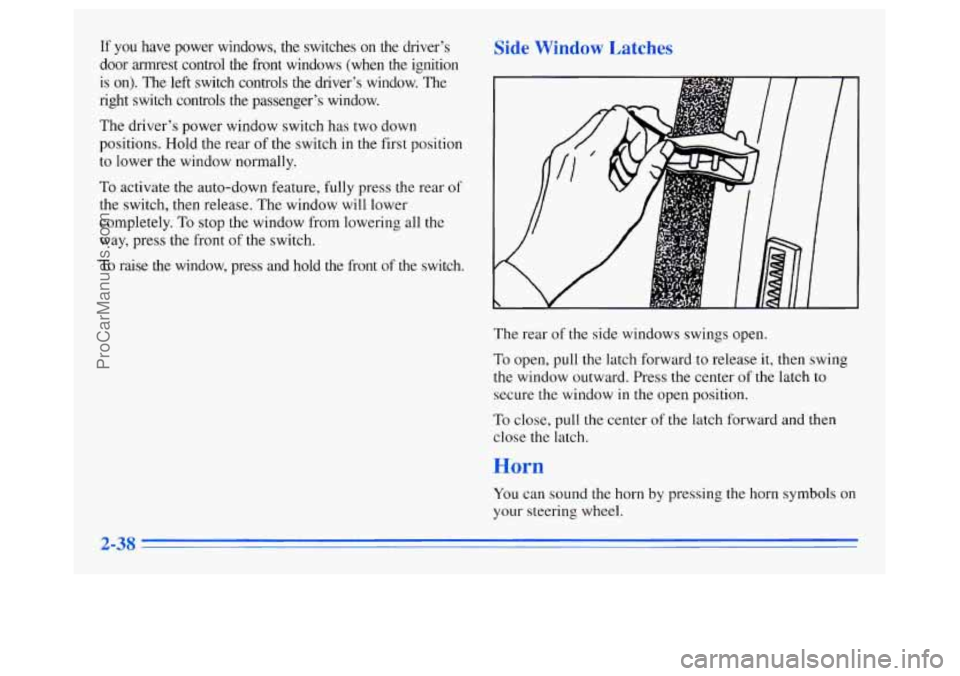
,atches
The rear of the side windows swings open.
To open, pull the latch forward to release
it, then swing
the window outward. Press the center
of the latch to
secure the window
in the open position.
To close, pull the center of the latch forward and then
close the latch.
You can sound the horn by pressing the horn symbols
on
your steering wheel.
ProCarManuals.com
Page 127 of 372
I NOTICE:
Loading cargo that weighs more than 125 lbs.
(56 kg) on the luggage carrier may damage
your vehicle.
When you carry cargo on the luggage carrier
of a
proper size and weight, put it on the slats, as far
forward as you can. Then slide the crossrail up
against the rear
of the load, to help keep it from
moving. You can then tie it down.
Don’t exceed the maximum vehicle capacity when
loading your Oldsmobile. For more information on
vehicle capacity and loading, see “Loading Your
Vehicle”
in the Index.
To prevent damage or loss of cargo as you’re driving,
check now and then to make sure the luggage carrier and
cargo are still securely fastened.
ProCarManuals.com
Page 128 of 372
c
Your luggage carrier has
release knobs set in the
ends
of each crossrail. I L A
Use the adjustable tie-down
loops
in the side rails to
I help secure large loads. i
Turn the release knobs counterclockwise to unlock the
crossrails. Slide the crossrails forward or back,
as
needed, to accommodate loads of varying size.
After repositioning the crossrails, be sure to tighten the
release knobs by turning them clockwise, locking
the
crossrails in place. Reposition the tie-downs
by turning them
counterclockwise, then slide them along the side rail.
Turn the tie-downs clockwise to tighten them in place.
Tiedowns
may be removed and used in the adjustable
tapped plates
in the crossrails. You may also use these
tapped plates to secure bicycle or
ski racks.
Outboard bumper strips
on the luggage carrier crossrails
help ensure
a quieter ride.
2-64
ProCarManuals.com
Page 167 of 372

lg the Disc Player
Turn the power off or turn the ignition key off. The disc
stays
in the player and will resume playing at the point
where it stopped.
ST-PL: Press this button to stop playing the disc and
switch to the radio. Press
it again to restart the disc at
the point where it stopped.
EJCT Press this button to eject the disc and switch to
the radio. The disc will start playing track one when you
reinsert it.
=Deterrent Feature
Delco-Loc II@ is a security feature for the compact disc
player, It may be used or ignored. If ignored, the system
plays normally and the radio is not protected by the
feature. If Delco-Loc
I1 is activated, your radio will
not operate if stolen.
If your vehicle loses battery power for any reason, you
must enter your secret code again before the system will
turn on.
; the TI tterrent 1 ature
The instructions which follow, explain how to enter your
secret code
to activate the Delco-Loc I1 system. It is
recommended that you read through all of the steps
before starting the procedure.
NOTE: If you allow more than 15 seconds to elapse
between any steps, the radio automatically reverts to
time and you must start the procedure over at Step
4.
1.
2.
3.
4.
5.
Write down any six-digit number and keep it in a
safe place separate from the vehicle.
Turn the ignition to the
ACC or RUN position.
Press the
PREV and FF buttons together. Hold them
down until
--- shows on the display. Next you
will use the secret code number which you have
written down.
Press
SET and 000 will appear on the display.
Press
SCAN to make the first digit of your
code appear.
ProCarManuals.com
Page 168 of 372

6. Press SEEK to make the second and third digits of
your code appear.
7. Press AM-FM and 000 will appear on the display
again. Now
you are ready to enter the last three
digits
of your code.
code appear.
code appear.
8. Press SEEK to make the fourth digit of your
9. Press SCAN to make the last two digits of your
10. Press AM-FM and REP will appear on the display
for five seconds, and then
000 will appear on
the display.
11. For verification, repeat Steps 6 through 11. If SEC
appears on the display, your audio system is secured.
If
--- shows on the display, your system is not
secured.
You must restart the entire procedure again
from Step
4.
Unlockin-
Power Loss
! Theft-Deterrent Feature After a
Enter your secret code as follows; pause no more than
15 seconds between steps:
2. Press SET and 000 will appear on the display.
3. Press SCAN to make the first digit of your
code appear.
4. Press SEEK to make the second and third digits of
your code appear.
5. Press AM-FM and 000 will appear on the display
again. Now you are ready
to enter the last three
digits
of your code.
6. Press SCAN to make the fourth digit of your
code appear.
7. Press SEEK to make the last two digits of your
code appear.
8. Press AM-FM. If the time appears, the unlocking
sequence was successful. If the display shows
SEC,
the digits did not match and the unit is still secured.
9. Press AM-FM after you have confirmed that the
code matches the secret code you have written down.
The display will
show SEC, indicating the radio is
now operable and secure.
If you lose or forget your code, contact your retailer.
1. Turn the ignition on. (The radio should be off. LOC
will appear on the display.)
P--
ProCarManuals.com
Page 169 of 372

Disabling the Theft-Deterrent Feature
1.
2.
3.
4.
5.
6.
7.
Turn the ignition on.
Turn
the radio off.
Press the
PREV and FF buttons together. Hold them
down until
SEC shows on the display.
Press
SET and 000 will appear on the display.
Press SCAN to make
the first digit of your
code appear.
Press
SEEK to make the second and third digits of
your code appear.
Press AM-FM and
000 will appear on the display
again. Now you are ready to enter the last three
digits
of your code.
8. Enter the last three digits of your code. The display
will show the numbers as entered.
9. Press AM-FM after you have confirmed that the
code matches the secret code you have written down.
The display will show
---, indicating that the radio is
no longer secured.
If the code entered
is incorrect, SEC will appear on the
display. The radio will remain secured until the correct
code is entered.
When battery power
is disconnected from a secured
radio, the radio won’t turn on and LOC will appear on
the display.
To unlock
a secured radio, see “Unlocking the
Theft-Deterrent Feature After a Power
Loss” earlier
in this section.
ProCarManuals.com
Page 197 of 372
Winter Driving
Here are some tips for winter driving:
Have your Oldsmobile in good shape for winter.
You may want to put winter emergency supplies in
your vehicle. Include an ice scraper, a small brush or broom, a supply
of
windshield washer fluid, a rag, some winter outer
clothing, a small shovel, a flashlight, a red cloth and
a
couple of reflective warning triangles. And, if you will
be driving under severe conditions, include a small bag of sand, a piece of old carpet or a couple of burlap bags
to help provide traction.
Be sure you properly secure
these items in your vehicle.
Driving on Snow or Ice
Most of the time, those places where your tires meet the
road probably have good traction.
However, if there is snow or ice between your tires and the road, you can have a very slippery situation. You’ll
have a lot less traction or “grip” and will need to be \
very careful.
4-23
ProCarManuals.com
Page 203 of 372

,A C-UTION: I
Things you put inside your vehicle can strike
and injure people in
a sudden stop or turn, or in
a crash.
Put things in the cargo area of your vehicle.
Never stack heavier things, like suitcases,
Try to spread the weight evenly.
inside the vehicle
so that some of them are
above the tops of the seats.
Don’t leave an unsecured child restraint in
your vehicle.
0 When you carry something inside the
vehicle, secure it whenever you can.
0 Don’t leave a seat folded down unless you
need to.
If you don’t use the correct equipment and drive
properly, you can lose control when you pull
a
trailer. For example, if the trailer is too heavy, the
brakes may not work well
-- or even at all. You
and your passengers could be seriously injured.
Pull a trailer only if you have followed all the
steps in this section. Ask your Oldsmobile retailer
for advice and information about towing a trailer
with your vehicle.
NOTICE:
Pulling a trailer improperly can damage your
vehicle and result in costly repairs not covered by
your warranty.
To pull a trailer correctly, follow
the advice in this part, and see your Oldsmobile
retailer for important information about towing
a trailer with your vehicle.
ProCarManuals.com