Page 93 of 320

If the turn signal stays on after you turn, move
the lever back to the center (off) position. A
warning chime will sound after approximately
one-half mile (one kilometer) of driving if you do
not return the lever to off.
For lane changes, move the lever far enough to
signal but not to latch. The lever will return to
the off position when you release it.
NOTE: The flash rate of the turn signal will
speed up considerably if the Lighting Control
Module detects a left or right turn lamp bulb
(front or rear) is burned out.
High Beams
To turn on the high beams, turn the headlamp
control switch to the headlamp ON position (or
activate the autolamp feature) and push the turn
signal lever away from you until it latches. When
the high beams are ON, the high beam indicator
light on the instrument cluster comes on.
90To turn off the high beams, pull the lever toward
you until it latches. The high beam indicator
light turns off.
Flashing the Lights
To flash the headlamps, pull the lever toward
you for a moment and then release it. The
headlamps will flash whether the headlamp knob
is in the on or off position.
Windshield Wipers and Washer
To turn on the windshield wipers, the ignition
key must be turned to the ON or ACC position.
Rotate the knob towards "S" to activate the
wipers. The first seven detents are interval wipe
positions, the eighth detent is the LO position
and the ninth detent is the HI position.
To turn the wipers off, turn the knob to the OFF
position.
Page 98 of 320

To change the position of the steering wheel, pull
the release lever on the column toward you. Tip
the steering wheel to the desired position.
Release the lever to lock the steering wheel in
place.
Speed Control
Your vehicle has speed control, so you can
automatically maintain a constant speed above 30
mph (48 km/h). The switches to operate the
speed control are on the steering wheel.
Use of radio transmitting equipment that is not
Federal Communications Commission (FCC) or
in Canada the Canadian Radio and
Telecommunications Commission (CRTC)
approved may cause the speed control to
malfunction. Therefore, use only properly
installed FCC (CRTC in Canada) approved radio
transmitting equipment in your vehicle.NOTE: Since your vehicle has an Automatic
Overdrive Transaxle, you may want to drive in D
(Drive) when driving in hilly terrain, at higher
altitudes, or when pulling a trailer. This will
improve speed control performance.
NOTE: Do not shift to N (Neutral) when using
the speed control. This will cause the engine to
overspeed.
95
Page 110 of 320

NOTE: The operating range of the remote entry
system can also be affected by weather conditions
(such as very cold temperatures) or structures
around the vehicle (buildings, other vehicles, radio
and TV towers, etc.). Typical operating range will
allow you to be up to 33 feet (10 meters) away
from your vehicle.
The transmitter can be snapped apart to replace the
batteries by twisting a thin coin between the two
halves of the transmitter. DO NOT TAKE THE
FRONT PART OF THE TRANSMITTER
APART. When installing the new batteries, be sure
to place the positive (+) side down as marked.
Snap the two halves back together.
Replacement / additional transmitters
In the event a transmitter is lost, a new one may be
purchased from your dealer.
To program replacement or additional transmitters
you must have all the transmitters intended for use
on your vehicle.Initiating the following procedure erases all prior
programmed transmitters, thus ALL must be
reprogrammed at the same time.
1. Enter the factory keyless entry code. Your
personal code will not allow programming.
2. Press the 1/2 button.
3. Press one button on each of the transmitters
to be programmed. Each transmitter button
must be pressed within seven (7) seconds of
the prior one. Each time a transmitter is
successfully programmed, all of the vehicle
doors will lock and then unlock to verify
programming. If the doors did not
lock/unlock, your transmitter was not
programmed.
Additional transmitters may be purchased from
your dealer (remote entry system will work with
up to four transmitters). Follow the same
programming procedure as above.
107
Page 148 of 320

Quick Summary To utilize your vehicle's assistance request
feature, YOUR CELLULAR PHONE MUST BE
ACTIVATED. Roadside or emergency assistance can be
requested whenever your key is in the
RUN/START position and for two minutes after
the vehicle is turned off. An assistance request is initiated by pressing
either the tow truck or ambulance button located
in the overhead console. When a button is pressed, a warning lamp located
in the overhead console begins to flash and status
messages are displayed on the vehicle's message
center. (Messages are only displayed when your
key is in the RUN/START position.) The vehicle's cellular phone automatically
places a call to a 24 hour emergency
response center. When contact is made, the vehicle sends an
electronic data message to the response center's
computer. This data message includes latitude
and longitude coordinates obtained from the
vehicle's positioning system. Once the data transmission is complete, the
call is forwarded to a response center
operator who confirms your location using a
computerized map. The vehicle's cellular handset is locked-out,
the phone is automatically placed in "hands
free" mode and voice communication is
established with the operator through the
"hands free" microphone. Typically, voice communication with an
operator is established within one minute
after an assistance button is pressed.
145
Page 149 of 320
The operator verbally obtains details of Your
situation and, if necessary, ties your vehicle into a
three-way phone call with the United States Auto
Club or local 911 or other emergency services to
dispatch the appropriate assistance to your
location. Once the situation has been appropriately
handled, the operator will terminate the call, the
system warning light will stop flashing and the
system will be reset. In most situations, ONLY
the response center can terminate an assistance
request.
General Description
Lincoln's Remote Emergency Satellite Cellular
Unit (RESCU) is designed to expedite roadside or
emergency assistance to distressed motorists who
are uncertain of their location and/or are uncertain
of who to contact for assistance.
The Lincoln RESCU System utilizes Global
Positioning System (GPS) technology and the
146nation's cellular phone network to track vehicle
location and, at the touch of a button, put you in
voice contact with the Lincoln Security
Response Center.
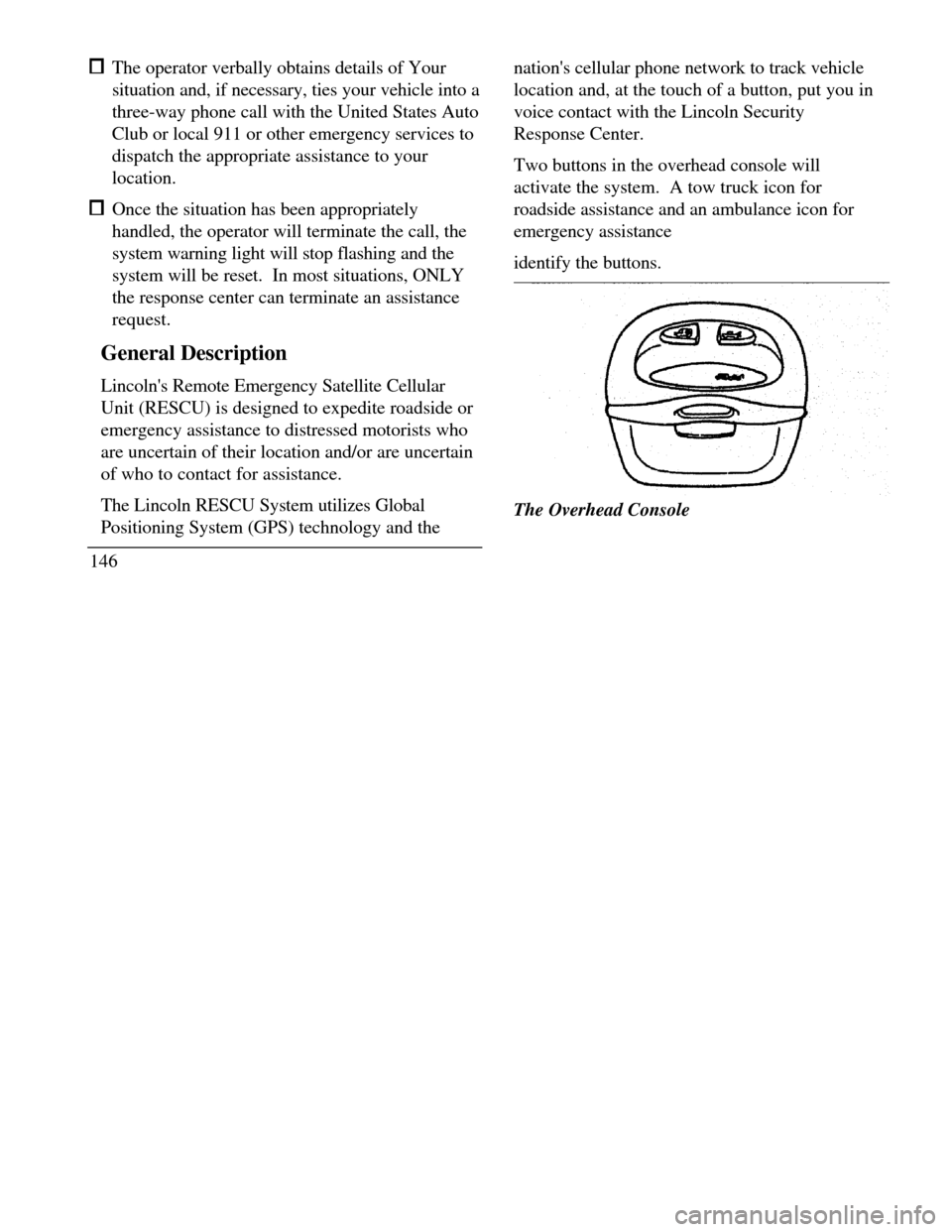
Two buttons in the overhead console will
activate the system. A tow truck icon for
roadside assistance and an ambulance icon for
emergency assistance
identify the buttons.The Overhead Console
Page 150 of 320
When you select a button, the vehicle's cellular
phone will automatically place a call to the response
center's central computer. Once contact is made, an
electronic data message will be transmitted. This
data message will include: Type of alarm (roadside or emergency) Vehicle Identification Number (VIN) Latitude and longitude coordinates Last recorded speed and direction of the vehicle Time tag identifying when last position was taken Call-back phone number
After the transmission is complete, the call is
forwarded to an operator who will verify the details
of the request and confirm the vehicle's location
using computerized map.Tow Truck Button
(Roadside Assistance)
The tow truck button should be selected if
roadside assistance is required. The feature
should be used: when your vehicle runs out of gas when your vehicle needs a tow to acquire assistance in any non-emergency
situationThe Roadside Assistance button
147
Page 173 of 320
Disc magazine eject buttonFigure 2Figure 3
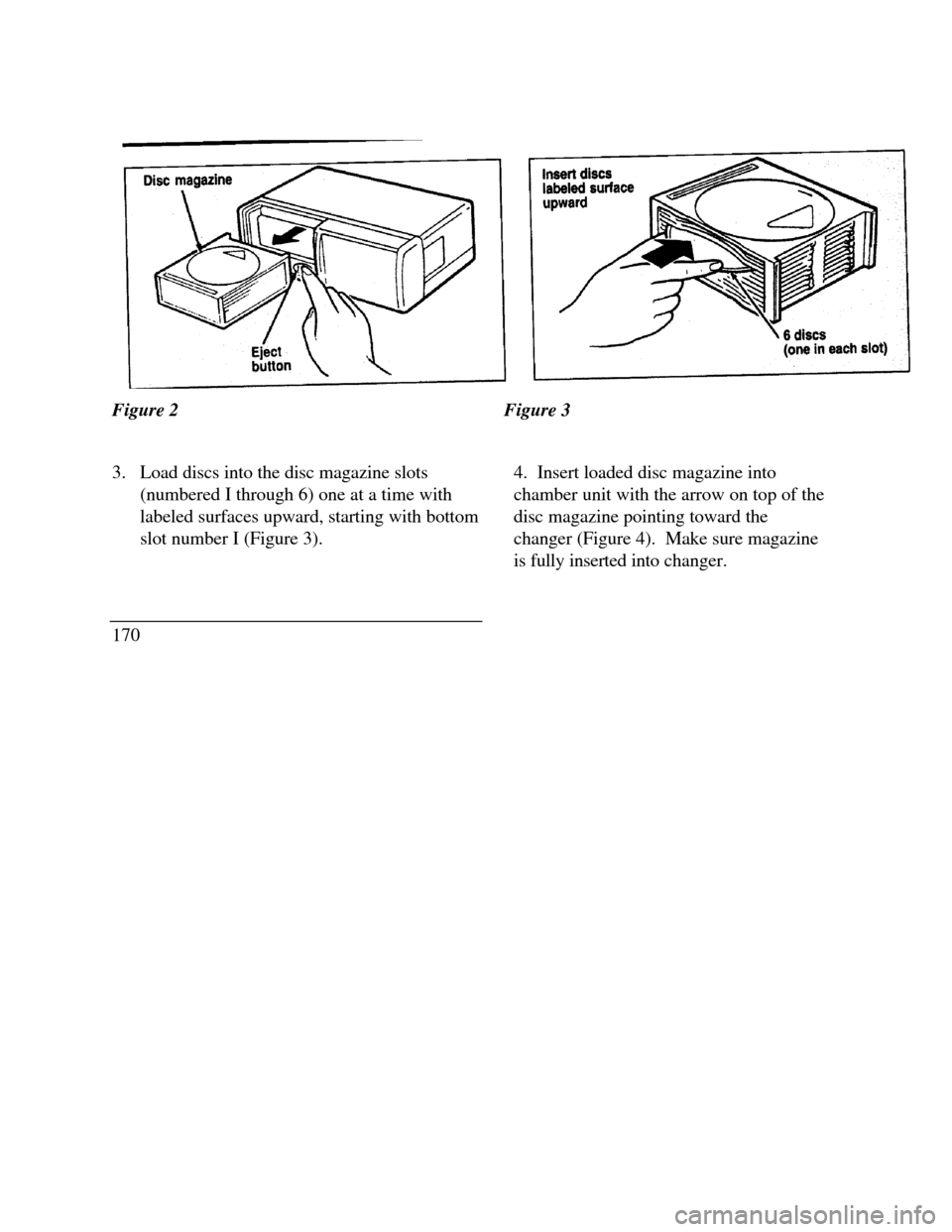
3. Load discs into the disc magazine slots
(numbered I through 6) one at a time with
labeled surfaces upward, starting with bottom
slot number I (Figure 3).
1704. Insert loaded disc magazine into
chamber unit with the arrow on top of the
disc magazine pointing toward the
changer (Figure 4). Make sure magazine
is fully inserted into changer.
Page 180 of 320

To minimize these conditions, a stereo/mono
blend circuit has been incorporated into this
system. This feature automatically switches a
weak stereo signal to a clearer monaural signal,
which improves the quality of reception.
Several sources of static are normal conditions
on AM frequencies. These can be caused by
power lines, electric fences, traffic lights and
thunderstorms.
Another reception phenomenon is Strong Signal
Capture and Overload. This can occur when
listening to a weak station and when passing
another broadcast tower. The close station may
capture the more distant station, although the
displayed frequency does not change. While
passing the tower, the station may switch back
and forth a few times before returning to the
original station.When several broadcast towers are present
(common in metropolitan areas) several
stations may overload the receiver,
resulting in considerable station changing,
mixing and distortion.
Automatic gain control circuitry for both AM and
FM bands has been incorporated into this system to
reduce strong signal capture and overload.
All About Radio Frequencies
The Federal Communications Commission (FCC)
and the Canadian Radio Telecommunications
Commission (CRTC) establish the frequencies that
AM and FM radio stations may use for their
broadcasts. The allowable frequencies are, AM:
530, 540... 1600, 1610 kHz in 10 kHz steps; FM:
87.9, 88.1... 107.7, 107.9 MHz in 0.2 MHz steps.
Not all frequencies will be assigned to a given area.
This radio will time to each of these frequencies
using manual tune and no fine tuning is necessary as
radio stations may not use other frequencies.
177