1996 CHRYSLER VOYAGER service
[x] Cancel search: servicePage 184 of 1938

INSTALL
(1) Install the CAB (Fig. 19) on the bottom of the
HCU. Refer to Controller Antilock Brakes (CAB) in
the Removal And Installation Section in this group of
the service manual for the required procedure.
(2) Install the HCU on the mounting bracket (Fig.
23). Install the 3 bolts (Fig. 23) attaching the HCU to
the mounting bracket. Tighten the 3 mounting bolts
to a torque of 11 N´m (97 in. lbs.).
CAUTION: The HCU mounting bracket to front sus-
pension cradle mounting bolts have a unique corro-
sion protection coating and a special aluminum
washer. For this reason, only the original, or origi-
nal equipment Mopar replacement bolts can be
used to mount the HCU bracket to the front suspen-
sion crossmember.
(3) Install the HCU and its mounting bracket as
an assembly on the front suspension crossmember.
Install the 3 bolts attaching the HCU bracket to the
crossmember (Fig. 22). Tighten the 3 mounting bolts
to a torque of 28 N´m (250 in. lbs.).
CAUTION: Because of the flexible section in the
primary and secondary brake tubes, and the brake
tubes between the HCU and the proportioning
valve, the brake tubes must be held in proper ori-
entation when tightened and torqued. These tubes
must not contact each other or other vehicle com-
ponents when installed. Also, after the brake tubes
are installed on the HCU, ensure all spacer clips are
reinstalled on the brake tubes.
CAUTION: When installing the chassis brake tubes
on the HCU valve block, they must be located cor-
rectly in the valve block to ensure proper ABS oper-
ation. Refer to (Fig. 21) for the correct chassis
brake tube locations.NOTE: The chassis brake tube attachment loca-
tions to the HCU, are marked on the bottom of the
HCU mounting bracket.
(4) Install the 6 chassis brake tubes into their cor-
rect port locations on the HCU valve block as shown
in (Fig. 21). Tighten the tube nuts to a torque of 17
N´m (145 in. lbs.).
NOTE: Before installing the 25 way connector in
the CAB be sure the seal is properly installed in the
connector.
(5) Install the 25 way connector (Fig. 19) on the
CAB using the following procedure. Position the 25
way connector in the socket of the CAB and carefully
push it down as far as possible. When connector is
fully seated by hand into the CAB socket, push in the
connector lock (Fig. 20). This will pull the connector
into the socket of the CAB and lock it in the installed
position.
NOTE: The CAB wiring harness must be clipped to
the HCU mounting bracket. This will ensure the wir-
ing harness is properly routed and does not contact
the brake tubes or the body of the vehicle.
(6) Clip the cab wiring harness (Fig. 19) to the
HCU mounting bracket.
(7) Install the routing clips (Fig. 24) on the brake
tubes.
(8) Lower vehicle.
(9) Connect negative cable back on negative post of
the battery.
(10) Bleed the base brakes and the ABS brakes
hydraulic system. Refer to the Bleeding ABS System
in this section of the manual for the proper bleeding
procedure.
(11) Road test vehicle to ensure proper operation of
the base and ABS systems.
Fig. 23 HCU Mounting Bolts
Fig. 24 Brake Tube Routing Clips
5 - 102 BRAKESNS
REMOVAL AND INSTALLATION (Continued)
Page 185 of 1938

CONTROLLER ANTILOCK BRAKES (CAB)
REMOVE
(1) Disconnect the negative (ground) cable from
the battery and isolate cable.
(2) Using a brake pedal depressor, move and lock
the brake pedal to a position past the first inch of
pedal travel.This will prevent brake fluid from
draining out of the master cylinder when the
brake tubes are removed from the HCU.
(3) Raise vehicle. Vehicle is to be raised and sup-
ported on jackstands or on a frame contact type
hoist. See Hoisting in the Lubrication And Mainte-
nance section of this service manual.
CAUTION: Do not apply a 12 volt power source to
any terminals of the 25 way HCU connector when
disconnected.
(4) Remove the 25 way connector (Fig. 25) from
the CAB located on the bottom of the HCU. The 25
way connector is removed from the CAB using the
following procedure. Grasp the lock on the 25 way
connector (Fig. 25) and pull it as far out as possible
(Fig. 26). This will unlock and raise the 25 way con-
nector from the socket on the CAB.
CAUTION: Before removing the brake tubes from
the HCU, the HCU must be thoroughly cleaned. This
must be done to prevent dirt particles from falling
into the ports of HCU or entering the brake tubes.
(5) Thoroughly clean all surfaces of the HCU, and
all brake tube nuts located on the HCU. Use only a
solvent such as Mopar Brake Parts Cleaner or an
equivalent to clean the HCU.
(6) Remove the brake tubes (6) from the inlet and
outlet ports on the HCU. (Fig. 27).(7) Remove the 3 bolts (Fig. 28) attaching the
HCU mounting bracket to the front suspension cross-
member.
Fig. 25 CAB 25 Way Connector
Fig. 26 Unlocking CAB 25 Way Connector
Fig. 27 Brake Tube Connections To HCU
Fig. 28 HCU To Suspension Cradle Mounting Bolts
NSBRAKES 5 - 103
REMOVAL AND INSTALLATION (Continued)
Page 187 of 1938

CAUTION: Because of the flexible section in the
primary and secondary brake tubes, and the brake
tubes between the HCU and the proportioning
valve, the brake tubes must be held in proper ori-
entation when tightened and torqued. These tubes
must not contact each other or other vehicle com-
ponents when installed.
CAUTION: When installing the chassis brake tubes
on the HCU valve block, they must be located cor-
rectly in the valve block to ensure proper ABS oper-
ation. Refer to (Fig. 27) for the correct chassis
brake tube locations.
NOTE: The chassis brake tube attachment loca-
tions to the HCU, are marked on the bottom of the
HCU mounting bracket.
(6) Install the 6 chassis brake tubes into their cor-
rect port locations on the HCU valve block as shown
in (Fig. 27). Tighten the tube nuts to a torque of 17
N´m (145 in. lbs.).
NOTE: Before installing the 25 way connector in
the CAB be sure the seal is properly installed in the
connector.
(7) Install the 25 way connector on the CAB using
the following procedure. Position the 25 way connec-
tor in the socket of the CAB and carefully push it
down as far as possible. When connector is fully
seated by hand into the CAB socket, push in the con-
nector lock (Fig. 26). This will pull the connector into
the socket of the CAB and lock it in the installed
position.
(8) Install the routing clips (Fig. 33) on the brake
tubes.(9) Lower vehicle.
(10) Connect negative cable back on negative post
of the battery.
(11) Bleed the base brakes and the ABS brakes
hydraulic system. Refer to the Bleeding ABS System
in this section of the manual for the proper bleeding
procedure.
(12) Road test vehicle to ensure proper operation
of the base and ABS brake systems.
WHEEL SPEED SENSOR (FRONT)
REMOVE
(1) Raise vehicle on jack stands or centered on a
frame contact type hoist. See Hoisting in the Lubri-
cation and Maintenance section of this service man-
ual, for the required lifting procedure to be used for
this vehicle.
(2) Remove the tire and wheel assembly from the
vehicle.
(3) Remove the 2 screws (Fig. 34) attaching front
channel bracket and grommet retainer to the outer
frame rail.
CAUTION: When disconnecting the wheel speed
sensor from vehicle wiring harness, be careful not
to damage pins on connector
(4) Pull speed sensor cable grommet and connector
through the hole in the strut tower (Fig. 35). Discon-
nect speed sensor cable from vehicle wiring harness
(Fig. 35).
(5) Remove the wheel speed sensor head to steer-
ing knuckle attaching bolt (Fig. 36).
(6) Remove sensor head from steering knuckle. If
the sensor has seized, due to corrosion,DO NOT
USE PLIERS ON SENSOR HEAD.Use a hammer
and a punch and tap edge of sensor ear, rocking the
sensor side to side until free.
Fig. 33 Brake Tube Routing Clips
Fig. 34 Front Speed Sensor Cable Channel Bracket
NSBRAKES 5 - 105
REMOVAL AND INSTALLATION (Continued)
Page 192 of 1938
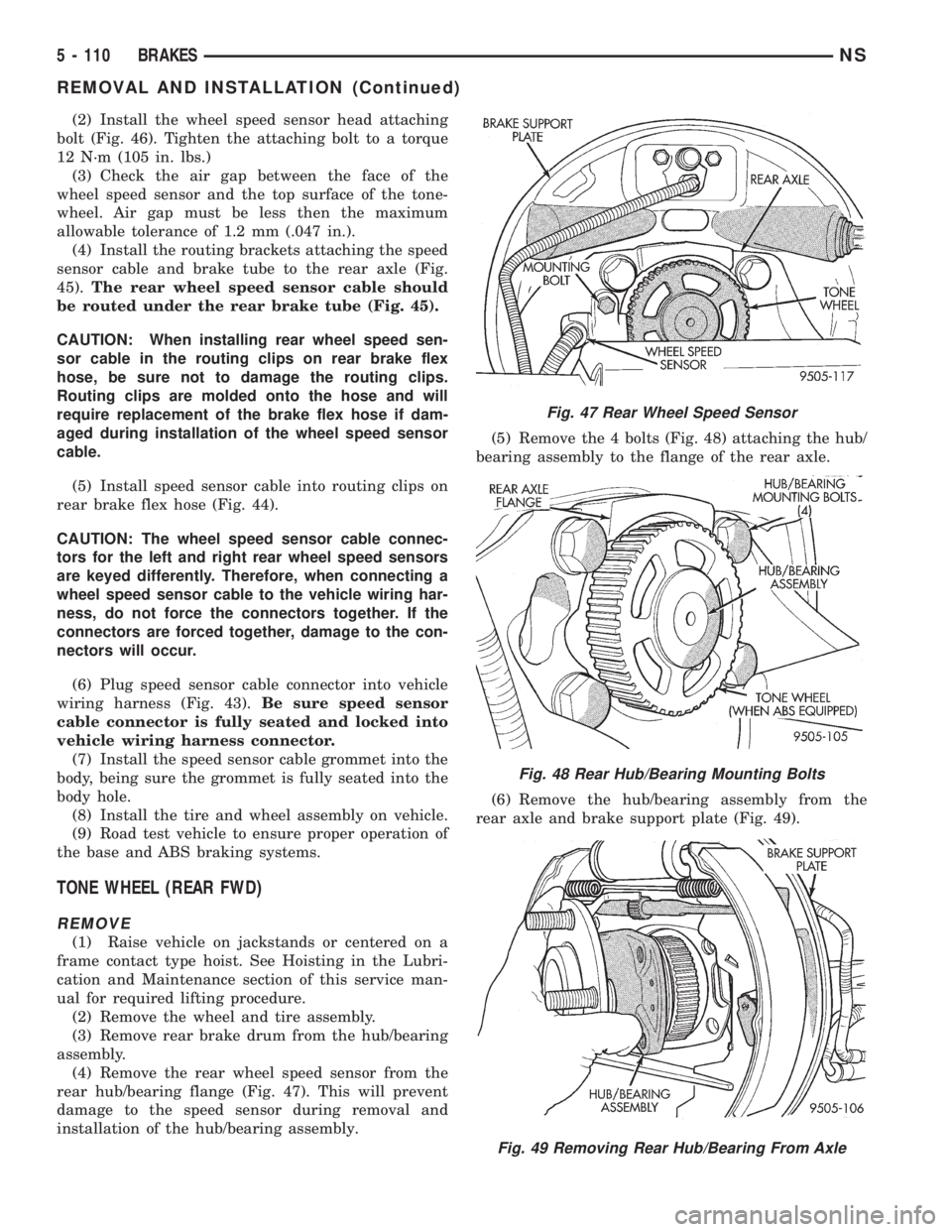
(2) Install the wheel speed sensor head attaching
bolt (Fig. 46). Tighten the attaching bolt to a torque
12 N´m (105 in. lbs.)
(3) Check the air gap between the face of the
wheel speed sensor and the top surface of the tone-
wheel. Air gap must be less then the maximum
allowable tolerance of 1.2 mm (.047 in.).
(4) Install the routing brackets attaching the speed
sensor cable and brake tube to the rear axle (Fig.
45).The rear wheel speed sensor cable should
be routed under the rear brake tube (Fig. 45).
CAUTION: When installing rear wheel speed sen-
sor cable in the routing clips on rear brake flex
hose, be sure not to damage the routing clips.
Routing clips are molded onto the hose and will
require replacement of the brake flex hose if dam-
aged during installation of the wheel speed sensor
cable.
(5) Install speed sensor cable into routing clips on
rear brake flex hose (Fig. 44).
CAUTION: The wheel speed sensor cable connec-
tors for the left and right rear wheel speed sensors
are keyed differently. Therefore, when connecting a
wheel speed sensor cable to the vehicle wiring har-
ness, do not force the connectors together. If the
connectors are forced together, damage to the con-
nectors will occur.
(6) Plug speed sensor cable connector into vehicle
wiring harness (Fig. 43).Be sure speed sensor
cable connector is fully seated and locked into
vehicle wiring harness connector.
(7) Install the speed sensor cable grommet into the
body, being sure the grommet is fully seated into the
body hole.
(8) Install the tire and wheel assembly on vehicle.
(9) Road test vehicle to ensure proper operation of
the base and ABS braking systems.
TONE WHEEL (REAR FWD)
REMOVE
(1) Raise vehicle on jackstands or centered on a
frame contact type hoist. See Hoisting in the Lubri-
cation and Maintenance section of this service man-
ual for required lifting procedure.
(2) Remove the wheel and tire assembly.
(3) Remove rear brake drum from the hub/bearing
assembly.
(4) Remove the rear wheel speed sensor from the
rear hub/bearing flange (Fig. 47). This will prevent
damage to the speed sensor during removal and
installation of the hub/bearing assembly.(5) Remove the 4 bolts (Fig. 48) attaching the hub/
bearing assembly to the flange of the rear axle.
(6) Remove the hub/bearing assembly from the
rear axle and brake support plate (Fig. 49).
Fig. 47 Rear Wheel Speed Sensor
Fig. 48 Rear Hub/Bearing Mounting Bolts
Fig. 49 Removing Rear Hub/Bearing From Axle
5 - 110 BRAKESNS
REMOVAL AND INSTALLATION (Continued)
Page 193 of 1938

(7) Install wheel lug nuts on 3 of the wheel mount-
ing studs to protect the stud threads from damage by
the vise jaws. Mount the hub/bearing assembly in a
vise (Fig. 50). Using Puller, Special Tool C-4693
installed as shown in (Fig. 50) remove the tone wheel
from the hub/bearing assembly.
INSTALL
(1) Place hub/bearing assembly in an arbor press
supported by Receiver, Special Tool, 6062A±3 (Fig.
51). Position Driver, Special Tool 6908±1 with under-
cut side facing up (Fig. 51) on top of the tone wheel.
(2) Press the tone wheel onto the hub/bearing
assembly until it is flush with the end of hub shaft
(Fig. 52).
(3) Install the 4 hub/bearing to axle flange mount-
ing bolts into the 4 mounting holes in the flange of
the rear axle.(4) Install the rear brake support plate on the 4
mounting bolts installed in the flange of the rear
axle.
(5) Align the rear hub/bearing assembly with the 4
mounting bolts and start mounting bolts into hub/
bearing assembly. Tighten the 4 bolts in a criss-cross
pattern until the hub/bearing and brake support
plate is fully and squarely seated onto flange of rear
axle.
(6) Tighten the 4 hub/bearing mounting bolts (Fig.
48) to a torque of 129 N´m (95 ft. lbs.)
(7) Install the rear wheel speed sensor on the rear
hub/bearing flange (Fig. 47). Install the speed sensor
attaching bolt and tighten to a torque of 12 N´m (105
in. lbs.).
(8) Check the air gap between the face of the
wheel speed sensor and the top surface of the tone-
wheel. Air gap must be less then the maximum
allowable tolerance of 1.2 mm (.047 in.).
(9) Install the brake drum onto the rear hub/bear-
ing assembly.
(10) Install rear wheel and tire assembly, tighten
wheel stud nuts to 129 N´m (95 ft. lbs.).
(11) Adjust the rear brakes, (See Adjusting Service
Brakes) in Service Adjustments section in this group
of the service manual.
TONE WHEEL (REAR AWD)
The rear tone wheel on all wheel drive applications
is an integral part of each rear axle outer C/V joint.
If the rear tone wheel on an all wheel drive vehicle
requires replacement it can not be replace as a sep-
arate component of the rear axle. Tone wheel replace-
ment will require the replacement of the rear axle.
Refer to Differential And Driveline in this service
manual for the rear axle replacement procedure.
Fig. 50 Tone Wheel Removal From Hub/Bearing
Assembly
Fig. 51 Installing Tone Wheel On Hub/Bearing
Assembly
Fig. 52 Correctly Installed Tone Wheel
NSBRAKES 5 - 111
REMOVAL AND INSTALLATION (Continued)
Page 195 of 1938
BRAKES
CONTENTS
page page
GENERAL INFORMATION
BASE BRAKE SYSTEM COMPONENT
DESCRIPTION........................ 1
DESCRIPTION AND OPERATION
MASTER CYLINDER..................... 1
DIAGNOSIS AND TESTING
MASTER CYLINDER FLUID LEVEL CHECK . . . 2REAR DRUM BRAKE ADJUSTMENT........ 1
REMOVAL AND INSTALLATION
BRAKE PEDAL TORQUE SHAFT ASSEMBLY . . 4
FRONT PARK BRAKE CABLE AND LEVER
ASSEMBLY-RHD&LHD VEHICLES........ 2
GENERAL INFORMATION
BASE BRAKE SYSTEM COMPONENT DESCRIPTION
The standard brake system on this vehicle contains
the same components as brake systems described in
group 5 of the service manual, with the exception of
the brake pedal system and master cylinder. These
differences are mainly related to service procedures.
The major differences are as follows:
²Use of a torque shaft assembly to transfer brake
pedal travel to the power brake booster and master
cylinder on the left side of the vehicle
²A unique power brake booster and master cylin-
der.
Refer to the Base Brake System Component
Description in the General Information section of
group 5 for more information on components used in
the base brake system.
DESCRIPTION AND OPERATION
MASTER CYLINDER
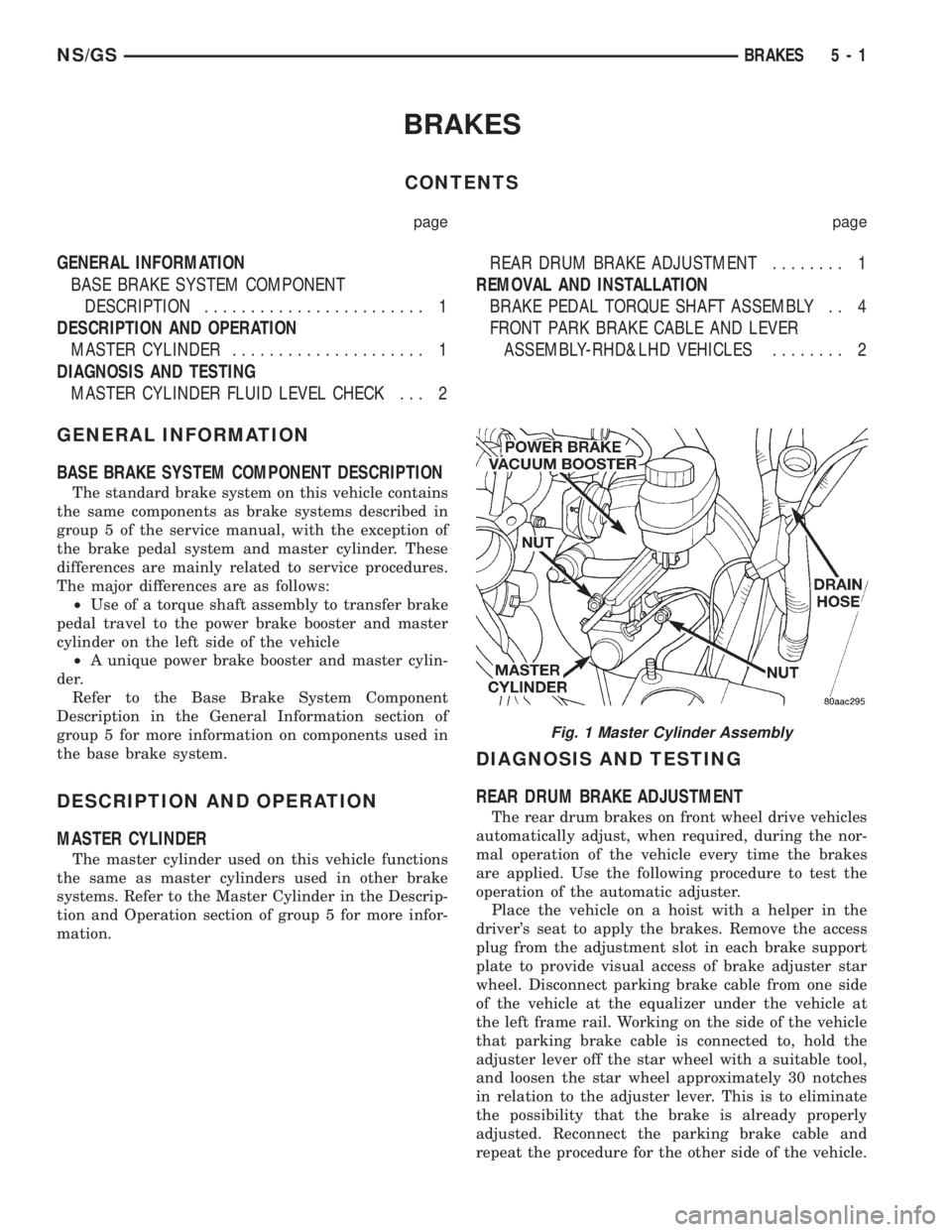
The master cylinder used on this vehicle functions
the same as master cylinders used in other brake
systems. Refer to the Master Cylinder in the Descrip-
tion and Operation section of group 5 for more infor-
mation.
DIAGNOSIS AND TESTING
REAR DRUM BRAKE ADJUSTMENT
The rear drum brakes on front wheel drive vehicles
automatically adjust, when required, during the nor-
mal operation of the vehicle every time the brakes
are applied. Use the following procedure to test the
operation of the automatic adjuster.
Place the vehicle on a hoist with a helper in the
driver's seat to apply the brakes. Remove the access
plug from the adjustment slot in each brake support
plate to provide visual access of brake adjuster star
wheel. Disconnect parking brake cable from one side
of the vehicle at the equalizer under the vehicle at
the left frame rail. Working on the side of the vehicle
that parking brake cable is connected to, hold the
adjuster lever off the star wheel with a suitable tool,
and loosen the star wheel approximately 30 notches
in relation to the adjuster lever. This is to eliminate
the possibility that the brake is already properly
adjusted. Reconnect the parking brake cable and
repeat the procedure for the other side of the vehicle.
Fig. 1 Master Cylinder Assembly
NS/GSBRAKES 5 - 1
Page 196 of 1938

Upon application of the brake pedal, the lever
should move down, turning the star wheel. A definite
rotation of the star wheel should be seen if the auto-
matic adjuster is working properly. If no rotation of
the star wheel is observed when the pedal is consec-
utively pressed and released, the respective drum
will have to be removed and the adjuster serviced.
MASTER CYLINDER FLUID LEVEL CHECK
The master cylinder used in this vehicle has the
same fluid level markings as the master cylinders
used in other brake systems on the side of the fluid
resevoir. Refer to the Master Cylinder Fluid Level
Check in the Diagnosis and Testing section of group
5 for more information
REMOVAL AND INSTALLATION
FRONT PARK BRAKE CABLE AND LEVER
ASSEMBLY-RHD&LHD VEHICLES
REMOVE
(1) Raise vehicle on jackstands or centered on a
hoist. See Hoisting in the Lubrication and Mainte-
nance group of this service manual.
(2) Remove the intermediate and left rear park
brake cable from the park brake cable equalizer (Fig.
2).
(3) Remove the front park cable housing retainer
from body outrigger bracket (Fig. 3). Cable is remov-
able by sliding a 14 mm box wrench over cable
retainer and compressing the three retaining fingers.
Alternate method is to use an aircraft type hose
clamp and screwdriver.(4) Remove the two (2) retaining nuts and (2)
retaining bolts from the bottom of the parking brake/
gearshift lever bracket.
(5) Lower vehicle.
(6) Carefully lift the base of the gearshift boot
from the gearshift console to access the screws (Fig.
4).
Fig. 2 Park Brake Cable Attachment To Equalizer
Fig. 3 Front Park Brake Cable Attachment To Body
Fig. 4 Console and Gearshift boot
5 - 2 BRAKESNS/GS
DIAGNOSIS AND TESTING (Continued)
Page 199 of 1938

CLUTCH
CONTENTS
page page
GENERAL INFORMATION
CLUTCH COMPONENTS.................. 1
CLUTCH DISC AND COVER APPLICATION . . . 3
CLUTCH REPLACEMENT................. 3
DESCRIPTION AND OPERATION
CLUTCH PEDAL POSITION SWITCH........ 4
CLUTCH RELEASE SYSTEM.............. 4
DIAGNOSIS AND TESTING
CLASH±INTO±REVERSE
COMPLAINTS........................ 8
CLUTCH CHATTER COMPLAINTS.......... 8
CLUTCH COVER AND DISC RUNOUT....... 8
CLUTCH DIAGNOSIS.................... 6
CLUTCH PEDAL POSITION SWITCH........ 4
DRIVE PLATE MISALIGNMENT............ 7
REMOVAL AND INSTALLATION
CLUTCH ASSEMBLY (2.5L DIESEL)....... 13
CLUTCH CABLE SYSTEM Ð LHD.......... 8
CLUTCH PEDAL POSITION SWITCH....... 10CLUTCH RELEASE BEARING AND FORK . . . 14
HYDRAULIC CLUTCH LINKAGE SYSTEM Ð
RHD ............................... 11
MASTER CYLINDER SYSTEM
Ð RHD ............................ 12
MODULAR CLUTCH ASSEMBLY (2.0L AND
2.4L GASOLINE)..................... 13
QUICK CONNECT COUPLING
Ð RHD ............................ 12
SLAVE CYLINDER ASSEMBLY
Ð RHD ............................ 12
CLEANING AND INSPECTION
CLEANING PRECAUTIONS............... 15
CLUTCH CONTAMINATION.............. 15
ADJUSTMENTS
CLUTCH CABLE Ð LHD................ 16
CLUTCH PEDAL POSITION SWITCH....... 16
SPECIFICATIONS
CLUTCH TIGHTENING REFERENCE........ 16
GENERAL INFORMATION
CLUTCH COMPONENTS
The clutch used in the 2.0 liter and 2.4 liter gaso-
line engine is a single, dry-disc modular clutch
assembly. The modular clutch assembly combines the
pressure plate cover, pressure plate, disc, and fly-
wheel into one unit. The unit rides on the input shaft
of the transmission and is bolted to the drive plate
mounted on the rear of the crankshaft. The clutch
used in the 2.5 liter diesel engine is a conventional
clutch and pressure plate arrangement.
CLUTCH CABLE AND PEDAL Ð LHD
The clutch cable has a unique self-adjuster mecha-
nism built into the cable which compensates for
clutch disc wear. The cable requires no maintenance
or lubrication. There are no serviceable components
on the cable assembly.The clutch pedal is connected to the cable through
a plastic spacer (Fig. 1). The upper end of the clutch
pedal pivots in the pedal bracket on two nylon bush-
ings and a shaft (Fig. 2). These bushings are greased
during assembly and do not require periodic lubrica-
tion.
Fig. 1 Upstop/Spacer and Cable Ð LHD
NS/GSCLUTCH 6 - 1