Page 132 of 340
Unlocking the System
If battery power is removed for any reason, LOC will
appear
on the display when power is reapplied. You will
need to enter your code to unlock the system. You have
only
15 seconds between each of the following steps.
1.
2.
3.
4.
5.
Turn the ignition on. LOC will appear on the display.
Press
MIN and “000” will appear on the display.
Press MTN again and hold
until the last two digits of
your code appear.
Press and
hold HRS until the first digit or digits of
your code appear.
Press
AM.FM after you make sure the code matches
the one you wrote down.
SEC should appear on the
display, meaning you can now use your system, and
it is secured.
Disabling THEFTLOCK
If you want to turn off THEFTLOCK, you will need to
enter your code. If you lose or forget your code, see
your dealer.
1.
2.
3.
4.
5.
Press the 1 and 4 preset buttons at the same time and
hold
until SEC shows on the display.
You now have only
I5 seconds between each of the
following steps.
Press MIN and
“000” will appear on the display.
Press MIN again and hold
until the last two digits of
your code appear.
Press and hold
HRS until the first digit or digits of
your code appear.
Press
AMaFM after you make sure the code matches
the one you wrote down. ‘9- - -” should appear on the
display, meaning your system is u1xecure.d.
ProCarManuals.com
Page 163 of 340
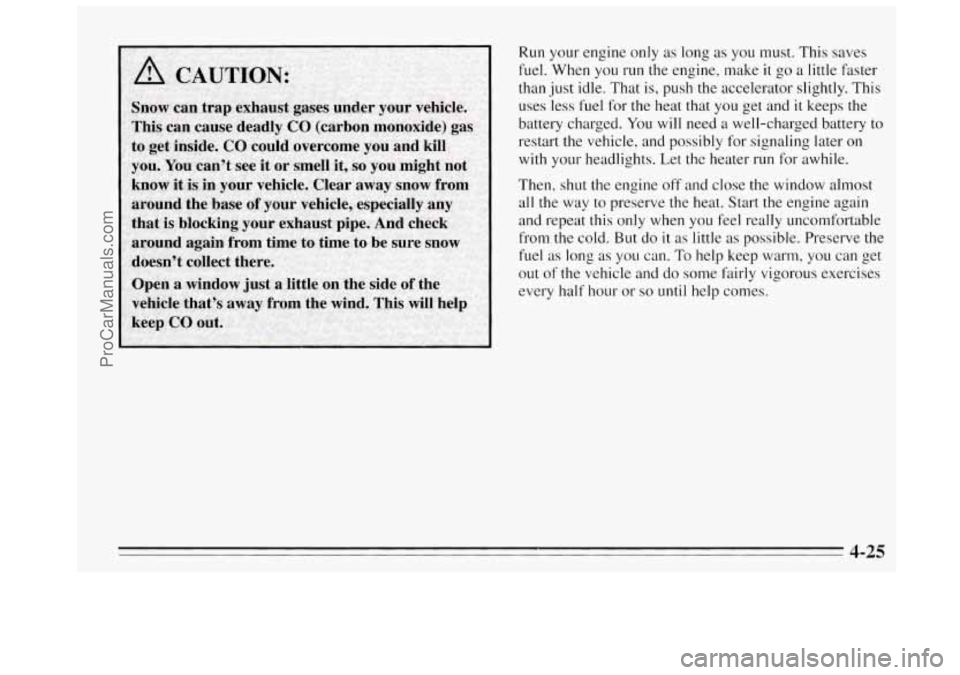
Run your engine only as long as you must. This saves
fuel. When you
run the engine, make it go a little faster
than
just idle. That is, push the accelerator slightly. This
uses ‘less fuel for the heat that you get and it keeps the
battery charged. You will need a well-charged battery to
restart the vehicle, and possibly .for signaling later on
with
your headlights. Let the heater run for awhile.
Then, shut the engine off and close the window almost
all the way to preserve the heat. Start
the engine again
and repeat this only when
you feel really uncomfortable
from the cold.
But do it as little as possible. Preserve the
fuel as long as you can. To help keep warm, you can get
out
of the vehicle and do some fairly vigorous exercises
every half hour or
so until help comes.
4-25
ProCarManuals.com
Page 176 of 340
Other Warning Devices
If you carry reflective triangles, you can set one up at
the side
of the road about 300 feet (100 m) behind your
vehicle.
Jump Starting
If your battery has run down, you may want to use
another vehicle and some jumper cables to start
your
Buick. But please follow the steps below to do it. safely.
I NOTICE:
Ignoring these steps could result in costly damage
to your vehicle that wouldn’t be covered by
your
warranty. Trying to start your Buick by pushing
or pulling it won’t work, and it could damage
your vehicle.
To Jump Start Your Buick
1. Check the other vehicle. It must have a 12-volt
battery with a negative ground system.
I NOTICE:
If the other system isn’t a 12-volt system with a
negative ground, both vehicles can be damaged.
5-2
ProCarManuals.com
Page 177 of 340
2. Get the vehicles close enough so the jumper cables
can reach,
but be sure the vehicles aren’t touching
each other.
If they are, it could cause a ground
connection
you don’t want. You wouldn’t be able to
start your Buick, and the bad grounding could
damage the electrical systems.
You could be injured
if the vehicles roll. Set the
parking brake firmly on each vehicle. Put an
automatic transaxle
in PARK (P) or a manual
transaxle
in NEUTRAL (N).
3. Turn off the ignition on both vehicles. Turn off all
iamps that aren’t needed, and radios. This will avoid
sparks and help save both batteries. And
it could
save your radio!
NOTICE:
If you leave your radio on, it could be badly
damaged. The repairs wouldn’t be covered
by
your warranty.
4. Open the hoods and locate the batteries.
A CAUTION:
An electric fan can start up even when the engine
is not running and can injure you. Keep hands,
clothing and tools away from any underhood
electric fan.
5. Find the positive (+) and negative (-) terminals on
each battery. Your Buick has a remote positive
(+)
jump starting terminal. The terminal is on the same
side of
the engine compartment as your battery. You
should
always use the remote positive (+) terminal
instead of the positive
(+) terminal on your battery.
To uncover the remote positive
(+) terminal, lift the
red plastic cap.
3-3
ProCarManuals.com
Page 179 of 340
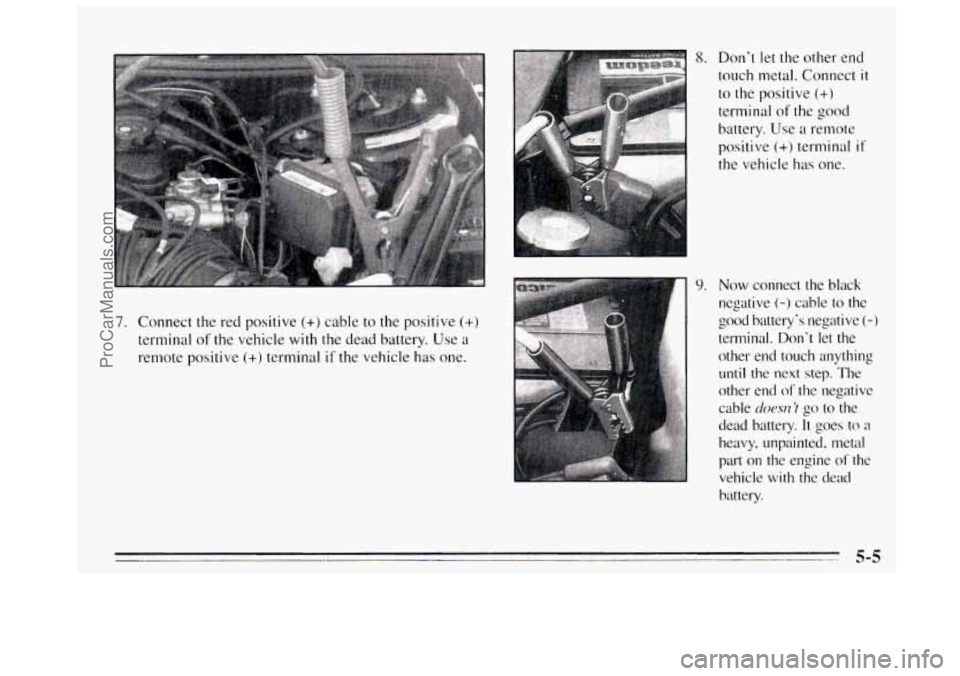
7. Connect the red positive (+) cable to the positive (+)
terminal of the vehicle with the dead battery. Use a
remote positive
(+) terminal if the vehicle has one.
8. Don't let the other end
touch metal. Connect
it
to the positive (+)
terminal of the good
battery. Use a remote
positive
(+) terminal if'
the vehicle has one.
9. Now connect the black
negative (-) cable to the
good battery's negative
(-)
terminal. Don't let the
other end touch anything
until the next step. The
other end
of the negative
cable
docw~ 'I go to the
dead battery.
It goes to a
heavy, unpainted. metal
part
on the engine of the
vehicle with the dead
battery.
5-5
ProCarManuals.com
Page 180 of 340
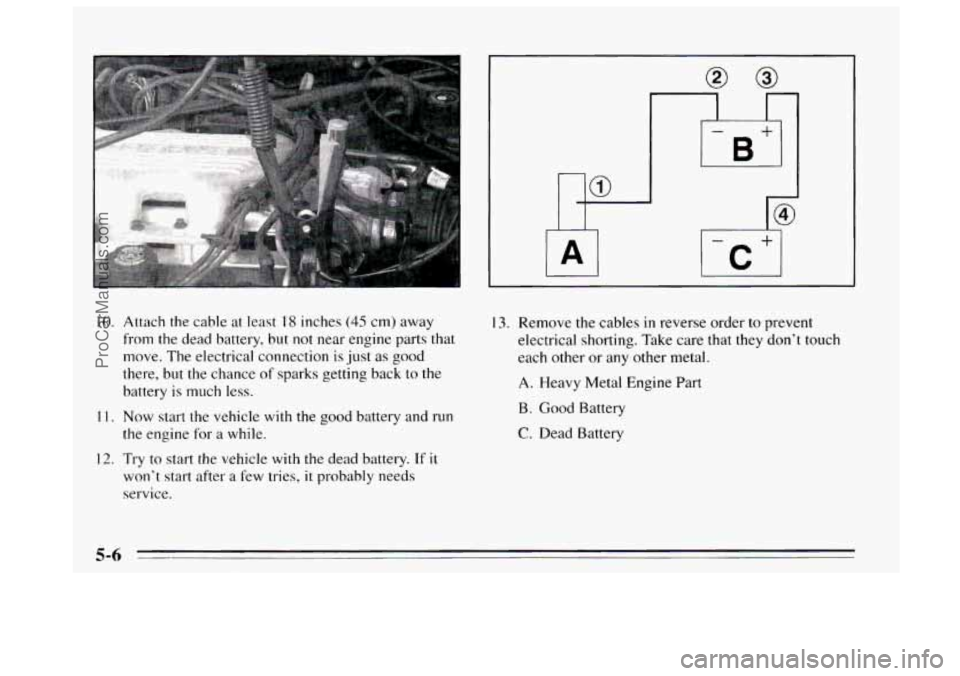
IO. Att.ach the cable at least I8 inches (45 cm) away
from the dead battery, but not near engine parts that
move. The electrical connection
is just as good
there, but the chance
of sparks getting back to the
battery is much less.
1 1. Now start the vehicle with the good battery and run
the engine for a while.
12. Try to start the vehicle with the dead battery. If it
won’t start after a few tries, it probably needs
service.
13. Remove the cables in reverse order to prevent
electrical shorting. Take care that they don’t touch
each other or any other metal.
A. Heavy Metal Engine Part
B. Good Battery
C. Dead Battery
5-6
ProCarManuals.com
Page 234 of 340
Replacing Brake System Parts
The braking system on a modern vehicle is complex.
Its many parts have to be of top quality and work well
together
if the vehicle is to have really good braking.
Vehicles we design and test have top-quality
GM brake
parts
in them, as your Buick does when it is new. When
you replace parts of your braking system -- for example,
when your brake linings wear down and you have to
have new ones put
in -- be sure you get new genuine
GM replacement parts. If you don’t, your brakes may
no longer work properly. For example,
if someone puts
in brake linings that are wrong for your vehicle, the
balance between your front and rear brakes can
change
-- for the worse. The braking performance
you’ve come to expect can change in many other ways
if someone puts in the wrong replacement brake parts.
Battery
Every new Buick has a Delco Freedom@ battery. You
never have to add water to one of these. When it’s time
for
a new battery, we recommend a Delco Freedom@
battery. Get one that has the replacement number shown
on the original battery’s label.
Vehicle Storage
If you’re not going to drive your vehicle for 25 days or
more, take off the black, negative
(-) cable from the
battery. This
will help keep your battery from running
down.
Contact your dealer to learn how to prepare your vehicle
for longer storage periods.
6-26
ProCarManuals.com
Page 256 of 340
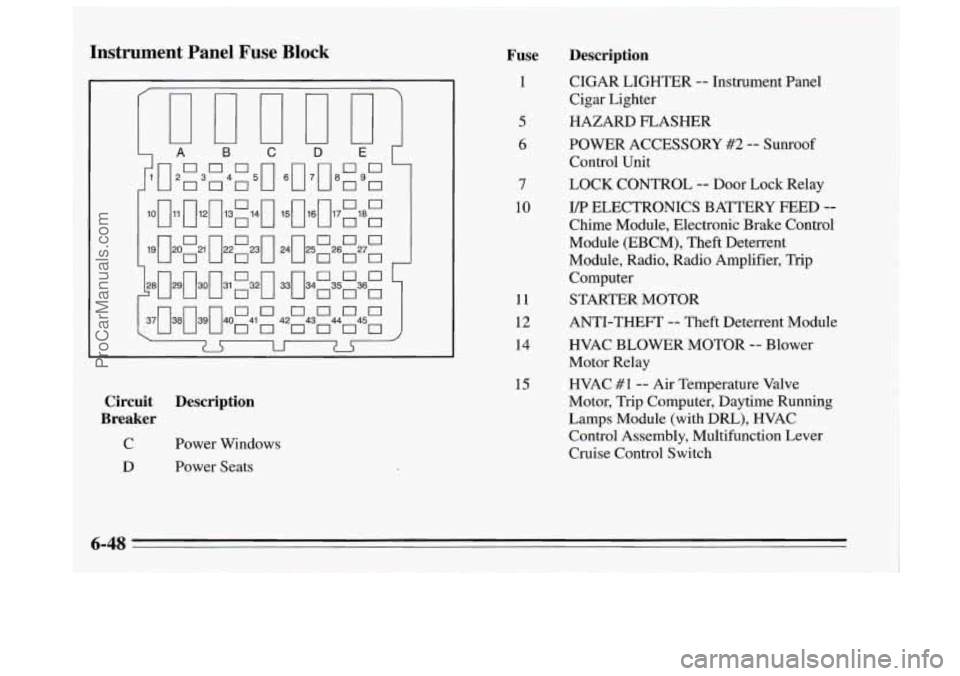
Instrument Panel Fuse Block Fuse
1
5
6
7
10
11
12
14
15
Circuit Description
Breaker
C Power Windows
Description
CIGAR LIGHTER -- Instrument Panel
Cigar Lighter
HAZARD FLASHER
POWER ACCESSORY
#2 -- Sunroof
Control Unit
LOCK CONTROL
-- Door Lock Relay
I/p ELECTRONICS BATTERY FEED --
Chime Module, Electronic Brake Control
Module (EBCM), Theft Deterrent
Module, Radio, Radio Amplifier,
Trip
Computer
STARTER MOTOR
ANTI-THEFT
-- Theft Deterrent Module
HVAC BLOWER MOTOR
-- Blower
Motor Relay
HVAC
#1 -- Air Temperature Valve
Motor,
Trip Computer, Daytime Running
Lamps Module (with
DRL), HVAC
Control Assembly, Multifunction Lever
Cruise Control Switch
D Power Seats
6-48
ProCarManuals.com