Page 99 of 399
Downloaded from www.Manualslib.com manuals search engine NOTICE:
Your engine is designed to work with the electronics in your
vehicle.
If you add electrical parts or accessories, you could
change the
way the fuel injection system operates. Before
adding electrical equipment, check with your dealer.
If you
don’t, your engine might not perform properly.
If you ever have to have your vehicle towed, see the part of this
Manual that tells how to do it without damaging your vehicle.
See “Towing Your Vehicle” in the Index.
ENGINE COOLANT HEATER (ENGINE
BLOCK HEATER) (CANADA ONLY)
(OPTION)
In very cold weather, 0°F (-18O C) or colder, the engine coolant warmer
can help. You’ll get easier starting and better fuel economy during engine
warm-up. Usually, the coolant warmer should be plugged in a minimum
of four hours prior to starting your vehicle.
To use the coolant warmer:
1. Turn off the engine.
2. Open the hood and unwrap the electrical cord.
3. Plug it into a normal, grounded 110-volt outlet.
-
t. *
Page 128 of 399
Downloaded from www.Manualslib.com manuals search engine r LIGHTS
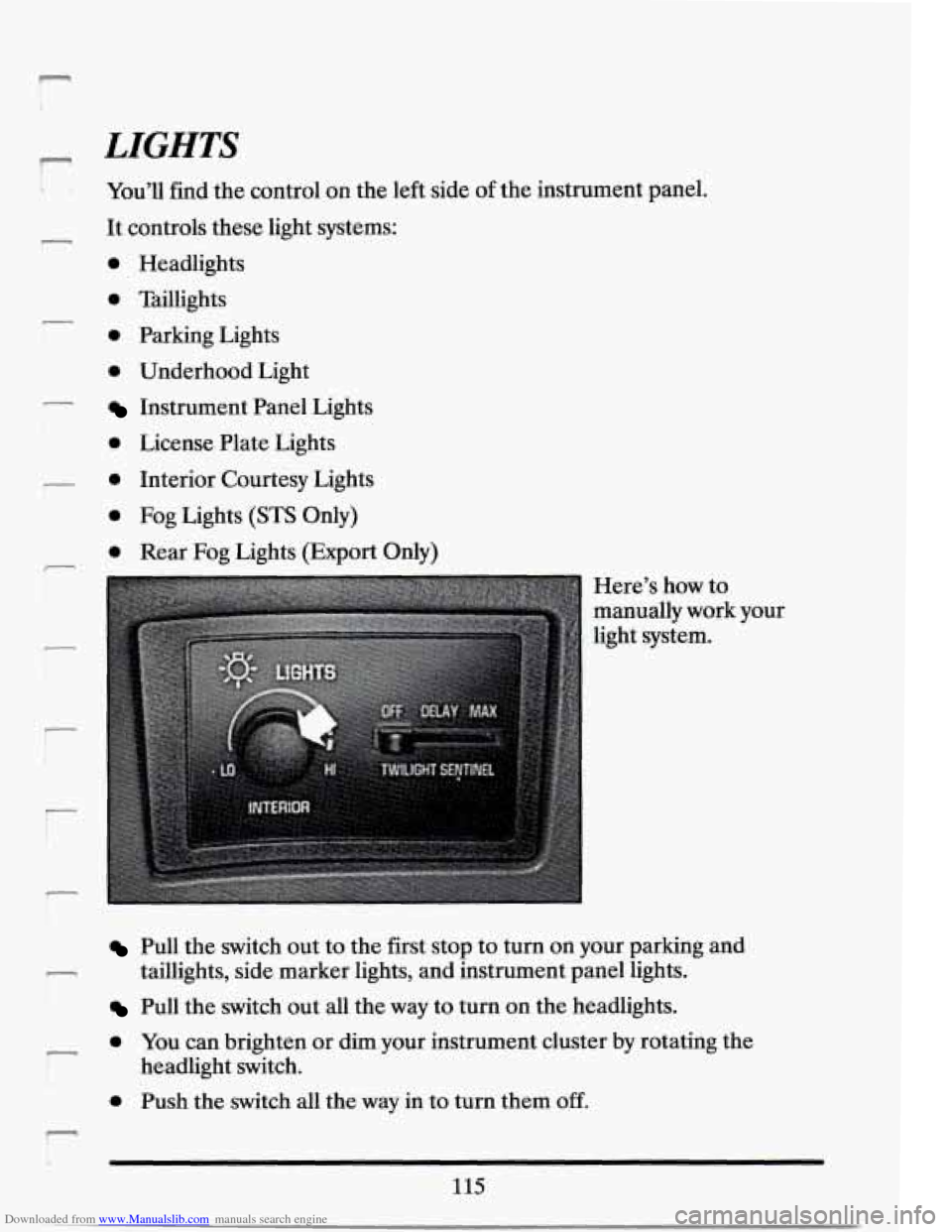
You’ll find the control on the left side of the instrument panel.
- It controls these light systems:
r
r
i
0 Headlights
0 Taillights
0 Parking Lights
0 Underhood Light
Instrument Panel Lights
0 License Plate Lights
0 Interior Courtesy Lights
0 Fog Lights (STS Only)
0 Rear Fog Lights (Export Only)
-
r
i
Here’s how to
manually work your
light system.
Pull the switch out to the first stop to turn on your parking and
Pull the switch out all the way to turn on the headlights.
taillights,
side marker lights, and instrument panel lights.
0 YOU can brighten or dim your instrument cluster by rotating the
0 Push the switch all the way in to turn them off.
r
headlight switch.
r‘ b
115
Page 131 of 399

Downloaded from www.Manualslib.com manuals search engine If you switch on your high beam headlights, your fog lights will \
turn off.
They’ll turn back on again when you switch to low beam headlights.
When the twilight sentinel is on, only the headlights will turn
off
automatically. Your fog and parking lights will remain on.
Rear Fog Lights (E~port Only)
To operate the rear fog
lights, first turn on the
front fog lights, then
push the lower switch.
A small indicator light
will glow to tell you
they are on.
To turn
them
off, press the
switch again.
Cornering Lights
The cornering lights come on when you signal a turn when the headlights
or parking lights are on. This will provide more light for cornering.
Underhood Light
To operate, turn on your parking lights, then the underhood light will
illuminate when the hood is open.
Daytime Running Lights (Canada Only)
The Canadian Federal Government has decided that “Daytime Running
Lights” (DRL) are a useful feature, in that DRL can make your vehicle
more visible
to pedestrians and other drivers during daylight hours. DRL
are required on new vehicles sold in Canada.
Your DRL work with a light sensor on top
of the instrument panel. Don’t
cover it up.
Page 171 of 399
Downloaded from www.Manualslib.com manuals search engine DEFROSTER
1-1 Push this button to
remove fog or frost
from the windshield.
This setting sends most of the air flow to the windshield with only a small
amount to the floor outlets. In some cold start conditions, the
“AUTO”
blower fan speed may be limited until the cooling system warms up. This
is normal to prevent windshield fogging.
The .fan speed will work automatically to maintain your requested interior
temperature. If
you need more air to your windshield, you should select a
higher fan speed.
It will help a lot if you first clear any ice and snow from the hood and the
air inlet (it’s between the hood and the windshield).
REAR DEFOGGER
I
Push this button to turn
on the rear defogger.
With it, your rear window and both outside rearview mirrors are heated.
The system will automatically shut off after
10 minutes. If further
defrosting is desired, simply push the button again.
NOTICE:
Scraping the inside of your rear window could cut and damage
the heating grids. Your warranty would not,cover this damage.
And don’t put decals there; you might have to scrape them.off.
158
Page 227 of 399
Downloaded from www.Manualslib.com manuals search engine 2. Get the vehicles close enough so the jumper cables can reach, but be
sure the vehicles aren’t touching each other.
If they are, it could cause
a ground connection you don’t want.
You wouldn’t be able to start
your Cadillac, and the bad grounding could damage the electrical
systems.
3. Turn off the ignition on both vehicles. Turn off all lights, radio, or any
accessories that are in use on both vehicles. This will avoid sparks and
help save both batteries. And it could avoid damage to any
of the
accessories.
NOTICE:
If you leave your radio on, it could be badly damaged. The
repairs wouldn’t be covered by your warranty.
4. Open the hoods and locate the batteries.
Find the positive
(+) and negative (-) terminals on each battery.
214
Page 237 of 399
Downloaded from www.Manualslib.com manuals search engine still have the warning, TURN OFF THE ENGINE AND GET
EVERYONE OUT OF THE VEHICLE until it cools down.
You may decide not to lift the hood but to get service help right away.
COOLING SYSTEM
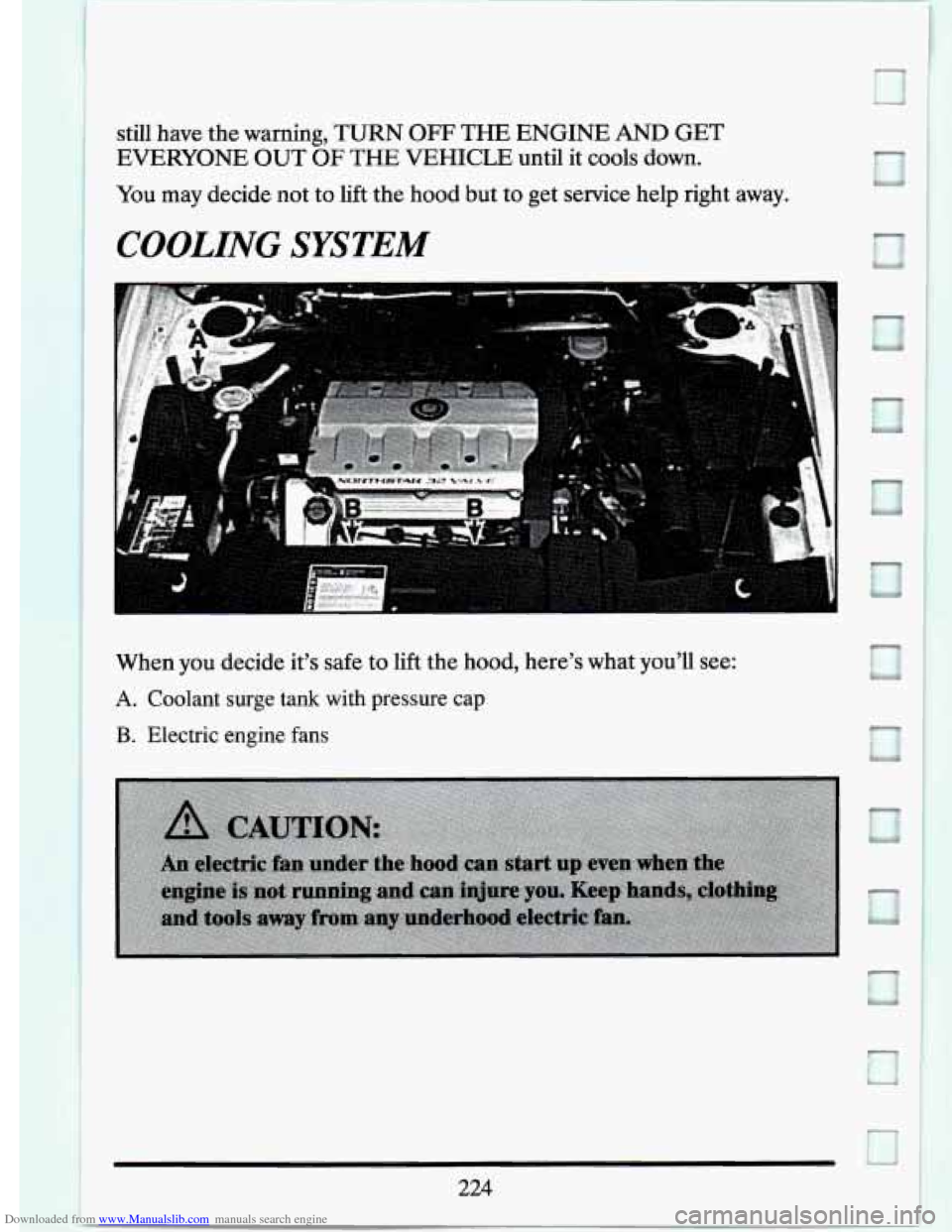
When you decide it’s safe to lift the hood, here’s what you’ll see:
A. Coolant surge tank with pressure cap
B. Electric engine fans
Page 264 of 399
Downloaded from www.Manualslib.com manuals search engine CHECKING THINGS UNDER THE HOOD
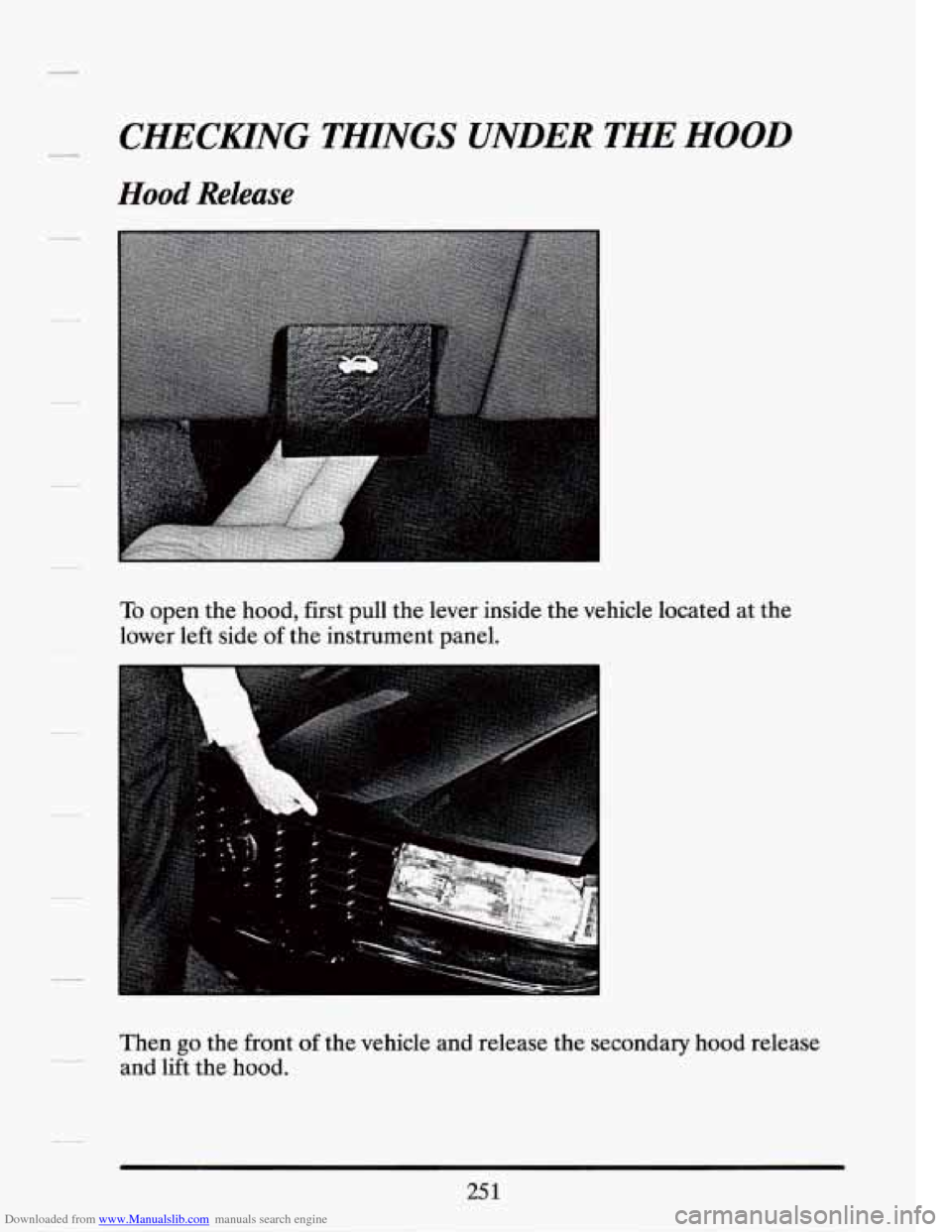
Hood Release
To open the hood, first pull the lever inside the vehicle located at the
lower left side of the instrument panel.
Then
go the front of the vehicle and release the secondary hood release
and lift the hood.
25 1
Page 320 of 399
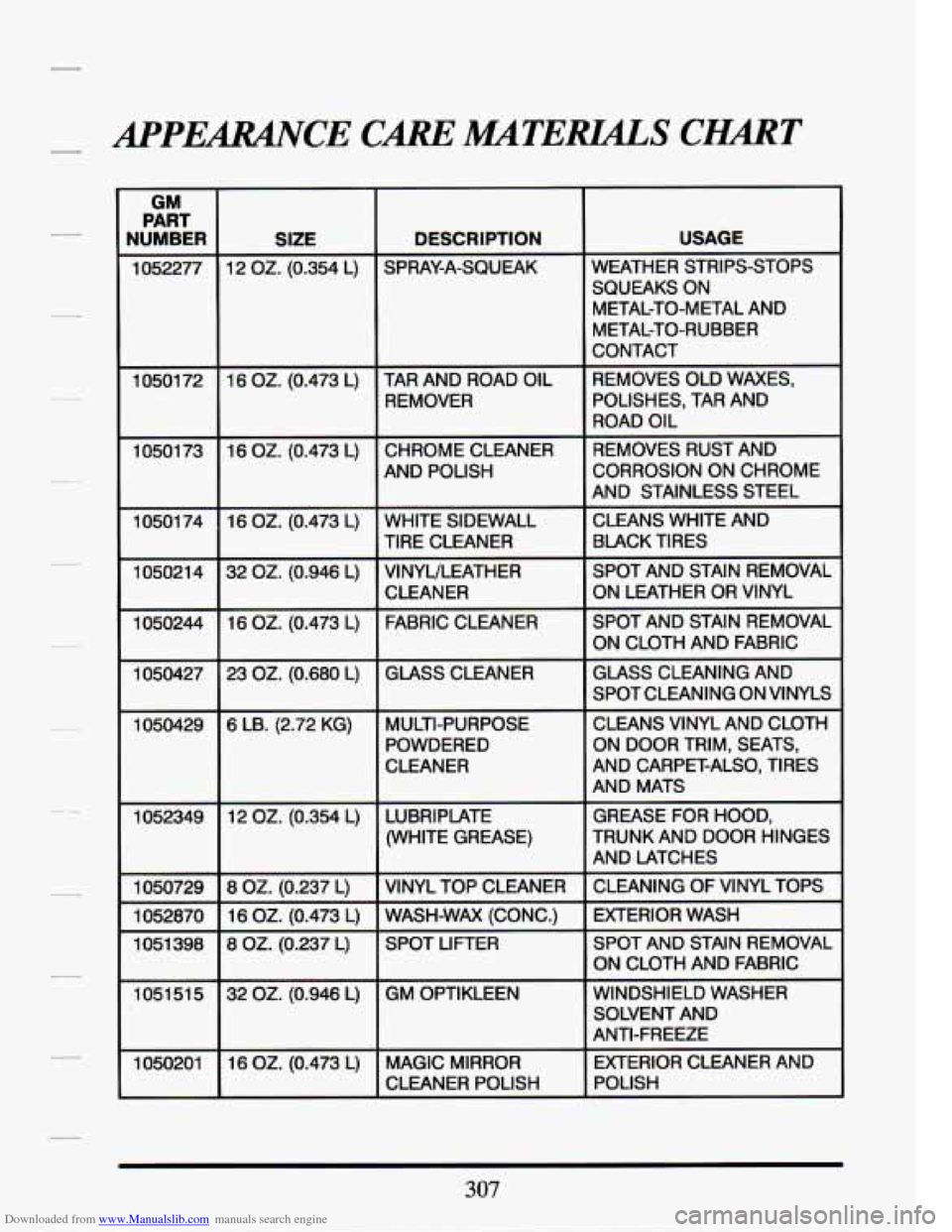
Downloaded from www.Manualslib.com manuals search engine 4PERANrE CAREMTERLALS CHART
GM
PART
NUMBER
1052277
1 0501 72
10501 73
10501 74
105021 4
1050244
1050427
1050429
1052349
1050729
1052870
1051 398
1051 51
5
1050201
SIZE DESCRIPTION
12 OZ. (0.354 L) SPRAY-A-SQUEAK
16
OZ. (0.473 L) TAR AND ROAD OIL REMOVER
16 OZ. (0.473 L) CHROME CLEANER AND POLISH
16
OZ. (0.473 L) WHITE SIDEWALL
32
OZ. (0.946 L) VINYULEATHER
16
OZ. (0.473 L) FABRIC CLEANER
23
OZ. (0.680 L) GLASS CLEANER
TIRE CLEANER
CLEANER
6 LB. (2.72 KG) MULTI-PURPOSE POWDERED
CLEANER
12
02. (0.354 L) LUBRIPIATE (WHITE GREASE)
8 OZ. (0.237 L) VINYL TOP CLEANER
16
OZ. (0.473 L) WASH-WAX (CONC.)
8
02. (0.237 L) SPOT LIFTER
32
OZ. (0.946 L) GM OPTIKLEEN
16
OZ. (0.473 L) MAGIC MIRROR CLEANER POLISH
USAGE
WEATHER STRIPS-STOPS
SQUEAKS ON METAL-TO-METAL AND
METAL-TO-RUBBER
CONTACT
REMOVES OLD WAXES, POLISHES, TAR AND
ROAD OIL
REMOVES RUST AND
CORROSION ON CHROME
AND STAINLESS STEEL
CLEANS WHITE AND BLACK TIRES
SPOT AND STAIN REMOVAL
ON LEATHER
OR VINYL
SPOT AND STAIN REMOVAL
ON CLOTH AND FABRIC
GLASS CLEANING AND
SPOT CLEANING ON VINYLS
CLEANS VINYL AND CLOTH
ON DOOR TRIM, SEATS,
AND MATS GREASE FOR HOOD,
TRUNK AND DOOR HINGES
AND LATCHES
CLEANING OF VINYL TOPS
EXTERIOR WASH
SPOT AND STAIN REMOVAL
ON CLOTH AND FABRIC
AND CARPET-ALSO, TIRES
WINDSHIELD WASHER SOLVENT AND
ANTI-FREEZE
EXTERIOR CLEANER AND
POLISH
307