1994 CADILLAC SEVILLE display
[x] Cancel search: displayPage 168 of 399
Downloaded from www.Manualslib.com manuals search engine Temperature
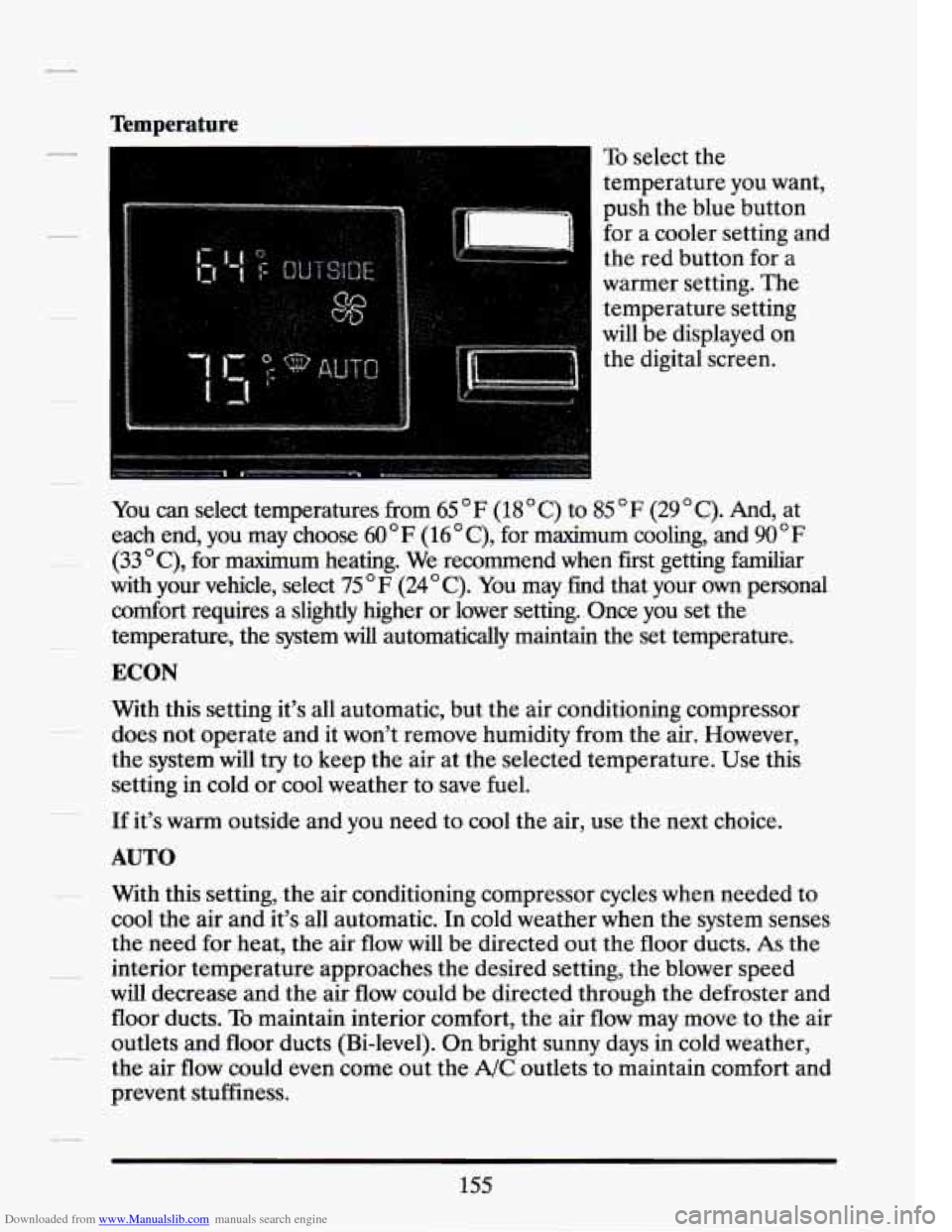
To select the
temperature you want,
push the blue button
for a cooler setting and
the red button for a
warmer setting. The
temperature setting
will be displayed on
the digital screen.
You can select temperatures from 65
F (18 C) to 85 F (29 C). And, at
each end, you may choose
60 F (16 C), for maximum cooling, and 90 F
(33 OC), for maximum heating. We recommend when fiit getting familiar
with your vehicle, select 75
OF (24OC). You may find that your own personal
comfort requires a slightly higher or lower setting. Once you set the
temperature, the system
will automatically maintain the set temperature.
ECON
With this setting it’s all automatic, but the air conditioning compressor
does not operate and it won’t remove humidity from the air. However,
the system will try to keep the air at the selected temperature. Use this
setting in cold or cool weather to save fuel.
If it’s warm outside and you need to cool the air, use the next choice.
AUTO
With this setting, the air conditioning compressor cycles when needed to
cool the air and it’s all automatic.
In cold weather when the system senses
the need for heat, the air flow will
be directed out the floor ducts. As the
interior temperature approaches the desired setting, the blower speed
will decrease and the air flow could be directed through the defroster and
floor ducts.
To maintain interior comfort, the air flow may move to the air
outlets and floor ducts (Bi-level). On bright sunny days in cold weather,
the air flow could even come out the
A/C outlets to maintain comfort and
prevent stuffiness.
155
Page 170 of 399
Downloaded from www.Manualslib.com manuals search engine Fan Speeds
Push the (symbol)
button until “AUTO” is
displayed on the
screen. At this setting,
the fan speed is
controlled automatically.
If it is cold outside, the blower may not run in the maximum high fan
speed right away. The system checks the temperature of the coolant to
assure it is warm enough to provide heat. When the coolant is warm, the
controller will allow the fan to ramp up to a higher speed. This prevents
cold air from blowing into the passenger compartment.
If you want the blower fan to run only at a fixed high speed, push the
(upper) button until you see “HI” on the display.
If you want the fan speed to be automatic, but you like the fan speed to
be higher than the AUTO setting, just push the buttons until “HI/AUTO”
is shown on the display.
If you want the blower to run only at a fixed low speed, push the (low)
button until
“LO” is shown on the display.
If you want the fan speed to run lower than the “AUTO” setting, push the
button until “AUTO
LO” is shown on the display.
157
Page 177 of 399
Downloaded from www.Manualslib.com manuals search engine 1 =waJPim
TUNE
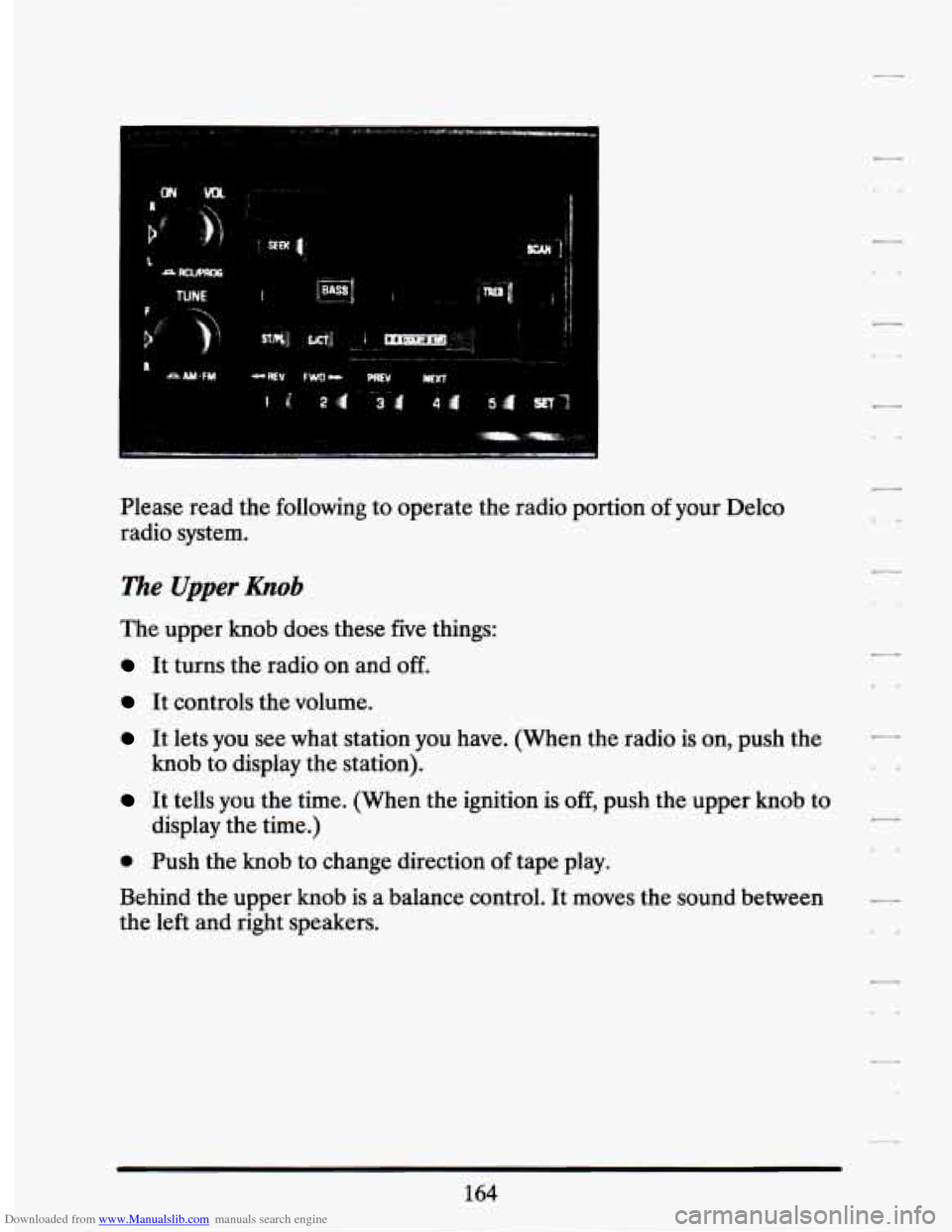
Please read the following to operate the radio portion of your Delco
radio system.
The Upper &ob
The upper knob does these five things:
It turns the radio on and off.
It controls the volume.
It lets you see what station you have. (When the radio is on, push the
It tells you the time. (When the ignition is off, push the upper knob to
knob
to display the station).
display the time.)
@ Push the knob to change direction af tape play.
Behind the upper
knob is a balance control. It moves the sound between
the left and right speakers.
Page 178 of 399
Downloaded from www.Manualslib.com manuals search engine l%e Lower Knob
Turn the lower knob to choose radio stations. Push the knob to switch
from
AM or FM.
If you have the Delco Bose Gold Series Music System, it lets you switch
from CD (Compact Disc) to TP (Tape player).
The control behind the lower knob moves the sound between your front
and rear speakers
When you push this button either up or down, the SCAN indicator
in the
display will light and the radio will find the next station and stay there
about
5 seconds. Then it will go to the next station and pause, and keep
doing that until you push either the SCAN or upper knob.
SEEK
This button selects stations, but it doesn’t keep moving as SCAN does.
When you push
SEEK up or down, the radio will automatically go to the
next strongest station and stay there.
Eqport Radio Only
The SCAN and SEEK function selects station only in one direction.
Push Buttons
You can set the push buttons to get up to ten favorite stations (Five on
AM and five more on FM). Just:
0 Choose either AM or FM
0 Tune in the station.
Push the SET button.
0 Within 5 seconds, push one of the five push buttons.
0 Repeat these steps for each of the five push buttons.
165
Page 179 of 399
Downloaded from www.Manualslib.com manuals search engine BASS
The slide control increases or decreases the bass response tone. Moving
the control to the right increases bass while moving it to the left decreases
it.
TREBLE
The slide control increases or decreases the treble response tone. Moving
the control to the right increases the treble while moving it to the left
decreases it.
Your Cassette Tape Player
Your cassette tape player works best with tapes that are 30 to 45 minutes
long on each side. Tapes longer than that are
so thin that they may not
work well in this player.
If you look at the tape, or on its label or box, it should say whether its
bias, (“equalization”
is 70 microseconds (70 p ) or 120 microseconds (120
p ). Chrome and metal tapes are 70 p sec and standard iron tapes are 120
p sec. Your tape player will adjust automatically for either type of
cassette tape.
To Play A Cassette Tape
Turn the radio on.
Insert the cassette through the tape door. (The “TAPE indicator in
If you hear nothing or hear just a garbled sound, the cassette may not be
in squarely. Push the EJCT button to remove the tape and start over. The
tape equalization is automatically sensed and set. Inserting the cassette
also automatically disables DNR’” and activates
DOLBY’ noise
reduction.
DNR@ is the Dynamic Noise Reduction. It helps remove background hiss
noise from the radio.
the
display will light.)
*DNR@ is a registered trademark of National Semiconductor
Corporation.
166
7
LI
Page 180 of 399
Downloaded from www.Manualslib.com manuals search engine Once the tape is playing, use the upper and lower knobs to adjust the
volume and balance, just as you do
for the radio. Push the upper knob
to change tape direction. The arrow in the display show which
direction the tape is being played.
FWI (Forward)
Push the FWD button to move forward rapidly to another part of the
tape. The radio will play during fast forward.
To stop the tape push the
same button and the tape will start to play again.
REV (Reverse)
Push the REV button to move the tape rapidly backward. To stop the
tape, push the same button lightly or any
of the other buttons. The radio
will play during this reverse function.
To go from one side of the tape to the other, push in the upper knob on
your radio. To remove the tape, push EJCT The tape can be ejected when
the ignition is turned
off.
NEXT
Push the NEXT button up to jump quickly to the next selection. If the
selection is at the end of the tape, the tape will reverse directions and
begin playing at a normal speed.
PREV
Push the PREV button up to quickly go to the beginning of the last
selection.
If the player has played less than 10 seconds into the current selection,
depressing the PREV button will cause the player to find the beginning of
the previous selection
and resume play from that point. If the player is
more than
10 seconds into the current selection, pressing PREV button
will cause the player to find the beginning of the current selection and
resume play from that point. If PREV is issued while the first selection on
the tape is being played, the player will return
to the beginning of that
side of the tape.
167
Page 181 of 399
Downloaded from www.Manualslib.com manuals search engine Press STPL to switch back to the radio without ejecting the tape. Press it
a second time to start playing it again.
UCT (Eject Tape)
Press this button to remove the tape.
llze Delco Bose Gold Series Music System
This optional sound system combines an AM/FM stereo radio with a
cassette tape player and a compact disc player in a single unit.
To operate the radio and cassette tape player portion of this music
system, please read the beginning
of this section. “How To Operate Your
Sound System” and “Your Cassette Tape Player.”
To Play the Disc Player
Before you begin, please note: don’t use the mini-discs that are called
“singles” (even with an adapter). They won’t eject. Use full-size compact
discs only.
Turn the radio on.
Insert a disc (label side up) partway into the slot. The player will pull
it in. Wait a few seconds and the disc will play. Then only the time
of
day and “CD” will display.
If the disc comes back out, check to see if:
0 The disc is upside down.
The disc is dirty, scratched, or wet.
There’s too much moisture in the air. (If there is, wait about one hour
and try again),
“Err” (Error Detection)
If this message is displayed, you have a condition of either extreme
temperature, moisture, or an incorrect disc. The disc will automatically be
ejected. When conditions are back to normal, the disc should play again.
168
7
Page 182 of 399
Downloaded from www.Manualslib.com manuals search engine RCLIPROG (RecalllProgram)
0 Press once to see what track is being played.
0 Within 5 seconds press it a second time to see how long the disc has
0 Press it a third time to see the time of day.
been
playing.
Rev (Reverse)
Push and hold REV to return rapidly within a track. Release it to play the
passage. The elapsed time will be displayed to show the reverse progress
of the CD.
FWZ) (Fast Forward)
Press and hold FWD to advance quickly within a track. Release it to
resume playing. Elapsed time will be displayed to show the forward
progress
of the CD.
Prev (Previous)
Push this button to go back to the beginning of the track or push it again
to a favorite track.
Next
Push this button to advance to the next track.
STIPL (StoplPEay)
Press this button and the disc or tape will stop without ejecting it and the
radio will start to play. Press it again and the disc or tape will start to play
again.
EJCT (Eject)
Press this button to eject the disc or tape. If you have both a CD and a
tape in the player, then the other playback media will start to play. Press
it again and the other media
will eject.
169